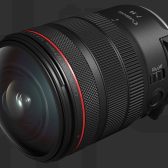
DPReview reviews the Canon EOS R5 Mark II

Richard Cox
3 Min Read

When you purchase through links on our site, we may earn an affiliate commission. Here's how it works.

Dpreview has completed its review of the Canon EOS R5 Mark II and gave it a glowing review. Just in case you were hibernating, here's the rough key features of the R5 Mark II;

  • 45MP Full-Frame Stacked BSI CMOS Sensor
  • DIGIC Accelerator Processing
  • Dual Pixel Intelligent AF, Eye Control
  • 8K 60 Raw/4K 60 SRAW/4K 120 10-Bit Video
  • Up to 30 fps, Pre-Continuous Shoot Mode
  • 5.76m-Dot EVF with OVF Sim. View Assist
  • 3.2″ Vari-Angle Touchscreen LCD
  • In-Camera Upscaling to 179MP
  • CFexpress & SD UHS-II Memory Card Slots
  • Wi-Fi 6E / Wi-Fi 6 Support

I found this sentence from the review to be excellent, and wrapping up in one sentence on just how good the EOS R5 Mark II is.

our main concern wasn't anything the camera couldn't do, but that it does so much that it's impossible to put ourselves in the shoes of the vast range of photographers that might opt to buy one

You know you've created a camera that can bridge multiple fields of discipline so well, that even DPReview goes, that's a wrap we're good.

Even when looking at the pros and cons, I have to wonder if they just felt they had to have something, anything at all in the cons section.

Pros;

  • Excellent image quality in a range of circumstances
  • Very fast autofocus with very effective subject tracking
  • Action Priority mode to help capture specific sports
  • Eye Control can be a rapid and intuitive way to select a subject
  • Packed with features to suit a wide range of photography
  • Good video support tools, including waveform display
  • Choice of Raw or Canon Log 2 workflows
  • Optional fan grip available if you need longer recording times or faster recovery
  • Blur/Out-of-focus system helps you home-in on your best shots
  • New menu arrangement easier to make sense of
  • In-camera upscaling and de-noising options could be useful

Cons;

  • Slight reduction in dynamic range may impact images with extreme processing
  • Not all users will find Eye Control reliable
  • Temperature limits require considered shooting in most ambitious video modes
  • Waveform display is quite small and can't be moved
  • No way to quickly access Auto ISO minimum shutter speed
  • Blur/Out-of-focus detection only works for JPEGs with detected subjects in e-shutter mode and isnt great at recognizing sharp images.

Read the entire review at dpreview.

Remember to get on a reserve list, or if there is stock, go pick up your EOS R5 Mark II.

Go to discussion...

Share This Article
Follow:
Richard has been using Canon cameras since the 1990s, with his first being the now legendary EOS-3. Since then, Richard has continued to use Canon cameras and now focuses mostly on the genre of infrared photography.

47 comments

  1. I like how the closest competitor for generalist body is the Z8 (at substantial weight difference but price/features pro/cons).
    Sony doesn't have anything close so they compare to A1 at USD2k more and 61mp for A7Rv as basically being the only advantage there.

    It would be interesting to know the % of users that the eye controlled AF work for. It seems amazing for them but an extra cost for those that can't use it.
    Clearly Canon thinks it has more universal application otherwise they wouldn't have invested (and continue to invest) in the technology.
  2. It would be interesting to know the % of users that the eye controlled AF work for. It seems amazing for them but an extra cost for those that can't use it.
    Clearly Canon thinks it has more universal application otherwise they wouldn't have invested (and continue to invest) in the technology.
    Eye control never worked for me on the R5II. Calibration had a success rate of maybe 1 out of 10, and even when calibration succeeded, it din't work in practice. I seriously hope that a future firmware update will fix this.
  3. I have never had much luck with Eye Control AF on either the R3 or the R5 Mk2. Maybe it will be better in the upcoming R1?
    Aren’t the R5II and R1 supposed to have the same improvement relative to the R3? Eye Control AF on the R3 works fine for me in terms of how Canon describes it should work. If I'm photographing a group of people, eye control can be used to move the focus point from one person to another. But if I'm standing in my garden, I can't use it to shift focus from a tomato plant on my left to a zucchini plant on my right.

    The original eye control in film cameras was selecting among a limited number of AF points. DPAF in current cameras gives you 5000-6000 AF points spread across the frame, there's no way eye control will offer that level of precision for AF point selection.

    Canon states, "Eye Control AF has been designed to work alongside the camera's subject detection functionality... Once the system knows which person you want to focus on, it can lock on to their eye or their face, and it can track them as they move." Elsewhere they state, "The camera will use AI to prioritise a human (eyes, head and body, in that order), or an animal, or a vehicle, according to the subject detection preference you've set, to focus on," and you can use Eye Control AF to move the focus point between those identified subjects.

    In other words, if the camera's subject detection system doesn't detect a subject, eye control AF 'won't work'. You know a subject has been automatically detected by the camera (assuming the setting is enabled) when a tracking frame appears over the subject:

    If there are no tracking frames showing up in your scene, eye control AF will still float the orange circle around the frame as you move your eye, but it won't do anything but float because there's no detected subject for it to lock on to.

    I wonder how many people expect the system to enable you to stare at any random point in the frame and have the camera focus on it? If that's the expectation, it makes sense that many people believe it doesn't work for them...that's not how it's supposed to work.
  4. Aren’t the R5II and R1 supposed to have the same improvement relative to the R3? Eye Control AF on the R3 works fine for me in terms of how Canon describes it should work. If I'm photographing a group of people, eye control can be used to move the focus point from one person to another. But if I'm standing in my garden, I can't use it to shift focus from a tomato plant on my left to a zucchini plant on my right.

    The original eye control in film cameras was selecting among a limited number of AF points. DPAF in current cameras gives you 5000-6000 AF points spread across the frame, there's no way eye control will offer that level of precision for AF point selection.

    Canon states, "Eye Control AF has been designed to work alongside the camera's subject detection functionality... Once the system knows which person you want to focus on, it can lock on to their eye or their face, and it can track them as they move." Elsewhere they state, "The camera will use AI to prioritise a human (eyes, head and body, in that order), or an animal, or a vehicle, according to the subject detection preference you've set, to focus on," and you can use Eye Control AF to move the focus point between those identified subjects.

    In other words, if the camera's subject detection system doesn't detect a subject, eye control AF 'won't work'. You know a subject has been automatically detected by the camera (assuming the setting is enabled) when a tracking frame appears over the subject:

    View attachment 219778

    If there are no tracking frames showing up in your scene, eye control AF will still float the orange circle around the frame as you move your eye, but it won't do anything but float because there's no detected subject for it to lock on to.

    I wonder how many people expect the system to enable you to stare at any random point in the frame and have the camera focus on it? If that's the expectation, it makes sense that many people believe it doesn't work for them...that's not how it's supposed to work.
    You shouldn't have let that out of the bag - zucchini plant growers will be fleeing to Sony in droves.
  5. You shouldn't have let that out of the bag - zucchini plant growers will be fleeing to Sony in droves.
    As long as they don't eat the ones from my from my garden, we've been enjoying zucchini muffins all summer.

    It's funny, but the above just occurred to me, i.e. people believing Eye Control AF doesn't work for them because of an erroneous expectation about what Eye Control AF is supposed to do and what it isn't. It occurred to me because of this thread itself...and the erroneous expectations of some reviewers. I don't plan on commenting on DPR's review of the R5II because I don't intend to read it. The last review by them that I read was over a decade ago, the 5DIII review where they bashed the AF because the auto AF point selection 'just selects the closest subject' when, in fact, that's exactly what Canon says it should do (Nikon AF behaves differently, and the reviewer didn't know what to expect from a Canon camera because he wasn't a Canon shooter and didn't bother to RTFM).
  6. I don't plan on commenting on DPR's review of the R5II because I don't intend to read it. The last review by them that I read was over a decade ago, the 5DIII review where they bashed the AF because the auto AF point selection 'just selects the closest subject' when, in fact, that's exactly what Canon says it should do
    Well, DPReviews' review of the R5 II is pretty much a love fest ... although you have pointed out a very important issue re what the camera was designed to do vs. what the uninformed person assumed it should do. I have received my R5 II but haven't had time to play with its eye-detection focus, so your clarification is very helpful and appreciated.
  7. Aren’t the R5II and R1 supposed to have the same improvement relative to the R3? Eye Control AF on the R3 works fine for me in terms of how Canon describes it should work.
    I am not as certain as you are. Canon.jp provides different information on both cameras.

    Google Translated:

    For the R5 Mk2 they state: "The camera detects the photographer's line of sight and supports gaze input, which moves the AF frame/AF area to the direction of the photographer's gaze. The newly developed optical system and gaze detection algorithm ensure stable gaze detection even if the photographer's eyes are not in the correct position or the photographer is wearing glasses."

    For the R1 they state: "The AF frame can be quickly moved to the subject you want to focus on. Compared to the EOS R3, the EOS R1 has a higher pixel count and improved layout of the sensor, and more LED light sources. The gaze detection range has been expanded, improving detection stability when the eye position is misaligned or when wearing glasses. In addition, the detection frame rate has been improved to a maximum of approximately 60 fps, approximately double the maximum of approximately 30 fps for the EOS R3. It achieves both high accuracy and high tracking of changes in the gaze, achieving more stable detection and quick tracking of gaze movements."

    With that said, maybe I am reading too much into the text.
  8. Aren’t the R5II and R1 supposed to have the same improvement relative to the R3? Eye Control AF on the R3 works fine for me in terms of how Canon describes it should work. If I'm photographing a group of people, eye control can be used to move the focus point from one person to another. But if I'm standing in my garden, I can't use it to shift focus from a tomato plant on my left to a zucchini plant on my right.

    The original eye control in film cameras was selecting among a limited number of AF points. DPAF in current cameras gives you 5000-6000 AF points spread across the frame, there's no way eye control will offer that level of precision for AF point selection.

    Canon states, "Eye Control AF has been designed to work alongside the camera's subject detection functionality... Once the system knows which person you want to focus on, it can lock on to their eye or their face, and it can track them as they move." Elsewhere they state, "The camera will use AI to prioritise a human (eyes, head and body, in that order), or an animal, or a vehicle, according to the subject detection preference you've set, to focus on," and you can use Eye Control AF to move the focus point between those identified subjects.

    In other words, if the camera's subject detection system doesn't detect a subject, eye control AF 'won't work'. You know a subject has been automatically detected by the camera (assuming the setting is enabled) when a tracking frame appears over the subject:

    View attachment 219778

    If there are no tracking frames showing up in your scene, eye control AF will still float the orange circle around the frame as you move your eye, but it won't do anything but float because there's no detected subject for it to lock on to.

    I wonder how many people expect the system to enable you to stare at any random point in the frame and have the camera focus on it? If that's the expectation, it makes sense that many people believe it doesn't work for them...that's not how it's supposed to work.
    So it should work for birds reasonably well??
  9. R5 MARK II, unfortunately, doesn't support IBIS HIGH-RESOLUTION MODE any more. R5 MARK I had that feature and it was magic for gallery work to make installation shots at exhibitions, with a tripod of course. While MARK I was able to deliver 400MP, MARK II only capable to do 45 MP. A big big disappointment!!!
  10. As long as they don't eat the ones from my from my garden, we've been enjoying zucchini muffins all summer.

    It's funny, but the above just occurred to me, i.e. people believing Eye Control AF doesn't work for them because of an erroneous expectation about what Eye Control AF is supposed to do and what it isn't. It occurred to me because of this thread itself...and the erroneous expectations of some reviewers. I don't plan on commenting on DPR's review of the R5II because I don't intend to read it. The last review by them that I read was over a decade ago, the 5DIII review where they bashed the AF because the auto AF point selection 'just selects the closest subject' when, in fact, that's exactly what Canon says it should do (Nikon AF behaves differently, and the reviewer didn't know what to expect from a Canon camera because he wasn't a Canon shooter and didn't bother to RTFM).
    How well I remember and I don't have the greatest memory. There were some very entertaining postings!
  11. Eye control never worked for me on the R5II. Calibration had a success rate of maybe 1 out of 10, and even when calibration succeeded, it din't work in practice. I seriously hope that a future firmware update will fix this.
    It does not work well for me either. It is OK at best in landscape but does not work at all in portrait, and yes I recalibrated it for vertical. The R3 was just as bad for me in the same situations. I do wear corrective lenses but even tried without them and no dice.
  12. R5 MARK II, unfortunately, doesn't support IBIS HIGH-RESOLUTION MODE any more. R5 MARK I had that feature and it was magic for gallery work to make installation shots at exhibitions, with a tripod of course. While MARK I was able to deliver 400MP, MARK II only capable to do 45 MP. A big big disappointment!!!
    I thought there was an upscale feature in the mark 2? I have not tried it.
  13. I thought there was an upscale feature in the mark 2? I have not tried it.
    There's a JPG upscale option which uses AI to quadruple the image size, but they do not have the sensor shift tool to actually upscale as the Mark I did. I would love more resolution, but I (personally) didn't see a lot of value in their sensor shift implementation, or their AI upscale. I think the sensor shift tool was best suited to something in a VERY controlled environment like a gallery reproduction (as the previous poster noted), but honestly, with a bit of photoshop and taking several images of the stationary subject you should be able to achieve a similar result manually.

    I believe even setting up your shot, shooting it normally, then nudging the camera to move the perspective by as small of an amount as you can, then repeating for 4 or more images, then loading into photoshop, aligning, up scaling each layer by 4x (or more), and then finally stacking with a median or mean blending mode should give a pretty good result and provide similar additional resolution/quality. More clunky, and your mileage may vary, but doable I think.
  14. If there are no tracking frames showing up in your scene, eye control AF will still float the orange circle around the frame as you move your eye, but it won't do anything but float because there's no detected subject for it to lock on to.
    Just to add, it actually will focus at the orange point if you half-press the shutter and have AF assigned to that (default, not back-button focus).
  15. I don't plan on commenting on DPR's review of the R5II because I don't intend to read it. The last review by them that I read was over a decade ago, the 5DIII review where they bashed the AF because the auto AF point selection 'just selects the closest subject' when, in fact, that's exactly what Canon says it should do (Nikon AF behaves differently, and the reviewer didn't know what to expect from a Canon camera because he wasn't a Canon shooter and didn't bother to RTFM).
    For what it's worth, the personnel at DPR have changed quite a bit over the last couple of years (amidst the near-demise of the site) and the current reviews strike me as far less biased and/or narky than they once were.

    The current reviewer (of the R5 Mark 2) just seemed a bit overwhelmed by the sheer scale of what the R52 can do, and pretty obviously had a hard publishing date for the review!
  16. Canon states, "Eye Control AF has been designed to work alongside the camera's subject detection functionality... Once the system knows which person you want to focus on, it can lock on to their eye or their face, and it can track them as they move." Elsewhere they state, "The camera will use AI to prioritise a human (eyes, head and body, in that order), or an animal, or a vehicle, according to the subject detection preference you've set, to focus on," and you can use Eye Control AF to move the focus point between those identified subjects.

    In other words, if the camera's subject detection system doesn't detect a subject, eye control AF 'won't work'. You know a subject has been automatically detected by the camera (assuming the setting is enabled) when a tracking frame appears over the subject:

    If there are no tracking frames showing up in your scene, eye control AF will still float the orange circle around the frame as you move your eye, but it won't do anything but float because there's no detected subject for it to lock on to.

    I wonder how many people expect the system to enable you to stare at any random point in the frame and have the camera focus on it? If that's the expectation, it makes sense that many people believe it doesn't work for them...that's not how it's supposed to work.
    I’ve done some testing with my R5 Mk II and my conclusion is that what you are stating is not correct. Eye controlled AF does not need a tracking frame or a subject it ‘ recognizes’ to work correctly:
    • When I set ‘subject to detect’ to ‘None’, the Eye controlled AF will move the pointer across the viewfinder and focus when I half press the shutter button.
    • The same happens when I select an AF point without ‘Whole area tracking servo AF’ (AF point with a padlock), this disables ‘Subject to detect’. The camera will move the AF point to the pointer and focus when I half press the shutter button.
    • This works for ‘AF operation’ set to ‘One shot’. Or ‘Servo’.
    With eye controlled AF I can move the pointer at across the whole viewfinder and get the camera to focus on any subject (curtains, tv flatscreen, bowl of fruit, cushions of the couch etc.) when I half press the shutter button.

    P.S. I did not test with zucchini and tomato plants as these do not grow in my holiday apartment 😉 .

Leave a comment

Please log in to your forum account to comment