
Trying to calibrate the Eye Controlled Auto Focus on my R1 for the first time. When I ran the calibration for the fist time it ran alright, 5 dots appeared and disappeared but then thinking that wasn't a good run and I also missed/skipped vertical calibration, I wanted to do it again. But no matter what I do it won't progress from displaying the first point in the middle at the bottom of the calibration screen, I keep staring at it and it keeps blinking, no matter how long I stare at it and change the position of my eye on the view finder, it just keeps blinking, won't proceed to the next point. I tried different calibration Numbers, deleted all the calibration data, turn it off/on. It still will not progress from the very first calibration point in the middle of the screen at the bottom. Any help/idea is appreciated.
You are using an out of date browser. It may not display this or other websites correctly.
You should upgrade or use an alternative browser.
You should upgrade or use an alternative browser.
Calibrating Eye Controlled Autofocus on R1
- Thread starter Arnie
- Start date
Yes I knew it was an obvious question to ask if you pressed it each time, as it’s written right on the screen! Thought I would double check.Thanks for your response. Yes, I am pressing it, otherwise it wouldn't start the process at all. It is very bizarre, I can' find anything on this on the entire net.
I ended up requesting support from Canon AU, that's where I am. See what they have to say.
I have been looking at mine but I can’t see how your issue is occurring. Perhaps there is a fault. You said you turned it on and off. Maybe it’s worth removing the battery completely. Or perhaps save your settings to the card and reset the camera.
Upvote
0
I did remove the battery but no difference. When you start the calibration process, the first circle with the dot in the center appears in the middle of the bottom of the screen and keeps flashing, it never jumps to the next spot regardless of how long I stare at it or change the position of my eye on the view finder. When I did it the first time it function as it is supposed to do, the circles did disappear one after each other and it displayed the message the calibration was done. But when I want to re-do it, it just gets stuck on the first position at the bottom of the screen in the middle, never jumps to the next point. I did also delete the initial calibration that was done so; there is no existing calibration data. Don't want to reset the camera for the time being cause so much setup is done, such as multiple custom settings and so on.
Upvote
0

Canon, in the form of Rudy Winston, has stated that the calibration is additive, so you have to delete the slot if you want to start over.
Upvote
0
Sorry to beat on and repeat myself, but you’re not being clear. You do realise that you need to press the mfn button after each circle?it never jumps to the next spot regardless of how long I stare at it or change the position of my eye on the view finder
Look, and press the button, move on the the next circle and repeat.

Upvote
0
As I stated before, I deleted the the calibration that I did it is blank canvas at the moment , no registered calibrations.Canon, in the form of Rudy Winston, has stated that the calibration is additive, so you have to delete the slot if you want to start over.
Upvote
0
Yes, I am pressing the mfn bottom. The way it is supposed to work is that you look thru the viewfinder and press mfn continuously. First circle with dot appears in the middle of the bottom of the screen after it successfully registers that spot the circle disappears and it automatically moves to the next circle which is in the middle of the right side of the screen then to the top then to the left and lastly to the middle of the screen. That's exactly what happened when I did it for the first time. But now, no matter what I do, the very first circle that appears in the middle of the bottom of the screen will not move, it just keeps flashing there as long as I stare at it., Yes I did change position of my eye relative to the view finder billion times and also pulled the battery out ad put back in many times. I hope this is clear enough.Sorry to beat on and repeat myself, but you’re not being clear. You do realise that you need to press the mfn button after each circle?
Look, and press the button, move on the the next circle and repeat.
Upvote
0
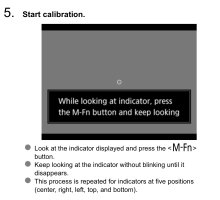
No that incorrect. Where did you hear it was supposed to work like that? It’s worded weirdly through the viewfinder, but if you look at the manual (see section 5 of eye control calibration), it’s worded more accurately. Not only that, but it specifically doesn’t work like that when you’re doing it. If you don’t press the mfn button each time, the pointer won’t advance (as per your symptoms).The way it is supposed to work is that you look thru the viewfinder and press mfn continuously.
If you’re just staring at the circle hoping it will disappear without pressing the mfn button or just holding the button down, then you’re doing it wrong. However if you’re trying to press the button each time to make the circle disappear- then yes. You have an issue with the system.
Last edited:
Upvote
0
Thanks for this info, somehow I got the notion that one should keep pressing the mfn button continuously. Yes you are supposed to look and press the mfn button once and then it disappears and goes to the next spot then keep going like that for all of the points. So I successfully done a couple of calibrations but then when I try to use Eye controlled autofocus it doesn't seem to be focusing to the subject that I am looking at thru the view finder, most probably I am doing something wrong there tooNo that incorrect. Where did you hear it was supposed to work like that? It’s worded weirdly through the viewfinder, but if you look at the manual (see section 5 of eye control calibration), it’s worded more accurately. Not only that, but it specifically doesn’t work like that when you’re doing it. If you don’t press the mfn button each time, the pointer won’t advance (as per your symptoms).
If you’re just staring at the circle hoping it will disappear without pressing the mfn button or just holding the button down, then you’re doing it wrong. However if you’re trying to press the button each time to make the circle disappear- then yes. You have an issue with the system.
View attachment 222236
 Any recommendations at this stage? Many thanks again much appreciated.
Upvote
0

Thanks for this info, somehow I got the notion that one should keep pressing the mfn button continuously. Yes you are supposed to look and press the mfn button once and then it disappears and goes to the next spot then keep going like that for all of the points. So I successfully done a couple of calibrations but then when I try to use Eye controlled autofocus it doesn't seem to be focusing to the subject that I am looking at thru the view finder, most probably I am doing something wrong there too View attachment 222255 Any recommendations at this stage? Many thanks again much appreciated.
Attachments
Upvote
0
Glad you managed! After this point I can’t help - I can’t get eye control to follow my eye, it essentially doesn’t really work for me. So actually using it, I don’t know.Thanks for this info, somehow I got the notion that one should keep pressing the mfn button continuously. Yes you are supposed to look and press the mfn button once and then it disappears and goes to the next spot then keep going like that for all of the points. So I successfully done a couple of calibrations but then when I try to use Eye controlled autofocus it doesn't seem to be focusing to the subject that I am looking at thru the view finder, most probably I am doing something wrong there too View attachment 222255 Any recommendations at this stage? Many thanks again much appreciated.
I wear contacts and I hear it makes a difference. That’s logical. I also have blue eyes and I read several times that that makes a difference, although that seems much less logical so I don’t know how true that is.
Bit of a bummer, but the focus controller button and the subject detection is more than fast enough so all good.
Upvote
0
Sorry that you can't take advantage of the Eye Controlled Autofocus. I believe it is a good/beneficial feature. It is interesting and bizarre that blue eyes is an issue, luckily I got brown ones but I would check it out with Canon to validate it. Yes subject detection and focus controller buttons work good but if Eye Controlled Autofocus works as I expect it to work it would be a big bonus for me. I shoot lots of birds (mostly small ones) in action. If it locks/focuses on the bird using Eye Controlled Auto Focus without having to push one of the back button focuses (I've set up 3 back buttons for different focusing scenarios), it would be great cause my carpal tunnel syndrome and RSI gets aggravated if I keep pushing one off the back buttons for focusing and the shutter release for pre-cont. shooting continuously. If I can focus on the bird by means of Eye Controlled Autofocus and just half press Shutter Release for Pre-cont. shooting that would be great. Thanks for your help again.Glad you managed! After this point I can’t help - I can’t get eye control to follow my eye, it essentially doesn’t really work for me. So actually using it, I don’t know.
I wear contacts and I hear it makes a difference. That’s logical. I also have blue eyes and I read several times that that makes a difference, although that seems much less logical so I don’t know how true that is.
Bit of a bummer, but the focus controller button and the subject detection is more than fast enough so all good.
Upvote
0
Yes I imagine for animals and birds it’s great. I shoot people so it’s no great loss I don’t think. I would like it to work better for me though, nonetheless!Sorry that you can't take advantage of the Eye Controlled Autofocus. I believe it is a good/beneficial feature. It is interesting and bizarre that blue eyes is an issue, luckily I got brown ones but I would check it out with Canon to validate it. Yes subject detection and focus controller buttons work good but if Eye Controlled Autofocus works as I expect it to work it would be a big bonus for me. I shoot lots of birds (mostly small ones) in action. If it locks/focuses on the bird using Eye Controlled Auto Focus without having to push one of the back button focuses (I've set up 3 back buttons for different focusing scenarios), it would be great cause my carpal tunnel syndrome and RSI gets aggravated if I keep pushing one off the back buttons for focusing and the shutter release for pre-cont. shooting continuously. If I can focus on the bird by means of Eye Controlled Autofocus and just half press Shutter Release for Pre-cont. shooting that would be great. Thanks for your help again.
Upvote
0
I gave it a go with some birding yesterday and can't seem to get it working properly yet, looks like gotta do more homework. So much to learn on this cameraYes I imagine for animals and birds it’s great. I shoot people so it’s no great loss I don’t think. I would like it to work better for me though, nonetheless!

Upvote
0
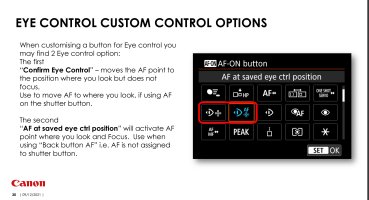
I can't seem to find the exact available options in neither in R1 nor its user's manual. There is only one option in R1, which is the first one in the red circle in the screen shot you posted. Also the screen shot you kindly provided is dated 2021 !?! It must be a manual for a different camera not R1.
Upvote
0
I can't seem to find the exact available options in neither in R1 nor its user's manual. There is only one option in R1, which is the first one in the red circle in the screen shot you posted. Also the screen shot you kindly provided is dated 2021 !?! It must be a manual for a different camera not R1.
Custom button options:
Eye control section:
There are plenty of options for turning on and off various aspects of eye control, using a regular button or the special AF button.
Upvote
0
You are correct, it was for the R3.I can't seem to find the exact available options in neither in R1 nor its user's manual. There is only one option in R1, which is the first one in the red circle in the screen shot you posted. Also the screen shot you kindly provided is dated 2021 !?! It must be a manual for a different camera not R1.
Check out Canon's Autofocus guide for the R1. Specifically section 5 Combining Various Settings. It goes into great detail on how to setup Eye Control (5-5-1 to 5-5-4)
https://cam.start.canon/en/C018/guide/html/AF-01_Overview_0010.html
Upvote
0
Similar threads
D
- Replies
- 32
- Views
- 5K
