Drowning in new R5 Mark II config

ahsanford

Particular Member
Aug 16, 2012
8,656
1,664
57,701
The race car and the pickle jar are now in hand:
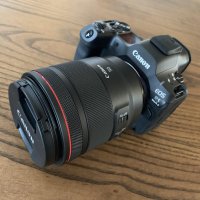
unnamed.jpg

Now comes the fun of config, controls, etc. I'll pepper this thread with questions in the days ahead.

First: when shooting JPG + RAW, what sort of onboard hocus pocus will cook/modify my JPGs and/or my RAW files?
(less concerned about 'if this feature is on, X must be off, your fps drops or a shutter mode must be Y' -- more concerned about things that permanently alter files, drop RAW bit rate, etc.)

Auto Lighting Optimizer
Anti-Flicker Mode
Highlight Tone Priority
High ISO NR
Lens aberation corrections: corner illumination, distortion, DLO, etc.

Some of this I once knew with my 5D3 and have forgotten over the years. In other cases the R5 might have changed the value proposition of one of these features in a way I am not aware of. And some things done onboard are kinda faff and I'd just as soon manage them in post.

So lay it on me, team. I'm all ears. Thx!

- A
 
Last edited:
  • Like
Reactions: 1 user
First: when shooting JPG + RAW, what sort of onboard hocus pocus will cook/modify my JPGs vs. my RAW files?
They’ll be processed in camera according to the picture style you select within the camera, as far as I understand. If I were you (and you don’t need to for compatibility) I would use HEIC over jpeg.
 
  • Like
Reactions: 1 user
Upvote 0
The race car and the pickle jar are now in hand:

View attachment 222499

Now comes the fun of config, controls, etc. I'll pepper this thread with questions in the days ahead.

First: when shooting JPG + RAW, what sort of onboard hocus pocus will cook/modify my JPGs and/or my RAW files?
(less concerned about 'if this feature is on, X must be off, your fps drops or a shutter mode must be Y' -- more concerned about things that permanently alter files)

Auto Lighting Optimizer
Anti-Flicker Mode
Highlight Tone Priority
High ISO NR

Some of this I once knew with my 5D3 and have forgotten over the years. In other cases the R5 might have changed the value proposition of one of these features in a way I am not aware of.

So lay it on me, team. I'm all ears. Thx!

- A
What? You finally found a 50mm? :ROFLMAO:
Welcome back to the forum!
 
  • Love
Reactions: 1 user
Upvote 0
HF Anti-flicker is for getting rid of banding artefacts when using dimmed LED lights, mostly with fully electronic shutter, but I’ve seen EFCS suffer from it as well.
Non-HF anti flicker times the shots to be at the peak of the brightness caused by the AC frequency.

Both are exposure tools, no image manipulation going on for JPEGs.
 
  • Like
Reactions: 1 user
Upvote 0
They’ll be processed in camera according to the picture style you select within the camera, as far as I understand. If I were you (and you don’t need to for compatibility) I would use HEIC over jpeg.

JPG may be a ride or die for me -- I need a quick out to swap pictures with friends and family when I'm there with them. And they pump those pics into all sorts of ancient tech (SD slot on a TV from ages ago, a digital picture frame, etc.) -- can HEIC work for those use cases?

- A
 
Upvote 0
HF Anti-flicker is for getting rid of banding artefacts when using dimmed LED lights, mostly with fully electronic shutter, but I’ve seen EFCS suffer from it as well.
Non-HF anti flicker times the shots to be at the peak of the brightness caused by the AC frequency.

Both are exposure tools, no image manipulation going on for JPEGs.

I thought I'd only use those for sporting events / concerts / artificially lit environments.

But we dim our LEDs in the house all the time. Don't want to shackle this rig with odd modes / extra asks unless I need to, so perhaps I leave anti-flicker off for now but we wary (i.e. chimp) that I may need to turn it on.

- A
 
Upvote 0
JPG may be a ride or die for me -- I need a quick out to swap pictures with friends and family when I'm there with them. And they pump those pics into all sorts of ancient tech (SD slot on a TV from ages ago, a digital picture frame, etc.) -- can HEIC work for those use cases?

- A
Safer to stick with jpeg- universal compatibility. HEIC is more useful should you need to edit.
 
  • Like
Reactions: 1 users
Upvote 0
I thought I'd only use those for sporting events / concerts / artificially lit environments.

But we dim our LEDs in the house all the time. Don't want to shackle this rig with odd modes / extra asks unless I need to, so perhaps I leave anti-flicker off for now but we wary (i.e. chimp) that I may need to turn it on.

- A
I add functions like these to the quick control screen.

Edit: please take my input with a pinch of salt, firstly - I don’t have an r5ii (though I have an r1 so it’s pretty similar).
Secondly, I’m only a few months into mirrorless after previously rocking 5div’s.
 
Upvote 0
Yes, it is a miracle. And if you take a close look at the lens, you’ll see it has an IS sticker ;) .

I'm not looking at stickers, TBH.

I'm looking at a lens nailing f/1.2 AF everywhere across the frame without ghostly IQ (EF non-L 50 1.4) or diva like 'I'll let you know if I nailed AF later' (EF 50L).

This tech is nuts.

- A
 
  • Like
Reactions: 1 user
Upvote 0
Button mapping, custom modes, etc. will probably not be until page 32 or so of this thread.

Too much and too soon. We start by force-fielding the camera away from punishing my IQ. :p

- A
You are right, of course. I was merely giving you a look into your future - you know you’ll be there before too long

Edit again(!) forgive me if there are millions of emojis, I put one, and it didn’t show up. So I put another. And that didn’t show. So I put a couple more. They didn’t show either. Just a warning in case there is a glitch my end and in fact they’re all there!!
 
  • Love
Reactions: 1 user
Upvote 0
Side question as I hash out all this minutiae:

What is more headache inducing fine print reading for you?

Reading a modern camera manual and having to cross reference all the related features

OR

Understanding lane sharing on PCIe slots on a PC motherboard, as explained in the wonderful English we see on display in a mobo manual​

(I vote the latter. The impossible odds stork serendipitously presented me an RTX 5080 *today* -- months ahead of when I thought I'd land one -- and that has caused me to need to do some mobo manual speed-reading today. o_O)

- A
 
Upvote 0
Side question as I hash out all this minutiae:

What is more headache inducing fine print reading for you?

Reading a modern camera manual and having to cross reference all the related features​
OR​
Understanding lane sharing on PCIe slots on a PC motherboard, as explained in the wonderful English we see on display in a mobo manual​

(I vote the latter. The impossible odds stork serendipitously presented me an RTX 5080 *today* -- months ahead of when I thought I'd land one -- and that has caused me to need to do some mobo manual speed-reading today. o_O)

- A
I have hand annotated notes excerpts from the PDF manuals next to the computers in the computer room due to that. The most recent computer, which will replace the others, has the least amount of scribbles, I specifically selected that motherboard for its PCIe layout :)

And I still need to open up cam.start.canon pretty much weekly. If it isn’t to double check a setting, it is to quote a passage on the internet :)
 
  • Like
Reactions: 1 user
Upvote 0
A couple of quotes from Einstein:
“Reading, after a certain age, diverts the mind too much from its creative pursuits. Any man who reads too much and uses his own brain too little falls into lazy habits of thinking.”
“There comes a point in your life when you need to stop reading other people's books and write your own.”

Translated into photography: "Go out and use the camera, play with it and find out what it can do."
 
  • Like
Reactions: 1 user
Upvote 0
Of course, they are custom buttons for a reason. But I typically start with TDP's set up guide. Then, there has been in depth looks at set ups by bird photographer Jan Wegener and Whistling Wings Photography.

Not a bird photographer you consider to yourself, you still might find it useful to hear them talk through what each function does and why they chose what they did. You can simply make other choices.
 
  • Like
Reactions: 3 users
Upvote 0