• The Canon Rumors Forum has officially been shut down as of July 10, 2026.

    All data will be deleted on September 16, 2026.

    the ad free experience will return by July 17, 2026.

Image Review Magnification Controls on 5D3

  • Thread starter Thread starter dcreisman
  • Start date Start date
Status
Not open for further replies.
D

dcreisman

Guest
On the 5D2 and 7D, when you review an image you've taken on the LCD, to zoom in or out you simply just had to press either of the top-right thumb buttons on the camera. However, now on the 5D3, you have to first press the magnification button under your left thumb, then turn the main dial to zoom in or out. Essentially they added a step. I've been going through the manual, but I can't find a way to customize the buttons to revert back to the old way. Is there no way to do that???
 
You can program the 'set' button to magnify, then zoom with the wheel. I'm actually liking this method better than the old push button method as the wheel zooms in and out, whereas before you had to push a different button to zoom out than to zoom in.
 
Upvote 0
5D mark iii picture review zoom is not user friendly

I wanted to see what the general user feedback is on the new way of reviewing pictures with the 5d Mark iii. I personally hate the current workflow and find I keep hitting the wrong buttons when in a darker setting. I would love it if the buttons were lit up like my 1500.00 dollar laptop, but I will have to wait another three/four years for that. I admit part of this is attributed to getting new muscle memory of where the buttons are located. I wanted to see what people thought of an idea I had and I wonder if Canon could do this with a firmware update.

First I wanted to look at the workflow of reviewing pictures:

5D mark ii
1. Press the playback button
2. Press the AF button or AE lock buttons over and over to zoom in and out

5D mark iii
1. Press the playback button
2. Press the zoom button or we can move it to the set button to zoom
3. Rotate the top dial / wheel to zoom in and out

First I am very frustrated that we have buttons all over the camera that already are disabled when in playback mode but we are not allowed to set those buttons to even do what they did before. The fact that a pro camera does not allow us to set any button to anything we want within reason makes no sense to me. I write tools for artists using a program called Maya and we can change any button in the entire program if we want to. It is professional software that also costs 3500.00 dollars per user. I want more options in the custom menu to change a button to anything I want. I don't care if Canon does not think its useful, I want the option.

New workflow:

We have a touch dial wheel on the back of the mark iii that is not used for anything for the photographers. Why? The reason Apple did this on the Ipod was that it made it easier to navigate.

1. Press set button to bring up playback mode (this is currently already possible)
2. Make it so that the back wheel turns into a touch wheel for zooming like an ipod when in playback mode.
3. To switch to another picture you would still physically rotate he wheel. If this is not possible because the camera would get confused then the user could set changing pictures to the top wheel.

I also want to have a way to get the old setup like the mark ii back. Its absurd that they forced us to use the new way even though the old way is still valid.

Thanks for listening,
Ryan
 
Upvote 0
Re: 5D mark iii picture review zoom is not user friendly

I agree it is frustrating, though I would not want the back wheel touch to control the zoom. I am sure I will accidently touch this during viewing the photo a few times to be annoying. I say just give the option to use the old 5d2 controls and remove that stupid zoom step. No idea why they thought adding an additioanl step would enhance the workflow...

Love this camera overall though:)
 
Upvote 0
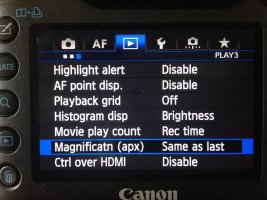
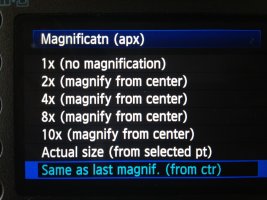
Just to ask, can you set the mag-button to zoom directly to 100% like on the 1-series?

I hate the 5d and other canon's for having to spend 5 seconds holding the button to get to 100%, why would I review at 50%? I want to see if it's sharp or not...
 
Upvote 0
Re: 5D mark iii picture review zoom is not user friendly

I love the way I can zoom/review on my 40d (ie with exposure lock/AF select). When I saw the new bodies without that, essentially switching to the zooming style of nikons I was kinda shocked.

To me the new style seems far less easy and intuitive, you can't do it with just one hand. Its going from direct button mapping to indirect. If it aint broken dont "fix" it canon..
 
Upvote 0
Re: 5D mark iii picture review zoom is not user friendly

Just have to ask since I haven't been able to touch a 5D3 yet.

On the back, the two upper most right buttons.
(AF point and AE-lock)
On cheaper cameras, **D and even 7D, they are used to zoom in and out during playback.
I've always found that very practical.
Isn't that an option on the 5D3?
 
Upvote 0
You can set it to your pleasing with the MK3 so yes you can do 100%
Viggo said:
Just to ask, can you set the mag-button to zoom directly to 100% like on the 1-series?

I hate the 5d and other canon's for having to spend 5 seconds holding the button to get to 100%, why would I review at 50%? I want to see if it's sharp or not...
 
Upvote 0
1sicknickel said:
You can set it to your pleasing with the MK3 so yes you can do 100%
Viggo said:
Just to ask, can you set the mag-button to zoom directly to 100% like on the 1-series?

I hate the 5d and other canon's for having to spend 5 seconds holding the button to get to 100%, why would I review at 50%? I want to see if it's sharp or not...

Fantastic!! Thanks for clearing it up. And Canon; That was about time!!
 
Upvote 0
I did not notice you could just press the zoom button rather than the playback button to instantly be in zoom mode. At least that eliminates a button press. Someone mentioned that they would be afraid to move the wheel if it was set to touch when shooting but I was thinking the touch wheel would only activate when reviewing pictures. I would not want to use it for changing the aperture size or speed. I also would be afraid to bump it. However if someone wanted to set the touch wheel to be used for something they should let them, then we can make fun of them on here if they have issues putting it up to their face.

I hope that Canon will unlock more of the buttons in future firmware updates. Many reviewers have mentioned it does not feel right and most mention changing the zoom to the set button.

Ryan
 
Upvote 0
Status
Not open for further replies.