
• The Canon Rumors Forum has officially been shut down as of July 10, 2026.

    All data will be deleted on September 16, 2026.

    the ad free experience will return by July 17, 2026.

Defective 5D MK III.....

  • Thread starter Thread starter SF DTM
  • Start date Start date
Status
Not open for further replies.
S

SF DTM

Guest
Maybe defective is not the right word and I'm in no way a sensationalist but I think it's important for people to be informed. I bought my MK3 the other day the second I found one locally, and immediately started shooting and noticing a huge lack of detail in all of my images. I was hoping maybe I had something wrong in the settings, after shooting for a entire day and night I've come to the conclusion that there's definitely something wrong with my copy of the camera. I've tried 4 different lenses and all sorts of settings to try and remedy the problem. Most of these around ISO 160-200.

Hopefully this is a 1 time fluke and there aren't others floating around with this issue.

Anybody know if the Camera shop should take the camera straight back? I definitely just want a brand new camera and not for it to just be repaired.


 
SF DTM said:
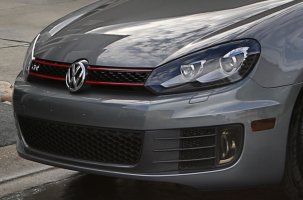
Here's a good example: (100%)

If this is a 100% crop, I'm not seeing a problem with sharpness. Maybe I'm looking at something different than you but it looks great to me.

If you are comparing this to the performance of another DSLR like a 5D2, it might be helpful to actually set up a shot, shoot the same shot with the same lens and settings on both camera bodies and then post identical crops to illustrate the difference.
 
Upvote 0
Should the camera store take it back? Yes, if you feel it is defective, I can't imagine any reputable dealer not accepting the return.

Is it defective? Honestly, as others are saying, it's pretty hard to tell from your examples, but it looks like you are showing us crops that represent 5% or less of the total frame. Have you compared these images to similar crops from your previous camera? Is it less sharp than what you had?

This reminds me of a thread awhile back from someone who felt his 7D wasn't performing up to par and no one else could see any problem. Bottom line is, if you aren't satisfied with it, there is probably nothing that people on this forum can say to change your mind so you may be better off returning it and either getting a different body or reconsidering if this is the camera for you.
 
Upvote 0
zwoop said:
Here's another tip: stop shooting JPEG.
When it comes to the 5d3, I am afraid that statement is not so robust. The jpgs on the 5d3 are pretty good to judge quality of the Cam. Although not as good as RAW, but for this example, perfectly adequate.

SFDTM: The picture of the grey car is 1322x2000 pixels or 2.64MP. This is about 12% of the full resolution of the 5d3. Question, was this a cro of the 100% magnification (i.e. 12% from the image) or did you "resize" the image itself to arrive at 1322x2000?

At a crop with no re-size, the shot is pretty ok. But if you resized, then it looks a bit soft.

Also as others have said, if you have shots from other 5d3 owners with similar cropping/ resizing then please show it to us.
 
Upvote 0
Since you were able to check side by side and your mark iii failed, take it back! Hopefully you will have no problems. I'm sure you are frustrated though, unfortunately s*** happens... Keep us posted on your experience, thanks
 
Upvote 0
I see a lens that's not absolutely calibrated and I'm seeing what looks like heavy color-noise reduction, def not the sharpness I see from my 5d2. It looks over processed and too much NR.

On a more positive note, the DR looks to have more detail in the highlights.
 
Upvote 0
SF DTM said:
t.linn said:
SF DTM said:
Here's a good example: (100%)

If this is a 100% crop, I'm not seeing a problem with sharpness. Maybe I'm looking at something different than you but it looks great to me.

If you are comparing this to the performance of another DSLR like a 5D2, it might be helpful to actually set up a shot, shoot the same shot with the same lens and settings on both camera bodies and then post identical crops to illustrate the difference.

If you don't see anything wrong with he quality of that image then perhaps some glasses would do you good. I just met up with Borrow Lens and did multiple tests with their cameras and there is indeed something wrong with my MK3 body. The difference in image quality side by side with their MK3 was night and day.

hi, i'm only an amateur and i've never shot with a full frame so sorry in advance for the stupid question... can you please enlighten me (and the other that are not seeing any problem) on what's wrong with that image?
it just seems slightly out of focus to me, it would be nice to see a side by side compare with the other MK3 and same lens/composition to see this night and day difference.
 
Upvote 0
SF DTM said:
Here's a good example: (100%)

Any comments on the reflection in this photo? According to the EXIF info it was taken at 24mm (no lens info) so the camera was quite close - and to me the reflection of the camera is a bit suspect... Unless it's not the camera's reflection I see in the photo?

Which lens was used here?
 
Upvote 0
The issue is that every image taken with the camera, no matter what ISO, F stop, RAW, JPEG, etc. is coming out very milky/blotchy, almost like the camera is applying heavy NR to every image.
 
Upvote 0
SF DTM said:
The issue is that every image taken with the camera, no matter what ISO, F stop, RAW, JPEG, etc. is coming out very milky/blotchy, almost like the camera is applying heavy NR to every image.

Sorry about your luck but thanks for bringing this to our attention. When mine arrives, I will test thoroughly. The 5DM2 I just sold would easily outperform what you sent.

I wonder how critical anti-alias filter alignment is? If it were askew relative to the sensor, I speculate it would create some strange NR looking results...
 
Upvote 0
K-amps said:
SF DTM said:
The issue is that every image taken with the camera, no matter what ISO, F stop, RAW, JPEG, etc. is coming out very milky/blotchy, almost like the camera is applying heavy NR to every image.

Sorry if this has been covered already, but Have your tried turning off in Camera NR and also long term NR?

Yup, definitely turned all the in camera processing off including the NR.
 
Upvote 0
I think maybe you are just looking too closely at the images. They look fine to me and are very small crops. Though if you could post the actual full res JPEG somewhere that would help a lot. I'd love to crawl around in a full jpeg.
 
Upvote 0
Status
Not open for further replies.