5D2 & Strobe Light Question

Status
Not open for further replies.
Hey guys,
I'm hoping someone can give me some direction on what mode to set the white balance to when shooting with a 3 light strobe set-up? I typically leave it on auto WB and tweak it in post production; however, this time I'll have the editor, stylist, and publisher of the magazine at the shoot wanting to see every image sent to my iPad for review. I would like to hit the WB on the spot and not have to explain that we can fix in post..

I’m using a 5D MK2, 90mm TS lens, 50mm f1.4, and 24-70 f2.8. Firing with PW to a 3 light strobe set-up by Novatron with 1 large softbox and 2 umbrellas.

Thanks
 
I'd use the custom white balance setting. Grab a white balance gray card, or just a white piece of printer paper, have the someone hold it once the lighting is more or less setup, and use that to set the white balance. Simple, easy. Plus the editor can use that image to set the white balance separately or tweak it in post if they prefer. Once you have the WB set to a static value, it's simple for the editor to get white balance to the setting desired in the first image, and then paste those settings to everything else quickly and easily.

90mm TS for studio work? Interesting, I've never show with a TS, but that seems like an interesting choice.

I don't know your specific needs, but with the 24-70, I'd rent one of the 70-200L or the 135L lenses to complement if you are doing more portraiture type shots.
 
Upvote 0
RonQ said:
Hey guys,
I'm hoping someone can give me some direction on what mode to set the white balance to when shooting with a 3 light strobe set-up? I typically leave it on auto WB and tweak it in post production; however, this time I'll have the editor, stylist, and publisher of the magazine at the shoot wanting to see every image sent to my iPad for review. I would like to hit the WB on the spot and not have to explain that we can fix in post..

I’m using a 5D MK2, 90mm TS lens, 50mm f1.4, and 24-70 f2.8. Firing with PW to a 3 light strobe set-up by Novatron with 1 large softbox and 2 umbrellas.

Thanks

Use the Flash WB preset. I still use some novatron flashes from 2003 and they've been quite reliable.
 
Upvote 0
Drizzt321 said:
I'd use the custom white balance setting. Grab a white balance gray card, or just a white piece of printer paper, have the someone hold it once the lighting is more or less setup, and use that to set the white balance. Simple, easy. Plus the editor can use that image to set the white balance separately or tweak it in post if they prefer. Once you have the WB set to a static value, it's simple for the editor to get white balance to the setting desired in the first image, and then paste those settings to everything else quickly and easily.

90mm TS for studio work? Interesting, I've never show with a TS, but that seems like an interesting choice.

I don't know your specific needs, but with the 24-70, I'd rent one of the 70-200L or the 135L lenses to complement if you are doing more portraiture type shots.
Thanks for the feedback.
You would not happen to have a step by step using either a grey card or white piece paper? I'm not familiar with setting the WB that way...
For the 90mm TS lens, I'm shooting products (high end dinner plates and silverware). They want the image to be sharp only in certain areas (focal plane).
 
Upvote 0

Use the Flash WB preset. I still use some novatron flashes from 2003 and they've been quite reliable.
[/quote]
Does it hit the WB everytime? My Novatron is 10 years old and still kicken. If you're interested, I found a guy in TX that will repair any Novatron equipment, he was actually an engineer for them and knows what to do. He'll actually replace your flash heads for a decent price. The only issue I ran across is the power pack I have is a 5 prong plug and the new lights reuire a 6 prong plug. I found an adapter to go from 5 pin to 6.
 
Upvote 0
RonQ said:
Drizzt321 said:
I'd use the custom white balance setting. Grab a white balance gray card, or just a white piece of printer paper, have the someone hold it once the lighting is more or less setup, and use that to set the white balance. Simple, easy. Plus the editor can use that image to set the white balance separately or tweak it in post if they prefer. Once you have the WB set to a static value, it's simple for the editor to get white balance to the setting desired in the first image, and then paste those settings to everything else quickly and easily.

90mm TS for studio work? Interesting, I've never show with a TS, but that seems like an interesting choice.

I don't know your specific needs, but with the 24-70, I'd rent one of the 70-200L or the 135L lenses to complement if you are doing more portraiture type shots.
Thanks for the feedback.
You would not happen to have a step by step using either a grey card or white piece paper? I'm not familiar with setting the WB that way...
For the 90mm TS lens, I'm shooting products (high end dinner plates and silverware). They want the image to be sharp only in certain areas (focal plane).

Ah, product photography, ok. Makes sense then.

For White Balance, you're going to want to have someone hold the paper where model you will be shooting will be, then fill it pretty much completely in the frame (but make sure you won't shadow it), and then take a shot. Then you'll need to go to the Menu, and choose Custom White Balance. You'll have to select an image, choose it, and then once it tells you the white balance has been set, you set your White Balance setting to Custom White Balance. See this YouTube video which does a pretty decent job of showing you what you need to do.
How to set you White Balance (Canon 5D)
 
Upvote 0
RonQ said:

Use the Flash WB preset. I still use some novatron flashes from 2003 and they've been quite reliable.
Does it hit the WB everytime? My Novatron is 10 years old and still kicken. If you're interested, I found a guy in TX that will repair any Novatron equipment, he was actually an engineer for them and knows what to do. He'll actually replace your flash heads for a decent price. The only issue I ran across is the power pack I have is a 5 prong plug and the new lights reuire a 6 prong plug. I found an adapter to go from 5 pin to 6.
[/quote]

I use the m500 Monolights. Its just a normal plug. :P
 
Upvote 0
Drizzt321 said:
I'd use the custom white balance setting. Grab a white balance gray card, or just a white piece of printer paper

Whatever you do, don't use plain printer paper. Such paper has fluorescent optical brightening agents in it and is actually blue. Some can be strikingly blue. Because the color comes from UV fluorescence, the color of the paper changes depending on the UV content of the light. And the paper substrate (that they then saturate with fluorescent dyes) is usually rather yellow.

Styrofoam coffee cups are actually superlative white balance tools. They have a flat spectral reflection (the only thing that matters) of about 80% (which is good for this sort of thing). And, their curved shape lets you sample all the lighting in the scene in one shot. Such a cup will probably be too small for an in-camera custom white balance, but a lot of packaging material is made from the same stuff, and that'd work well. Use the sheet for in-camera white balance, but take a shot of the cup for later use in RAW processing (and eyedropper from different parts of the cup to see the range of light source colors in the scene).

If you have any sheets of high quality matte photo paper, that's a good option, too. Canon Fine Art Watercolor, Red River Aurora Natural, and Hanhemule Photo Rag are all excellent choices. It might be a bit too reflective for your stage, but Tyvek (that un-tearable stuff that envelopes are often made out of) is another option, and the back side of Canon's large format Tyvek Banner media is uncoated Tyvek. Tyvek actually has about 98% reflectivity, and is only bested by (pure) Teflon. But I'm guessing you don't want to spend as much on a 24" Spectralon target as you would on a 1-series body....

Cheers,

b&
 
Upvote 0
TrumpetPower! said:
Drizzt321 said:
I'd use the custom white balance setting. Grab a white balance gray card, or just a white piece of printer paper

Whatever you do, don't use plain printer paper. Such paper has fluorescent optical brightening agents in it and is actually blue. Some can be strikingly blue. Because the color comes from UV fluorescence, the color of the paper changes depending on the UV content of the light. And the paper substrate (that they then saturate with fluorescent dyes) is usually rather yellow.

Styrofoam coffee cups are actually superlative white balance tools. They have a flat spectral reflection (the only thing that matters) of about 80% (which is good for this sort of thing). And, their curved shape lets you sample all the lighting in the scene in one shot. Such a cup will probably be too small for an in-camera custom white balance, but a lot of packaging material is made from the same stuff, and that'd work well. Use the sheet for in-camera white balance, but take a shot of the cup for later use in RAW processing (and eyedropper from different parts of the cup to see the range of light source colors in the scene).

If you have any sheets of high quality matte photo paper, that's a good option, too. Canon Fine Art Watercolor, Red River Aurora Natural, and Hanhemule Photo Rag are all excellent choices. It might be a bit too reflective for your stage, but Tyvek (that un-tearable stuff that envelopes are often made out of) is another option, and the back side of Canon's large format Tyvek Banner media is uncoated Tyvek. Tyvek actually has about 98% reflectivity, and is only bested by (pure) Teflon. But I'm guessing you don't want to spend as much on a 24" Spectralon target as you would on a 1-series body....

Cheers,

b&

I did not know that. The Lighting class I took when we went over white balance when using gels we just used a piece of plain old white paper.
 
Upvote 0
drjlo said:

Offset printing isn't going to give you a flat spectrum, and 5" x 7" is small. At $2, it's not like you're wasting a lot of money, but you can do a lot better for even cheaper, still -- free, even. I mentioned the styrofoam coffee cup. If you've got any styrofoam sheets or blocks from packaging materials, that works. Good quality OBA-free inkjet media, too.

If you really feel like you need to spend money, a quick search on Amazon reveals this:

http://www.amazon.com/Expanded-Polystyrene-Foam-Sheets-qty/dp/B0054JDQQC/ref=sr_1_1?s=office-products&ie=UTF8&qid=1342204484&sr=1-1&keywords=styrofoam+sheets

$20 for four two-foot by four-foot one-inch-thick polystyrene sheets. Repackage them and sell them as photographic white balance targets at $500 each (flat spectrum! diffuse reflective surface! large size! light-weight!) and you'll retire early. And, oh-by-the-way, they'll actually work significantly better than literally any white balance target you can buy in the camera store.

Cheers,

b&
 
Upvote 0
Why not use something like a Xrite ColorChecker Passport and apply the settings in LightRoom.

This is what I do and makes it not only a no brainer for WB, but also helps make sure you nail the colors if you lighting is uneven or mixed.
 
Upvote 0
Drizzt321 said:
I did not know that. The Lighting class I took when we went over white balance when using gels we just used a piece of plain old white paper.

Doesn't surprise me. I see that bit of bad advice everywhere.

Oh, sure, it'll get you close, and maybe even "good enough" for lots of people. And using bluish paper will have a warming effect on the white balance, which many people like, especially for portraiture. But it's so cheap and easy to get it right....

Cheers,

b&
 
Upvote 0
Maui5150 said:
Why not use something like a Xrite ColorChecker Passport and apply the settings in LightRoom.

This is what I do and makes it not only a no brainer for WB, but also helps make sure you nail the colors if you lighting is uneven or mixed.

That's good for post-processing, especially if you're using something truly neutral for white balance (which the Passport doesn't have) and then using the Passport software to create a DNG profile that you use in Lightroom or ACR.

But the original question is for immediate preview on an iPad, which only leaves you in-camera custom white balance.

Since you've got a Passport, let me pass on a suggestion: cut out a piece of Tyvek (you can get envelopes at your local office supply store) to fit the inside back lid, glue it in place (rubber cement works fine), and use that instead of the light gray white balance target. It's cheap (free if you've already got the Tyvek) and far superior.

Cheers,

b&
 
Upvote 0
TrumpetPower! said:
Drizzt321 said:
I'd use the custom white balance setting. Grab a white balance gray card, or just a white piece of printer paper

Whatever you do, don't use plain printer paper. Such paper has fluorescent optical brightening agents in it and is actually blue. Some can be strikingly blue. Because the color comes from UV fluorescence, the color of the paper changes depending on the UV content of the light. And the paper substrate (that they then saturate with fluorescent dyes) is usually rather yellow.

Styrofoam coffee cups are actually superlative white balance tools. They have a flat spectral reflection (the only thing that matters) of about 80% (which is good for this sort of thing). And, their curved shape lets you sample all the lighting in the scene in one shot. Such a cup will probably be too small for an in-camera custom white balance, but a lot of packaging material is made from the same stuff, and that'd work well. Use the sheet for in-camera white balance, but take a shot of the cup for later use in RAW processing (and eyedropper from different parts of the cup to see the range of light source colors in the scene).

If you have any sheets of high quality matte photo paper, that's a good option, too. Canon Fine Art Watercolor, Red River Aurora Natural, and Hanhemule Photo Rag are all excellent choices. It might be a bit too reflective for your stage, but Tyvek (that un-tearable stuff that envelopes are often made out of) is another option, and the back side of Canon's large format Tyvek Banner media is uncoated Tyvek. Tyvek actually has about 98% reflectivity, and is only bested by (pure) Teflon. But I'm guessing you don't want to spend as much on a 24" Spectralon target as you would on a 1-series body....

Cheers,

b&
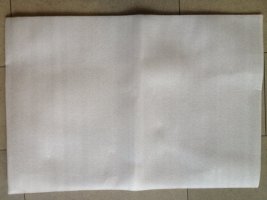
I found this type of packing material. Took it with my iPhone, is this what you are reffering to?
 

Attachments

  • photo.JPG
    photo.JPG
    45.5 KB · Views: 622
Upvote 0
RonQ said:
I found this type of packing material. Took it with my iPhone, is this what you are reffering to?

I know the stuff you've go there, and I'm pretty sure it's also polystyrene. But it's not what I was referring to; I'm referring to those solid styrofoam blocks, like beer cooler foam. In fact, the lid from a throw-away foam beer cooler would do the trick.

But hold on a sec while I check to see if I've got any of that stuff...yes. It's a bit too translucent; you can see through it, which means that you'll be including the colors of whatever is behind it. But, when you fold it over a bunch of times, it's got a flat spectrum and about 43% reflectance, translating into D50 L*a*b* values of L* = 71.90, a* = 0.18, b* = 0.01. If it weren't for the translucency, that'd be better than any commercial white balance tool on the market that costs under a grand.

Cheers,

b&
 
Upvote 0
TrumpetPower! said:
RonQ said:
I found this type of packing material. Took it with my iPhone, is this what you are reffering to?

I know the stuff you've go there, and I'm pretty sure it's also polystyrene. But it's not what I was referring to; I'm referring to those solid styrofoam blocks, like beer cooler foam. In fact, the lid from a throw-away foam beer cooler would do the trick.

But hold on a sec while I check to see if I've got any of that stuff...yes. It's a bit too translucent; you can see through it, which means that you'll be including the colors of whatever is behind it. But, when you fold it over a bunch of times, it's got a flat spectrum and about 43% reflectance, translating into D50 L*a*b* values of L* = 71.90, a* = 0.18, b* = 0.01. If it weren't for the translucency, that'd be better than any commercial white balance tool on the market that costs under a grand.

Cheers,

b&

Ah yes, the great myth of "It's more expensive and labeled Pro so I must have it!" busted yet again :)
 
Upvote 0
Drizzt321 said:
Ah yes, the great myth of "It's more expensive and labeled Pro so I must have it!" busted yet again :)

Well, to be fair, there are all sorts of thing with a "pro" label that are justifiably expensive that are far superior to the alternatives; a 400 f/2.8 comes to mind.

But, in this case...yeah, a 4¢ Tyvek envelope beats a $40 WhiBal, and a 2¢ styrofoam cup beats a $60 SpyderCube.

Cheers,

b&
 
Upvote 0
Status
Not open for further replies.