Max CF Card size that can be used in the 5D2?

  • Thread starter Thread starter Portpix
  • Start date Start date
Status
Not open for further replies.
I can confirm, the 60mb (400x) cards stop working at full 3.9fps on a 5Dmk2 (highest jpg with hightest raw) after about 7 shots.
not great, and will do ok for me, but i might get a faster card incase needed, 90mps (600x)
 
Upvote 0
"How about buffer flush? Say you hold down the shutter until the buffer fills, then release the shutter. At that point, the camera reads BUSY and you can't take another shot until a sufficient amount of data in the buffer is written off to the card. So, in that scenario, a faster card may mean you can take another shot sooner, right?"

Unfortunately not and it's a common missconception, there might be a slight advantantage, but it is slight. This is because the bottleneck in the system is not the memory card, or the buffer, it's the image processor. The data from the sensor is written to the buffer, processed, written back to the buffer and then to the memory card, when the buffer fills up it isn't full of data waiting to be written to the memory card, it's full of data waiting for the image processor to catch up. A faster memory card can't make the image processor work any faster, all it can do is empty a single image from the buffer a little bit quicker, and if you still have the shutter pressed another shot can be taken.
 
Upvote 0
Flake said:
This is because the bottleneck in the system is not the memory card, or the buffer, it's the image processor. The data from the sensor is written to the buffer, processed, written back to the buffer and then to the memory card, when the buffer fills up it isn't full of data waiting to be written to the memory card, it's full of data waiting for the image processor to catch up.

If that's the case, why does shooting RAW give significantly lower frame rates than JPG? I'm skeptical of your claim, do you have a reference?
 
Upvote 0
epsiloneri said:
Flake said:
This is because the bottleneck in the system is not the memory card, or the buffer, it's the image processor. The data from the sensor is written to the buffer, processed, written back to the buffer and then to the memory card, when the buffer fills up it isn't full of data waiting to be written to the memory card, it's full of data waiting for the image processor to catch up.

If that's the case, why does shooting RAW give significantly lower frame rates than JPG? I'm skeptical of your claim, do you have a reference?

I did have but on this occasion I don't know where it is! Shooting RAW takes longer to process because of the amount of data, much of the data from a jpeg is dumped in processing.
 
Upvote 0
mreco99 said:
interesting.
i didnt realise 3.9fps only ment for 2 seconds. oh well saves me buying a faster card. thanks

2 seconds is fairly a long time I think... I'm not saying that say 3 seconds or maybe 4 might be useful in some situations but in most high-speed action sequences wouldn't the action be just about done in that amount of time or less? I'm not an expert sports shooter so I honestly don't know how many seconds would be optimal for a sequence and I hope I'm not starting a theoretical debate that ends up in someone pointing out that "if you could just hold down the shutter button for an hour you'd never miss anything" ;p
 
Upvote 0
epsiloneri said:
If that's the case, why does shooting RAW give significantly lower frame rates than JPG? I'm skeptical of your claim, do you have a reference?

By "frame rates" do you mean frames per second or total number of frames before the buffer fills? I don't believe the frames per second drops shooting JPG, RAW, or RAW+JPG at least not on my 7D but could be different for other bodies (7D has dual DIGIC4 processors).

Shooting jpg only many more shots can be taken before the buffer fills because once processed they take up less space in the buffer before being written to the memory card.
 
Upvote 0
Flake said:
I did have but on this occasion I don't know where it is! Shooting RAW takes longer to process because of the amount of data, much of the data from a jpeg is dumped in processing.

Please look, because that statement makes no sense to me. You seem to be saying jpg processing is faster because data are discarded during processing, but that would mean bits are tossed without being processed, e.g. take every other pixel and just ignore it. It can't work that way - the data have to be analyzed during processing, before elimination. Write would be faster, with less data to write. Processing would be the same. It's write speed and quantity of data that determine overall throughput - I don't think the processor is a significant bottleneck. That's why frame rate and buffer capacity take a bit hit going from JPG to RAW, and another small hit from RAW to RAW+JPG. There's no difference in the processing required for those three modes - all involve processing the full sensor RAW image to a JPG, including applying the in-camera settings (Picture Style, ALO, PIC, etc.), the only difference is the amount of data that need to be written to the card.

 
Upvote 0
Flake said:
Unfortunately not and it's a common missconception, there might be a slight advantantage, but it is slight. This is because the bottleneck in the system is not the memory card, or the buffer, it's the image processor. The data from the sensor is written to the buffer, processed, written back to the buffer and then to the memory card, when the buffer fills up it isn't full of data waiting to be written to the memory card, it's full of data waiting for the image processor to catch up. A faster memory card can't make the image processor work any faster, all it can do is empty a single image from the buffer a little bit quicker, and if you still have the shutter pressed another shot can be taken.

That is the correct order of the processing but I'm not sure the image processor is the bottleneck as you suggest at least not with current generation processors and files sizes. The following quote from a Canon website http://cpn.canon-europe.com/content/education/infobank/capturing_the_image/digic_processing.do confirms the order of processing but implies the image processor is not the bottleneck.

"To overcome limitations with processor speed and capacity, manufacturers can install large and expensive buffers as a temporary store for unprocessed data, or compromise image quality by ‘dumbing down’ image processing, or both. DIGIC II is designed to avoid these compromises. The processor is so fast it can read, process, compress and write JPEG image data back to the buffer between exposures."
 
Upvote 0
neuroanatomist said:
Flake said:
I did have but on this occasion I don't know where it is! Shooting RAW takes longer to process because of the amount of data, much of the data from a jpeg is dumped in processing.

Please look, because that statement makes no sense to me. You seem to be saying jpg processing is faster because data are discarded during processing, but that would mean bits are tossed without being processed, e.g. take every other pixel and just ignore it. It can't work that way - the data have to be analyzed during processing, before elimination. Write would be faster, with less data to write. Processing would be the same. It's write speed and quantity of data that determine overall throughput - I don't think the processor is a significant bottleneck. That's why frame rate and buffer capacity take a bit hit going from JPG to RAW, and another small hit from RAW to RAW+JPG. There's no difference in the processing required for those three modes - all involve processing the full sensor RAW image to a JPG, including applying the in-camera settings (Picture Style, ALO, PIC, etc.), the only difference is the amount of data that need to be written to the card.

I agree with neuro... RAW files have to be processed first then converted to jpg (which is done even if you shoot in RAW only because a small jpg is needed to display the image on the LCD). If you shoot in jpg only then after processing only the jpg is written back to the buffer saving a lot of space and reducing the write time to the memory card.

Edit: Actually, even in jpg only mode, the processed RAW file also may be written back to the buffer first and then deleted if the user selected JPG only. Discarding the RAW file is not likely built in to the processor as that would be an unnecessary function since it can be done after the fact.
 
Upvote 0
I ran some tests this evening, and in a day or two I'll tabulate and post the results. But preliminarily, a 90 MB/s cards does result in a slight performance boost on the 5DII compared to 60 MB/s cards (roughly, shaves a second off the write speed following a 3 second burst, and allows a few more frames during 20 s of continuous shooting).
 
Upvote 0
neuroanatomist said:
I ran some tests this evening, and in a day or two I'll tabulate and post the results. But preliminarily, a 90 MB/s cards does result in a slight performance boost on the 5DII compared to 60 MB/s cards (roughly, shaves a second off the write speed following a 3 second burst, and allows a few more frames during 20 s of continuous shooting).

Consistent with my anecdotal observations with my 7D that I mentioned earlier in this thread. Do you have a 200x card available to measure the jump in performance compared to 400x cards?
 
Upvote 0
Meh said:
Consistent with my anecdotal observations with my 7D that I mentioned earlier in this thread. Do you have a 200x card available to measure the jump in performance compared to 400x cards?

I tested 4 cards (all SanDisk, 2 GB 20 MB/s, 8 GB 60 MB/s, 16 GB 60 MB/s, and 32 MB 90 MB/s) on a 5DII and a 7D.
 
Upvote 0
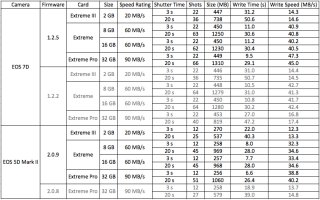
Here are the results of my testing. All shots were with the 100mm f/2.8L Macro IS pointed at a fluorescent ceiling fixture (i.e. a featureless white subject filling the frame), M mode, f/5.6, 1/100 s, ISO 100, manual focus, all 'modifiers' off (e.g. ALO, PIC, HTP, etc.). Shutter time refers to the duration of continuous shutter press, write time was measured from the start of the shutter press until the red 'busy' light went out. All values represent the average of four tests.

Tests with old firmware are shown, but grayed out. Notice that while previous verisons of firmware don't affect cards rated at 60 MB/s or slower, the old firmware really throttles the faster 90 MB/s card. Also, that 90 MB/s Extreme Pro is UDMA6, and while Canon's firmware updates state, "Improves writing/reading speeds when using UDMA 7-compatible CF cards," clearly they also improve performance with fast UDMA6 cards.

It's interesting that a faster card gives a slight benefit to even the 'slow' 5DII, with one second shaved off the recovery time from a 3-second burst, and 6 more shots obtained in a 20-second burst.
 

Attachments

  • SanDisk Tests.jpg
    SanDisk Tests.jpg
    381.7 KB · Views: 3,190
Upvote 0
Status
Not open for further replies.