Need advice for high ISO shooting / noise management

Status
Not open for further replies.

ahsanford

Particular Member
Aug 16, 2012
8,656
1,664
57,701
Hey gang,

I'm shooting handheld indoors without flash with my 5D3 all the time these days, it seems. Shame on me, I know, but these are often social / performance events where the flash would not be welcomed.

In these situations, I leave the zooms at home and shoot either my trusty 50/1.4 or the surprisingly good new 28/2.8 IS. To avoid wide open softness, I am pushing ISO into 3200-6400 levels to allow either lens to be stopped down a bit. I won't lie that I push ISO even beyond 6400 periodically.

I am shooting RAW in these situations with the High ISO NR turned off as it seems to do nothing to RAW files (I presume it's a JPG-only feature?).

I generally prefer capturing sharpness + detail with noise than softening up the image by cranking up the noise reduction. That said, if I can chase the noise intelligently without much detail being sacrificed, I'd love to hear how.

Can folks on this fine forum please give advice on:

1) Best RAW processing parameters to managing noise in Camera RAW. I get lost on the five noise reduction sliders (Luminance, L Detail, L Contrast, Color and Color Detail) -- so pointers on which to use and when would be terrific.

2) Are there other settings in camera that are recommended for shooting in these indoor/handheld/low-light situations?

3) Is Camera RAW is the best tool for noise reduction work? Should I use another RAW handler? Does saving noise work for Photoshop to manage a better path to take? Advice appreciated!

Thanks for your help!
A
 
ahsanford said:
Hey gang,

I'm shooting handheld indoors without flash with my 5D3 all the time these days, it seems. Shame on me, I know, but these are often social / performance events where the flash would not be welcomed.

In these situations, I leave the zooms at home and shoot either my trusty 50/1.4 or the surprisingly good new 28/2.8 IS. To avoid wide open softness, I am pushing ISO into 3200-6400 levels to allow either lens to be stopped down a bit. I won't lie that I push ISO even beyond 6400 periodically.

I am shooting RAW in these situations with the High ISO NR turned off as it seems to do nothing to RAW files (I presume it's a JPG-only feature?).

I generally prefer capturing sharpness + detail with noise than softening up the image by cranking up the noise reduction. That said, if I can chase the noise intelligently without much detail being sacrificed, I'd love to hear how.

Can folks on this fine forum please give advice on:

1) Best RAW processing parameters to managing noise in Camera RAW. I get lost on the five noise reduction sliders (Luminance, L Detail, L Contrast, Color and Color Detail) -- so pointers on which to use and when would be terrific.

2) Are there other settings in camera that are recommended for shooting in these indoor/handheld/low-light situations?

3) Is Camera RAW is the best tool for noise reduction work? Should I use another RAW handler? Does saving noise work for Photoshop to manage a better path to take? Advice appreciated!

Thanks for your help!
A

I can comfortably shoot ISO 12,800 Color Images and 25,600 B&W's on my 5D3. 51,200 B&W's if needed.

I use LR4 and its Noise Reduction software. I generally apply color NR until its gone, and enough Luminance NR to lower the grain, Not to remove it. (which can be done to smooth-en portraits if needed.)

You can Use the Median Distort tool in Photoshop and selectively remove noise from an image. Its usually not needed.

The best thing for noise is to nail your exposure. I've gotten Usable ISO 3200 Files from a 5Dc because I nailed the exposure.
 
Upvote 0
Thx for the advice. Regarding nailing the exposure, that a bit of the rub. In these cave-like lighting conditions, I am generally underexposing (just a shade) to get a wee bit quicker shutter. So my histograms rarely look ideal, leaving me to have to boost exposure after the fact (which I presume is bad for noise according to your comment).

So what would lead to a better looking final image -- ISO X that is underexposed or ISO 2X that is appropriately exposed?
 
Upvote 0
lightroom 4 is amazing with the 5d mk3
iso 12800 or 16000 (similar noise to 12800) iso 25600 there is a big jump and noie reduction makes it worse
however at 25600 a B&w conversion and leaving the noise there works really well.
once you get the settings right the images are very clean from lightroom 4 I prefer to leave some noise there so it doesnt look all plastic and wrong like portrait professional over processed garbage
 
Upvote 0
Getting a correct expoosure and avoiding underexposure is critical use higher ISO to get a good exposure. There will be less noise than you get from a underexposed image.
The big issue with low light and high ISO shooting is not noise, but lack of DR. A dim light on one side of the stage can be blown out while the rest of the image is underexposed. Don't be afraid to increase ISO enough to slightly overexpose, pulling down the exposure 1/3 stop in Lightroom decreases noise in the dark areas.
 
Upvote 0
neuroanatomist said:
I prefer DxO Optics Pro for managing ISO noise during RAW conversions.

Having said that, even the default settings of DPP aren't too bad. This is ISO 12800 on the 1D X, and the DR isn't bad, considering...


EOS 1D X, EF 70-200mm f/2.8L IS II USM @ 70mm, 1/200 s, f/5, ISO 12800

While I suspect it handles noise a little better than the 5DIII, the difference probably isn't huge. Now that DxO finally supports the 1D X, I'll have to compare it to DPP for NR, etc.
 
Upvote 0
neuroanatomist said:
I prefer DxO Optics Pro for managing ISO noise during RAW conversions.
.. the problem being added hd space because dxo exports only linear tiff afaik - while inside lr everything is done on the much smaller raw image. But dxo is known to have the best lens correction profiles for sure.

neuroanatomist said:
This is ISO 12800 on the 1D X, and the DR isn't bad, considering...
Impressive in comparison to my 60d, but still the blown highlights on the cap look distracting, at least to me.

Mt Spokane Photography said:
Getting a correct expoosure and avoiding underexposure is critical use higher ISO to get a good exposure. There will be less noise than you get from a underexposed image.
The big issue with low light and high ISO shooting is not noise, but lack of DR. A dim light on one side of the stage can be blown out while the rest of the image is underexposed. Don't be afraid to increase ISO enough to slightly overexpose, pulling down the exposure 1/3 stop in Lightroom decreases noise in the dark areas.
Um, did you just contradict yourself or I am misunderstanding you? The problem with lack of dr is mostly that you get blown highlights, so a bit underexposing might be safer unless the scene has very low contrast. And raising iso instead of underexposing even further lowers dr.

And to make it really complicated, the "best" iso depends on the scene, have a look at what the Magic Lantern dev figured out (you can customize iso much more with ml): http://magiclantern.wikia.com/wiki/ISO#Then.2C_what_is_the_best_ISO.3F
 
Upvote 0
neuroanatomist said:
I prefer DxO Optics Pro for managing ISO noise during RAW conversions.

DXO Pro was the best before LR4 came out - i used it most of the time for RAW files
Now i feel that LR4 is giving better results - at least to my taste so now i am using LR4 for most of the time. The are some different conditions when one of them gives more pleasant look.
But in general LR4 leaves more details and with just a little bit of luminance grain image is more real - does not destroy low contrast surface textures so you feel it more realistic and more "tangible". DXO at default setting smears low contrast surface texture details and gives more "plastic" look. Especially noticable on RED channel - even if luminance and chroma sliders are set to 0 red channel details are still smeared a little bit. Turn off NR then all OK. Never observed that in LR4.
I did number of tests on this for myself and can post some results later.
On the other hand DXO strength is lens correction modules and film pack for true film rendering - i like that features most of all.
 
Upvote 0
Neutral said:
neuroanatomist said:
I prefer DxO Optics Pro for managing ISO noise during RAW conversions.

DXO Pro was the best before LR4 came out - i used it most of the time for RAW files
Now i feel that LR4 is giving better results - at least to my taste so now i am using LR4 for most of the time. ...

I did number of tests on this for myself and can post some results later.
On the other hand DXO strength is lens correction modules and film pack for true film rendering - i like that features most of all.

I'd be interested to see those, especially with the 1D X files. Although I don't have LR4, I have CS6 - I assume the ACR is the same for both, but I'm not positive.

I should ask, what version of DxO? The newest version (which probably few people have at this point) is actually a little bit better than the previous ones.
 
Upvote 0
neuroanatomist said:
Neutral said:
neuroanatomist said:
I prefer DxO Optics Pro for managing ISO noise during RAW conversions.

DXO Pro was the best before LR4 came out - i used it most of the time for RAW files
Now i feel that LR4 is giving better results - at least to my taste so now i am using LR4 for most of the time. ...

I did number of tests on this for myself and can post some results later.
On the other hand DXO strength is lens correction modules and film pack for true film rendering - i like that features most of all.

I'd be interested to see those, especially with the 1D X files. Although I don't have LR4, I have CS6 - I assume the ACR is the same for both, but I'm not positive.

I should ask, what version of DxO? The newest version (which probably few people have at this point) is actually a little bit better than the previous ones.
neuroanatomist said:
Neutral said:
neuroanatomist said:
I prefer DxO Optics Pro for managing ISO noise during RAW conversions.

DXO Pro was the best before LR4 came out - i used it most of the time for RAW files
Now i feel that LR4 is giving better results - at least to my taste so now i am using LR4 for most of the time. ...

I did number of tests on this for myself and can post some results later.
On the other hand DXO strength is lens correction modules and film pack for true film rendering - i like that features most of all.

I'd be interested to see those, especially with the 1D X files. Although I don't have LR4, I have CS6 - I assume the ACR is the same for both, but I'm not positive.

I should ask, what version of DxO? The newest version (which probably few people have at this point) is actually a little bit better than the previous ones.


Latest dxo 7.5.5 which supports 1dx, latest LR4 and latest C1 from Phase One. Start always with LR4 as all files are initially imported into LR, and then if not satified try DXO or C1 depending on the conditions. C1 is mostly at low ISO settings. Each tool has it's strong and weak points.
Advantage of LR4 and C1 is that they give ability to apply almost any possible adjustements locally including NR and sharpness which adds a lot of flexibility.
I will post some test results for 1dx when have time. This is indeed very interesting especially showing big diffence in 1dx image quality for diferent types of low light conditions. This again relates to shadows recovery. In indoor conditions when most of the image details are in the center of histogram - all is very good and amazing. If most of the details in the shadow area ( e.g. outdoor city shots in the evening) then results are very average - I expected that but still was a bit dissapointed. Hope in new big mpx canon camera that would be fixed.
Will also try to compare that with 1ds m3 while it is still with me - soon it is going to the new owner.
 
Upvote 0
RLPhoto said:
ahsanford said:
Hey gang,

I'm shooting handheld indoors without flash with my 5D3 all the time these days, it seems. Shame on me, I know, but these are often social / performance events where the flash would not be welcomed.

In these situations, I leave the zooms at home and shoot either my trusty 50/1.4 or the surprisingly good new 28/2.8 IS. To avoid wide open softness, I am pushing ISO into 3200-6400 levels to allow either lens to be stopped down a bit. I won't lie that I push ISO even beyond 6400 periodically.

I am shooting RAW in these situations with the High ISO NR turned off as it seems to do nothing to RAW files (I presume it's a JPG-only feature?).

I generally prefer capturing sharpness + detail with noise than softening up the image by cranking up the noise reduction. That said, if I can chase the noise intelligently without much detail being sacrificed, I'd love to hear how.

Can folks on this fine forum please give advice on:

1) Best RAW processing parameters to managing noise in Camera RAW. I get lost on the five noise reduction sliders (Luminance, L Detail, L Contrast, Color and Color Detail) -- so pointers on which to use and when would be terrific.

2) Are there other settings in camera that are recommended for shooting in these indoor/handheld/low-light situations?

3) Is Camera RAW is the best tool for noise reduction work? Should I use another RAW handler? Does saving noise work for Photoshop to manage a better path to take? Advice appreciated!

Thanks for your help!
A

I can comfortably shoot ISO 12,800 Color Images and 25,600 B&W's on my 5D3. 51,200 B&W's if needed.

I use LR4 and its Noise Reduction software. I generally apply color NR until its gone, and enough Luminance NR to lower the grain, Not to remove it. (which can be done to smooth-en portraits if needed.)

You can Use the Median Distort tool in Photoshop and selectively remove noise from an image. Its usually not needed.

The best thing for noise is to nail your exposure. I've gotten Usable ISO 3200 Files from a 5Dc because I nailed the exposure.
ISO 51k bw. +1
So amazing...some NR and that's it.
Depending on one's taste, up to ISO 25k in color...
 
Upvote 0
Neutral said:
neuroanatomist said:
I should ask, what version of DxO? The newest version (which probably few people have at this point)
Latest dxo 7.5.5 which supports 1dx

Which isn't the latest, although it is the latest public version. You may be re-doing those tests soon... Or so I hear, although maybe I'm Not Definitively Accurate. :-X
 
Upvote 0
neuroanatomist said:
Neutral said:
neuroanatomist said:
I should ask, what version of DxO? The newest version (which probably few people have at this point)
Latest dxo 7.5.5 which supports 1dx

Which isn't the latest, although it is the latest public version. You may be re-doing those tests soon... Or so I hear, although maybe I'm Not Definitively Accurate. :-X

Hope that they will release it soon together with the support for 24-70 m2
For certain kind of images dxo pro gives results not attainable with LR or C1
 
Upvote 0
neuroanatomist said:
Neutral said:
neuroanatomist said:
I prefer DxO Optics Pro for managing ISO noise during RAW conversions.

DXO Pro was the best before LR4 came out - i used it most of the time for RAW files
Now i feel that LR4 is giving better results - at least to my taste so now i am using LR4 for most of the time. ...

I did number of tests on this for myself and can post some results later. ...

I'd be interested to see those, especially with the 1D X files. Although I don't have LR4, I have CS6 - I assume the ACR is the same for both, but I'm not positive. ...

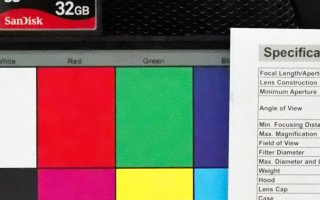
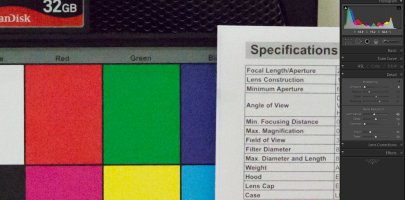
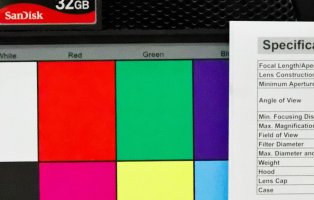
OK, here is comparison of LR4 and DXO on NR for 1Dx in few next posts:
Shots are in normal indoor room lighting with normal contrast.
100% crops are done by WIn 7 snipping tool to be quick
first snapshot is showing crop area.
Next are 100% crops ISO51200 -No NR at LR, LR with NR, DXO with NR
 

Attachments

  • 1Dx test NR  LR vs DXO - area 2.JPG
    1Dx test NR LR vs DXO - area 2.JPG
    14.2 KB · Views: 798
  • 1Dx ISO51200 no NR  area 2.JPG
    1Dx ISO51200 no NR area 2.JPG
    331.5 KB · Views: 872
  • 1Dx ISO51200 LR NR -area 2.JPG
    1Dx ISO51200 LR NR -area 2.JPG
    159.9 KB · Views: 892
  • 1Dx ISO51200 DXO NR -area 2.JPG
    1Dx ISO51200 DXO NR -area 2.JPG
    119.4 KB · Views: 879
Upvote 0
here are the same for other crop area - still ISO51200
 

Attachments

  • 1Dx ISO51200 DXO NR.JPG
    1Dx ISO51200 DXO NR.JPG
    175.5 KB · Views: 889
  • 1Dx ISO51200 LR NR.JPG
    1Dx ISO51200 LR NR.JPG
    206.2 KB · Views: 847
  • 1Dx ISO51200 no NR no sharpening.JPG
    1Dx ISO51200 no NR no sharpening.JPG
    320.5 KB · Views: 848
  • 1Dx test NR  LR vs DXO.JPG
    1Dx test NR LR vs DXO.JPG
    13.5 KB · Views: 781
Upvote 0
now for ISO25600. In previous one and here please note how red channel is handled in DXO - all smeared and oversaturated
 

Attachments

  • 1Dx ISO25600 no NR no sharpening.JPG
    1Dx ISO25600 no NR no sharpening.JPG
    266.6 KB · Views: 855
  • 1Dx ISO25600 LR NR.JPG
    1Dx ISO25600 LR NR.JPG
    184.8 KB · Views: 876
  • 1Dx ISO25600 DXO NR.JPG
    1Dx ISO25600 DXO NR.JPG
    143.4 KB · Views: 828
Upvote 0
Helpful sample shots, thanks. I prefer the speaker shot for what I do as I am rarely shooting continuous, even patches of color like with the swatches.

Still, as a novice I have PS but neither Lightroom nor DXO. I am using Adobe Camera RAW to manage my noise right now.
 
Upvote 0
Status
Not open for further replies.