Axilrod said:
Man it's very hard to tell the difference between those. Are the supposed artifacts on top and bottom of the label or on the left and right?
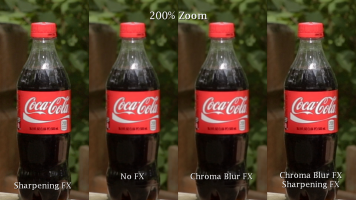
I agree, especially on the Vimeo video. But it is clear on my full resolution previews from my NLE timeline. Look at the 200% zoom screen capture at full resolution (i.e., open the attachment and view at 100%). It is all over the label on the far left, to a lesser extent on the unsharpened footage second to left, and not an issue on sharpened and chrom blurred shot on the far right. Look at the label wherever the red borders another color.
You can only really sharpen the footage a very minimal amount, artificial sharpening can make any image look like crap if turn it up too far.
Agreed. Although, if you watch the video, do you think I've sharpened too much? This is actually sharpened a bit more than I NORMALLY do, but not more than I've EVER done - and I understand well the points you make that too much sharpening can give a video a, well, video look. Thus, I'm generally conservative with my sharpening, which is why I didn't like the effect it had on red.
My point isn't about sharpening in general. It is about sharpening with red objects. I think you'll find wide agreement that sharpening, in general, is beneficial to 5D3 footage -- I don't think I'm out on a limb on this one. As I said in the video, ANY amount of sharpening that I would add with a shot with red in it would reveal these artifacts of the red object.
I'm not claiming any dificiency in 5D3 footage. Indeed, the chroma blur trick probably is as effective on any other footage for which this issue arises. I would say, if you don't find this to be an issue in your footage, then ignore the chroma blur trick. For those that do, I offer this tip that I've found to work for me.