Ultimate giclée lens?

Status
Not open for further replies.
Mar 29, 2012
934
2
10,086
So, I do a bit of fine art reproduction / copy / giclée work, and I'm expecting to do more in the future.

I get great results with the Canon 50mm f/2.5 Compact Macro.

More is always better, of course, which is why this question.

Can anybody offer a recommendation of a significantly better lens to use (with a 5DIII)?

At optimum aperture (presumably somewhere in the f/5.6 - f/11 range), it must be visibly (not just measurably) superior in all these categories, in this order of importance:

[list type=decimal]
[*]Distortion. The CM is virtually distortion-free. Any candidate lens must have no more distortion than the CM.
[*]Sharpness. The CM at f/8 is very sharp, but I suspect there might be even sharper lenses by now.
[*]Corner sharpness. The CM is very good in the corners at f/8, but not quite as good as in the center.
[*]Light falloff. Again, at f/8, this is well controlled with the CM. A candidate lens shouldn't be worse, but my workflow already compensates for less than perfectly even illumination so it's my least important criteria.
[/list]

I'm confident that the CM is far and away the best lens that Canon offers for this type of work...the question is if there's anything anybody else offers that's even better.

I'm aware of the Zeiss f/2 Makro-Planar, but the distortion comparison at The Digital Picture

http://www.the-digital-picture.com/Reviews/Lens-Distortion.aspx?FLI=0&FLIComp=0&Lens=727&Camera=453&LensComp=287

shows, to my eye at least, visibly more distortion for the Zeiss, which makes it a non-starter. (If the difference is more due to lack of proper alignment of the test target in Bryan's comparison, I'll reconsider.)

Given the versatility of the Canon mount with adapters, I'm willing to consider anything that can be physically attached to the camera. Basically everything is on the table, including even medium format lenses. But the Canon 50 CM seems to have the least distortion of any of the competition in Bryan's database, which makes it a very hard act to follow.

So...any suggestions, or is this already as good as it gets?

Thanks,

b&
 
raptor3x said:

Okay, that would seem to cover the "ultimate" range of the spectrum. And I have actually toyed with the idea of getting into multi-spectral imaging, which is a level of insanity way above and beyond ICC color profiling...which is why I've veered away from it.

So, since the thread would seem to be won with the first post -- and, as you note, since it's as expensive as a lesser Great White...can anybody offer any suggestions between the Canon 50 CM and the Coastal Optics 60mm?

That is, in the years between now and when I've saved up for the Coastal Optics, is there anything else worth considering to tide me over?

(Though the rental option is probably a really good idea for special projects and high-dollar clients.)

Thanks,

b&
 
Upvote 0
If you want sharper overall images, consider a lens with a larger image circle such as a Tilt-Shift lens. Distortion will be low, and sharper corners and less viginetting.
You might also adapt a MF lens, but most low cost ones will not match a 35mm lens.
All Macro lenses are very good. I'd go for contrast and color rather than worry about a tiny amount of difference in distortion. Realistically, you have to spend a lot of $$ to get much improvement over your existing lens. Money might well be better spent on lighting.
 
Upvote 0
I doubt you're going to find anything noticeably sharper, no matter what it is. I think you'll have to wait for a high MP camera body. Or i guess you could look into stitching, possibly with a longer macro lens.
 
Upvote 0
raptor3x said:
Another option would be the Sigma 70mm macro. That one should be a bit sharper in the corners than your 50 is in the center at F/8 as well as having slightly lower distortion (not that either of these have any detectable distortion.), and less vignetting. See the photozone.de reviews for more info.

http://www.photozone.de/canon_eos_ff/559-sigma70ff28eosff?start=1

That Sigma looks quite attractive. Unfortunately, I didn't find any review sites that included both the Sigma 70 and the Canon 50 Compact Macro -- let alone any that compared the two. Still, it might well be worth doing the comparison myself, either by trying it at the local camera store or (EDIT: Blast! none of the local stores carry it!) renting one for $25.

Thanks again!

(And more suggestions are certainly welcome.)

Cheers,

b&
 
Upvote 0
Mt Spokane Photography said:
If you want sharper overall images, consider a lens with a larger image circle such as a Tilt-Shift lens. Distortion will be low, and sharper corners and less viginetting.
You might also adapt a MF lens, but most low cost ones will not match a 35mm lens.
All Macro lenses are very good. I'd go for contrast and color rather than worry about a tiny amount of difference in distortion. Realistically, you have to spend a lot of $$ to get much improvement over your existing lens. Money might well be better spent on lighting.

I've got the 24 TS-E, and it's awesome. It's also a bit short for this sort of thing, though I might wind up using it for an oversized canvas. I'm holding off on additional TS-E purchases until after Canon updates them.

Can you offer any suggestions for specific medium format lenses to consider?

Contrast and color are important to a degree, yes, but differences are almost entirely eliminated with a good ICC profile. Distortion, at least for me, is much more challenging to correct for. And even slight amounts of distortion can be jarring in artwork with lots of straight lines.

Lighting I've got covered...four Einsteins. When I configure my studio for copy work, there's perfectly flat, glare-free illumination on the artwork.

Thanks,

b&
 

Attachments

  • 706C3360.jpg
    706C3360.jpg
    128.5 KB · Views: 1,112
Upvote 0
risc32 said:
I doubt you're going to find anything noticeably sharper, no matter what it is. I think you'll have to wait for a high MP camera body. Or i guess you could look into stitching, possibly with a longer macro lens.

I've done the stitching thing, both with shorter camera-to-subject distances and with the 180 macro (which is serious overkill). It's a royal pain in the netherbits, and really only worth doing if you need more than 12" x 18" x 300 ppi for output (using a 5DIII for input). Even the slightest defects in your capture show up as glaring seams, so you have to do really big overlaps which means that many more frames to stitch. It can be done, but it's not fun.

Oh -- and for anybody who might want to try it, move the artwork under the camera, keeping the sensor plane parallel to the artwork. Landscape-style panoramas where you re-aim the camera between shots doesn't work at all for art reproduction.

Cheers,

b&
 
Upvote 0
neuroanatomist said:
TrumpetPower! said:
So, I do a bit of ... reproduction / copy... work...

So, actually you're the photocopy-ist here, shooting flat targets on walls. Hmmmm.... :P

Well, it's just one of my hats -- and the targets aren't always flat, and the flat ones are usually on the floor, not the wall....

b&
 

Attachments

  • The Towers _06C8739.jpg
    The Towers _06C8739.jpg
    44.1 KB · Views: 900
  • 706C3349.jpg
    706C3349.jpg
    762.4 KB · Views: 1,022
Upvote 0
So how ultimate is 'Ultimate'? And how macro is 'Macro'? And how budget is your budget?

Nikon made a lovely lens a few years back, and 80mm f/1.1 (or 1.0?) macro lens, for 1:1 reproduction of things like Postage Stamps and such. I'm pretty sure it can't focus to infinity and needs a bellows, but it sells second-hand for $2k for a reason...
 
Upvote 0
dr croubie said:
So how ultimate is 'Ultimate'? And how macro is 'Macro'? And how budget is your budget?

Nikon made a lovely lens a few years back, and 80mm f/1.1 (or 1.0?) macro lens, for 1:1 reproduction of things like Postage Stamps and such. I'm pretty sure it can't focus to infinity and needs a bellows, but it sells second-hand for $2k for a reason...

Sounds like a curious beastie. My Google-fu isn't leading me to any hits. Any chance you've got a link?

While I don't need infinity focus, I do need to be able to focus at least up to several feet away. In fact, for the main purpose, it'll mostly be used at a distance of 20 - 40 inches or so..."true" macro isn't part of this exercise.

Something just happened to come up this afternoon whereby it made sense to order the Sigma in a hurry, so it'll be here tomorrow. I'll do a thorough comparison between it and the Canon and post the results here, or at least post them somewhere and post a link here.

Cheers,

b&
 
Upvote 0
Here is the one i'm thinking of, 85mm f/1.0 Repro-Nikkor.
It looks like a perfectly symmetrical design, 0.0000% distortion is amazing, even a half-decent working distance.
But it's very limited to 0.9x - 1.1x magnification, so it's pretty much postage stamps or nothing, not very useful for larger artworks unfortunately.

Still, it's something nice to drool over.

I know I'll never own one, but wow, check out that bokeh (check out the gallery link down the bottom)
 
Upvote 0
TrumpetPower,
Love the setup, interesting looking target for calibration. I miss my studio space...

You didn't say this outright but you must have decided that the lens profiles that adjust for distortions are not adequate. Or is it good enough for only certain art work? Does, say, Lightroom use Adobe profiles that change the Canon 50 f2.5 much at all? ...and did DxO have any different profiles that were better, worse?

Interesting warning on the shift and merge tactic. I was planning to try that to allow me to pitch local artists for this service. I have the 90 and 45TSE's. I do wish the 45 was sharper. A friend of mine has the 50 macro so will have to try the 45TSE side by side with the 50 -- pointed at the same material -- for comparison.

jonathan7007
 
Upvote 0
dr croubie said:
Here is the one i'm thinking of, 85mm f/1.0 Repro-Nikkor.

That is an intriguing lens. Not at all what I'm looking for, of course, but still a very interesting diversion. I'll have to keep my eyes out for one in the wild. Thanks!

docholliday said:
When I do copy work, usually for 3d painting/torn canvas stuff and some sculpture, I use one of these if I'm shooting on small format: http://www.hartblei.de/en/sr120m.htm

I've stumbled across those before, but always figured that, if I ever really wanted to go that route, it might make more sense to skip them and go straight to medium format...which is, alas, probably not a realistic move. Still, their 40/80/120 trio of lenses would be very nice to have...if I had an extra $12K laying around....

Otherwise, scanning back with a large format for the best quality in repro.

True, but you might be surprised at what you can do with 135 format. I can comfortably do 12x18@300ppi in a single frame, which is plenty of resolution for most of the stuff I do. The rare exception I can reasonably accommodate with stitching.

And...it's been a long, hard slog, but I get superlative color accuracy.

jonathan7007 said:
TrumpetPower,
Love the setup, interesting looking target for calibration.

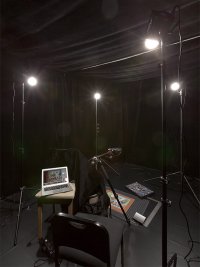
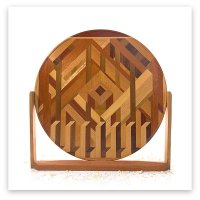
It's my own creation. The majority of the patches are just printed from an iPF8100, but there's a ColorChecker in there with paints matched at Home Depot (and the spectral characteristics are the same as the original), plus another 24 patches of various "interesting" paints, plus a light trap, plus some PTFE. And a dozen pieces of wood. I have some ideas of what to do for the next version, but this is probably already better than anything on the market.

I miss my studio space...

And I wish mine were bigger! It started life as a garage. A previous owner converted it into something vaguely resembling an extension of the living room. I've run copper pipe around the perimeter of the tops of the walls and made drapes I can hang from them. I can go from a normal-looking generic empty room with white walls and (fake) hardwood floors to a white box to a black box to anything between.

...but it's only 10' x 20', with slightly more than 8' ceilings. I've got a big opening to the living room that I can use if I need more working distance, but that gets awkward to work in....

You didn't say this outright but you must have decided that the lens profiles that adjust for distortions are not adequate. Or is it good enough for only certain art work? Does, say, Lightroom use Adobe profiles that change the Canon 50 f2.5 much at all? ...and did DxO have any different profiles that were better, worse?

DNG color management is a cruel and unusual joke. I have the scars -- deep scars -- to prove it. And correct color trumps even the worst distortion you're going to get in a decent lens, by a wide margin.

My workflow corrects both for light falloff (and uneven illumination, should I screw up the setup) and for color. I don't touch geometry; with the 50 CM, there's no need.

I use Raw Photo Processor for raw conversion; Argyll CMS for color management; EquaLight for equalizing illumination; and Photoshop for whatever else (minimal sharpening, cropping, stitching, that sort of thing).

Elle Stone pointed me to a technique for nailing exposure in-camera and then perfectly nailing both exposure and white balance in post. I followed up that message with some refinements I've made to her workflow...but, alas, the text got stripped and only the screenshots remain. Anyway, the straight-out-of-RPP images I get are already very, very close to correct. I then equalize illumination with EquaLight. The first shot (after getting everything set up, of course) is the target, which I then feed to Argyll to generate a profile. For the artwork itself, I apply the profile in RPP before outputting it, and then equalize that with EquaLight. Then it's off to Photoshop for sharpening and cropping, and then back to Argyll for conversion to the printer's profile, and back again to Photoshop to actually print.

Interesting warning on the shift and merge tactic. I was planning to try that to allow me to pitch local artists for this service. I have the 90 and 45TSE's. I do wish the 45 was sharper. A friend of mine has the 50 macro so will have to try the 45TSE side by side with the 50 -- pointed at the same material -- for comparison.

If you're going to do a panorama shift with the TS-Es, you'll need to figure out a way to keep the lens fixed and shift the camera behind it. And, even still, you don't get all that much extra out of it.

What I meant was to leave the camera alone, and to slide the artwork on the table (or, in my case, floor).

There's definitely a big pent-up demand for quality giclée work, even here in the Phoenix metro area. The catch is that artists care primarily about color reproduction, and nobody outside of the national museums knows how to do quality color reproduction. If you can get to the point where it takes several long seconds of close scrutiny by the artist before spotting a part of the image where the colors aren't quite a perfect match, you might have some success.

Cheers,

b&
 
Upvote 0
TrumpetPower! said:
If you're going to do a panorama shift with the TS-Es, you'll need to figure out a way to keep the lens fixed and shift the camera behind it. And, even still, you don't get all that much extra out of it.

Should I say Hartblei to the rescue again? (too bad it's only for the 17 and 24mm so far, maybe when the 45 mk2 gets released it'll "support" them too)
 
Upvote 0
privatebydesign said:
You do not need that ridiculously priced lens clamp to create parallax free stitched TS-E images, just slide the camera back the other way to the lens shift, even a modest body plate of the Arca Swiss variety has 24mm of shift capability.

Holy Hornswoggle, Batman -- that's an entire Grover Cleveland for an oversized tuning fork! It's half the price of a TS-E 24 II! I know a shade-tree mechanic who could fabricate something like that and wouldn't charge more than a Benjamin for it, maybe even half that.

privatebydesign is right. Count the number of ticks on the lens indicating mm of shift, and move the clamp an equal number of ticks the opposite direction. Done and done. Only potentially problematic if you want to do a vertical panorama, but you can use the dropout in your ballhead -- and who does vertical shift panoramas, anyway?

b&
 
Upvote 0
privatebydesign said:
TrumpetPower!

If you really want to know how far you can go with this stuff, the story of the Unicorn and the Chudnovsky brothers is as good as it gets.

http://www.unicorns.co.za/tapestries/capturing-the-unicorn-how-two-mathematicians-came-to-the-aid-of-the-met.html

As should be no surprise for the New Yorker, that was a good story told well.

Fortunately, I'm nowhere near insane enough to tackle a project of that magnitude.

I also like to think that I would have done some small-scale experiments, discovered the fundamental flaws in the technique, and solved them before doing the full shoot. Specifically, I'd have made sure the tapestry was laid flat and not touched during the shooting, and I'd have come up with some sort of etch-a-sketch mechanism for suspending the camera over it. I'd probably have also thrown multiple cameras at it, too. The tapestries are about 8' x 12'...be conservative and shoot them in 8" x 12" sections, that's 144 exposures. Let's say it takes 30" to reposition the camera on the etch-a-scetch and make an exposure. Use three cameras simultaneously, and you could shoot an entire tapestry in under a half an hour. Double the cameras and get the per-shot interval down to 15" and you've got the whole tapestry imaged in six minutes, which would have easily solved all the problems the brothers had to deal with. Now, put the tapestry on a rolling bed with wheels that you can rapidly slide it into place, and have two other such beds set up, one with pure white and the other with a grid and a bunch of ColorCheckers (except you'd want something with way more colors, and heavy representation of the same and similar pigments used in the art). In half an hour, you've got the art imaged plus enough reference materials to perform any necessary corrections.

And that's assuming the technology they described in the article. Today...today, they'd be doing multi-spectral imaging using some sort of large format, probably even in 3-D, and I doubt that the imaging process itself will take more than a few minutes. The setup and post-processing and everything else, I'm sure, takes forever...but not the button-pressing part.

One assumes that the budget is not much of an obstacle for the Met....

b&
 
Upvote 0
Status
Not open for further replies.