When you purchase through links on our site, we may earn an affiliate commission. Here's how it works. |
Lightroom CC (2015.7) and Lightroom 6.7 are now available. The goal of this release is to provide additional camera raw support and lens profile support, and to address bugs that were introduced in previous releases of Lightroom.
Please note that this version of Lightroom contains compatibility fixes for macOS 10.12 (Sierra) and also requires macOS 10.10 and greater.
We recommend you update to Lightroom CC (2015.7) and Lightroom 6.7 prior to updating to macOS 10.12 (Sierra).
Publish to Adobe Stock Contributor Site
You can now submit images directly from Lightroom CC to the brand new Adobe Stock Contributor Site using the included Adobe Stock Publish Service. By contributing to Adobe Stock, you have the opportunity to showcase your work to millions of customers directly inside Creative Cloud applications.
Updates to “All Synced Photos”
We’ve made it easier to access your Lightroom CC images on the go with Lightroom for mobile and Lightroom for web.
You can now drag images directly to the “All Synced Photographs” collection in the Catalog panel. By doing so, the image syncs with the Creative Cloud, and ensures that you’ll be able to edit, organize, or share the photo on the go with Lightroom across your devices.
Smart Previews for Faster Performance
You’ve always been able to use Smart Previews in the Develop Module as a way to edit photos without having access to the original images on disk. Astute customers reported faster performance in the Develop Module when using Smart Previews and keeping their original images disconnected from their computer. Now, you can set a Preference in the Performance tab so that Lightroom will always use Smart Previews in the Develop Module, if they are available, even when the original files are also available.
To do so,
- Choose Edit > Preferences.
- In the Preferences dialog, select the Performance tab.
- In the Develop section, select Use Smart Previews Instead Of Originals For Image Editing.
- Click OK and then restart Lightroom.
New Camera Support in Lightroom CC (2015.7) / 6.7
- Apple iPad Pro 9.7″ (wifi and cellular)
- Apple iPhone 6s Plus
- Apple iPhone 6s
- Apple iPhone 7
- Apple iPhone 7 Plus
- Apple iPhone SE
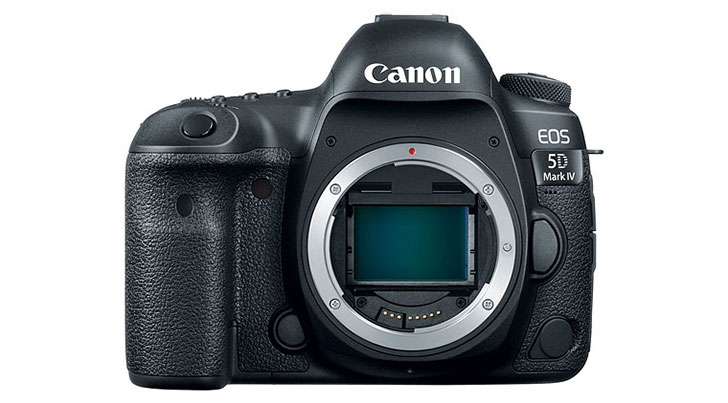
- Canon EOS 5D Mark IV*
- Casio EX-ZR4000 (EX-ZR5000)
- GoPro HERO5 Black
- Hasselblad H6D-100c
- Nikon D3400
- Panasonic DMC-G8 (DMC-G80, DMC-G81, DMC-G85)
- Panasonic DMC-LX9 (DMC-LX10, DMC-LX15)
*Please note that we support the import and editing of jpegs, raw files and dual pixel raw files from this camera model. We do not support any specific dual pixel raw functionality. If you are planning to use Dual Pixel raw files, please read Limitations with Canon Dual Pixel raw files in Camera Raw and Lightroom.
**We added new versions of Adobe Standard color profiles for the Canon EOS 5DS and Canon EOS 5DS R cameras. These versions are denoted as V2, and the v2 profiles have lower contrast than the original Adobe Standard (v1) camera profiles.
New Tethered Shooting Support in Lightroom CC (2015.7) / 6.7
- Nikon D5
- Nikon D500
New Lens Profile Support in Lightroom CC (2015.7) / 6.7
| Mount | Name |
| Apple | iPhone 6s back camera 4.15mm f/2.2 (DNG) |
| Apple | iPhone 6s Plus back camera 4.15mm f/2.2 (DNG) |
| Apple | iPad Pro back camera 4.15mm f/2.2 (DNG + JPEG) |
| Apple | iPhone 7 back camera 3.99mm f/1.8 (DNG + JPEG) |
| Apple | iPhone 7 front camera 2.87mm f/2.2 |
| Apple | iPhone 7 Plus back camera 3.99mm f/1.8 (DNG + JPEG) |
| Apple | iPhone 7 Plus back camera 6.6mm f/2.8 (DNG + JPEG) |
| Apple | iPhone 7 Plus back iSight Duo camera 3.99mm f/1.8 |
| Apple | iPhone 7 Plus back iSight Duo camera 6.6mm f/2.8 |
| Apple | iPhone 7 Plus front camera 2.87mm f/2.2 |
| Apple | iPhone SE back camera 4.15mm f/2.2 (DNG + JPEG) |
| Canon EF | Canon EF 70-200mm f/2.8L IS II USM +1.4x |
| Canon EF | Canon EF 70-200mm f/2.8L IS II USM +2.0x |
| Canon EF | Rokinon 8mm f/3.5 UMC Fish-Eye CS |
| Canon EF | Rokinon 8mm f/3.5 UMC Fish-Eye CS II |
| Canon EF | Samyang 8mm f/3.5 UMC Fish-Eye CS |
| Canon EF | Samyang 8mm f/3.5 UMC Fish-Eye CS II |
| Canon EF | Venus Optics Laowa 105mm f2 (T3.2) Smooth Trans Focus |
| Leica S | Leica ELMARIT-S 1:2.8/45mm ASPH. CS |
| Nikon F | Nikon AF VR Zoom-NIKKOR 80-400mm f/4.5-5.6D ED |
| Nikon F | Nikon AF-P NIKKOR 70-300mm f/4.5-6.3G ED |
| Nikon F | Nikon AF-P NIKKOR 70-300mm f/4.5-6.3G ED VR |
| Nikon F | Nikon AF-S NIKKOR 105mm f/1.4E ED |
| Nikon F | Rokinon 8mm f/3.5 UMC Fish-Eye CS |
| Nikon F | Rokinon 8mm f/3.5 UMC Fish-Eye CS II |
| Nikon F | Samyang 8mm f/3.5 UMC Fish-Eye CS |
| Nikon F | Samyang 8mm f/3.5 UMC Fish-Eye CS II |
| Nikon F | Venus Optics Laowa 105mm f2 (T3.2) Smooth Trans Focus |
| Olympus | Bower 7.5mm f/3.5 Fish-eye |
| Olympus | Rokinon 7.5mm f/3.5 Fish-eye |
| Olympus | Samyang 7.5mm f/3.5 Fish-eye |
| Panasonic | Bower 7.5mm f/3.5 Fish-eye |
| Panasonic | Rokinon 7.5mm f/3.5 Fish-eye |
| Panasonic | Samyang 7.5mm f/3.5 Fish-eye |
| Pentax K | PENTAX HD PENTAX-DA 15mm F4 ED AL Limited |
| Pentax K | PENTAX HD PENTAX-DA 21mm F3.2 ED AL Limited |
| Pentax K | PENTAX HD PENTAX-DA 35mm F2.8 Macro Limited |
| Pentax K | PENTAX HD PENTAX-DA 40mm F2.8 Limited |
| Pentax K | PENTAX HD PENTAX-DA 55-300mm F4.5-6.3 ED PLM WR RE |
| Pentax K | PENTAX HD PENTAX-DA 70mm F2.4 Limited |
| Pentax K | Rokinon 8mm f/3.5 UMC Fish-Eye CS |
| Pentax K | Rokinon 8mm f/3.5 UMC Fish-Eye CS II |
| Pentax K | Samyang 8mm f/3.5 UMC Fish-Eye CS |
| Pentax K | Samyang 8mm f/3.5 UMC Fish-Eye CS II |
| Pentax Q | PENTAX 08 WIDE ZOOM |
| Ricoh | Ricoh GR 18.3mm f/2.8 |
| Ricoh | Ricoh GR II 18.3mm f/2.8 |
| Sony A | Rokinon 8mm f/3.5 UMC Fish-Eye CS |
| Sony A | Rokinon 8mm f/3.5 UMC Fish-Eye CS II |
| Sony A | Samyang 8mm f/3.5 UMC Fish-Eye CS |
| Sony A | Samyang 8mm f/3.5 UMC Fish-Eye CS II |
| Sony E | Rokinon 12mm f/7.4 RMC Fisheye |
| Sony FE | Rokinon 50mm AF F1.4 FE |
| Sony FE | Samyang 50mm AF F1.4 FE |
| Sony FE | Sony FE 50mm F1.4 ZA |
| Sony FE | Sony FE 50mm F2.8 Macro |
| Sony FE | Venus Optics Laowa 105mm f2 (T3.2) Smooth Trans Focus |
| Sony FE | Voigtlander HELIAR-HYPER WIDE 10mm F5.6 |
| Sony FE | ZY Optics Mitakon SpeedMaster 85mm f/1.2 |
Customer reported issues resolved
- Selected Published Folder or Collection is not deselected if a folder is selected
- Adjustment brush stops working after deleting photo
- Collections with counts greater than 5 digits are truncated
- Exporting with a watermark changes white point.
- White Balance Loupe displays incorrect RGB values
- Error message about not being able to import photos when in fact the issue is due to the destination folder is read only
- Fuji E X2 file imported as DNG is unreadable “The File Appears to be unsupported or damaged”
- Keyword suggestion for a word having &(ampersand) is incorrect
- Vignette correction for Zeiss Batis 25mm f2 too aggressive
- Improved performance when using the Temperature and Tint slides for adjusting White Balance
- Fixed issue where Panorama merge failed when using source files from a Leica M Monochrom (Typ 246)
- Fixed issue where the SIGMA 10-20mm F3.5 EX DC HSM lens for Pentax mount was not being auto recognized
Installation Instructions
Please select Help > Updates to use the update mechanism in the Creative Cloud app.
This update contains the Adobe DNG Converter 9.7.
The Adobe DNG Converter is a free utility that enables you to easily convert camera-specific raw files from more than 600 cameras to the more universal DNG raw format.
Digital Negative was developed to address the lack of an open standard for the proprietary and unique raw files created by each digital camera. DNG allows photographers to archive their raw camera files in a single format for easy cataloging and access in the future. With the format specification freely available, any developer can build software that supports and takes advantage of DNG. For more information, visit the Digital Negative page.
Support for the following cameras has been added. Visit the Camera Raw page for a complete list of supported cameras.
Canon
- Canon EOS 5D Mark IV
Download DNG Converter 9.7 from Adobe
Canon EOS 5D Mark IV
- USA $3499: B&H Photo | Amazon | Adorama | Canon Store | Midwest Photo
- UK £3599: Park Cameras
More camera support notices after the break.
Apple
- Apple iPad Pro 9.7″ (wifi and cellular)
- Apple iPhone 6s
- Apple iPhone 6s Plus
- Apple iPhone 7
- Apple iPhone 7 Plus
- Apple iPhone SE
Casio
- Casio EX-ZR4000 (EX-ZR5000)
GoPro
- GoPro HERO5 Black
Hasselblad
- Hasselblad H6D-100c
Nikon
- Nikon D3400
Panasonic
- Panasonic DMC-G8 (DMC-G80, DMC-G81, DMC-G85)
- Panasonic DMC-LX9 (DMC-LX10, DMC-LX15)