

When you purchase through links on our site, we may earn an affiliate commission. Here's how it works. |
UPDATE
I was unable to properly profile Epson Lustre or Premium Matte Papers
Personal Project
– Ultra Premium Presentation Paper Matte
– Ultra Premium Photo Paper Luster
If anyone wants to try out my ICC profiles for these papers, drop me an email and I'll send them off when I'm finished on Sunday.
I'm also redoing the profile for the Canon Fine Art Matte paper. Canon's profile is horrible for me. I'll do the profile to eliminate the 35mm margin Canon requires for the fine art papers. If anyone wants this profile as well, just let me know.
I'd be curious to know if others had success with my profiles.
cr


after more than a week of solid 500D talk, getting enthused about paper is … well…
hmmm.
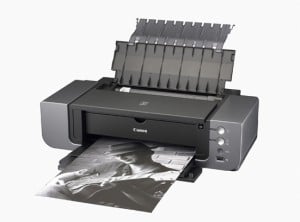
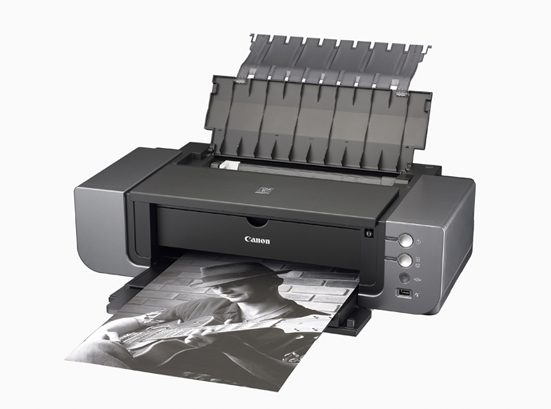
Just curious what made you decide on the 9500? I wasn’t terribly impressed with it myself. Despite having 10 colours, I found the Epson Stylus Pro 3800 with 8 colours (9 … but you only use 8 at once) produced better results. And as an added bonus the profiles for Epson’s high-end printers are generally of very good quality (that’s my experience, anyway). I ended up buying the 3800 myself after looking at similar Canon and HP models … but I’m curious what pushed you towards Canon?
Haha… I know.
I have to fill space with something during downtime. I do expect new rumors to flow soon.
Firstly, cost. The Canon was about $900 cheaper all said and done. There were a couple discounts involved.
This is my first photographic printer, I’ve always used labs. I had to set the price bar somewhere. After a few years with it, we’ll see what I don’t like about it and purchase my next printer based on that.
Second, I liked the 9500 for its great B&W results. I’ve also been very impressed with its color reproduction.
I use Ilford papers for most of my printing. They suit me the best.
Sadly, I also bought it because it was a Canon. I almost feel obliged. :)
The equivalent Epson to 9500 would be 2400 or 2880 and in the reviews I’ve seen the 9500 do at least as well.
It’s true it’s a bit apples to oranges. As for the 2880, I never really considered it because it gets very expensive very quickly printing larger than A4 (or 8×12 for North Americans) with those small cartridges. Despite having the same ink, there are some significant differences between the 2880 and the 3800. As far as I understand it, all of the ‘pro’ printers are hand calibrated for consistency, etc., before leaving the factory. Which probably goes a long way to explaining why Epson has a good reputation for their canned ICC profiles. That isn’t the case for the mid range models (though you don’t pay the same price either).
In any case, I’d love to hear your experience with the Canon printers. My initial impressions of them weren’t amazing, but I haven’t looked seriously at them in more than a year or two so maybe they’ve made some decent progress. Glad to hear you like the BW output. I’m really happy with the BW on the 3800 with the right paper … I’m sure you get similar results from the 9500. I’ve never had results from an inkjet that reminded me of a nice hand made BW print before the current generation of photo printers. I certainly don’t miss the chemicals or expensive, manual-labour intensive trial and error, though I do actually miss working with sheet film and my 4×5 view camera.
A $500 Epson Stylus R1900 does FANTASTIC job after proper calibrating on the monitor and printer, the color handling is just perfect and I can finally produce black and white prints without any unwanted color tints.
I hope you calibrated your monitor and printer before making profiles because you’re supposed to do that.
I have tried calibrating with the DataColor Spyderprint set with mixed results. The most annoying thing is that the printerdriver under Mac OS 10.5 is not great. It will not let you turn off color management altogether. Obviously that is required to be able to calibrate the printer. There is a workaround via Photoshop but is very time consuming and inconvenient. I’ve managed to make one colorprofile that works good on Ilford paper. I contacted Canon about the issue, although they acknowledge the problem nothing is happening to the driver so far.
I’d be really interested in trying out your profiles for both the Ultra Premium Presentation Matte and the Ultra Premium Photo Paper Lustre. I just bought a Pro9500 Mark II today and have three packages of these papers around. I had the matte paper profiled for an iP6100D a few years ago (I think it was called Enhanced Matte Heavyweight then) and have had generally good results with it. But I wouldn’t expect that profile to be much use with the 9500. I’ve never profiled the Lustre surface, although I like the quality of the paper. Every group of prints seems to have required its own set of adjustments using the Canon driver (which I normally try to avoid). Thanks!
Not having heard back, I bought a ColorMunki and have created profiles for several different papers. I was skeptical about the the ColorMunki but have been pleasantly surprised. Ultra Premium Presentation Matte (the packaging has four stars on it) came out very well, although I haven’t been using it much as my recent prints demand rich, deep blacks. The Ultra Premium Photo Luster is completely usable, albeit a touch warmer than I might wish. The ColorMunki allows one to optimize the profiles it creates by extracting color test charts from problematic prints and rescanning them. I may try this. Right now, however, I’m using HFA Pearl. The canned profile gives me a perfect screen to print match; there are practically no out of gamut colors. Ink consumption is considerably lower than with my iP6100D. Black and white prints are stunning.
hey, i’m printing a portfolio on that printer and paper. mind sending over that profile you created?
thanks
I found this thread and hopefully someone can help. It is October 14, 2009 and I just bought a new Canon PIXMA Pro 9500 Mark II printer. A good friend of mine suggested Epson ultra premium luster paper so I bought a pack to try. Little did I know I can’t seem to find the profile for the Epson paper for my printer. Can anyone help me find the profile that I need to download for my printer? I use Photoshop CS4 and Lightroom 2 for printing if that matters at all.
Thanks in advance,
Tim
Hi guys,
I realize this may not be your exact intentions but you seem to be very knowledgeable with all things printing and I’m hoping you can help. I have a canon Pixima ip3500 and am having a heck of a time eliminating the margins. No matter what I try it leaves a small boarder around my prints. I have changed the margin settings in both photoshop, word and printer control panel options. In all of these places I have set them to zero.
My last guess is this. I am printing on a 5×7 card that has slightly wavy edges around all of its sides… perhaps the printer detects “blank spots” in the page and determines that it needs to auto margin in order to avoid wasting ink by spraying into empty space? I am attempting to do some fancy wedding invitations here and this hiccup is killing me!
Any suggestions or input? I see you guys talking about printer paper profiles.. do i need to try and track one down?
any help is appreciated!
thanks
I am having the exact same issue. I purchased a Canon iPF6100 and I was talked into Epson Luster paper. I can’t find a profile. did you find a solution?
Greetings
I see you have owned a Pro9500 about as long as I have. It’s been great for me. I sell prints at the local gallary, and everyone loves the look. I’m thrilled with the color accuracy on PPP semi-gloss.
I really wanted a more matte look than semi-gloss for wildlife. Like you, I tried the Fine Art Matte and was not impressed with the color. Not sure if matte would be too flat anyways, but there is no Canon luster paper. And I hate the fine art boarders and limited sizes, though limited palette prints and BW are incredible on Museum Etching.
If you have had success with any of your Fine Art profiles, I would appreciate trying them, esp. to eliminate boarders. I would be glad to post my thoughts afterwards. If you think the UPPP Luster would be a nice look for wildlife, I would give it a try. I hear a lot of good things about it.
Thanks!
Hi,
Do you have profiles for Epson papers on the pro 9500 mark II ?
Thanks,
Same with me. I just bought the 9500 and have a bunch of Epson Premium Lustre paper but no profile for it.
If you are willing, please let me try yours. Thanks loads.