Canon EOS R5 Mark II: Firwmare v1.1.1 Release

I'm going to update my R5m2 to 1.1.1 soon. Will need to backup and
reload my settings ... but can't remember where to find the instructions
on how to do that.

Also assuming that either the CF card or SD card can be used for either task?

... thanks in advance ... Jim in the PNW
Thanks - I simply went into the menus on the camera and found the Save Settings.
Easey-Peasey. Camera is not 90% of the way thru the update to 1.1.1 ... this update
takes a -long- time and I'm finding it difficult to keep my fingers crossed while
typing this message. *G*. ... Jim in the PNW
 
Upvote 0
Thanks - I simply went into the menus on the camera and found the Save Settings.
Easey-Peasey. Camera is not 90% of the way thru the update to 1.1.1 ... this update
takes a -long- time and I'm finding it difficult to keep my fingers crossed while
typing this message. *G*. ... Jim in the PNW
Firmware update complete. Settings backup was not required (this time) and camera
seems to be back to normal - with the new 1.1.1 version firmware. The Password has
been set - and bypassed. I see no need for this password - because I never have and
never will (?) use the bluetooth or usb or internet or App connections to the camera.
I guess I'm "old school" on tech? Actually I don't do that stuff because it uses battery
power I don't want to spend. I don't shoot video and can go out for a full day's
shooting (once over 1100 images in one day) without ever using up the battery. I
have a second battery - but have never had it in the camera.
... Jim in the PNW
 
Upvote 0
I'm going to update my R5m2 to 1.1.1 soon. Will need to backup and
reload my settings ... but can't remember where to find the instructions
on how to do that.

Also assuming that either the CF card or SD card can be used for either task?

... thanks in advance ... Jim in the PNW
You do not need to reload your settings after the update to 1.1.1. That is only required when you do a complete reset.
However, it is a good idea to save your settings before you update firmware. I always copy the settings file to my pc and include the date in the filename on my pc.

The ‘save settings to card’ is in the yellow menu. See: https://cam.start.canon/en/C017/manual/html/UG-07_Set-up_0310.html
 
Last edited:
  • Like
Reactions: 1 user
Upvote 0
I never use a tripod for photographing birds when I have a relatively lightweight lens like the RF 100-500 or RF 200-800mm with really good stabilization. It's a fag to carry, useless for birds in flight, not suitable for me for opportunistic shots when walking, and in a hide I can rest my arms or camera on a ledge. I might on a very rare occasion take an ultra lightweight flimsy monopod.
Thanks for the information, I appreciate it! I'm really not a birder but always think it'd be fun. I tend to carry like 5 lenses with me, which can be a burden. I keep telling myself to just bring one or two. If birding, I guess I'd really only need one. I know I have a monopod somewhere in my mess of photography equipment..

If I ever get some nice photos, I'm going to upload them in the forum and see what people think. I don't think there's a ton of unique birds in the Chicago area but there's some I'd love to get shots of. Especially action shots!
 
Upvote 0
CharlesB - be careful, VERY careful ... birding photography can and often is addictive.
Getting just one good action shot can set the hook! Take a long lens, 100-400 or
longer, and set up a custom setting for Shutter Preferred, Auto Iso, AF Animals, AF
Subject Eye Detect and go out for a walk. Find a cooperative bird that is relatively
close to you (10-20 feet), set up and take a couple of shots - and then use Pre-Capture
to catch the Bird In Flight. Just keep shooting on your walk. Then go back to your
computer and upload and import the pictures and "see what you got". Let the
camera do the work, don't mess around with manual settings (now).
- written by a drug pusher (bird photography) ... Jim in the PNW
 
  • Like
Reactions: 1 user
Upvote 0
CharlesB - be careful, VERY careful ... birding photography can and often is addictive.
Getting just one good action shot can set the hook! Take a long lens, 100-400 or
longer, and set up a custom setting for Shutter Preferred, Auto Iso, AF Animals, AF
Subject Eye Detect and go out for a walk. Find a cooperative bird that is relatively
close to you (10-20 feet), set up and take a couple of shots - and then use Pre-Capture
to catch the Bird In Flight. Just keep shooting on your walk. Then go back to your
computer and upload and import the pictures and "see what you got". Let the
camera do the work, don't mess around with manual settings (now).
- written by a drug pusher (bird photography) ... Jim in the PNW
Thanks for all of your help and tips! I actually screen shot everything, so I'll have it for later.

I have such a habit of shooting in manual just from macro photography, sometimes I get stuck in that mindset that it has to be manual, I don't fully consider the other options.

Your tips have been very helpful and I'll definitely be giving it a "shot" and look forward to it! I hope to catch some great moments. ☺️
 
Upvote 0
Thanks for all of your help and tips! I actually screen shot everything, so I'll have it for later.

I have such a habit of shooting in manual just from macro photography, sometimes I get stuck in that mindset that it has to be manual, I don't fully consider the other options.
1/
Your tips have been very helpful and I'll definitely be giving it a "shot" and look forward to it! I hope to catch some great moments. ☺️
Charles,

I apologize for 'setting the hook'. I shoot "birds" well over 90% of the time. I have C3 set up
for 1/4000th so every time I turn on the camera I am "ready" for Birds In Flight ... and always
grab a couple of shots right away. Birds are -very- likely to fly off! Then, when the bird is
perched, I'll roll the shutter speed down to 1/2000th or even slower and take some more.
Since you spend most of your time in Macro I suggest you set up an 'alternative' custom
mode that let's you easily do some BIF. You'll be amazed at the capabilities of the R5m2.

All - today's testing of the R5m2 ... after the upgrade to firmware version 1.1.1 was outstanding.
I am very happy with this new firmware version. Actually I don't notice much change ... because
I'm not using the new/improved features - so I should just say "works same as before" (but you
need to understand what my focus it/what kind of pictures I'm taking).
Today was a strange day for "August in the PNW" because there has been a heavy overcast
all day - so today's testing was in the worst conditions I use the R5m2 ... and it performed as
expected (as in I'm more than happy with what it does for me). Yes, I use masks in LrC to
improve the results I'm getting (shooting in CR3 and using LrC Denoise). Today I shot just 150
or so images and put just 4 or 5 of them thru post processing. Got some nice stuff of Belted
Kingfishers and a Red-tailed Hawk.
- Jim in the PNW

 
  • Like
Reactions: 1 user
Upvote 0
Charles,

I apologize for 'setting the hook'. I shoot "birds" well over 90% of the time. I have C3 set up
for 1/4000th so every time I turn on the camera I am "ready" for Birds In Flight ... and always
grab a couple of shots right away. Birds are -very- likely to fly off! Then, when the bird is
perched, I'll roll the shutter speed down to 1/2000th or even slower and take some more.
Since you spend most of your time in Macro I suggest you set up an 'alternative' custom
mode that let's you easily do some BIF. You'll be amazed at the capabilities of the R5m2.

All - today's testing of the R5m2 ... after the upgrade to firmware version 1.1.1 was outstanding.
I am very happy with this new firmware version. Actually I don't notice much change ... because
I'm not using the new/improved features - so I should just say "works same as before" (but you
need to understand what my focus it/what kind of pictures I'm taking).
Today was a strange day for "August in the PNW" because there has been a heavy overcast
all day - so today's testing was in the worst conditions I use the R5m2 ... and it performed as
expected (as in I'm more than happy with what it does for me). Yes, I use masks in LrC to
improve the results I'm getting (shooting in CR3 and using LrC Denoise). Today I shot just 150
or so images and put just 4 or 5 of them thru post processing. Got some nice stuff of Belted
Kingfishers and a Red-tailed Hawk.
- Jim in the PNW
Jim,

Don't apologize for "setting the hook", I actually really like and appreciate your help! It's extremely helpful actually makes me want to get back out there shooting. I'm not sure why I've been "blah" about it but when I come on here and see people being helpful and sharing their experiences, it certainly does set a spark under me.

I truly love photography, all kinds of it. There's a lot I want to learn. A large part of it to me is just being out in nature and enjoying that time. Getting great photos is just the cherry on the top! I haven't even shared many of my outings on social media or anything. Even if I get photos I really enjoy.

I am going to take your advice on the settings. I never have really set any settings like that ever. I'm so use to just shooting a certain way (slowly, patiently) and not messing with settings a whole lot. The R5ii can be a little overwhelming with all of the possible settings. My 5Diii, I rarely touched any settings beyond the shutter speed, ISO and aperture. Maybe it's just in my head but the R5ii seems to have hundreds of settings! Even looking through the EVF, there's soooo much information, it can be a lot. I know I can remove some of the stuff in the display but it's hard for me to choose.

Thanks again for sharing so much information, it's greatly appreciated! I hope you enjoy getting more shots of those winged beauties you adore! ☺️
 
Upvote 0
Has anybody downloaded and installed the firmware 2.20 for the R5 (original, not mkii). Does it work or are there some bugs?
There's a thread right below this one for the R5 Firmware. There's only two comments and the second one mentions battery drain (a lot). You may want to ask in that thread and hopefully find some answers to your question.
 
  • Like
Reactions: 1 user
Upvote 0
In addition to my story. The Austrian CPS office didn't respond to my email. What a customer care. I reflashed the camera with the same FW, and it didn't help. I assume it's due to the SD card format. Maybe everyone already uses their R5m2 with CFExpress cards. Yesterday I decided to try this feature with the electronic shutter, and it worked without any issues. And both mechanical modes after that too . However, I found a new bug in the Multiple Exposure feature: if you don't have the latest file with a number in your continuous numeration, shooting in this mode starts file names with 0001, and if you have a file, it continues. The Focus Bracketing feature does not do that, though.
 
Last edited:
  • Like
Reactions: 1 user
Upvote 0
Hey, forum admins. Today is the second decade of the 21th century. It's OK to use emojis in modern forum posts as well as the single quote as apostrophes. What text encoding do you use? ASCII?
It's the third decade of the 21st century. Have you been asleep for 5 years?:););):(:confused::cool:
 
Upvote 0
Hey, forum admins. Today is the second decade of the 21th century. It's OK to use emojis in modern forum posts as well as apostrophes in their regular look. What text encoding do you use? ASCII?
It's the third decade of the 21st century. Have you been asleep for 5 years?:););):(:confused::cool:
Oh really? I have to click a dedicated forum button to insert emojis? I usually use my keyboard to input them in macOS ‍♂️. <- you can see the result.
 
Upvote 0
Hey, forum admins. Today is the second decade of the 21th century. It's OK to use emojis in modern forum posts as well as apostrophes in their regular look. What text encoding do you use? ASCII?

Oh really? I have to click a dedicated forum button to insert emojis? I usually use my keyboard to input them in macOS ‍♂️. <- you can see the result.
I asked chatgpt what popular sites allow keyboard shortcuts in inserting emojis. It replied: "Platforms such as Facebook, Twitter, Instagram, LinkedIn, and others do not support emoji insertion via keyboard shortcuts." I then asked when Facebook stopped using the shortcuts - 2017. So, in the second decade of the 21 C, emoji could be inserted in that way, but today in the third decade, Canonrumors is the same as Facebook et al.
 
Upvote 0
I asked chatgpt what popular sites allow keyboard shortcuts in inserting emojis. It replied: "Platforms such as Facebook, Twitter, Instagram, LinkedIn, and others do not support emoji insertion via keyboard shortcuts." I then asked when Facebook stopped using the shortcuts - 2017. So, in the second decade of the 21 C, emoji could be inserted in that way, but today in the third decade, Canonrumors is the same as Facebook et al.
I don't use shortcuts either and have no clue what keyboard shortcuts you're talking about. I click a dedicated button that reveals OS native Emoji and Symbols panel and input emoji from there. I've just checked it on Facebook and it worked. The same thing with Linkedin and Instagram. ☹️ <- and this the line of your emojis inserted through OS' Emoji panel. Only one remained.
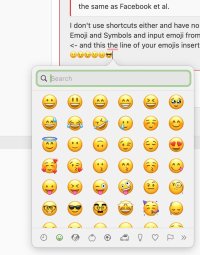
 

Attachments

  • Screenshot 2025-08-10 at 15.45.19.jpg
    Screenshot 2025-08-10 at 15.45.19.jpg
    109.9 KB · Views: 0
Last edited:
Upvote 0
I don't use shortcuts either and have no clue what keyboard shortcuts you're talking about. I click a dedicated button that reveals OS native Emoji and Symbols and input emoji from there. I've just checked it on Facebook and it worked. The same thing with Linkedin and Instagram. ☹️ <- and this the line of your emojis inserted through OS' Emoji panel. Only one remained.
This is the usual keyboard shortcut: If you type : - ) (without the spaces) it does give you :) etc. I have never tried it before as clicking on the emoji button is easy enough.
Oh really? I have to click a dedicated forum button to insert emojis? I usually use my keyboard to input them in macOS ‍♂️. <- you can see the result.
 
Upvote 0