1DX lock up?

Status
Not open for further replies.
I think I already know the answer to this, but I wanted to see if anyone else has had their 1DX lock up. I was in the middle of shooting a hula festival and the shutter just went dead. The red "writing" light was on, so I waited about 10 secs, and it never went off. (I wasn't shooting continuously, and I have a Lexar 1000x card, which has *always* kept up.) None of the other buttons on the camera did anything and the LCD on the back was blank.

Eventually, I turned the camera off and back on. Things seemed fine (no images lost on the card, for instance).

Anyhow, I suspect the camera might have a defect and I should return it.

Thoughts?

Shawn L.
 
I'd suspect the memory card. The card determines where to write the files in order to level use. If it tries to write to a bad spot, the camera will hang. Then, repowering the camera will restart the process until the card once again points to the bad memory cells.
Its easy to check, in windows, put the card in the reader and do a checkdisk with scan unused sectors enabled. Every sector will be checked and bad ones will be identified. Then, a low level format will mark them as bad.
If the cards check good, then, at least the most likely cause is eliminated.
A format in the camera will not fix a bad card, it requires a low level format or erase of the card where every memory sector is tested.
 
Upvote 0
Shawn L said:
Ran chkdsk /R /F from command prompt, and it found no errors. I also ran "error checking" (right click on drive, properties, tools, "error checking"). It, too, found no issues.

Hmm...

Shawn L.

Some guys on another forum had problems with a circuit board in a particular batch of 1DX's and actually had to send it back to Canon to have the board replaced. This likely isn't it, but I'm just sharing this so that you are on the lookout in case it happens again, with other cards. Don't be afraid to send it in. Canon will not charge you.
 
Upvote 0
Shawn L said:
Ran chkdsk /R /F from command prompt, and it found no errors. I also ran "error checking" (right click on drive, properties, tools, "error checking"). It, too, found no issues.

Hmm...

Shawn L.
At least you eliminated a possible error. Now decide if you need to have it fixed, or return it and hope the replacement isn't also bad.
 
Upvote 0
Mt Spokane Photography said:
At least you eliminated a possible error. Now decide if you need to have it fixed, or return it and hope the replacement isn't also bad.

Exactly :/

I've shot a couple of thousand photos with this combo without any issues. This was, however, the most photos I have shot at one time (around 700 in about 15 minutes). I wonder how many others have pushed this combination (1DX with 32 GB 1000x Lexar). All of the other times I've used them together, it has been at a much slower pace.

I just tested, filling the camera's buffer, and things behaved as they have in the past with the 1D MIV (pictures could be taken as the buffer emptied)...

So, one time glitch, or something that might be tricky to reproduce...

Shawn L.
 
Upvote 0
bdunbar79 said:
Some guys on another forum had problems with a circuit board in a particular batch of 1DX's and actually had to send it back to Canon to have the board replaced. This likely isn't it, but I'm just sharing this so that you are on the lookout in case it happens again, with other cards. Don't be afraid to send it in. Canon will not charge you.

My only fear is getting one with something else wrong. Barring this incident, I love this camera...

Shawn L.
 
Upvote 0
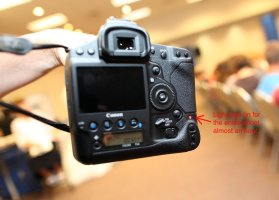
I had the same issue today. I used to have Error 80 but that has somehow gone away and now I have this going on. The red light was on for almost the entire shoot, I'm using Sandisk 64gb and 32gb Extreme Pro cards. The camera "froze up" on me and wouldn't respond to anything so I had to take out the battery briefly to get it going again. I must have a bad board.
 

Attachments

  • 1DX activity light.jpg
    1DX activity light.jpg
    382.4 KB · Views: 1,862
Upvote 0
Mark, I am both relieved and sad that someone else has the same issue. FWIW, I sent an email to Canon support this morning about the issue:

Problem Description:
Camera locked up on me (completely unresponsive, no error code, shutter "clicked" as it happened), and I'm not sure how to proceed. I was shooting a hula show, had taken about 700 photos in a 10 to 15 minute window, when the shutter "clicked" and the camera stopped working. The red "writing" light was on, though I'm sure the buffer wasn't full as I was shooting in short bursts (maximum rate was set to 6 frames a second) and *not* holding the shutter release down. Also, when the camera is buffering, it's still responsive (menus work, etc). In this case, it was completely locked and unresponsive. I waited for 10 seconds for the writing light to go away. But it didn't. I then turned the unit off and on. Everything seemed to work, and none of the images were missing or corrupt. I've since run chkdsk on the memory card (Lexar 32 GB 1000X), and there were no issues found. I'm writing to you because I'm not sure how to proceed. I'm not sure if this is some incompatibility between the camera and the card, or an indication of something wrong with the camera given how it just cut out and became unresponsive.

Additional Information:
The memory card is a Lexar 32 GB 1000x (I only use one card in the camera, this one, in slot 1). It's worked flawlessly for me in the past (I've taken a couple thousand photos with it). I've since run chkdsk on it to see if it had any bad "sectors," it did not. Since the incident, I've tested filling up the camera's buffer (using the same card both empty and with the photos from the hula shoot), and it worked as expected: new photos were still taken, but at a reduced rate as images were cleared from the buffer.

Has anything changed:
No. I had successfully used this combination in the past, having taken around 2,000 photos without issue. This was, however, the first time the camera had been on and in use for more then fifteen minutes straight. Not necessarily taking photos the whole time, but never off.

Error code:
No error code. Just completely locked up with the red "writing" light on. None of the buttons did anything, and I couldn't get the menu to come up on the back of the unit. I waited for 10 secs or so for the red light to go away (again, I'm nearly 100% the buffer wasn't full), and it never did. I finally turned the camera off and back on. It came up without issue and worked fine. It's the lack of error code coupled with the "click" the shutter made as it just cut off, becoming completely unresponsive, that has me worried there might be something wrong with the camera.


I'll post here what I hear back.

Shawn L.

 
Upvote 0
Shawn L said:
Mark, I am both relieved and sad that someone else has the same issue. FWIW, I sent an email to Canon support this morning about the issue:

Problem Description:
Camera locked up on me (completely unresponsive, no error code, shutter "clicked" as it happened), and I'm not sure how to proceed. I was shooting a hula show, had taken about 700 photos in a 10 to 15 minute window, when the shutter "clicked" and the camera stopped working. The red "writing" light was on, though I'm sure the buffer wasn't full as I was shooting in short bursts (maximum rate was set to 6 frames a second) and *not* holding the shutter release down. Also, when the camera is buffering, it's still responsive (menus work, etc). In this case, it was completely locked and unresponsive. I waited for 10 seconds for the writing light to go away. But it didn't. I then turned the unit off and on. Everything seemed to work, and none of the images were missing or corrupt. I've since run chkdsk on the memory card (Lexar 32 GB 1000X), and there were no issues found. I'm writing to you because I'm not sure how to proceed. I'm not sure if this is some incompatibility between the camera and the card, or an indication of something wrong with the camera given how it just cut out and became unresponsive.

Additional Information:
The memory card is a Lexar 32 GB 1000x (I only use one card in the camera, this one, in slot 1). It's worked flawlessly for me in the past (I've taken a couple thousand photos with it). I've since run chkdsk on it to see if it had any bad "sectors," it did not. Since the incident, I've tested filling up the camera's buffer (using the same card both empty and with the photos from the hula shoot), and it worked as expected: new photos were still taken, but at a reduced rate as images were cleared from the buffer.

Has anything changed:
No. I had successfully used this combination in the past, having taken around 2,000 photos without issue. This was, however, the first time the camera had been on and in use for more then fifteen minutes straight. Not necessarily taking photos the whole time, but never off.

Error code:
No error code. Just completely locked up with the red "writing" light on. None of the buttons did anything, and I couldn't get the menu to come up on the back of the unit. I waited for 10 secs or so for the red light to go away (again, I'm nearly 100% the buffer wasn't full), and it never did. I finally turned the camera off and back on. It came up without issue and worked fine. It's the lack of error code coupled with the "click" the shutter made as it just cut off, becoming completely unresponsive, that has me worried there might be something wrong with the camera.


I'll post here what I hear back.

Shawn L.

Sounds good, I'll send a message over to my CPS rep as well to see what she says. She's aware I have one of the more problematic cameras so it may be time to send for repairs.
 
Upvote 0
Okay, so not too surprisingly I got a fairly standard reply from Canon. My issue is that I've only seen the problem once, so I'm not sure how to reproduce it (for instance, I've had the camera for three weeks and this is the first time this has occurred). With that, it's hard to tell if any of the following have fixed the issue. I'm still within my first 30 days, so maybe it's time to just return it :(


Lets try resetting your camera using the following steps to try and resolve this issue.

1. Turn the camera OFF and remove the memory card and battery first. Then detach the lens and place it out of the way. Use the camera body cap to prevent dust from getting inside and let the camera sit for 20 minutes.

2. In the interim please clean the lens contacts with a soft, lint free cloth. Use this to gently wipe the lens contacts. Sometimes the lens can lose contact with the camera if the contacts are dirty, so we want to be sure these are free from anything that could possible cause disruption.

3. Put these items back in the camera and turn the power switch to <OFF> and <ON> again.

4. Using the Mode Dial, change from Auto to Creative Zone modes and back testing each, to shoot and note if the issue persists.

5. Try a different Canon EF Series lens on the camera of any focal length. Also try another memory card in the camera.

- Are you in an area that has high humidly or cold temperatures? If so, move to a more suitable location.

If completing the above steps fail to resolve the issue then we recommend sending the camera into the Factory so we may examine your equipment and pinpoint the underlying cause of this issue. We very much apologize for any inconvenience this causes you at this time.


Shawn L.
 
Upvote 0
neuroanatomist said:
Shawn L said:
4. Using the Mode Dial, change from Auto to Creative Zone modes and back testing each, to shoot and note if the issue persists.

Good luck with that one on a 1-series body... :o

LOL!!

Ohh... that must be the problem, your mode dial fell off!

I'm surprised they also didn't say, don't use an eraser on the lens contacts!

Good Luck with your issue!
 
Upvote 0
I tested a few CF cards yesterday, all Sandisk.

Testing was performed by turning the camera on after installing a single CF card in slot 1. All cards had photos on them. The camera was used all day yesterday.

Extreme Pro 64gb (90Mb/s) - Memory light activity light stayed on for prolonged period of time after turning the camera on.
Extreme Pro 32gb (90Mb/s) - No issues, camera performed normal.
Extreme III 32gb (30Mb/s) - Memory light activity light stayed on for prolonged period of time after turning the camera on.
Extreme III 16gb (30Mb/s) - No issues, camera performed normal.

I tried to repeat the test again today after waking up, all cards performed normally. Still waiting on the CPS representative to reply.
 
Upvote 0
Shawn L said:
Mark:

Have you been able to reproduce the lock up? I haven't been able to.

Which, of course, means I have no way to test their suggested "fixes" -- not that I have high hopes any of them are actually relevant (though I am curious about my missing mode dial :P).

Shawn L.

This is a huge headache for me. I keep my camera on my desk even on my days off and I turn the camera on with different memory card combinations to see if I can reproduce the error but I can't. Perhaps it has something to do with the amount of power left in the battery although I highly doubt that. It is most likely related to a certain level of heat/humidity. If we are having this much trouble then I assume Canon's tech support is as well.

My CPS rep got back with me and she said she spent quite a long time chatting with their tech department but at this point they are assuming it is memory card related (plus some certain setting on the camera I assume).

Chatting with a rep rather than calling tech support directly seems to get a less "standard" answer as she knows the right people to chat with to get info but they are all still a bit clueless at this time.
 
Upvote 0
That's what I was afraid would happen. While it's possible it's the cards, you and I use different brands and different speeds. Moreover, between us we cover the two major brands I suspect others are using (SanDisk and Lexar).

I've been toying with returning my camera, but while I suspect we're the first to see/report this issue, it's possible that we won't be the last.

It could be a mismatch somewhere between camera settings (ala the "orientation specific AF" and AFMA issue reported earlier). I'm wondering if we have any "unique" settings in common:

* Before I started my shoot, I changed C.Fn3 so that "Low Speed" was 6 shots/sec. I then shot at that speed. After the lock-up, this value was reset to 3, but other values I had set at the same time retained their new values (e.g., changes to the custom menu).

* I had "orientation linked AF points" set -- I always have this set as the only lens I've used with the 1DX (a 70-200 L IS II) doesn't need AFMA

* I was constantly switching back and forth between portrait and layout shots

* I was also switching between "spot" metering (which I have linked to AF) and "evaluative"

* the camera had been on for longer than ever before (probably about 15 minutes or so)

Other than those, I didn't do anything different than normal. As for humidity/heat, I'm in the SF bay area, the day was dry and cool(ish).

Shawn L.
 
Upvote 0
Status
Not open for further replies.