
You are using an out of date browser. It may not display this or other websites correctly.
You should upgrade or use an alternative browser.
You should upgrade or use an alternative browser.
Magic Lantern... CONTINUOUS raw recording @ 24fps on 5D3
- Thread starter AAPhotog
- Start date
- Status
- Not open for further replies.
Insane!!
And look at this:
14-bit RAW on Canon 5D Mark III vs. factory default - Night Image Quality & Dynamic Range on Vimeo
and:
http://www.eoshd.com/content/10324/big-news-hands-on-with-continuous-raw-recording-on-canon-5d-mark-iii
Good god man Canon fire your marketing droids!! The 5D3 would still be out of stock to this day if you had released doing all it could a year ago. Black Magic may have folded before even trying. Etc.
But man those Canon engineers. What amazing hardware! This is just awesome! 5D3 is pretty amazing in the end isn't it.
And look at this:
14-bit RAW on Canon 5D Mark III vs. factory default - Night Image Quality & Dynamic Range on Vimeo
and:
http://www.eoshd.com/content/10324/big-news-hands-on-with-continuous-raw-recording-on-canon-5d-mark-iii
Good god man Canon fire your marketing droids!! The 5D3 would still be out of stock to this day if you had released doing all it could a year ago. Black Magic may have folded before even trying. Etc.
But man those Canon engineers. What amazing hardware! This is just awesome! 5D3 is pretty amazing in the end isn't it.
Upvote
0
More stuff getting posted:
And compares both again:
original 5D3:
1080p video test. i-frame canon 5D Mark III
5D3 with ML:
Magic lantern 1920 x 1080 2.35:1 aspect ratio raw test Canon 5D Mark III edit 2
wow
And compares both again:
original 5D3:
1080p video test. i-frame canon 5D Mark III
5D3 with ML:
Magic lantern 1920 x 1080 2.35:1 aspect ratio raw test Canon 5D Mark III edit 2
wow
Upvote
0
arcanej said:A (perhaps) stupid question. What software do you use to edit the raw video output? I'm very interested in installing this and giving it a go on my camera but my video experience is about nil.
The EosHD has a better, full description. It looks like you need to convert it with another tool into something that pulls the DNGs apart so that something like After Effects can pull them in as a sequence. See the Workflow section on the link.
Upvote
0
Drizzt321 said:arcanej said:A (perhaps) stupid question. What software do you use to edit the raw video output? I'm very interested in installing this and giving it a go on my camera but my video experience is about nil.
The EosHD has a better, full description. It looks like you need to convert it with another tool into something that pulls the DNGs apart so that something like After Effects can pull them in as a sequence. See the Workflow section on the link.
yeah that which is basically:
1. make a folder and plop rawtodng.exe and the RAW video file into it
2. drag the RAW video file onto rawtodng.exe, wait a while
3. move the RAW video file and the rawtodng.exe to some other folder
4. start After Effects and then select Import -> multiple files and select the first DNG in the folder
5. then it will open up ACR and you adjust it up all as you wish
6. then it will open up the file dialog again and this time near the bottom right you select "import folder"
7. then it boom does that and automatically applies the same ACR settings to every frame
8. then you click on the that imported file set name near the upper left
9. then go to the menu and do export to render queue
10. then in the render que you can fiddle with the various options there if you wish (you need to at least set the output name style and then it asks for directory)
11. then you hit Render and then like 45 minutes later of your CPU burning up (for like 50 seconds of footage) you get a video file, maybe AVI lossless or maybe Cinemark or ProRes or something depending upon what codecs you have and select (using different HDs for buffers and out put and internal fast ones might speed this up, as might selecting more core usage, having faster computer, having 16GB of memory, etc.)
12. Then you can import that into Premiere and do whatever.
a bit slow in the stuff the computer does but in some ways it saves tweaking time since RAW+ACR have tons of power compared to video programs handling 8bit files
quality is crazy compared to the regular video it produces
Upvote
0

You do get a bit more aliasing though so it's perhaps a touch more of a video-cam digital look than as filmic but OTOH all the detail isn't smeared away and it's much easier to control dynamic range and colors.
Upvote
0
LetTheRightLensIn said:1. make a folder and plop rawtodng.exe and the RAW video file into it
2. drag the RAW video file onto rawtodng.exe, wait a while
3. move the RAW video file and the rawtodng.exe to some other folder
Can I do these first three steps in Windows, and then perform the remaining steps on a Mac?
Presumably someone will develop a Mac version of rawtodng.exe in the next few months.
I'm still stunned by the possibilities here.
Upvote
0

Slighly not safe for work, but hilarious with regard to the ML breakthrough...
Hitler finds out about ML breakthrough!!
Hitler finds out about Magic Lantern RAW video for Canon DSLRs

Hitler finds out about ML breakthrough!!
Hitler finds out about Magic Lantern RAW video for Canon DSLRs
Upvote
0
dirtcastle said:LetTheRightLensIn said:1. make a folder and plop rawtodng.exe and the RAW video file into it
2. drag the RAW video file onto rawtodng.exe, wait a while
3. move the RAW video file and the rawtodng.exe to some other folder
Can I do these first three steps in Windows, and then perform the remaining steps on a Mac?
Presumably someone will develop a Mac version of rawtodng.exe in the next few months.
I'm still stunned by the possibilities here.
I'll do you one better. Here is the raw2dng app compiled for mac. Same thing applies. Just drag your raw file and drop onto this app(after unzipping app of course) and it will create a folder wherever your raw file is with DNG's
https://www.dropbox.com/s/01ms48zavggcjzu/raw2dng.app.zip
Upvote
0
AAPhotog said:dirtcastle said:LetTheRightLensIn said:1. make a folder and plop rawtodng.exe and the RAW video file into it
2. drag the RAW video file onto rawtodng.exe, wait a while
3. move the RAW video file and the rawtodng.exe to some other folder
Can I do these first three steps in Windows, and then perform the remaining steps on a Mac?
Presumably someone will develop a Mac version of rawtodng.exe in the next few months.
I'm still stunned by the possibilities here.
I'll do you one better. Here is the raw2dng app compiled for mac. Same thing applies. Just drag your raw file and drop onto this app(after unzipping app of course) and it will create a folder wherever your raw file is with DNG's
https://www.dropbox.com/s/01ms48zavggcjzu/raw2dng.app.zip
THANK YOU !!!!!!!!!!!!!!
 ;D 8)
;D 8)  8) ;D 8)
Upvote
0
Here is a comp making the rounds:
left is ML RAW video frame cap and right is without ML video frame cap (both are 100% crop crops)
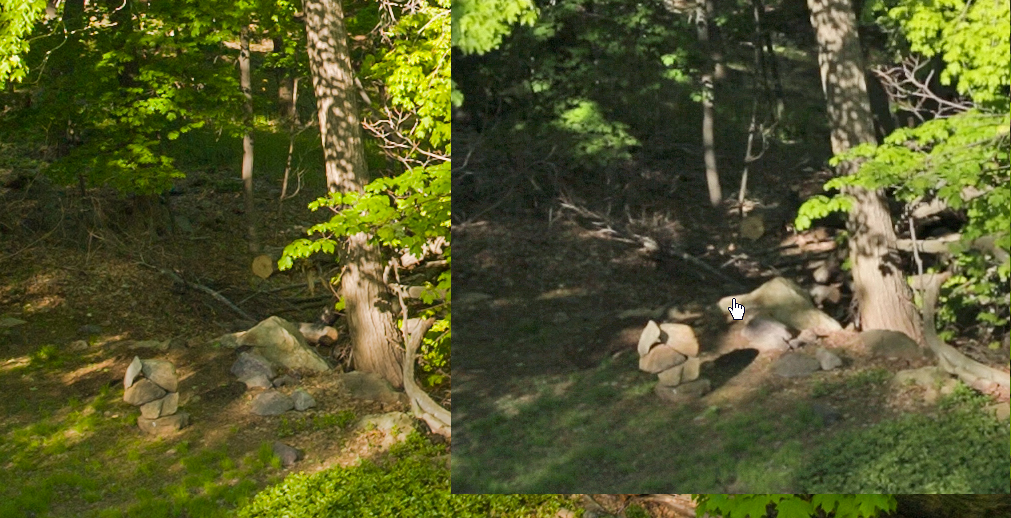
left is ML RAW video frame cap and right is without ML video frame cap (both are 100% crop crops)
Upvote
0
Artifex said:Does anyone know if this kind of shooting could be possible on the 6D in the future?
By the way, fantastic job (again) to the ML team!
They said they're working on other cameras as well, and there is a limited build for the 5DII, and appears to be working well, albeit not as good as the 5D3. The problem though here is with the cards, SDs don't go as fast as CF and even then you need the fasted available CF cards. So the SD only 6D may not work well. Though, lower resolution with the fasted SD cards could work, not sure, much is in development with so many changes coming so quick~
Upvote
0
dirtcastle said:AAPhotog said:dirtcastle said:LetTheRightLensIn said:1. make a folder and plop rawtodng.exe and the RAW video file into it
2. drag the RAW video file onto rawtodng.exe, wait a while
3. move the RAW video file and the rawtodng.exe to some other folder
Can I do these first three steps in Windows, and then perform the remaining steps on a Mac?
Presumably someone will develop a Mac version of rawtodng.exe in the next few months.
I'm still stunned by the possibilities here.
I'll do you one better. Here is the raw2dng app compiled for mac. Same thing applies. Just drag your raw file and drop onto this app(after unzipping app of course) and it will create a folder wherever your raw file is with DNG's
https://www.dropbox.com/s/01ms48zavggcjzu/raw2dng.app.zip
THANK YOU !!!!!!!!!!!!!!
You're more than welcome.
Upvote
0

cayenne said:Slighly not safe for work, but hilarious with regard to the ML breakthrough...
Hitler finds out about ML breakthrough!!
Hitler finds out about Magic Lantern RAW video for Canon DSLRs
That made me start the day with a laugh
Upvote
0
Nishi Drew said:Artifex said:Does anyone know if this kind of shooting could be possible on the 6D in the future?
By the way, fantastic job (again) to the ML team!
They said they're working on other cameras as well, and there is a limited build for the 5DII, and appears to be working well, albeit not as good as the 5D3. The problem though here is with the cards, SDs don't go as fast as CF and even then you need the fasted available CF cards. So the SD only 6D may not work well. Though, lower resolution with the fasted SD cards could work, not sure, much is in development with so many changes coming so quick~
Thanks for the respond! Makes me regret a bit buying the 6D a few weeks ago

Do you think with HDMI out, the writing speed could be fast enough? That might be a solution to get pass the SDs lower writing speed.
Upvote
0
Artifex said:Nishi Drew said:Artifex said:Does anyone know if this kind of shooting could be possible on the 6D in the future?
By the way, fantastic job (again) to the ML team!
They said they're working on other cameras as well, and there is a limited build for the 5DII, and appears to be working well, albeit not as good as the 5D3. The problem though here is with the cards, SDs don't go as fast as CF and even then you need the fasted available CF cards. So the SD only 6D may not work well. Though, lower resolution with the fasted SD cards could work, not sure, much is in development with so many changes coming so quick~
Thanks for the respond! Makes me regret a bit buying the 6D a few weeks ago
Do you think with HDMI out, the writing speed could be fast enough? That might be a solution to get pass the SDs lower writing speed.
I think so far, they're ruling out HDMI. But then again, they do seem to pull of miracles.
I did hear them talk at one time of USB, but not sure if USB2 would be fast enough.
There has even been talk of doing some kind of CF card adapter to cable, but that won't help with the SD card situation.
Right now, the best speed to capture size is the extra speedy CF cards, and the cheap ones aren't working too well, especially the one that starts with a "K" and is 128GB. The 32and 64 of that seem to do ok at times, but not the cheap 128GB one.
At least, that's what I've been reading.
C
Upvote
0
- Status
- Not open for further replies.
Similar threads

- Replies
- 56
- Views
- 24K
- Replies
- 19
- Views
- 19K

- Replies
- 51
- Views
- 17K

