
100mm macro L problems?

Hi, I wonder if anybody could help me out, I recently purchased the canon 100mm macro l to replace my sigma 50mm macro so i'm no stranger to the ultra thin d.o.f you can get from a macro. However, I took a few shots out of the window and the right hand side seemed to be a little soft, especially the bottom corner. Anyway, I put this down to the d.o.f and a few days later took a few more snap shots and noticed the bottom right was a bit blurred again so I did some amazing brick wall [and fence] shots to try and test it out and most of them came away ok, corner sharpness seemed to fall off a little on the right but nothing too drastic. Then I took this shot [attached], the bottom left seems fine but move over the the right and the blur appears. If this was due to d.o.f we'd be seeing a blurred band across the bottom right? I took this from roughly 40/50 foot away so there was more d.o.f than an extreme close up but I was shooting wide open at 2.8. Anyone have any thoughts? I could post a few more samples? I feel like I'm 70% sure that there's a problem with the lens but the d.o.f is going to be pretty slim even at long distances so it makes it difficult to be sure of anything. Thanks
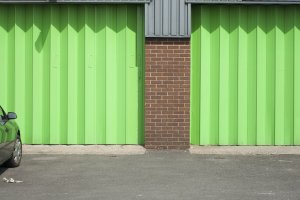
 

Attachments

  • test.jpg
    test.jpg
    3.5 MB · Views: 242
It doesn't look good but you are not square to the wall either.

I do this test looking at glass patio doors to ensure a flat enough surface. Then stick a mirror at the same height as your tripod on the door and use Live View to get the reflection lined up. Then place five bits of paper with writing, I use old phone book pages, one in each corner and one in the center, then use Live View 10x manual focus to really nail that and compare the corners. Then you will be sure.

If the lens is decentered don't worry, it is an easy fix for Canon and if you got it new it is obviously covered under warranty.
 
Upvote 0
DRR said:
I agree with your assessment, if you are close to parallel with the brick wall, then I think there is a problem with the corner.

A more controlled test, should confirm.

Thanks, it does seem a bit odd then and it's not just me. I'v done a few similar shots turning the camera swivelling the camera left and right too and the blur pattern turns up in the same place in both instances. I'll do the test suggested by private in a day or two and see what that turns up and then yes, I think I still might be entitled to an exchange rather than sending it for repair. Thanks for that point
 
Upvote 0
A better way to test it is to use a mirror as mentioned above. I use a standard chart with mini star charts added along the periphery so that I can test for decentering and sharpness simultaneously.

If you look back at some of my (not that much) older posts, you'll see I was struggling with my 70-200/2.8 IS II lens and what looked like decentering to me. It went back to Canon multiple times and was a massive pain in the butt. I think it's fixed now. I need to really thoroughly test it one day, but things look better so far.

FWIW, it wasn't until I joined CPS that anybody at Canon took me or my lens seriously. The folks at CPS were confused as to what (if anything) the non CPS techs were doing. Ultimately they gave it to supposed best tech, and I think he fixed it.
 
Upvote 0