18-55 EF-M STM lens

Mar 23, 2012
80
12
5,291
I just bought this lens hoping to get somre mover versatality out of my EOS-M camera. On the scene intelligent Auto picture taking mode (which I use 99% of the time) I am noticing that the images are really soft. I saw some reviews say the same thing and this is more pronounced indoors with lower light.

Aside from applying a sharpen filter or mask - is there a setting I should use on the camera to adjust for this? Thanks - Tom
 
Mine is very sharp.. the time it takes from focus to taking the photo is a bit delayed compared to a dslr... maybe you're moving too much? When some of my family uses the m, they're not happy with the images. When I use it, not the case. I think it's on par or sharper than my EFS 18-55mm IS STM.
 
Upvote 0
Based on what you said, I like to make the following suggestion: 1. set the scene mode to Landscape, reguardless what type of picture that your are taking. 2. Make sure that the IS for the lens is on. 3. Look at the shooting information and see what is the shutter speed. If it is 1/60 second or more, then all bets are off.
 
Upvote 0
tomsop said:
I just bought this lens hoping to get somre mover versatality out of my EOS-M camera. On the scene intelligent Auto picture taking mode (which I use 99% of the time) I am noticing that the images are really soft. I saw some reviews say the same thing and this is more pronounced indoors with lower light.

Aside from applying a sharpen filter or mask - is there a setting I should use on the camera to adjust for this? Thanks - Tom

Mine is very sharp. But there's always sample variation. Mount it on a tripod, manually focus on a flat target, shoot different apertures, see what you get.

If it's soft when other possibilities are eliminated then you might need to exchange it.
 
Upvote 0
One more thing, Check the ISO setting and noise reduction setting of the "not sharp picture". There is a "BIG" difference in sharpness between ISO 6400 and ISO 100. Also the noise reduction will decrease the sharpness of the picture.
 
Upvote 0


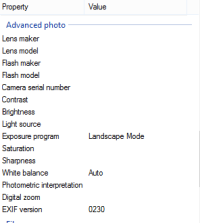
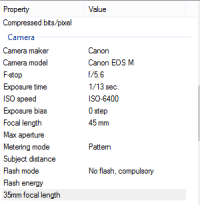
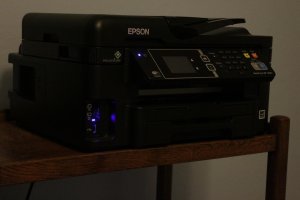
Here is my example image. I have gotten better images outdoors and I think the issue may be the light - I think the only thing I did with this picture is try the landscape mode and I did make sure IS is on. I also don't know how to use the advanced settings - I don't know how to post EXIF data so not sure if you can pull it from the image so I took a screenshot of some of the date that contained useful information. Let me know if I need to do something more or differently. This was taken in a room at night with just a ceiling fan light. I don't understand the comment about shooting more than 1/60 - if I go faster trhe image is too dark and I tried not to mess with the shutter speed.
 

Attachments

  • smaller.jpg
    smaller.jpg
    89.5 KB · Views: 265
  • ScreenClip.png
    ScreenClip.png
    7.1 KB · Views: 611
Upvote 0
tomsop said:


Forgot this one too.
ISO6400,1/15sec. Both will not give you sharp picture. ISO6400 will give you too much noise. 1/15 sec will have potential shaking of the camera. Have the lens wide opened will make it worst also. The picture being partially blur is due to shallow depth of field. In other word, you have almost everything that will prevent you to get a sharp picture.
 
Upvote 0
f/5.6 indoors is tough. Even at ISO6400 the camera needs to slow down to 1/15. That's slow enough shutter to introduce a lot of hand-held shake.

IS is on, right? That should help a little bit. But most of all, you might need more/better light than you have for that example shot.
 
Upvote 0
DRR said:
f/5.6 indoors is tough. Even at ISO6400 the camera needs to slow down to 1/15. That's slow enough shutter to introduce a lot of hand-held shake.

IS is on, right? That should help a little bit. But most of all, you might need more/better light than you have for that example shot.

yes, f/5.6 indoors and red stage light is tough. I got 1/20s @ ISO 1600 and f/5.0 with my M + 18-55 here:

20140906_06138m.jpg


In decent light my 18-55 is really sharp and an excellent performer. Here at 1/30s, 45mm, f 5.0.
20140823_04687m.jpg
 
Upvote 0
I don't necessarily agree that 1/15 would produce blurred images at 45mm with IS.
Also noise isn't the same as loss of sharpness unless you're using noise reduction, although I agree at ISO 6400 some crop sensor cameras aren't at their best.
f/4-4.5 provides sufficient depth of field to keep some things in focus, at least.

So try this:
At certain focal lengths (18, 24, 30, 40, 55) take a shot of something where you can specify the focus point. I like to use a ruler lengthwise and point the center AF point on a number, say, 6. Then take photos and see if they are sharp, and if not, if any other number or mark is sharper.
Use the lowest ISO you can. Not more than 400.
If the number focused on isn't sharp- it might be a problem with the lens. If some other number is sharper it might be a problem of back or front focus.
Also, it's better to set it up on a tripod and turn off IS.
You want to have this information if and when you need to replace to defective lens.
 
Upvote 0
I can tell from the replies that you are suggesting manual settings - I will need to play with that - in my sample shot I selected landscape so I could not set ISO, shutter speed or aperature. Those variables were input by the camera. I will need to learn more about all of those I suppose and I suppose it is my fault for trying to use this as a point and shoot and then complaining about the results. Thanks for the information - I did try to move some of those settings around before I followed the landscape shot advice and I could tell it would be too dark for any lower ISO or increased shutter speed - I did not try to move the aperature setting.

Is there a general rule of thumb as to what settings I should use - I can try another shot tonight using the same conditions but probably cannot duplicate the distance because I did not measure it. Thanks -Tom
 
Upvote 0
tomsop said:
I can tell from the replies that you are suggesting manual settings - I will need to play with that - in my sample shot I selected landscape so I could not set ISO, shutter speed or aperature. Those variables were input by the camera. I will need to learn more about all of those I suppose and I suppose it is my fault for trying to use this as a point and shoot and then complaining about the results. Thanks for the information - I did try to move some of those settings around before I followed the landscape shot advice and I could tell it would be too dark for any lower ISO or increased shutter speed - I did not try to move the aperature setting.

Is there a general rule of thumb as to what settings I should use - I can try another shot tonight using the same conditions but probably cannot duplicate the distance because I did not measure it. Thanks -Tom

you could try mode "P" for a start. The camera will still set exposure automatically, but using the command wheel in the back you can change the aperture/shutter speed combination.

I find your sample picture actually quite OK for ISO 6400 and weak/difficult lighting. The closer corner of the printer is sharp, for the sharpness to extend further to the back, a higher aperture number would have been required, but this was not possible due to the given amount of light available in the scene.

You can also limit the maximum ISO value for Auto-ISO to something lower than 6400 ... eg 1600 -> hit the Q-button and tap "ISO" to get to this settings screen http://3.static.img-dpreview.com/previews/canon-eos-m/screens/canon/auto-iso-limit.jpg?v=2953 .. however that may result in blurry pictures, because then the camera needs to use a slower shutter speed in order to get a correctly exposed (not too dark) image.
 
Upvote 0
tomsop said:
I can tell from the replies that you are suggesting manual settings - I will need to play with that - in my sample shot I selected landscape so I could not set ISO, shutter speed or aperature. Those variables were input by the camera. I will need to learn more about all of those I suppose and I suppose it is my fault for trying to use this as a point and shoot and then complaining about the results. Thanks for the information - I did try to move some of those settings around before I followed the landscape shot advice and I could tell it would be too dark for any lower ISO or increased shutter speed - I did not try to move the aperature setting.

Is there a general rule of thumb as to what settings I should use - I can try another shot tonight using the same conditions but probably cannot duplicate the distance because I did not measure it. Thanks -Tom
There is a mis-communication here. When I suggested "landscape", I mean "landsacpe" in picture style. that is the sharpest setting. Not the "landscape" in scene. I would highly suggest you to read through the manual that comes with the camera. Also go to the Canon web site to download the complete manual and read it through the 370 pages. You can have a lot of control and being creative even you try to use use it as a point and shoot. First you need to understand what you can do with the camera.
 
Upvote 0


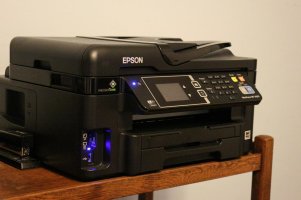
Here is my attempt to change the setting to make this a sharper picture. I don't think this is the best I could do to get it more sharp with the available lighting but I wanted to try it again - this is f5.6, 3200 ISO and 1/30th

I chose 3200 and f5.6 because it started getting too dark if I changed these and I chose 1/30 because I wanted a faster shutter even if it made it a little too dark to try to keep it sharp.

Thanks for the suggestions from all.
 

Attachments

  • 913printers.jpg
    913printers.jpg
    70 KB · Views: 247
Upvote 0