
1DsIII rear display

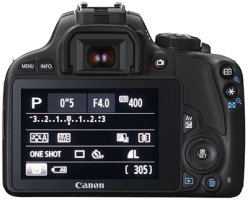
i got used to having the rear display showing all the settings on my previous cameras. i can bring up the same display on the 1DsIII but if i review an image it defaults back to a blank screen. is there a way to have the settings screen as default or is that just the way it is?
this is the screen i want to have as default
 

Attachments

  • Canon_EOS_100D_rear_400.jpg
    Canon_EOS_100D_rear_400.jpg
    84.7 KB · Views: 440
Corydoras said:
Try pushing the info button. In most Canon cameras the info button is the way to chance what the display is showing.
pushing the info button does bring up the display but if i review an image or go into the menu ,it always goes back to a blank screen. then i have to hit info again to get it back to how i want it. its not a big deal but i was wondering if there was a setting that i have overlooked.
 
Upvote 0
If tethering an Android device is possible in some of your shooting you can do this super-easily and control even the older 1Ds3 from a $9 application: "dSLR Controller". I do this on interiors all the time, although I also attach my faster laptop on some of these shoots to use the Canon software instead. I have a couple 1Ds3's for this work.

My used Samsung 10.1 Note 2014 has a wonderful screen and the screen size is fun for all kinds of camera control. Clients are amazed! Light enough to clamp to a tripod, although I have to come up with the "holder" - one area where the wide adoption of iPads helps - but not helpful to Android users.

To repeat: this is Android only, but so cheap some shooters buy a used tablet to be a dedicated view/control device.
 
Upvote 0