5d Mark III Misaligned Transmissive LCD

Jun 21, 2014
6
0
4,636
I just had my viewfinder fixed and was wondering how many other users had this same issue.
It went undetected for almost two years because I thought it was an af microadjustment/user error issue.

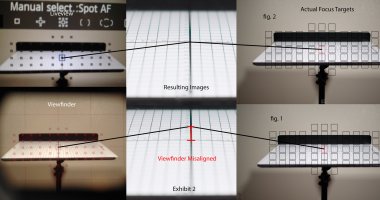
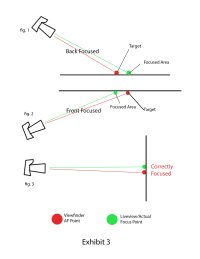
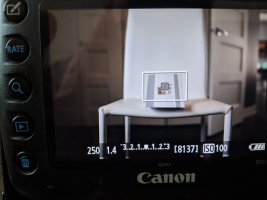
In liveview AFQuick mode the cameras mirror lowers and it focuses through the submirror, mirror, and sensor the same as it does through the viewfinder. Page 212 of the EOS 5D Mark III manual describes this operation. (Specifically page 213 Section 4 Paragraph 2) That means the AF point placement in both liveview and through the viewfinder should be perfectly aligned. Any slight variation in the viewfinder transmissive LCD will result in the focus point being misaligned from the intended target. There should be no slight difference between the AF point placement between the optical axis of the viewfinder and liveview – any variance would cause a shift in the focal plane and be considered a defect. Consumers should be aware their viewfinder focus points don’t precisely focus where they intend.
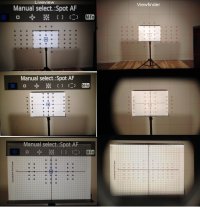
To test if your transmissive LCD is misaligned - place the camera on a tripod and turn on live view AFQuick mode. Line up your focus points to a target and focus. Now turn off live view and look through the viewfinder. Your AF points should still be squarely over the target. If they are not, your transmissive LCD is misaligned.
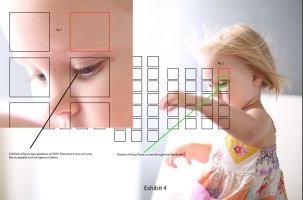
I assumed my camera was severely front focusing when placed on a subjects eye. Turns out the camera was actually spot focusing on the subjects eyebrow. Canon claims this is within spec. I disagree.
 

Attachments

  • liveview-to-viewfinder-misalignment.jpg
    liveview-to-viewfinder-misalignment.jpg
    755.8 KB · Views: 757
  • Exhibit-2---liveview-vs-viewfinder-misalignment-2.jpg
    Exhibit-2---liveview-vs-viewfinder-misalignment-2.jpg
    367.7 KB · Views: 819
  • Exhibit-3---Camera-Position.jpg
    Exhibit-3---Camera-Position.jpg
    160.9 KB · Views: 735
  • Exhibit-4---Live-example-with-sunny.jpg
    Exhibit-4---Live-example-with-sunny.jpg
    233.3 KB · Views: 712
Didn't you post this on another forum where it fell on unsympathetic ears?

The slight misregistration is typical, and the sensor is larger than the small square on the screen, so it should not cause a problem.

As you were told in those posts, live view focus points have no physical relationship to the ones in the OVF. They are electronically generated.
 
  • Like
Reactions: 1 user
Upvote 0
Hi, no, this is my first post about this issue.
Did you see my examples? Did you see the viewfinder spot AF point directly over the target and still miss in example 2? Thats because the actual af point was about an inch above it. This is repeatable and is most definitely a problem or Canon wouldn't have repaired my viewfinder. Liveview focus points definitely have a physical relationship to the ones used in OVF. In live view AFQuick mode, the mirror lowers and you use the same AF points and AF method it does in OVF (page 212 of the manual). If those two aren't identical you have to physically move the camera to zero your target. Moving the camera mean altering your focal plane. Thats a defect.

It is a problem when you spot AF on someones eye through the OVF and the camera focuses on their eyebrow. Every time. Turn on live view and you'll see the actual focus point is in fact directly over their eyebrow.

Congratulations on getting a copy that actually works correctly. Ive been battling this issue for a year and a half without knowing what the problem was. Service didn't catch the issue twice - only when I specifically told them what to fix did they repair it. Im wondering if there are others with this same issue, most of witch probably don't know this issue even exists.
 
Upvote 0
I agree the AF array in the VF and on the main LCD for Quick View AF should be aligned, and your first image shows they aren't (on my 1D X they are perfectly aligned). However, your test shots – particularly the graph paper – fail to convincingly demonstrate an issue. Focusing on steeply-angled graph paper, like focusing on an angled ruler, is providing multiple appropriate focus targets at different depths...you may know which one you're trying to focus on, but the camera's AF system can't read your mind. The girl's brow is a very low-contrast target. Also, that may be an AFMA issue.
 
  • Like
Reactions: 1 user
Upvote 0
kram7211 said:
Hi, no, this is my first post about this issue.
Did you see my examples? Did you see the viewfinder spot AF point directly over the target and still miss in example 2? Thats because the actual af point was about an inch above it. This is repeatable and is most definitely a problem or Canon wouldn't have repaired my viewfinder. Liveview focus points definitely have a physical relationship to the ones used in OVF. In live view AFQuick mode, the mirror lowers and you use the same AF points and AF method it does in OVF (page 212 of the manual). If those two aren't identical you have to physically move the camera to zero your target. Moving the camera mean altering your focal plane. Thats a defect.

It is a problem when you spot AF on someones eye through the OVF and the camera focuses on their eyebrow. Every time. Turn on live view and you'll see the actual focus point is in fact directly over their eyebrow.

Congratulations on getting a copy that actually works correctly. Ive been battling this issue for a year and a half without knowing what the problem was. Service didn't catch the issue twice - only when I specifically told them what to fix did they repair it. Im wondering if there are others with this same issue, most of witch probably don't know this issue even exists.

Sorry if you were not the one who posted a almost identical thing in another forum.

Liveview using live AF has no physical link to the AF points, it uses the sensor. Liveview using Quick AF does use the AF sensor, but those points are electronically generated, and there is no physical connection or link to the AF sensor or the transmissive LCD. Getting all three lined up does involve tolerances.

If both are off by a large amount, then the sensor might be out of place, or defective. However, the AF system does not always focus where you think it will, so a proper target designed to force it to focus is needed. This might be a + on a large white sheet of paper. Otherwise, its not possible to control where it actually focuses. This has given lots of people headaches. If focus is OK when shot straight on, and off when shot from a angle, the likely thing is that the AF is focusing on the wrong spot. Always do the testing in such a way that its impossible for AF to pick a slightly different point to focus on. It can do this and still show the correct focus point if its close.
 
  • Like
Reactions: 1 user
Upvote 0
Mt Spokane Photography said:
Liveview using live AF has no physical link to the AF points, it uses the sensor. Liveview using Quick AF does use the AF sensor, but those points are electronically generated, and there is no physical connection or link to the AF sensor or the transmissive LCD. Getting all three lined up does involve tolerances.

Presumably, the electronically generated AF point array shown on the main LCD during Live View Quick AF is 'ideal' – the center point is dead center on the image. But the AF array on the transmissive LCD should be similarly centered, as should the actual AF sensor.

That's three separate components, each of which must be properly aligned, and as you state they each have a manufacturing tolerance. It would certainly be possible for two of the three to match and the third to be differently aligned. Misalignment between the VF transmissive LCD and the 'ideal' display on the main LCD is easiest to detect (as in the OP's case), but if those two are aligned, the actual AF sensor could still be off...and that's more difficult to detect. I have carefully tested my 1D X (specifically, I tested that the transmissive LCD was aligned with the actual AF points, in Live View I use contrast-detect AF – but the transmissive LCD also aligns with the 'ideal' main LCD).
 
Upvote 0
Hi all, thanks all for responding.
Just to make it certain, it was a misalignment of the transmissive LCD in the viewfinder. Canon finally fixed the issue after 2 failed service attempts. The problem is that its not something they check for or issued a service advisory about. There may be a lot consumers out there with the same issue thinking its a parallax problem, or AMFA issue, or the autofocus can't read their mind, or worse, that its an operator problem. Maybe they just missed. I thought it was my fault for the longest time.
I know live view and the OVF are not linked - I simply used the AF point placement of live view as an approximation of where the focus points actually are, because after many different tests, live view never missed focus. Im not talking about contrast detect focus either. Im talking about AFQuick mode where the phase detect focus is used identically to using the viewfinder. (Page 212 of the 5D Mark III manual) On the other hand, the viewfinder AF points missed every time. (unless focused on a parallel plane to the sensor). What I finally discovered was that the viewfinder was not missing at all, it was just consistently focusing above my intended focus point.

I discovered this when the camera (on a tripod) couldn't lock focus on a bic lighter 5 feet away using an 85mm f/1.2L. Looking through the viewfinder, i placed the center spot Af point at the top of the lighter (the metal part that says bic). AF missed the lighter completely and focused on the wall behind 20 feet behind. I turned on live view and noticed the AF point was well above the lighter. I angled the camera down to place the AF point on the top of the lighter and it focused immediately. When I looked through the viewfinder again the AF point was not at the top, but the middle of the lighter, and it focused immediately. Thats when i printed those charts for testing. I tilted them at extreme angles to show just how off my focus was. It focused perfect, every single time - only it was about an inch above the OVF AF point.
Ive read about other people with this same issue online - if its widespread Canon should really issue a service advisory for this - to at least let consumers know this may be an issue. We shouldn't have to upgrade to a 1 series body just to have our AF points in the correct place.
 
Upvote 0
I have the same problem. I sent them out your picture AND the thread explaining the situation. I got this as a first responce :

customer complaint: There is a misalignment of the transmissive LCD in the viewfinder. I've had numerous failed attempt at adjusting focus with the micro
adjustments and I was unable to adapt any of my lenses until I found this thread which explains 100% of my situation. The liveview QuickAF is straight aligned
with a target I drew, while the viewfinder is pretty offset, making it very difficult to get something in focus in viewfinder./ **Upon inspection, we found the
product requires focus adjustments to return the unit back to Canon specification. The estimate has been adjusted to reflect full repair charges. Please contact
Canon at 1-800-652-2666 or follow the link in the email to the online repair site to either do a go-ahead and pay for the repair or to do a refusal.


Once everything was paid (265$), 4 work days passed and I get this response :

Dear Jonathan,
Service has inspected your EOS 5D Mark III camera. However at this point, there is no fault found with your unit as Service was unable to reproduce the issue described.
Your camera is found to be within normal specification. To troubleshoot further, you may require to send in your lens, or we can send the camera body back and you can consider using the microadjustment feature.
Alternately, you may confirm that you would simply like the camera sent back to you.


I'm lost. I called them twice and they don't seem to get what the problem is. They keep insisting that the body is within Canon's spec. :(
 
Upvote 0
Unbelievable. I got the camera back from Canon. The test shots are still on the memory card as I didn't format the card prior sending and they didn't either.
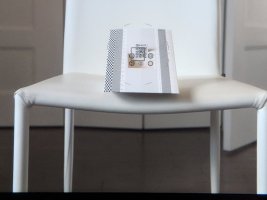
They took a picture of a poster on a wall. o_Oo_Oo_O:mad:
 
Upvote 0