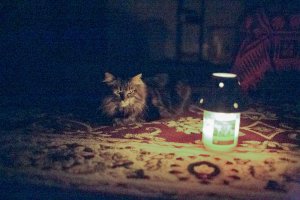
TrumpetPower! said:Anybody else who needs more than this needs a head examination more than they need a better camera....
Cheers,
b&
BIG LOL... Therefore I'll be the first to stand in line for one 8) I mean, a better camera... ;D
Upvote
0
TrumpetPower! said:Anybody else who needs more than this needs a head examination more than they need a better camera....
Cheers,
b&

Ray2021 said:WB was ‘as shot’.
TrumpetPower! said:Ray2021 said:WB was ‘as shot’.
That's actually contributing a fair amount to the distracting noise in the scene. And the amped-up saturation doesn't help at all, either.
Here's the image after some basic tweaking of the sliders in ACR.
Temperature: -58
Tint: -54
Exposure: +0.3
Contrast: -43
Highlights -40
Shadows: +38
Whites: -100
Blacks: -64
Clarity: 0
Vibrance: 0
Saturation: -38
Cheers,
b&
TrumpetPower! said:P.S. If I were going to make something "real" of this, I'd also mask in some selective desaturation of the darkest backgrounds. b&

Ray2021 said:Just uploaded the CR2 raw files to skydrive, hope this works:
The primary shot used here at 1/1000 sec:
https://skydrive.live.com/redir?resid=1F78FF9C09DCA480!108&authkey=!ADK2oOGh3O_uCXI
A slightly more exposed 1/800 sec shot taken moments apart with the same set up as the primary:
https://skydrive.live.com/redir?resid=1F78FF9C09DCA480!107&authkey=!AOL_-sdrd4HXRmY

Stephen Melvin said:Here's the XMP sidecar file. You can use it to make the changes and look at what I did.
http://galleries.stevemelvin.com/Primary 1-1000sec.xmp
Ray2021 said:Stephen Melvin said:Here's the XMP sidecar file. You can use it to make the changes and look at what I did.
http://galleries.stevemelvin.com/Primary 1-1000sec.xmp
Thanks Stephen, can't seem to open the url ... I could be doing something basic that's off. Cheers.

Stephen Melvin said:Here's my work with the primary, using Adobe Lightroom. It took about five minutes:

Jeremy said:Does anyone else find it funny that on a photography discussion board we're posting cat pics just like everyone on Facebook?

Stephen Melvin said:Ray2021 said:Just uploaded the CR2 raw files to skydrive, hope this works:
The primary shot used here at 1/1000 sec:
https://skydrive.live.com/redir?resid=1F78FF9C09DCA480!108&authkey=!ADK2oOGh3O_uCXI
A slightly more exposed 1/800 sec shot taken moments apart with the same set up as the primary:
https://skydrive.live.com/redir?resid=1F78FF9C09DCA480!107&authkey=!AOL_-sdrd4HXRmY
Here's my work with the primary, using Adobe Lightroom. It took about five minutes:
This is what you posted:

Here's the XMP sidecar file. You can use it to make the changes and look at what I did.
http://galleries.stevemelvin.com/Primary 1-1000sec.xmp
jabbott said:It appears that your 5D3 has the same issue that mine does... in the far bottom right corner of the image it has a more purple hue than it should. It is more noticeable in your NR 25 image. On my 5D3 it is most noticeable at ISO 12,800 and above, but sometimes at ISO 6,400.
pedro said:Oh yes it does really look great...time to go LR for me. I did everything in DPP until now...That is quite a great RAW converter and denoise software as I can see.
Stephen Melvin said:pedro said:Oh yes it does really look great...time to go LR for me. I did everything in DPP until now...That is quite a great RAW converter and denoise software as I can see.
It is a great converter, but keep in mind that a lot of it has to do with the choices I made when converting the file. The default image that comes up in LR isn't going to look much different from what the original post showed. I did about four or five things to the image in LR's "Develop" module to bring out more from the image. It didn't take me long, because I'm experienced in the program, and have a solid photography and retouching background. You'll need to play around and experiment with whatever program you use to process your images.
Stephen Melvin said:pedro said:Oh yes it does really look great...time to go LR for me. I did everything in DPP until now...That is quite a great RAW converter and denoise software as I can see.
It is a great converter, but keep in mind that a lot of it has to do with the choices I made when converting the file. The default image that comes up in LR isn't going to look much different from what the original post showed. I did about four or five things to the image in LR's "Develop" module to bring out more from the image. It didn't take me long, because I'm experienced in the program, and have a solid photography and retouching background. You'll need to play around and experiment with whatever program you use to process your images.
Stephen Melvin said:pedro said:Oh yes it does really look great...time to go LR for me. I did everything in DPP until now...That is quite a great RAW converter and denoise software as I can see.
Ray2021 said:Stephen Melvin said:pedro said:Oh yes it does really look great...time to go LR for me. I did everything in DPP until now...That is quite a great RAW converter and denoise software as I can see.
It is a great converter, but keep in mind that a lot of it has to do with the choices I made when converting the file. The default image that comes up in LR isn't going to look much different from what the original post showed. I did about four or five things to the image in LR's "Develop" module to bring out more from the image. It didn't take me long, because I'm experienced in the program, and have a solid photography and retouching background. You'll need to play around and experiment with whatever program you use to process your images.
Stephen, thanks for sharing your settings earlier. It is really a nice professional balance between too much processing and none at all.
@Pedro: the baseline version I posted was intentionally set to LR "zero" to show what one starts out with at this ISO. Refer/download Stephen's file for settings if you end up giving the LR4 free trial a go. I highly recommend the program.
jabbott said:It appears that your 5D3 has the same issue that mine does... in the far bottom right corner of the image it has a more purple hue than it should. It is more noticeable in your NR 25 image. On my 5D3 it is most noticeable at ISO 12,800 and above, but sometimes at ISO 6,400.
Ray2021 said:Yes, I see it in both CR2 raw files I uploaded as well (taken moments apart), but it mostly is gone when LR opens it with default settings...but I hadn't noticed that before...
Anyone else seeing these at very high ISO/low lighting?
Stephen Melvin said:jabbott said:It appears that your 5D3 has the same issue that mine does... in the far bottom right corner of the image it has a more purple hue than it should. It is more noticeable in your NR 25 image. On my 5D3 it is most noticeable at ISO 12,800 and above, but sometimes at ISO 6,400.Ray2021 said:Yes, I see it in both CR2 raw files I uploaded as well (taken moments apart), but it mostly is gone when LR opens it with default settings...but I hadn't noticed that before...
Anyone else seeing these at very high ISO/low lighting?
Yes, it's pretty common. I think Canon may be working on a firmware update to help with this.
TrumpetPower! said:There's actually a solution to that...avoid shooting moving subjects below EV -2 with a slow or long lens without a tripod, and you won't need to boost the ISO that high.
(EV -2 is much too dark to read, so it's not like this is a radical concept....)
b&