AF setups you personally use.

ahsanford said:
hne said:
AF joystick directly moves selected AF point.

Ooh, that's nice if by 'directly' you mean the joystick can move the AF point without hitting the AF point selection button first.

I usually shoot the '+' shaped 5-pt cluster, but I have to hit the AF point selection button first to allow the joystick start driving the AF point. Can I configure my 5D3 to bypass the AF point selection button and have a 'live' joystick at all times?

- A

Even my old 7D had that. 5D III must have that as well :)
 
Upvote 0
Mikehit said:
Yep. It is under the customisation (p332 of the manual)

Shut. the. front. door.

Five years with this rig and I've never spotted that. I know (and use) custom controls but I never dabbled with the joystick settings as I always wanted it to perform the task it was already performing. Had no idea I could skip a button press that way. Amazing!

5D3 folks -- Here's the really speedy version to turn this on via the Q menu:
https://www.canonrumors.com/forum/index.php?topic=10641.msg190476#msg190476

Good gravy, do I love this forum. Thank you!

- A

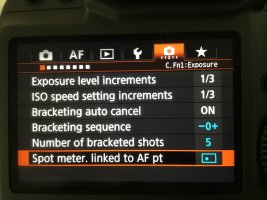
P.S. If someone could post the similarly really easy way to turn on spot metering at the selected AF point on my 5D3, do let me know. 8)
 
Upvote 0
Khalai said:
ahsanford said:
hne said:
AF joystick directly moves selected AF point.

Ooh, that's nice if by 'directly' you mean the joystick can move the AF point without hitting the AF point selection button first.

I usually shoot the '+' shaped 5-pt cluster, but I have to hit the AF point selection button first to allow the joystick start driving the AF point. Can I configure my 5D3 to bypass the AF point selection button and have a 'live' joystick at all times?

- A

Even my old 7D had that. 5D III must have that as well :)

The 1D/Ds MkIII's got that joystick functionality in a firmware upgrade, it makes most documentation for the cameras out of date and inaccurate.

As an aside the 1DX MkII got a menu change in FW 1.1.2 that altered several menu functions that are not reflected in some of the downloadable instruction manuals.

But yes the joystick only AF point movement is a default on my cameras.
 
Upvote 0
ahsanford said:
Khalai said:
ahsanford said:
P.S. If someone could post the similarly really easy way to turn on spot metering at the selected AF point on my 5D3, do let me know. 8)

Just push this button and you're good to go 8)


I thought it would be a link to Magic Lantern, ha.

https://www.canonrumors.com/forum/index.php?topic=25789.msg508706#msg508706

- A

C.Fn1 : Exposure, sixth item ;)
 

Attachments

  • IMG_0181.JPG
    IMG_0181.JPG
    1.8 MB · Views: 145
Upvote 0
dak723 said:
Mikehit said:
Sporgon said:
My cameras don't seems to have many AF settings :(

Sometimes I would call that a bonus....I have missed shots when too busy fritzing around with buttons and AF modes instead of just pointing the camera and pressing the damned shutter button!!!.

Agree. One shot, center point and all my shots are in focus. How about that!

Also agree. Whilst the 45 pt AF on my 1DS MkIII's was class leading at the time it didn't benefit, in my experience, from a huge amount of 'tinkering', heck even the micro AF adjustments seemed to do little so was left off! Now it takes time, effort and understanding to get the optimal personal results from these highly tune-able systems.

Unless, of course, you are shooting landscapes on a tripod, then nothing beats LV with 10x magnification and manual focus.... :D
 
Upvote 0
Mikehit said:
Yep. It is under the customisation (p332 of the manual)

Oh my, thanks a lot. Visited local store yesterday, as I am thinking of getting 5DIV instead of 6DII due to DR (which is now confirmed) and maybe AF advantage. But there was just 5DIII. I played with it for a while and thought to myself:

- what is the joystick good for, if I need to press some other button first? I also found the joystick a bit hard to press.
- I was subconsciously trying to press the bottom dial, as all those years with 60D/70D I use it as navigation arrows.
- tried teh expansion setting on the 5DIII and did not found it much useful. Was pointing at some camera in the store, focus locked. Pointed to the ground with the center of the zone, focus locked on the ground. I expected the camera to stay in focus, being captured by expanded focus point. But most probably this is not how it works and expansion points are used only in case the main (centre) focus point is not able to gain focus?

I know one has to get used to new stuff first, but I did not found the joystick being a big differentiator to the 70D arrow aproach on the bottom dial.

What I would found useful with the new touch enabled bodies, would be touch/drag to focus. But not sure moving a finger around my nose would make it comfortable, who knows.

Can't wait once in two weeks I make a final decision, playing in store with both 6DII and 5DIV. 6DII handling is going to be a no brainer, so we will see, if I decide to throw more money to the game and go with the 5DIV ...

 
Upvote 0
-pekr- said:
Mikehit said:
Yep. It is under the customisation (p332 of the manual)

Oh my, thanks a lot. Visited local store yesterday, as I am thinking of getting 5DIV instead of 6DII due to DR (which is now confirmed) and maybe AF advantage. But there was just 5DIII. I played with it for a while and thought to myself:

- what is the joystick good for, if I need to press some other button first? I also found the joystick a bit hard to press.
- I was subconsciously trying to press the bottom dial, as all those years with 60D/70D I use it as navigation arrows.
- tried teh expansion setting on the 5DIII and did not found it much useful. Was pointing at some camera in the store, focus locked. Pointed to the ground with the center of the zone, focus locked on the ground. I expected the camera to stay in focus, being captured by expanded focus point. But most probably this is not how it works and expansion points are used only in case the main (centre) focus point is not able to gain focus?

I know one has to get used to new stuff first, but I did not found the joystick being a big differentiator to the 70D arrow aproach on the bottom dial.

What I would found useful with the new touch enabled bodies, would be touch/drag to focus. But not sure moving a finger around my nose would make it comfortable, who knows.

Can't wait once in two weeks I make a final decision, playing in store with both 6DII and 5DIV. 6DII handling is going to be a no brainer, so we will see, if I decide to throw more money to the game and go with the 5DIV ...

I'm on my phone, so addressing your questions in full is a little cumbersome. Long story short, your concerns can easily be addressed by changing the camera set up in the menu.

With regard to your question about focusing on a subject and keeping focus on it if it or the camera moves, this functionality is found in the cameras with "ITR" focusing modes (the camera uses color information to support focusing). This focusing mode is found in the 1DX, 1DXII, 5Ds+r, 5DIV and 7DII. I don't think the 5DIII has it.

Personally I find the joystick very useful. My cameras are set up to activate the joystick functionality by half pressing the shutter button. Pressing the joystick down, only makes the focusing point return to the center. It's main functionality is to switch between the focusing points (side to side).
 
Upvote 0
Larsskv said:
I'm on my phone, so addressing your questions in full is a little cumbersome. Long story short, your concerns can easily be addressed by changing the camera set up in the menu.

With regard to your question about focusing on a subject and keeping focus on it if it or the camera moves, this functionality is found in the cameras with "ITR" focusing modes (the camera uses color information to support focusing). This focusing mode is found in the 1DX, 1DXII, 5Ds+r, 5DIV and 7DII. I don't think the 5DIII has it.

Personally I find the joystick very useful. My cameras are set up to activate the joystick functionality by half pressing the shutter button. Pressing the joystick down, only makes the focusing point return to the center. It's main functionality is to switch between the focusing points (side to side).

Thanks for the suggestions. 5D IV's AF seems definitely being advanced in comparison to 5D III's one. Those things tend to be subtle, so I will give it 1-2 hours in the store and will play with both 6D II and 5D IV and try to get some feeling from using both. 6D II should not be that far away from our recent 70D.
 
Upvote 0