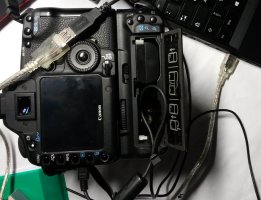
Or you could just take a pair of needle-nose pliers and squeeze the metal shield of the connector a little bit so that it will be tighter. But before you do that, try a different USB cable. It might be the cable connector that is stretched rather than the one in the camera.
I would agree with dgatwood. The USB socket in the camera can have the metal bent from front-back stress on the cable. (That's why I recommend a right angle cable so that the cable hangs down) I am not sure about the 5D2, but on the 60D there is a screw where you can remove the faceplate around the connectors. If you can remove the plate you should be able to pinch the bent metal of the usb connector shell back together so that there is a decent amount of friction when you insert the cable. If the plate does not remove easily, you should be able to use a jewellers screwdriver to bend the metal back.
I managed to remove the faceplate, the usb connector had like a assemble point which was split, I (carefully) managed to to squeeze it back together again.(if that all makes sense?) it helped a lot though I still think it need a real repair
Hello everybody,
just wanted to share my solution. It does of course not offer a solution for those whos Usb port is already broken but it might prevent from damage to working cameras.
The BG-E6 offers a small hole for the AC adapter cable, just leave out the second Battery and put the Usb cable through this hole and back out. Now if there is any tension, the cable will break but the port will be ok. Also use an extension cord, so if you acciedentially walk away with the camera there will happe no damage to the computer, just the two cables lose connection.
I'm not sure on the 5 series...on the 1-Series, it's the LEFT angle Mini-USB for the cable to go downward. Look at the Mini-USB port, if the bigger part of the port is towards the FRONT of the camera (towards the lens mount), it'll be the LEFT for down. If it's towards the back (towards the screen), it'll be the RIGHT for down.
I paid the extra for the "High-Flex" version of the cable, but also have one of the "Low Pro" ones around as a spare. The company is really good, good support too. I had a cable go bad on me and they promptly sent me a replacement without any headaches. They'll also cut specific sized cables with whatever ends you need on it.