having had the camera for a week now, I really really really don't like DPR. Lightroom is a far superior product and I hope they have an update soon.
Upvote
0

Don Haines said:having had the camera for a week now, I really really really don't like DPR. Lightroom is a far superior product and I hope they have an update soon.

Don Haines said:having had the camera for a week now, I really really really don't like DPR. Lightroom is a far superior product and I hope they have an update soon.
candc said:Don Haines said:having had the camera for a week now, I really really really don't like DPR. Lightroom is a far superior product and I hope they have an update soon.
I like it for its quikview feature. It opens up fast and is great for viewing rating and deleting. Also good if you want to convert without any additional auto corrections on top of what the camera does because the default conversion is the same as an in camera JPEG.
Don Haines said:having had the camera for a week now, I really really really don't like DPR. Lightroom is a far superior product and I hope they have an update soon.

RichM said:Don Haines said:having had the camera for a week now, I really really really don't like DPR. Lightroom is a far superior product and I hope they have an update soon.
+1 (or more). I'm going to have to go jpg as I don't have the patience I used to have. Anyone heard when we might get LR CR2->JPG for the 7d2?

GraFax said:RichM said:candc said:Don Haines said:having had the camera for a week now, I really really really don't like DPR. Lightroom is a far superior product and I hope they have an update soon.
I like it for its quikview feature. It opens up fast and is great for viewing rating and deleting. Also good if you want to convert without any additional auto corrections on top of what the camera does because the default conversion is the same as an in camera JPEG.
So why not just shoot jpeg? If all we're doing is using DPR to convert from raw to jpeg, then why bother.
I'm using DPP to convert them from RAW to Tiff with the minimum processing possible. But with DPP I have no idea whats really going on "under the hood". Then I review them in Adobe Bridge. The TIFFs that interest me go through Camera Raw into Photoshop. Probably not the best way but so far it's working OK. I'll bring them all into lightroom once there is an update available. If someone has a better workflow I'd love to here about it. The OOC JPGs looked OK but really weren't suitable for evaluating a new camera.
2n10 said:You will most likely need to get the Sigma rechipped. This is common since Sigma reverse engineers the communications with bodies. Your focus problem is highly likely a Sigma issue.
-Gamer- said:Go into Custom Controls and change the Set button to Mag/Reduce. (I think thats all I did as far as viewing back images.) You should now be able to just push the Set button and rotate the back dial to view the next image or prior image at whatever magnification you set in the Playback section of the main menu. Push the Set button again to change back into normal view size.
Use the top dial to enlarge or reduce the image size while viewing. Now you can playback and view images with just your right thumb and forefinger. Hope this helps ya out
Forgot to mention use the Multi-Controller to move about while viewing images.
privatebydesign said:It depends how you look at pricing. In the USA the minimum wage for many states is $7.25, and though many states have higher minimums things like overtime, healthcare etc are not paid as they are in the EU, the UK minimum wage is £6.25 for over 21's and that is $10, or nearly 40% more.
Steve said:Don Haines said:having had the camera for a week now, I really really really don't like DPR. Lightroom is a far superior product and I hope they have an update soon.
Open in DPP->Convert to TIFF->Open in LR
I personally hate LR/ACR (I'm definitely in the minority there, I realize) and this is what I do for pretty much all my photos so that I can work on them in Photoshop. DPP handles noise much better than Adobe. You can set DPP defaults to all zero so that there are no adjustments carried over to the TIFF if you want, as well.
Hi,GraFax said:candc said:i don't know if this was mentioned but it has exposure compensation in manual mode.
I thought I remembered reading that Canon had included that but I couln't figure out how to get there when I was shooting today. I kept having to drop out of auto ISO. I guess I'll have to go back and read the manual again. Looking forward to using it. I'm guessing that's why they added the meter display on the side of the viewfinder?
GraFax said:weixing said:Hi,GraFax said:candc said:i don't know if this was mentioned but it has exposure compensation in manual mode.
I thought I remembered reading that Canon had included that but I couln't figure out how to get there when I was shooting today. I kept having to drop out of auto ISO. I guess I'll have to go back and read the manual again. Looking forward to using it. I'm guessing that's why they added the meter display on the side of the viewfinder?
I set the "SET" button in the "Custom Control" as "Exposure Compensation", then I can use exposure compensation in manual mode by pressing the "SET" button and turn the main dial.
The side exposure scale will show both exposure compensation and flash exposure compensation at the same time and will show the brightness different if you use "AE Lock" function.
Have a nice day.
Thanks, that sounds like the way to go. Super, the missing piece of the Auto ISO puzzle. I'm a bit farsighted so I try to avoid setting anything on the back panel while I'm shooting. No telling what settings I might actually adjust without my glasses on. Sad but true.
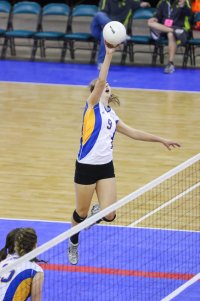
photorockies said:I returned mine due to front focusing issues. Volleyball players' arms and hands were in focus instead of the torso or face. It was a frequent occurrence. It may be something correctable by AFMA but FOCAL isn't working yet with the camera.

 _T6A0112_Haubentaucher by HelmiGloor, on Flickr
 _T6A0092_Graugans by HelmiGloor, on Flickr
 _T6A0040_Reiherente by HelmiGloor, on Flickr