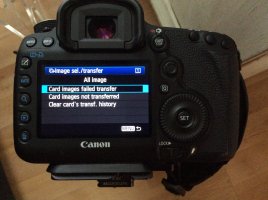
Card images failed transfer error on 5d3

I have a recurring problem in my workflow where i transfer images from cf to sd in camera, but the camera gives an error about card transfer history.

This seems to happen after i format both cards in camera, and after a while it goes away and i can again transfer images in camera.

The trouble is that when i am on location with my ipad, i have no way of reviewing the images on a larger screen. The ipad only takes sd, and i only shoot to cf.

Does anyone know a solution to this problem?
 

Attachments

  • image.jpg
    image.jpg
    1 MB · Views: 234
Probably some bad memory on one of the cards. Do a low level in camera format on the SD card and see if that helps.

Normal In Camera formatting does nothing but write to the FAT table that the files are available to overwrite. The controllers in the card attempt to level the writes by using all the memory cells as equally as possible. That probably results in a attempt to write at a different location after you turn off the camera and try again later. If the new location has good memory cells, it will work until you hit a bad one again.

If you see the issue with multiple SD cards, then I'd suspect a camera issue.

The CF could also be corrupted, so try two different cards, but one at a time so you can isolate one that is bad..
 
Upvote 0
I agree with everything mentioned here, however I came across this item a couple of years ago, but I can't guarantee positive results since I've luckily never had a problem with a card.
I hope it helps.
Ed

https://www.sdcard.org/downloads/formatter_4/
 
Upvote 0
arjay said:
You are in the wrong menu. To "transfer" images from CF to SD you need to use the option "Image Copy" (under PLAY2- [the blue menu])
Image Transfer is for transfering images to a PC.

Right Answer, if you are not using the copy function, see pg 277 of your manual. Since it works sometimes for you, I wonder if you have been using the coppy function on occasion.
 
Upvote 0
I don't go into any menu. I plug the USB cable into the camera and PC then turn on the camera. I go to "my Computer" and open the files. I copy those files to a folder on the Hard Drive. I started doing it this way when I had a card reader fail. Since it seems to be a much faster transfer, I didn't go back to a reader. Plus, if you don't remove a card from the camera, it's less wear and tear on the pins- or worse, a bent pin.
 
Upvote 0
KeithBreazeal said:
I don't go into any menu. I plug the USB cable into the camera and PC then turn on the camera. I go to "my Computer" and open the files. I copy those files to a folder on the Hard Drive. I started doing it this way when I had a card reader fail. Since it seems to be a much faster transfer, I didn't go back to a reader. Plus, if you don't remove a card from the camera, it's less wear and tear on the pins- or worse, a bent pin.

A 5D MK III has space for two cards, a CF and a SD. You can copy images from one card to the other. There is no pc and no usb involved.
 
Upvote 0
procentje20 said:
........transfer images from cf to sd in camera.....

The trouble is that when i am on location with my ipad, i have no way of reviewing the images on a larger screen. The ipad only takes sd, and i only shoot to cf......
At the risk of coming off as an iBasher, use an android tablet with DSLR Controller installed.
There'll then be no need for in camera file juggling, you can view photos stored on the camera directly on the android device's screen and/or copy files individually or in batches onto the android, with an OTG adapter, copy from android to any USB thumb drive, card reader or whatever.
 
Upvote 0
Mt Spokane Photography said:
KeithBreazeal said:
I don't go into any menu. I plug the USB cable into the camera and PC then turn on the camera. I go to "my Computer" and open the files. I copy those files to a folder on the Hard Drive. I started doing it this way when I had a card reader fail. Since it seems to be a much faster transfer, I didn't go back to a reader. Plus, if you don't remove a card from the camera, it's less wear and tear on the pins- or worse, a bent pin.

A 5D MK III has space for two cards, a CF and a SD. You can copy images from one card to the other. There is no pc and no usb involved.

Yes, I misread his issue. I bad.
 
Upvote 0
procentje20 said:
I have a recurring problem in my workflow where i transfer images from cf to sd in camera, but the camera gives an error about card transfer history.

This seems to happen after i format both cards in camera, and after a while it goes away and i can again transfer images in camera.

The trouble is that when i am on location with my ipad, i have no way of reviewing the images on a larger screen. The ipad only takes sd, and i only shoot to cf.

Does anyone know a solution to this problem?

Shoot raw to the CF and jpeg to the SD card. I often do that. It provides a backup and I can quickly get jpeg images to review. Since you have the capability, try it. I use a 64GB SD card, and since jpeg files are smaller, it holds a lot of images.
 
Upvote 0
It may be that MSP has given you the correct info from the manual.
But I just thought of one other idea, are your memory cards the exact same size?
If one is larger than another they can sometimes clash in odd ways even if they aren't full.
I don't have a fancy camera to do that with but seen that with varous types of memory on
computers over the years.
 
Upvote 0
phoenix7 said:
It may be that MSP has given you the correct info from the manual.
But I just thought of one other idea, are your memory cards the exact same size?
If one is larger than another they can sometimes clash in odd ways even if they aren't full.
I don't have a fancy camera to do that with but seen that with varous types of memory on
computers over the years.

I've never seen that issue on a camera and I've had many different Canon and Nikon cameras with two slots where I use different sized cards.

The issue is totally different from internal computer memory which must synch with each other. Its more like having two hard drives to store data on. That is no problem, you can move files back and forth as long as capacities are not reached.
 
Upvote 0
Thanks all, I have some stuff to try.

The cards are indeed different in size, but I don't think that's an issue.

As for the iBashing, I have been leaning towards swapping the iPad for a Samsung because of the remote control options you gain. But it still wont take a CF card directly I believe. A USB connection is also possible with an iPad for image transfer. It is however terribly slow.

The method I use is the one outlined on from page 277 of the manual. I am on the latest firmware. And as for a bad card: I'm in denial ;-) cause that would mean I need to spend big on new cards instead on the wide zoom I'm wanting to buy.

Thanks so far, I'll report back when I A) lose all my images due to a card failure or B) fix this problem like a pro
 
Upvote 0
procentje20 said:
......
As for the iBashing, I have been leaning towards swapping the iPad for a Samsung because of the remote control options you gain. But it still wont take a CF card directly I believe. A USB connection is also possible with an iPad for image transfer. It is however terribly slow......
A brief primer about USB Host and android......

Most somewhat recent android devices support connections via USB Host (also known as USB OTG, On The Go).
OTG connectors are standard USB Micro-B plugs with the normally unused 5th pin connected to ground.
In use, OTG allows many (most or all? dunno) USB devices to connect to an android's Micro-B USB connection and operate (as much as possible) just like they do when connected to a PC's USB port.
Just for grins and the experience, I've connected a USB keyboard and a USB mouse to my androids and they worked just fine even if rather pointless. Tried my xrite color calibrator, it connected and showed up just fine but is a model incompatible with my android software and hardware.
I regularly use my OTG adapter to connect a thumb drive or my camera for file transfers to and from my androids.

OTG connection is also fast and solid when tethering to android with the DSLR Controller app.
I've used the OTG adapter to transfer using a card reader, plug and play.
Here's a google for OTG adapters
https://www.google.com/#safe=off&q=usb%20otg%20adapter

I use a short cable dongle thingy that has a 5th pin configured Micro-B USB male on one end, a standard USB female receptacle on the other.
There are now OTG capable thumb drives readily available on the market that plug and play.

If your iThings support USB Host, you may be good to go for file transferring IF no additional software is needed for Canon connections.
I wrote IF because on WIN 7 and earlier (don't know about WIN 8 ) , Canons don't just plug and play as removable drives as some other brand cameras such as Nikon and Olympus do, drivers that install with programs such as DPP or Lightroom are required. Being an iAvoider, I've no idea how iThings handle connected Canons.

---
Regarding switching to a Samsung tablet, slow down a little bit and spend some quality time comparing specs, specifically screen/display specs.
Not saying I'm Samy averse, I have a Samy phone that I love/hate enough that I want a newer model.
When it came time for a tablet for use specifically as a Canon accessory, I chose an ASUS.
As the market has certainly changed since my purchases, I suggest you do your own research, ASUS may not still be the brand I'd choose for a tab.

B&H and NewEgg are two good places to start researching, good choices for purchasing too.
I especially like browsing NewEgg, on the specifications tab of many product pages is often a link direct to the manufacturer's product page

 
Upvote 0