Firmware: Canon EOS 5D Mark IV 1.02

BigAntTVProductions said:
TWI by Dustin Abbott said:
BigAntTVProductions said:
TWI by Dustin Abbott said:
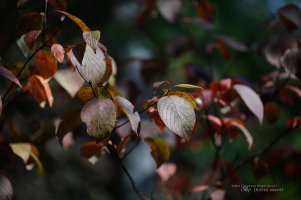
I'm not sure if it was my playing around under the hood to tweak the JPEGs or the firmware update, but they suddenly look a lot better.


Less smoothing and more goodness.


what were the lenses and settings

In general or for these particular shots?

in general sir

Well, lots of lenses from pretty much everyone. I'm using the Fine Detail picture setting, with the Sharpness strength at 7, Fineness at 3, Threshold at 1, and then I've added 1 on Saturation. I have pretty much all of the corrections (NR, etc...) off. End results are now very good.

Here's a few other samples from yesterday (taken with the Tamron 85 VC)
 

Attachments
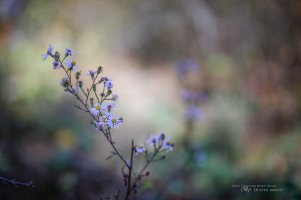
  • 37 Beautiful JPEGs.jpg
    37 Beautiful JPEGs.jpg
    423.4 KB · Views: 300
  • 38 Beautiful JPEGS.jpg
    38 Beautiful JPEGS.jpg
    460.6 KB · Views: 310
Upvote 0
Those shots are great Dustin. I really liked how you're making great reviews and having great shots to prove your experience. You are making me have a man crush on you. No homo.

Haven't logged in much lately as I'm trying to rein in myself from having "academic" discussion on the other threads in these few months. Just wanted to log in to say thanks to Dustin.
 
Upvote 0
arcer said:
Those shots are great Dustin. I really liked how you're making great reviews and having great shots to prove your experience. You are making me have a man crush on you. No homo.

Haven't logged in much lately as I'm trying to rein in myself from having "academic" discussion on the other threads in these few months. Just wanted to log in to say thanks to Dustin.

Thank you...and thanks for the clarification :)
 
Upvote 0
DootsHK said:
Hi everyone,

Not a a breaking news, but I just checked my 5D4, the firmware is already v1.02. The box has a label indicating 20160906, I assume this is the production date.

Apparently this firmware is ready for a few weeks already. Anybody else in the same situation?

Doots

I too already had 1.0.2 installed, on a camera received last week.
 
Upvote 0
TWI by Dustin Abbott said:
BigAntTVProductions said:
TWI by Dustin Abbott said:
BigAntTVProductions said:
TWI by Dustin Abbott said:
I'm not sure if it was my playing around under the hood to tweak the JPEGs or the firmware update, but they suddenly look a lot better.


Less smoothing and more goodness.


what were the lenses and settings

In general or for these particular shots?

in general sir

Well, lots of lenses from pretty much everyone. I'm using the Fine Detail picture setting, with the Sharpness strength at 7, Fineness at 3, Threshold at 1, and then I've added 1 on Saturation. I have pretty much all of the corrections (NR, etc...) off. End results are now very good.

Here's a few other samples from yesterday (taken with the Tamron 85 VC)

THKS SIR I WANTED TOO TRY OUT THE FINE DETAIL SETTINGS ON HS FOOTBALL GAME TONIGHT
BUT THE RAIN STOPPED EVEN THOUGH THERE PLAYING THE GAME JUST DONT FEEL LIKE TESTING OUT THE NEW CAMERA IN THE ELEMENTS YET
 
Upvote 0
TWI by Dustin Abbott said:
I'm not sure if it was my playing around under the hood to tweak the JPEGs or the firmware update, but they suddenly look a lot better.


Less smoothing and more goodness.

Beautiful images Dustin.. They do appear much better then the overly smoothed out ones you shown in your dynamic range video just the other day..
 
Upvote 0
Canon EOS 5D Mark IV with Phottix Odin 1.5

I'm experiencing problems with the E-TTL function of the Phottix ODIN 1.5 system with the new Canon 5D mark IV. All the photos are overexposed (seems flashes fired always at 1/1) in ettl mode. In manual mode it works well.

Anyone as the same problem?
 
Upvote 0
Re: Canon EOS 5D Mark IV with Phottix Odin 1.5

micheleciani said:
I'm experiencing problems with the E-TTL function of the Phottix ODIN 1.5 system with the new Canon 5D mark IV. All the photos are overexposed (seems flashes fired always at 1/1) in ettl mode. In manual mode it works well.

Anyone as the same problem?
Do you have latest firmware?

http://www.phottix.com/media/wysiwyg/Canon-Odin15-v210.zip

If yes I guess you should ask for their support otherwise you can give it a try first.
 
Upvote 0
TWI by Dustin Abbott said:
BigAntTVProductions said:
TWI by Dustin Abbott said:
BigAntTVProductions said:
TWI by Dustin Abbott said:
I'm not sure if it was my playing around under the hood to tweak the JPEGs or the firmware update, but they suddenly look a lot better.


Less smoothing and more goodness.


what were the lenses and settings

In general or for these particular shots?

in general sir

Well, lots of lenses from pretty much everyone. I'm using the Fine Detail picture setting, with the Sharpness strength at 7, Fineness at 3, Threshold at 1, and then I've added 1 on Saturation. I have pretty much all of the corrections (NR, etc...) off. End results are now very good.

Here's a few other samples from yesterday (taken with the Tamron 85 VC)

Dustin, are you using these settings in Picture Style for all of the pictures you are taking with the 5D4? RAW and JPEG?
 
Upvote 0
Hi jalbfb.
I thought it had been established that raws don't have any in camera processing, don't raws only carry tags to show DPP (and possibly some 3rd party software?) what was set in camera, or has that changed with the 5DIV due to some of the new sensor tech?

Cheers, Graham.

jalbfb said:
TWI by Dustin Abbott said:
Well, lots of lenses from pretty much everyone. I'm using the Fine Detail picture setting, with the Sharpness strength at 7, Fineness at 3, Threshold at 1, and then I've added 1 on Saturation. I have pretty much all of the corrections (NR, etc...) off. End results are now very good.

Here's a few other samples from yesterday (taken with the Tamron 85 VC)

Dustin, are you using these settings in Picture Style for all of the pictures you are taking with the 5D4? RAW and JPEG?
 
Upvote 0
Valvebounce said:
Hi jalbfb.
I thought it had been established that raws don't have any in camera processing, don't raws only carry tags to show DPP (and possibly some 3rd party software?) what was set in camera, or has that changed with the 5DIV due to some of the new sensor tech?

Cheers, Graham.

jalbfb said:
TWI by Dustin Abbott said:
Well, lots of lenses from pretty much everyone. I'm using the Fine Detail picture setting, with the Sharpness strength at 7, Fineness at 3, Threshold at 1, and then I've added 1 on Saturation. I have pretty much all of the corrections (NR, etc...) off. End results are now very good.

Here's a few other samples from yesterday (taken with the Tamron 85 VC)

Dustin, are you using these settings in Picture Style for all of the pictures you are taking with the 5D4? RAW and JPEG?

Graham, I thought that if you set your camera for a certain Picture Style that when you import it to say Lr, that "treatment" comes through on the uploaded picture. Am I wrong in my thinking??

Florian
 
Upvote 0
Hi Florian.
I guess we both think the same then I thought this was about slowing the camera down and as (I think) all previous models have appended this information to the raw file I can't see it being the problems hen writing raw and jpeg, but as others have said there is also a jpeg written in to the raw so I guess that is where the delay may be with the new features available on the MK IV.
Hopefully those who know more will clarify this.

Cheers, Graham.

jalbfb said:
Valvebounce said:
Hi jalbfb.
I thought it had been established that raws don't have any in camera processing, don't raws only carry tags to show DPP (and possibly some 3rd party software?) what was set in camera, or has that changed with the 5DIV due to some of the new sensor tech?

Cheers, Graham.

jalbfb said:
TWI by Dustin Abbott said:
Well, lots of lenses from pretty much everyone. I'm using the Fine Detail picture setting, with the Sharpness strength at 7, Fineness at 3, Threshold at 1, and then I've added 1 on Saturation. I have pretty much all of the corrections (NR, etc...) off. End results are now very good.

Here's a few other samples from yesterday (taken with the Tamron 85 VC)

Dustin, are you using these settings in Picture Style for all of the pictures you are taking with the 5D4? RAW and JPEG?

Graham, I thought that if you set your camera for a certain Picture Style that when you import it to say Lr, that "treatment" comes through on the uploaded picture. Am I wrong in my thinking??

Florian
 
Upvote 0
Re: Canon EOS 5D Mark IV with Phottix Odin 1.5

Already installed the latest firmware of the Odin system but nothing. i wrote to Phottix waiting for a reply (i hope)


tron said:
micheleciani said:
I'm experiencing problems with the E-TTL function of the Phottix ODIN 1.5 system with the new Canon 5D mark IV. All the photos are overexposed (seems flashes fired always at 1/1) in ettl mode. In manual mode it works well.

Anyone as the same problem?
Do you have latest firmware?

http://www.phottix.com/media/wysiwyg/Canon-Odin15-v210.zip

If yes I guess you should ask for their support otherwise you can give it a try first.
 
Upvote 0
jalbfb said:
TWI by Dustin Abbott said:
BigAntTVProductions said:
TWI by Dustin Abbott said:
BigAntTVProductions said:
TWI by Dustin Abbott said:
I'm not sure if it was my playing around under the hood to tweak the JPEGs or the firmware update, but they suddenly look a lot better.


Less smoothing and more goodness.


what were the lenses and settings

In general or for these particular shots?

in general sir

Well, lots of lenses from pretty much everyone. I'm using the Fine Detail picture setting, with the Sharpness strength at 7, Fineness at 3, Threshold at 1, and then I've added 1 on Saturation. I have pretty much all of the corrections (NR, etc...) off. End results are now very good.

Here's a few other samples from yesterday (taken with the Tamron 85 VC)

Dustin, are you using these settings in Picture Style for all of the pictures you are taking with the 5D4? RAW and JPEG?

This is now my default setup in the 5D Mark IV.
 
Upvote 0
atlcroc said:
Help. This has nothing to do with this topic. I read the board every day and am trying to start a new post with a question for help and cannot find the new topic option anywhere. How do I start a new post. Thanks.

You need a certain number of posts (as replies) before you can post a new topic. Not sure how many, but it's not too many. Many forums do this as an anti-spam measure.
 
Upvote 0