
lcd display on 6d

Status
Not open for further replies.
hi guys,

was just interested to know, what sort of processing is the canon 6d (or rough equivalent) doing to the photos before it displays it on the lcd display?

i ask because i took a reference photo of a nice sky the other evening, there were some subtle colours that i wanted to remember.

i know i shouldnt rely onthe lcd screen for colours or anything like that but a quick glance never hurts, i remember being happy with what i saw ( just a simple Av setting 100mm f2)

i downloaded the file which was a raw image, which has everything zeroed, so photos need a bit of processing, but the image i got was almost grey compared to what i saw on the lcd screen.and i had to process the raw in lightroom to look like the image from the back of my camera,as it was what i wanted it to look like! which seems totally stupid lol ive attached the files.

just for reference and for comparison id love to know what sort of processing is applied for the lcd output ?

sometimes digital photography is so darn backward lol

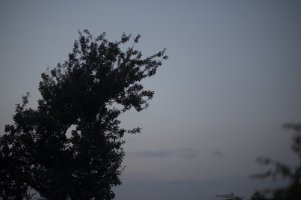
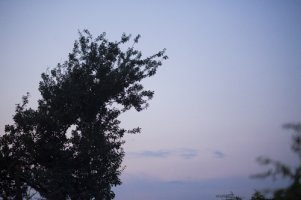
( the first photo is the raw no processing turned into a small jpeg, the second is the procssed image to look like what i saw on back of lcd screen and more what the actual sky looked like )
 

Attachments

  • _MG_2972-2.jpg
    _MG_2972-2.jpg
    113.6 KB · Views: 1,347
  • _MG_2972.jpg
    _MG_2972.jpg
    147.4 KB · Views: 1,404
You just need to get more creative with your editing of the raw file. The lcd image is always going to look brighter and more colorful than a raw image, even if everything is not zeroed as it is first displayed.

If you are only using the Canon software, that might be part of the problem. Lightroom seems to work best...

The whole point of shooting RAW, is you have a lot of color and dynamic range information getting recorded, that you can enhance later, and optimize for the eventual jpeg or 8 bit tiff that gets printed, or else displayed on the web.
 
Upvote 0
CarlTN said:
You just need to get more creative with your editing of the raw file. The lcd image is always going to look brighter and more colorful than a raw image, even if everything is not zeroed as it is first displayed.

If you are only using the Canon software, that might be part of the problem. Lightroom seems to work best...

The whole point of shooting RAW, is you have a lot of color and dynamic range information getting recorded, that you can enhance later, and optimize for the eventual jpeg or 8 bit tiff that gets printed, or else displayed on the web.

yes, i understand what your saying, i think you miss my point, or maybe im not being clear!

i would just like to know what processing is given to the lcd image, which is processed in camera from th eraw image im taking ( i only shoot raw, for the reasons you mentioned, no jpeg )

i want to know simply to help me make decisions in the field, and to help me understand my camera better
 
Upvote 0
I'm not sure how Canon does the LCD preview display but on Nikon's the preview image is a jpeg and not a representation of a flat raw file. I believe thats why it looks more like what you saw when you took the shot. Not sure whether picture style settings comes in to play or not -- try adjusting your picture style from faithful to monochrome and see what happens to your preview. I just verified that the preview image on Canon's are jpeg with picture style applied.
 
Upvote 0
Hey... I think I get what you are asking. I am not sure about the 6D but in my 5d3 I can shoot raw+jpeg. Jpeg is close to what you see on camera lcd screen so you can use it as-is (and keep the raw if you'd like to modify the look and feel)

I'll let the experts chime in.
 
Upvote 0
jimjamesjimmy said:
i would just like to know what processing is given to the lcd image, which is processed in camera from th eraw image im taking ( i only shoot raw, for the reasons you mentioned, no jpeg )

Canon cameras apply one of their "picture styles" to the RAW file before displaying it on screen. There are several different picture styles such as Landscape, Portrait, Neutral, etc., and you can select your preferred one from your camera's main menu in P, M, Tv, Av modes (the same place you change shutter speed, ISO, etc.) You can also create your own picture style and have the camera use that as the default.

Just remember that if you shoot RAW, the picture style doesn't get applied to the RAW file, just the image that gets displayed on the back of your camera screen. If you use Canon Digital Photo Professional to process your RAWs then you can have it automatically set the picture style of the RAW you are processing to the same one that was selected when you took the photograph. This still doesn't modify the actual RAW file, it just automatically processes it with the same style that the camera would have used had it been set to shoot JPG.

If you don't care about the picture styles but you still want the image displayed on the back of the camera to look like the RAW you can set the picture style to neutral.
 
Upvote 0
Wildfire said:
jimjamesjimmy said:
i would just like to know what processing is given to the lcd image, which is processed in camera from th eraw image im taking ( i only shoot raw, for the reasons you mentioned, no jpeg )

Canon cameras apply one of their "picture styles" to the RAW file before displaying it on screen

If you don't care about the picture styles but you still want the image displayed on the back of the camera to look like the RAW you can set the picture style to neutral.

the picture styles have no correlation to the output RAW , but i would love the option of seeing an image more like the raw file in its unprocessed state.

so we are saying the lcd display version of my RAW capture ( i only shoot raw no jpeg) is a small jpeg converted to the picture style settings??
 
Upvote 0
Reason for shooting RAW is to be able to tweak the photo the way you want it to be. Otherwises, RAW looks boring/flat. I usually shoot RAW + JPEG. I review my photos with JPEG, once I have all keepers, all JPEG get deleted. RAW will be imported into Lightroom and start PP.

Try these presets as the base line. With minor tweaks, your photos will look as good as everybody else.

http://vsco.co/film
http://www.slrlounge.com

Best of luck ;)
 
Upvote 0
jimjamesjimmy said:
Wildfire said:
jimjamesjimmy said:
i would just like to know what processing is given to the lcd image, which is processed in camera from th eraw image im taking ( i only shoot raw, for the reasons you mentioned, no jpeg )

Canon cameras apply one of their "picture styles" to the RAW file before displaying it on screen

If you don't care about the picture styles but you still want the image displayed on the back of the camera to look like the RAW you can set the picture style to neutral.

the picture styles have no correlation to the output RAW , but i would love the option of seeing an image more like the raw file in its unprocessed state.

so we are saying the lcd display version of my RAW capture ( i only shoot raw no jpeg) is a small jpeg converted to the picture style settings??
Yes that's right. The histogram is also based on this JPG with picture style applied.
if you want the image on the lcd to be closer to what the raw file is (pretty flat), choose "Faithful" or "Neutral", or create one yourself that has Saturation, Contrast, Sharpness set to their minimums
 
Upvote 0
ahab1372 said:
jimjamesjimmy said:
Wildfire said:
jimjamesjimmy said:
i would just like to know what processing is given to the lcd image, which is processed in camera from th eraw image im taking ( i only shoot raw, for the reasons you mentioned, no jpeg )

Canon cameras apply one of their "picture styles" to the RAW file before displaying it on screen

If you don't care about the picture styles but you still want the image displayed on the back of the camera to look like the RAW you can set the picture style to neutral.

the picture styles have no correlation to the output RAW , but i would love the option of seeing an image more like the raw file in its unprocessed state.

so we are saying the lcd display version of my RAW capture ( i only shoot raw no jpeg) is a small jpeg converted to the picture style settings??
Yes that's right. The histogram is also based on this JPG with picture style applied.
if you want the image on the lcd to be closer to what the raw file is (pretty flat), choose "Faithful" or "Neutral", or create one yourself that has Saturation, Contrast, Sharpness set to their minimums

yes i have it set to neutral, but this does not change the lcd image to match the raw image, it just effects its jpeg image on the lcd, which is useless as i dont shoot jpeg?

what i saying is if im only shooting raw and the lcd image has no relation to the raw image, whats the point of the lcd image? except maybe for composition?
 
Upvote 0
jimjamesjimmy said:
CarlTN said:
You just need to get more creative with your editing of the raw file. The lcd image is always going to look brighter and more colorful than a raw image, even if everything is not zeroed as it is first displayed.

If you are only using the Canon software, that might be part of the problem. Lightroom seems to work best...

The whole point of shooting RAW, is you have a lot of color and dynamic range information getting recorded, that you can enhance later, and optimize for the eventual jpeg or 8 bit tiff that gets printed, or else displayed on the web.

yes, i understand what your saying, i think you miss my point, or maybe im not being clear!

i would just like to know what processing is given to the lcd image, which is processed in camera from th eraw image im taking ( i only shoot raw, for the reasons you mentioned, no jpeg )

i want to know simply to help me make decisions in the field, and to help me understand my camera better

I understand what you are saying also, but you missed a subtle hint of mine. Frankly, the LCD screen itself on the camera, is not meant to display an accurate representation (regardless of what processing is applied to the RAW file for display). It is meant to display a color and contrast boosted representation, because marketing told them that's what people like to see when they take a picture. This is likely due to the lcd's firmware and/or the nature of the lcd itself, and very little to do with any jpeg conversion the camera performs on the RAW file, in camera.

Basically what I'm saying is, the camera's LCD is far from being "calibrated" accurately. It's small, it has limited resolution, it is unsophisticated...compared to a large dedicated monitor for editing on a desktop. It also has a sluggish refresh rate, and displays motion artifacts in video that aren't in the file...from what I can tell.
 
Upvote 0
jimjamesjimmy said:
ahab1372 said:
jimjamesjimmy said:
Wildfire said:
jimjamesjimmy said:
i would just like to know what processing is given to the lcd image, which is processed in camera from th eraw image im taking ( i only shoot raw, for the reasons you mentioned, no jpeg )

Canon cameras apply one of their "picture styles" to the RAW file before displaying it on screen

If you don't care about the picture styles but you still want the image displayed on the back of the camera to look like the RAW you can set the picture style to neutral.

the picture styles have no correlation to the output RAW , but i would love the option of seeing an image more like the raw file in its unprocessed state.

so we are saying the lcd display version of my RAW capture ( i only shoot raw no jpeg) is a small jpeg converted to the picture style settings??
Yes that's right. The histogram is also based on this JPG with picture style applied.
if you want the image on the lcd to be closer to what the raw file is (pretty flat), choose "Faithful" or "Neutral", or create one yourself that has Saturation, Contrast, Sharpness set to their minimums

yes i have it set to neutral, but this does not change the lcd image to match the raw image, it just effects its jpeg image on the lcd, which is useless as i dont shoot jpeg?

what i saying is if im only shooting raw and the lcd image has no relation to the raw image, whats the point of the lcd image? except maybe for composition?
Even if you shoot raw, the camera always creates a jpg preview image (not in full resolution), and that is displayed on the lcd. Picture style Neutral or Faithful will produce a preview on the lcd which os closer to the RAW, but it won't be exactly what you see on your computer when viewing the RAW file.

And yes, it is for composition, and reviewing shots you have taken. You can also use it to adjust exposure and manual focus. It might not be perfect, but better than nothing. It does have a relation to the raw image, just don't expect it to be what you will see on your computer after developing it, sometimes with adjustments specific for one particular image.
 
Upvote 0
jimjamesjimmy said:
hi guys,

was just interested to know, what sort of processing is the canon 6d (or rough equivalent) doing to the photos before it displays it on the lcd display?

i ask because i took a reference photo of a nice sky the other evening, there were some subtle colours that i wanted to remember.

i know i shouldnt rely onthe lcd screen for colours or anything like that but a quick glance never hurts, i remember being happy with what i saw ( just a simple Av setting 100mm f2)

i downloaded the file which was a raw image, which has everything zeroed, so photos need a bit of processing, but the image i got was almost grey compared to what i saw on the lcd screen.and i had to process the raw in lightroom to look like the image from the back of my camera,as it was what i wanted it to look like! which seems totally stupid lol ive attached the files.

just for reference and for comparison id love to know what sort of processing is applied for the lcd output ?

sometimes digital photography is so darn backward lol

( the first photo is the raw no processing turned into a small jpeg, the second is the procssed image to look like what i saw on back of lcd screen and more what the actual sky looked like )
I've had a similar problem with my 6D. The images I take look dull when imported into Lightroom, and I've never had that issue with my 7D using the same processes. It's to the point I've been questioning the accuracy of the light meter in the camera.
 
Upvote 0
CTJohn said:
jimjamesjimmy said:
hi guys,

was just interested to know, what sort of processing is the canon 6d (or rough equivalent) doing to the photos before it displays it on the lcd display?

i ask because i took a reference photo of a nice sky the other evening, there were some subtle colours that i wanted to remember.

i know i shouldnt rely onthe lcd screen for colours or anything like that but a quick glance never hurts, i remember being happy with what i saw ( just a simple Av setting 100mm f2)

i downloaded the file which was a raw image, which has everything zeroed, so photos need a bit of processing, but the image i got was almost grey compared to what i saw on the lcd screen.and i had to process the raw in lightroom to look like the image from the back of my camera,as it was what i wanted it to look like! which seems totally stupid lol ive attached the files.

just for reference and for comparison id love to know what sort of processing is applied for the lcd output ?

sometimes digital photography is so darn backward lol

( the first photo is the raw no processing turned into a small jpeg, the second is the procssed image to look like what i saw on back of lcd screen and more what the actual sky looked like )
I've had a similar problem with my 6D. The images I take look dull when imported into Lightroom, and I've never had that issue with my 7D using the same processes. It's to the point I've been questioning the accuracy of the light meter in the camera.

Happens with me all the time. I shoot RAW and the images look flat when imported into LR. Can't really say for JPEG.
 
Upvote 0
for me the wider issue is also that if when i import my raw files into lightroom, what looked initially acceptable (good histogram no clipping, not much blur) mostly gets zeroed out in the raw converter into a really nasty looking 'exposure' what is the point of tring to expose and get things right in camera, if i then have to go and fiddle around to get it looking like what i thought id exposed for!

i can understand why phtography rules must be such a pain for proffesional photographers now if the initial raw photo looks dull as muck before you tweak it back to something acceptable!
 
Upvote 0
One piece of advice: Always judge exposure using histogram, the R-G-B one.

You understand that digital photos are just bunch of numbers stored in memory right? As long as you recorded the entire scene values within sensor's dynamic range (i.e. not 'blow it'), what appears on screen doesn't matter, a beautiful scene can always be recreated using various mathematical mojos.
 
Upvote 0
jimjamesjimmy said:
for me the wider issue is also that if when i import my raw files into lightroom, what looked initially acceptable (good histogram no clipping, not much blur) mostly gets zeroed out in the raw converter into a really nasty looking 'exposure' what is the point of tring to expose and get things right in camera, if i then have to go and fiddle around to get it looking like what i thought id exposed for!

i can understand why phtography rules must be such a pain for proffesional photographers now if the initial raw photo looks dull as muck before you tweak it back to something acceptable!

If you set Lightroom to open the file with all sliders at zero, of course it is going to look dull on the display. Mine looks relatively dull even though it opens to Lightroom's default auto correction, rather than "zero". I am using Lightroom 4. If you are using 5, I've not tried it. It's possible version 5 performs an even more dull, flattened RAW conversion.

There is a form of artistic control that is allowed and encouraged with digital photography. This should be embraced, not avoided, or thought of as "too subjective to portray reality".

If you don't want to do any post processing, just shoot the pictures as jpegs, and keep experimenting with the camera's picture styles until you get something you think you can live with most of the time. Otherwise, just learn to edit, and make your own develop profiles for Lightroom. It's kind of fun after a while.

And again, the light meter on pretty much all digital cameras I have ever used, becomes less accurate as the available light decreases. This is even true of the beloved 5D3 and 1DX. They all tend to give you an underexposure if you look at the RGB curves. Also as the light gets very low or lacks contrast, the "auto white balance" becomes a whole lot less accurate...

One other variable, is the type of metering you choose for a particular shot. "Evaluative", "center weighted average"..."spot"...etc.
 
Upvote 0
jimjamesjimmy said:
but i would love the option of seeing an image more like the raw file in its unprocessed state.

I am not sure I understand the advantage of displaying on the LCD, a RAW file unprocessed. What would you see?

An unprocessed RAW file is not an image file. It won't look like anything, nor can it be displayed. For a RAW file to be displayed as any form of image, it has to have "some" processing. Whether a lot or a little depends on the machine.

As other's have posted, Canon cameras allow the user to modify, to some extent, the processing the camera will do in order to display an image on the LCD. This is a JPEG. If none of the modifications native to the camera are to your liking, I am assuming there may be third party modifications, but even they will take the RAW data and provide some level of processing.
 
Upvote 0
Status
Not open for further replies.