Lens Filters etc.

Status
Not open for further replies.
Good Morning,

I have the following lenses for my 60D:

Tokinon 17-55 (2.8)
Canon 50 (1.8)
Sigma 85 (1.4)

I was curious on a few things (i've used google but haven't found a centralized easy read on these questions):

1. What is the main purpose of filters etc. for lenses
2. Will adding a filter, etc., help bring clarity/sharpness to my focused images in video mode?
3. How best should they be applied (indoor vs. outdoor)

Best,

Jason
 
With a dSLR, only 4 types of filters are useful (not counting special effects things like starburst filters):

  • UV/clear - Protection of the front element (there are many debates on the utility of this, and regardless of filter, you should use a hood). Personally, I have B+W MRC UV filters on almost all my lenses (except the 40/2.8 pancake)
  • Circular polarizer - increase saturation, reduce reflections
  • Neutral density - slow shutter speeds on bright days (moving water, etc.), shooting fast primes wide open outdoors for portraits
  • Grad ND - controlling sky vs. ground exposure, these should be the rectangular ones, not screw-in circular filters

Cheap filters will reduce IQ, not improve it. The effects of CPLs and NDs can't be replicated in post, grad ND's maybe with HDR but it's not the same effect.
 
Upvote 0
I dunno, does diffusion count as a "special effects filter?"

I think most filters on the market are conceivably useful, in that being able to interact with them during capture means that you will make a more appropriate capture rather than just imagine what you're going to do to the image when you get it into Photoshop. Say Antique Suede or Skintone Enhancer or yellow filters in live view monochrome mode...these are going to affect how you perceive your composition and will do so in a way digital ones won't always handle the same way.

For grad filters, going with 4x4 format (via e.g. the Lee 82mm WA adapter) or Cokin P system etc. will allow you free sliding of the gradient point for your composition, as opposed to screw-ins. Both screw-ins and 4x4 are a bit fiddly to deal with changing in practice. I am a believer in using decent UV filters on lenses by default for safety though I don't hesitate to pull them off if there is unwanted flare etc. I am a skeptic when people insist you have to spend a lot of money to get decent filters...there are certainly bad ones but there are also very good bargains I'd challenge anyone to identify damage from blind.
 
Upvote 0
neuroanatomist said:
With a dSLR, only 4 types of filters are useful (not counting special effects things like starburst filters):

  • UV/clear - Protection of the front element (there are many debates on the utility of this, and regardless of filter, you should use a hood). Personally, I have B+W MRC UV filters on almost all my lenses (except the 40/2.8 pancake)
  • Circular polarizer - increase saturation, reduce reflections
  • Neutral density - slow shutter speeds on bright days (moving water, etc.), shooting fast primes wide open outdoors for portraits
  • Grad ND - controlling sky vs. ground exposure, these should be the rectangular ones, not screw-in circular filters

Cheap filters will reduce IQ, not improve it. The effects of CPLs and NDs can't be replicated in post, grad ND's maybe with HDR but it's not the same effect.

+1. Especially on the UV filter issue. Use B&W filters and leave em on. Shoot and don't worry about your front element.
 
Upvote 0
neuroanatomist said:
With a dSLR, only 4 types of filters are useful (not counting special effects things like starburst filters):

  • UV/clear - Protection of the front element (there are many debates on the utility of this, and regardless of filter, you should use a hood). Personally, I have B+W MRC UV filters on almost all my lenses (except the 40/2.8 pancake)
  • Circular polarizer - increase saturation, reduce reflections
  • Neutral density - slow shutter speeds on bright days (moving water, etc.), shooting fast primes wide open outdoors for portraits
  • Grad ND - controlling sky vs. ground exposure, these should be the rectangular ones, not screw-in circular filters

Cheap filters will reduce IQ, not improve it. The effects of CPLs and NDs can't be replicated in post, grad ND's maybe with HDR but it's not the same effect.

I am a bit puzzled.. I have UV protection filters on all my lenses for protection, and Circular ND, and CPL. It is the latter where I am now confused. I thought that the effects you get using a CPL could all be replicated in pp if you shoot in RAW (except for reflections, unless you are very skilled in photoshop). I have mainly used it for for reflections, although I like the saturation they give.
 
Upvote 0
charlesa said:
You cannot replicate a polarizer in Photoshop. GND yes, CPL, no.

Ok? Why? Is it because the informaton on the RAW file is insuffisient, thus not giving you the range to tweak in pp? I thought that you could alter the type of saturation through masking afterwards. If this is right, and I am not suggesting that you and Neuro are wrong, means that I will have to get a CPL for all my lenses, before I take a plunge into Lee.
 
Upvote 0
Quasimodo said:
charlesa said:
You cannot replicate a polarizer in Photoshop. GND yes, CPL, no.

Ok? Why? Is it because the informaton on the RAW file is insuffisient, thus not giving you the range to tweak in pp? I thought that you could alter the type of saturation through masking afterwards. If this is right, and I am not suggesting that you and Neuro are wrong, means that I will have to get a CPL for all my lenses, before I take a plunge into Lee.

It cannot be replicated in PS because the way the filter works.

http://en.wikipedia.org/wiki/Polarizing_filter_(photography)
 
Upvote 0
Quasimodo said:
charlesa said:
You cannot replicate a polarizer in Photoshop. GND yes, CPL, no.

Ok? Why? Is it because the informaton on the RAW file is insuffisient, thus not giving you the range to tweak in pp? I thought that you could alter the type of saturation through masking afterwards. If this is right, and I am not suggesting that you and Neuro are wrong, means that I will have to get a CPL for all my lenses, before I take a plunge into Lee.

When you boost saturation in Photoshop, you can introduce noise, artifacts, and other funky undesired effects. If you do it via physical filter, the saturation is real and looks better.I guess its kinda like digital zoom vs optical zoom. If you "zoom" digitally your really just making things worse. The only way to get a good result is to make the modification before the capture.
 
Upvote 0
Tcapp said:
Quasimodo said:
charlesa said:
You cannot replicate a polarizer in Photoshop. GND yes, CPL, no.

Ok? Why? Is it because the informaton on the RAW file is insuffisient, thus not giving you the range to tweak in pp? I thought that you could alter the type of saturation through masking afterwards. If this is right, and I am not suggesting that you and Neuro are wrong, means that I will have to get a CPL for all my lenses, before I take a plunge into Lee.

When you boost saturation in Photoshop, you can introduce noise, artifacts, and other funky undesired effects. If you do it via physical filter, the saturation is real and looks better.I guess its kinda like digital zoom vs optical zoom. If you "zoom" digitally your really just making things worse. The only way to get a good result is to make the modification before the capture.

Thank you. That makes a lot of sense and a good comparison to the digital vs. the optical zoom:)
 
Upvote 0
Quasimodo said:
charlesa said:
You cannot replicate a polarizer in Photoshop. GND yes, CPL, no.

Ok? Why? Is it because the informaton on the RAW file is insuffisient, thus not giving you the range to tweak in pp? I thought that you could alter the type of saturation through masking afterwards. If this is right, and I am not suggesting that you and Neuro are wrong, means that I will have to get a CPL for all my lenses, before I take a plunge into Lee.

I have B+W CPL's for my lenses, and Lee for the Big Stopper, grads, etc.
 
Upvote 0
jasonmillard81 said:
I was curious on a few things (i've used google but haven't found a centralized easy read on these questions):

1. What is the main purpose of filters etc. for lenses
2. Will adding a filter, etc., help bring clarity/sharpness to my focused images in video mode?
3. How best should they be applied (indoor vs. outdoor)

Hi Jason,

Here's a couple of helpful links:

http://www.redbubble.com/people/peterh111/journal/4421304-the-ultimate-guide-to-neutral-density-filters

http://www.cambridgeincolour.com/tutorials/polarizing-filters.htm

Rich
 
Upvote 0
couple of thoughts on filters


1. I'm currently in the "naked" camp. I used to put the best B&W UV filters on my lenses, especially on those non-Ls that are not sealed. Then I realized that in 30 years not one mishap was avoided with that practice. Recently I did an experiment showing an increase in flare due to the addition of the filter (on my 17-55, which is flare-prone to begin with). So took the UV off and shoot "naked" now whenever possible. now the only filter on my 17-55 is a slim B&W circular polarizer, of course only when needed. my lenses all have hoods -- even my 10-22. that provides the protection I personally need.

I've got a couple of primo B&W UV filters 72mm that I don't use anymore and would be willing to sell :-)

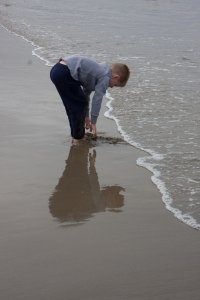
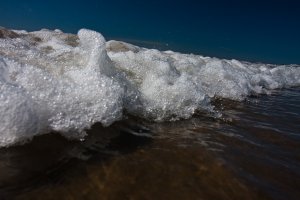
2. yes, you can make minor PP corrections to darken the sky, with all the hazards thereunto appertaining, but what you cannot do in post is remove reflections from water or other reflecting surfaces like airplanes, windows etc. here the polarizer is just fantastic - remember that reflected light is polarized light. So you're at the beach for example -- you can remove that reflection coming off of the water and get nice "depth".

here's a couple of examples. in the first, my objective was to capture the boy's reflection, so polarizer is off. in the second, polarizer is on because I wanted to capture the depth of color in the incoming surf. the dark sky was a bonus but not my primary objective. Even the color of the underlying sand is evident, something that would be impossible without the polarizer. FYI that one is at 17mm (1.6x) just a few inches from the incoming wave. I had to act fast :-)
 

Attachments

  • IMG_5164.jpg
    IMG_5164.jpg
    914.3 KB · Views: 707
  • IMG_5476.jpg
    IMG_5476.jpg
    875.1 KB · Views: 658
Upvote 0
dlleno said:
... I realized that in 30 years not one mishap was avoided with that practice. Recently I did an experiment showing an increase in flare due to the addition of the filter

You're lucky. I had a 77mm UV on a 100-400 badly scratched by a branch while hiking on the woods (hood was on), and while my MP-E 65 filter hasn't been scratched yet, I shove the lens into bushes often enough that it will be at some point.

I, too, have tested flare (on a 24-105 and 70-200 II), and as you found, it's increased a bit in backlit shots. But unlike you, I'd have been looking at a front element replacement instead of a new 77mm filter.
 
Upvote 0
Im too poor to not use UV filters. My basic bunch of gear consists of some of my most prized possesions. It made me sad when my 45 dollar 72mm HOYA filter got scratched, but i was sure glad it was there. I had my camera bag over packed and unorganized one time and my wired remote release popped a lens cap off my 28mm lens and the filter was rubbing against the remote bounching around down the frost heaved roads. The filter was damaged pretty bad. I do take filters off now and then, like when I shoot night shots and the moon or a light is off to the side of the frame, but then im on a tri-pod, and hooded, so im pretty safejust my .002(yes two tenths of a cent)
 
Upvote 0
The_Arsonist said:
I have a $30 77mm UV filter that I still can't get the mustard and water spots off of. Those water spots and mustard would be stuck on my $700 17-55 if I had not had the filter on. That said, I have been shooting without the filter on, unless I anticipate a mess headed my way in a shot

How much was it to put the Katzeye focusing screen in your 50d? Id like a little info and your personal opinion if you dont mind:-)
 
Upvote 0
Ryan708 said:
How much was it to put the Katzeye focusing screen in your 50d? Id like a little info and your personal opinion if you dont mind:-)
About $115 shipped. Not hard to put in, and I really like it. Being able to see the actual DOF of faster lenses is the biggest advantage. If I had to do it again, I'd probably skip the split prism and just have the microprisms. I don't find the split prism very useful
 
Upvote 0
Tcapp said:
Quasimodo said:
charlesa said:
You cannot replicate a polarizer in Photoshop. GND yes, CPL, no.

Ok? Why? Is it because the informaton on the RAW file is insuffisient, thus not giving you the range to tweak in pp? I thought that you could alter the type of saturation through masking afterwards. If this is right, and I am not suggesting that you and Neuro are wrong, means that I will have to get a CPL for all my lenses, before I take a plunge into Lee.

When you boost saturation in Photoshop, you can introduce noise, artifacts, and other funky undesired effects. If you do it via physical filter, the saturation is real and looks better.I guess its kinda like digital zoom vs optical zoom. If you "zoom" digitally your really just making things worse. The only way to get a good result is to make the modification before the capture.
Also, reducing unwanted reflections increases detail in certain subjects (such as rocks and leaves), that can't be recovered in PP. More than amy other filter, a CPL is the one that can't be replicated in PP. Bear in mind though, that they work best when the light source is at 90 degrees, so if the sun is directly in front or behind, then they will have little or no effect, unless you also have water or other shiny surfaces coming into play. While to some degree, the effects of ND grads can be replicated in PP, that only goes so far, if part of the image is too blown, then no amount of recovery will recover it, so then ND grads also become vital and can't be reporduced. While HDR will recover detail, they often don't look natural, without a lot of care and some scenes (such as those containing high contrast transitions and snow) really don't work with HDR.
 
Upvote 0
Status
Not open for further replies.