
As a hobbyist, I am almost ready for digital, ie the the 6D, after patiently waiting for Velvia-like results from digital. However, I note that despite Ken Rockwell saying that the 6D, and 5D3, can finally crank out fully saturated natural colors, I then read that 5D3 shots have needed 'Perfectly Clear' software to tidy up/corect/improve, color, contrast, etc etc etc. Does anybody have a strong opinion on this, before I start-up. How come Canon EOS in 2013 can't do this, and that I would need to buy software to do so. What I like about Velvia,, 35mm and MF, get evrything right, take the photo ,and you have it all. Unfortunately there is no stock nor processing here I now live. I really dont want to fiddle with any after-shooting processes. (Before calling Rockwell a moron, as many have, note that he only reviews gear he uses and paid for in full, or gear he plans to use/buy. And, that Ken is a scientist/engineer who conceived the world’s first dedicated digital colorspace converter chip, the TMC2272, back in 1990 when he worked at TRW LSI Products. He’s been working with the matrix math, hardware and software that does this for decades. He also coined the word “gigacolors,” for use with 36-bit and 48-bit color data. TRW. He is a pro photogarpher, see his velvia 5x4s.
You are using an out of date browser. It may not display this or other websites correctly.
You should upgrade or use an alternative browser.
You should upgrade or use an alternative browser.
Picture quality questions 6D.
- Thread starter ThomasT
- Start date
- Status
- Not open for further replies.
L
Loswr
Guest
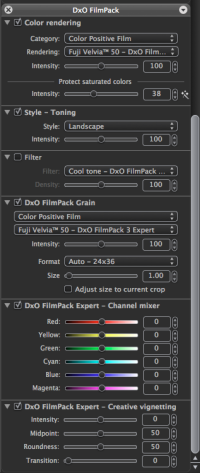
Digital is not film. DxO has Velvia 50 as part of their Film Pack, it's decent (but it's not Velvia). But if you can't get processing done, you either go digital or stop taking pictures, so it becomes pretty simple.
Frankly, the image quality of dSLR images far exceeds that of film, but there are filters that can fix that. Also, you can create a custom picture style with boosted saturation, if that's your thing.
As for KR, he's a marketeer, nothing more. He's all about driving web traffic and ad revenue, and will spew anything to that end. Being a scientist/engineer doesn't preclude idiocy. :
Frankly, the image quality of dSLR images far exceeds that of film, but there are filters that can fix that. Also, you can create a custom picture style with boosted saturation, if that's your thing.
As for KR, he's a marketeer, nothing more. He's all about driving web traffic and ad revenue, and will spew anything to that end. Being a scientist/engineer doesn't preclude idiocy. :
Upvote
0

AdamJ said:My instinct is to advise against software that claims automatically to correct 12 parameters with one click. That's not the kind of correction I would want. Also, the 'before' and 'after' examples on their website look simulated to me, which sets alarm bells ringing.
The parameters it corrects are all image quality flaws they are consistent from photo to photo.
Digital does far exceed the quality of film. Software only makes digital better and is one of the greatest reasons why it's so good. I would recommend catching up to the future and learning how to at least use Lightroom.
Upvote
0

Digitial just looks cleaner/shaper than film. I think this will never change. Go digital for convienience and shoot film whenever u want that typical "film look".
If you dont want to post process your photos its like giving away 50% of what you could achieve. Digital was meant to include post processing for getting the results u want.
In film days you had to choose a certain film to get the look u wanted, digital you just do it all yourself with post processing which also gives u the possibility to try different looks on a photo which isnt possible with film.
Its not that hard also. You can create a preset (i.e. Velvia like was u want) which is applied automatically on importing your files in case u want to.
Digital has a lot to offer. I shoot film and digital cuz i just prefer film B/W.
I recommend Adobe Lightroom. There also also commercial plugins available simulating the "film look" of certain films.
If you dont want to post process your photos its like giving away 50% of what you could achieve. Digital was meant to include post processing for getting the results u want.
In film days you had to choose a certain film to get the look u wanted, digital you just do it all yourself with post processing which also gives u the possibility to try different looks on a photo which isnt possible with film.
Its not that hard also. You can create a preset (i.e. Velvia like was u want) which is applied automatically on importing your files in case u want to.
Digital has a lot to offer. I shoot film and digital cuz i just prefer film B/W.
I recommend Adobe Lightroom. There also also commercial plugins available simulating the "film look" of certain films.
Upvote
0

I waited until 2009 to join the digital photography world and once I did, I've never looked back. Yes, film may have a different look, but unless you invested in a darkroom, you pretty much only got one look--the one that came from the print lab. And, until you got your pictures back, you were never 100% certain about what you had actually captured on film. Digital allows for so many options and, as the other posters have mentioned, many of those looks can be achieved by adjusting your in-camera settings. I love my 6D. But, since you seem uncertain, why don't you rent one and play with the settings? That will tell you all you need to know.
Upvote
0
A
AdamJ
Guest
Radiating said:AdamJ said:My instinct is to advise against software that claims automatically to correct 12 parameters with one click. That's not the kind of correction I would want. Also, the 'before' and 'after' examples on their website look simulated to me, which sets alarm bells ringing.
The parameters it corrects are all image quality flaws they are consistent from photo to photo.
Digital does far exceed the quality of film. Software only makes digital better and is one of the greatest reasons why it's so good. I would recommend catching up to the future and learning how to at least use Lightroom.
I can't imagine many self-respecting photographers wanting 12 image parameters (not all of them necessarily flaws) all changed automatically. It's no good for anyone wanting control over post-processing.
Upvote
0
L
Loswr
Guest
AdamJ said:I can't imagine many self-respecting photographers wanting 12 image parameters (not all of them necessarily flaws) all changed automatically. It's no good for anyone wanting control over post-processing.
You seem to be implying the user has no control over the process, which certainly isn't the case. Sure, there are default presets, as with just about any similar software. You can modify any or all of the parameters on a per-image basis, create your own presets, etc.
Upvote
0
C
Canon-F1
Guest
ThomasT said:As a hobbyist, I am almost ready for digital, ie the the 6D, after patiently waiting for Velvia-like results from digital. However, I note that despite Ken Rockwell saying
you want to be taken serious.. don´t mention KR in a discussion!
Upvote
0

Just as a sidenote, if you were planning on getting an ultra-high resolution digital medium format back, methinks it'd be easier to tear your hair out in advance. Here's what Joseph Holmes had to go through in order to get the quality levels he expected: http://www.josephholmes.com/news-medformatprecision.html
(skip to the end for the jaw-dropping results though
(skip to the end for the jaw-dropping results though
Upvote
0

You will have to do some postprocessing for this, but it can be VERY easy with Alien Skin Exposure 4. Just choose one of the presets and there you go. They offer a very big list of presets (analog look).
Upvote
0
You can get "Velvia" like results in a jpeg strait out of the camera on a digital SLR. But I don't recommend trying.
It involves getting the "picture style", white balance, exposure, etc. exactly right at capture time. It could be done with a lot of trial & error if one were patient.
But IMHO the main creative advantage of digital photography is being able to post-process so that you can concentrate on getting a well-exposed sharp RAW image while you're shooting & deal with the details later, just as one needed learn to work in a chemical darkroom in order to really be able to get your images the way you want them. You'll need to bite the bullet & get Digital Asset Management software like Adobe Lightroom 4, Phase One Capture One, or several others out there (those are the most popular among professionals though). You can even shoot tethered from your computer & see what your camera's sensor is seeing (the 6D even does this over wifi, if you have plenty of batteries on hand.
A great website for learning digital photography techniques is Luminous Landscape. I suggest reading Michael's article on how digital camera exposure works & what it means for your photos.
My experience with Lightroom (can't speak for C1) is that if you learn & understand the concepts that its tools manipulate, you can do far better than just "Velvia". It gives you the ability to really tailor the image to the subject matter in ways that could never have been done in a chemical darkroom.
If you're worried about the time that post-prod takes, make your most commonly used settings into presets & apply them in groups; you can really plow through piles of images in a hurry. Load 'em up, sort 'em out (& delete rejects to free up space), apply presets to the keepers in batches, look 'em over & tweak the best ones, publish to pretty much any web or print service you like (there are plenty of plugins out there), and yer done. Once you master digital asset management, you might look into getting yourself a pro-grade inkjet printer if you have more than an occasional need for prints (especially large ones).
Personally, having recently moved up from my trusty old 40D to a 6D, I can say that it's really pushed me to rediscover my love for photography, as *there just aren't any situations it can't handle* (within reason), and with the 40mm pancake it really becomes a "throw it in your bag & take it with you everywhere" camera.
It involves getting the "picture style", white balance, exposure, etc. exactly right at capture time. It could be done with a lot of trial & error if one were patient.
But IMHO the main creative advantage of digital photography is being able to post-process so that you can concentrate on getting a well-exposed sharp RAW image while you're shooting & deal with the details later, just as one needed learn to work in a chemical darkroom in order to really be able to get your images the way you want them. You'll need to bite the bullet & get Digital Asset Management software like Adobe Lightroom 4, Phase One Capture One, or several others out there (those are the most popular among professionals though). You can even shoot tethered from your computer & see what your camera's sensor is seeing (the 6D even does this over wifi, if you have plenty of batteries on hand
.A great website for learning digital photography techniques is Luminous Landscape. I suggest reading Michael's article on how digital camera exposure works & what it means for your photos.
My experience with Lightroom (can't speak for C1) is that if you learn & understand the concepts that its tools manipulate, you can do far better than just "Velvia". It gives you the ability to really tailor the image to the subject matter in ways that could never have been done in a chemical darkroom.
If you're worried about the time that post-prod takes, make your most commonly used settings into presets & apply them in groups; you can really plow through piles of images in a hurry. Load 'em up, sort 'em out (& delete rejects to free up space), apply presets to the keepers in batches, look 'em over & tweak the best ones, publish to pretty much any web or print service you like (there are plenty of plugins out there), and yer done. Once you master digital asset management, you might look into getting yourself a pro-grade inkjet printer if you have more than an occasional need for prints (especially large ones).
Personally, having recently moved up from my trusty old 40D to a 6D, I can say that it's really pushed me to rediscover my love for photography, as *there just aren't any situations it can't handle* (within reason), and with the 40mm pancake it really becomes a "throw it in your bag & take it with you everywhere" camera.
Upvote
0
A
AdamJ
Guest
neuroanatomist said:AdamJ said:I can't imagine many self-respecting photographers wanting 12 image parameters (not all of them necessarily flaws) all changed automatically. It's no good for anyone wanting control over post-processing.
You seem to be implying the user has no control over the process, which certainly isn't the case. Sure, there are default presets, as with just about any similar software. You can modify any or all of the parameters on a per-image basis, create your own presets, etc.
If that's right, it isn't at all obvious from their website.
Upvote
0
L
Loswr
Guest
AdamJ said:neuroanatomist said:AdamJ said:I can't imagine many self-respecting photographers wanting 12 image parameters (not all of them necessarily flaws) all changed automatically. It's no good for anyone wanting control over post-processing.
You seem to be implying the user has no control over the process, which certainly isn't the case. Sure, there are default presets, as with just about any similar software. You can modify any or all of the parameters on a per-image basis, create your own presets, etc.
If that's right, it isn't at all obvious from their website.
Lots of options. This is just the FilmPack plugin, not the myriad of settings in DxO Optics Pro.
Attachments
Upvote
0
L
Loswr
Guest
AdamJ said:I think we're at cross purposes here, neuro. I was talking about the Perfect Clear software referenced by the OP.
My bad, sorry! I do agree - I'd stay away from a 'one button' image editor. Reminds me of iPhoto's 'enhance' function - a black box with a sparkly-rainbow-magic-wand icon.

Upvote
0
- Status
- Not open for further replies.
Similar threads

- Replies
- 7
- Views
- 6K

- Replies
- 34
- Views
- 11K


- Replies
- 7
- Views
- 8K
D