Tamron Teases New Lenses

ecka said:
pknight said:
ecka said:
No lens is perfect, but I just really don't want to pay $600 for it :) because I know how much time it takes to fight those CA and fringing while editing.

Really? It takes 2 or 3 clicks in Lightroom to remove all CA and fringing in any photo. You might have to nudge a slider if it is really bad. These problems are non-issues for me any more, simply because they are so simple to deal with .

That only works for slight CA and PF, not for OMG ones from Tamron :). And if there's something purple in the frame other than PF, you can't do any easy fixing without affecting it. Even the A-Brush at 100 defringe doesn't cut it.
Did you actually try it, or are you just assuming?

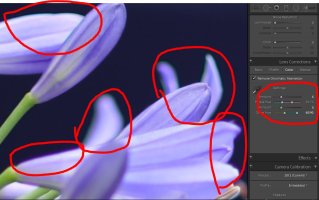
He is actually wrong. It doesn't take 2-3 clicks. It takes zero. I have CA removal settings in LR that are automatically applied to the images upon opening them, which leave zero CA, green or purple. Attached is a crop of the exact LR parameters I use. Please note the Green slider is set to 40/90 (not the default 40/60).

I can show images of before (with CA) and after should you wish.
 

Attachments
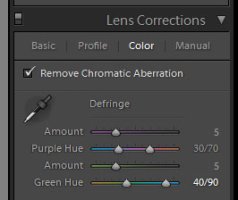
  • tamron-cafix.jpg
    tamron-cafix.jpg
    12.9 KB · Views: 484
Upvote 0
AlmostDecent said:
ecka said:
pknight said:
ecka said:
No lens is perfect, but I just really don't want to pay $600 for it :) because I know how much time it takes to fight those CA and fringing while editing.

Really? It takes 2 or 3 clicks in Lightroom to remove all CA and fringing in any photo. You might have to nudge a slider if it is really bad. These problems are non-issues for me any more, simply because they are so simple to deal with .

That only works for slight CA and PF, not for OMG ones from Tamron :). And if there's something purple in the frame other than PF, you can't do any easy fixing without affecting it. Even the A-Brush at 100 defringe doesn't cut it.
Did you actually try it, or are you just assuming?

He is actually wrong. It doesn't take 2-3 clicks. It takes zero. I have CA removal settings in LR that are automatically applied to the images upon opening them, which leave zero CA, green or purple. Attached is a crop of the exact LR parameters I use. Please note the Green slider is set to 40/90 (not the default 40/60).

I can show images of before (with CA) and after should you wish.

O.K, sure.
Try this one
http://img.photographyblog.com/reviews/tamron_sp_35mm_f1_8_di_vc_usd/sample_images/tamron_sp_35mm_f1_8_di_vc_usd_39.jpg
 
Upvote 0
ecka said:
AlmostDecent said:
ecka said:
pknight said:
ecka said:
No lens is perfect, but I just really don't want to pay $600 for it :) because I know how much time it takes to fight those CA and fringing while editing.

Really? It takes 2 or 3 clicks in Lightroom to remove all CA and fringing in any photo. You might have to nudge a slider if it is really bad. These problems are non-issues for me any more, simply because they are so simple to deal with .

That only works for slight CA and PF, not for OMG ones from Tamron :). And if there's something purple in the frame other than PF, you can't do any easy fixing without affecting it. Even the A-Brush at 100 defringe doesn't cut it.
Did you actually try it, or are you just assuming?

He is actually wrong. It doesn't take 2-3 clicks. It takes zero. I have CA removal settings in LR that are automatically applied to the images upon opening them, which leave zero CA, green or purple. Attached is a crop of the exact LR parameters I use. Please note the Green slider is set to 40/90 (not the default 40/60).

I can show images of before (with CA) and after should you wish.

O.K, sure.
Try this one
http://img.photographyblog.com/reviews/tamron_sp_35mm_f1_8_di_vc_usd/sample_images/tamron_sp_35mm_f1_8_di_vc_usd_39.jpg

I cropped the relevant part, which I presume is ok. The only change made to the image was to apply the CA fix that is in my import preset. The before, with purple fringing visible, and after without the fringing.
 

Attachments

  • tamron-caffix-before.jpg
    tamron-caffix-before.jpg
    54.3 KB · Views: 206
  • tamron-caffix-after.jpg
    tamron-caffix-after.jpg
    54.8 KB · Views: 211
Upvote 0
ecka said:
AlmostDecent said:
ecka said:
pknight said:
ecka said:
No lens is perfect, but I just really don't want to pay $600 for it :) because I know how much time it takes to fight those CA and fringing while editing.

Really? It takes 2 or 3 clicks in Lightroom to remove all CA and fringing in any photo. You might have to nudge a slider if it is really bad. These problems are non-issues for me any more, simply because they are so simple to deal with .

That only works for slight CA and PF, not for OMG ones from Tamron :). And if there's something purple in the frame other than PF, you can't do any easy fixing without affecting it. Even the A-Brush at 100 defringe doesn't cut it.
Did you actually try it, or are you just assuming?

He is actually wrong. It doesn't take 2-3 clicks. It takes zero. I have CA removal settings in LR that are automatically applied to the images upon opening them, which leave zero CA, green or purple. Attached is a crop of the exact LR parameters I use. Please note the Green slider is set to 40/90 (not the default 40/60).

I can show images of before (with CA) and after should you wish.

O.K, sure.
Try this one
http://img.photographyblog.com/reviews/tamron_sp_35mm_f1_8_di_vc_usd/sample_images/tamron_sp_35mm_f1_8_di_vc_usd_39.jpg

Just to verify another case from the same samples source (http://img.photographyblog.com/reviews/tamron_sp_35mm_f1_8_di_vc_usd/sample_images/tamron_sp_35mm_f1_8_di_vc_usd_48.jpg) but with green CA, here is how it looks before and after (again a 100% crop):
 

Attachments

  • tamron-caffix-green-before.jpg
    tamron-caffix-green-before.jpg
    291.1 KB · Views: 210
  • tamron-caffix-green-after.jpg
    tamron-caffix-green-after.jpg
    286 KB · Views: 206
Upvote 0
AlmostDecent said:
ecka said:
AlmostDecent said:
ecka said:
pknight said:
ecka said:
No lens is perfect, but I just really don't want to pay $600 for it :) because I know how much time it takes to fight those CA and fringing while editing.

Really? It takes 2 or 3 clicks in Lightroom to remove all CA and fringing in any photo. You might have to nudge a slider if it is really bad. These problems are non-issues for me any more, simply because they are so simple to deal with .

That only works for slight CA and PF, not for OMG ones from Tamron :). And if there's something purple in the frame other than PF, you can't do any easy fixing without affecting it. Even the A-Brush at 100 defringe doesn't cut it.
Did you actually try it, or are you just assuming?

He is actually wrong. It doesn't take 2-3 clicks. It takes zero. I have CA removal settings in LR that are automatically applied to the images upon opening them, which leave zero CA, green or purple. Attached is a crop of the exact LR parameters I use. Please note the Green slider is set to 40/90 (not the default 40/60).

I can show images of before (with CA) and after should you wish.

O.K, sure.
Try this one
http://img.photographyblog.com/reviews/tamron_sp_35mm_f1_8_di_vc_usd/sample_images/tamron_sp_35mm_f1_8_di_vc_usd_39.jpg

I cropped the relevant part, which I presume is ok. The only change made to the image was to apply the CA fix that is in my import preset. The before, with purple fringing visible, and after without the fringing.

You cheater ::)
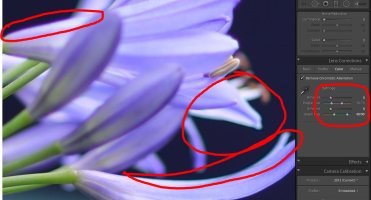
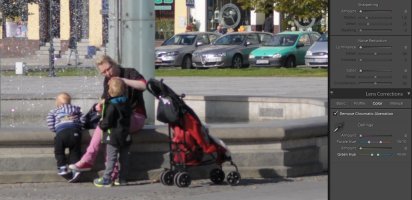
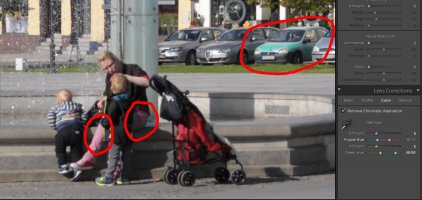
It looks worse than it was before. Flower colors are affected by the "easy fix". What about purple clothes, lipstick, cars, jewelry, etc.?
 

Attachments

  • c2.JPG
    c2.JPG
    98 KB · Views: 202
  • c1.JPG
    c1.JPG
    96.9 KB · Views: 202
Upvote 0
ecka said:
You cheater ::)
It looks worse than it was before. Flower colors are affected by the "easy fix". What about purple clothes, lipstick, cars, jewelry, etc.?

Cheater? I gave you pure unmodified crops of my results other than what I said, and the results looked fine to me. No?

I did not post the entire images simply because 1) it was a 50MP image, which is bloody huge, and 2) it was a close-up on the flower so 80% of the image is a severely out of focus background.
 
Upvote 0
AlmostDecent said:
ecka said:
You cheater ::)
It looks worse than it was before. Flower colors are affected by the "easy fix". What about purple clothes, lipstick, cars, jewelry, etc.?

Cheater? I gave you pure unmodified crops of my results other than what I said, and the results looked fine to me. No?

I did not post the entire images simply because 1) it was a 50MP image, which is bloody huge, and 2) it was a close-up on the flower so 80% of the image is a severely out of focus background.

Ok, I went back and revisited it and I see the problem you are having, but don't have an explanation. As I said, I have a Tamron 35 preset (just as I have presets for other lenses). It automatically applies +20 contrast, +10 clarity, +12 vibrance, turns on lens corrections, and adds those CA settings.

If I apply this preset, and then turn the contrast, clarity and vibrance to zero (leaving only the CA fixed), I get exactly what I showed you.

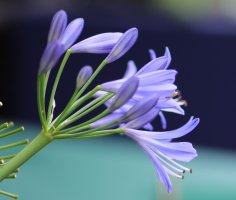
HOWEVER, if I take the image, and only manually apply the CA, the results are not the same. Attached is the full flower, again cropped from the original 50MP image, but 100% and unresized, and fixed just as described.
 

Attachments

  • tamron35-wholeflower-fixed.jpg
    tamron35-wholeflower-fixed.jpg
    397.7 KB · Views: 221
Upvote 0
AlmostDecent said:
AlmostDecent said:
ecka said:
You cheater ::)
It looks worse than it was before. Flower colors are affected by the "easy fix". What about purple clothes, lipstick, cars, jewelry, etc.?

Cheater? I gave you pure unmodified crops of my results other than what I said, and the results looked fine to me. No?

I did not post the entire images simply because 1) it was a 50MP image, which is bloody huge, and 2) it was a close-up on the flower so 80% of the image is a severely out of focus background.

Ok, I went back and revisited it and I see the problem you are having, but don't have an explanation. As I said, I have a Tamron 35 preset (just as I have presets for other lenses). It automatically applies +20 contrast, +10 clarity, +12 vibrance, turns on lens corrections, and adds those CA settings.

If I apply this preset, and then turn the contrast, clarity and vibrance to zero (leaving only the CA fixed), I get exactly what I showed you.

HOWEVER, if I take the image, and only manually apply the CA, the results are not the same. Attached is the full flower, again cropped from the original 50MP image, but 100% and unresized, and fixed just as described.

Still, the problem persists.
:)
 
Upvote 0
ecka said:
AlmostDecent said:
AlmostDecent said:
ecka said:
You cheater ::)
It looks worse than it was before. Flower colors are affected by the "easy fix". What about purple clothes, lipstick, cars, jewelry, etc.?

Cheater? I gave you pure unmodified crops of my results other than what I said, and the results looked fine to me. No?

I did not post the entire images simply because 1) it was a 50MP image, which is bloody huge, and 2) it was a close-up on the flower so 80% of the image is a severely out of focus background.

Ok, I went back and revisited it and I see the problem you are having, but don't have an explanation. As I said, I have a Tamron 35 preset (just as I have presets for other lenses). It automatically applies +20 contrast, +10 clarity, +12 vibrance, turns on lens corrections, and adds those CA settings.

If I apply this preset, and then turn the contrast, clarity and vibrance to zero (leaving only the CA fixed), I get exactly what I showed you.

HOWEVER, if I take the image, and only manually apply the CA, the results are not the same. Attached is the full flower, again cropped from the original 50MP image, but 100% and unresized, and fixed just as described.

Still, the problem persists.
:)

Sort of. Some weird behavior from LR or ACR, but at least I hope it showed two things: 1) no cheating was involved, and 2) it remains very clean after.
 
Upvote 0
AlmostDecent said:
ecka said:
Try this one.
http://pliki.optyczne.pl/tam35/tam35_fot13.JPG

Obviously since the section of image is so small compared to the overall frame (1000 pixels of the 6000), one needs to reduce the fringe. Aside from that:

So now, do you agree that it is not a zero click solution? Sometimes it can be a real headache. Those are just a quick search samples, but there are situations when the CA and fringing is just too much and you have to paint it out of there, literally.
 
Upvote 0
ecka said:
AlmostDecent said:
ecka said:
Try this one.
http://pliki.optyczne.pl/tam35/tam35_fot13.JPG

Obviously since the section of image is so small compared to the overall frame (1000 pixels of the 6000), one needs to reduce the fringe. Aside from that:

So now, do you agree that it is not a zero click solution? Sometimes it can be a real headache. Those are just a quick search samples, but there are situations when the CA and fringing is just too much and you have to paint it out of there, literally.

Perhaps zero click was a bit excessive, but hardly the Mission Impossible you painted. Even in your last request above, all I did was take my default setting, set the green to zero (down from +5), and lower the purple to +2 instead of +5. In your last example, you can't even see the fringing unless you are literally zoomed to 100%, and if you are planning on using an image where that is relevant, I would assume the rest of the post-processing will also be more than zero clicks as well. It literally took me a couple of seconds, so very far from a headache.
 
Upvote 0
AlmostDecent said:
ecka said:
AlmostDecent said:
ecka said:
Try this one.
http://pliki.optyczne.pl/tam35/tam35_fot13.JPG

Obviously since the section of image is so small compared to the overall frame (1000 pixels of the 6000), one needs to reduce the fringe. Aside from that:

So now, do you agree that it is not a zero click solution? Sometimes it can be a real headache. Those are just a quick search samples, but there are situations when the CA and fringing is just too much and you have to paint it out of there, literally.

Perhaps zero click was a bit excessive, but hardly the Mission Impossible you painted. Even in your last request above, all I did was take my default setting, set the green to zero (down from +5), and lower the purple to +2 instead of +5. In your last example, you can't even see the fringing unless you are literally zoomed to 100%, and if you are planning on using an image where that is relevant, I would assume the rest of the post-processing will also be more than zero clicks as well. It literally took me a couple of seconds, so very far from a headache.

What you did is you didn't actually remove the CA and fringing :), while still affecting everything from pink to purple. OK, let's leave it there, I see you are too stubborn to admit anything :).
 
Upvote 0
ecka said:
AlmostDecent said:
ecka said:
AlmostDecent said:
ecka said:
Try this one.
http://pliki.optyczne.pl/tam35/tam35_fot13.JPG

Obviously since the section of image is so small compared to the overall frame (1000 pixels of the 6000), one needs to reduce the fringe. Aside from that:

So now, do you agree that it is not a zero click solution? Sometimes it can be a real headache. Those are just a quick search samples, but there are situations when the CA and fringing is just too much and you have to paint it out of there, literally.

Perhaps zero click was a bit excessive, but hardly the Mission Impossible you painted. Even in your last request above, all I did was take my default setting, set the green to zero (down from +5), and lower the purple to +2 instead of +5. In your last example, you can't even see the fringing unless you are literally zoomed to 100%, and if you are planning on using an image where that is relevant, I would assume the rest of the post-processing will also be more than zero clicks as well. It literally took me a couple of seconds, so very far from a headache.

What you did is you didn't actually remove the CA and fringing :), while still affecting everything from pink to purple. OK, let's leave it there, I see you are too stubborn to admit anything :).

Funny I was going to say the same thing. i showed you your images perfectly cleaned, and proved not only it could be done, but easily. In not one instance did you show any issues with my results, other than to say you found them so unbelievably good, I could only be cheating.
 
Upvote 0
AlmostDecent said:
ecka said:
AlmostDecent said:
ecka said:
AlmostDecent said:
ecka said:
Try this one.
http://pliki.optyczne.pl/tam35/tam35_fot13.JPG

Obviously since the section of image is so small compared to the overall frame (1000 pixels of the 6000), one needs to reduce the fringe. Aside from that:

So now, do you agree that it is not a zero click solution? Sometimes it can be a real headache. Those are just a quick search samples, but there are situations when the CA and fringing is just too much and you have to paint it out of there, literally.

Perhaps zero click was a bit excessive, but hardly the Mission Impossible you painted. Even in your last request above, all I did was take my default setting, set the green to zero (down from +5), and lower the purple to +2 instead of +5. In your last example, you can't even see the fringing unless you are literally zoomed to 100%, and if you are planning on using an image where that is relevant, I would assume the rest of the post-processing will also be more than zero clicks as well. It literally took me a couple of seconds, so very far from a headache.

What you did is you didn't actually remove the CA and fringing :), while still affecting everything from pink to purple. OK, let's leave it there, I see you are too stubborn to admit anything :).

Funny I was going to say the same thing. i showed you your images perfectly cleaned, and proved not only it could be done, but easily. In not one instance did you show any issues with my results, other than to say you found them so unbelievably good, I could only be cheating.

You are wrong. Ignoring the problem doesn't make it go away. Your effortless method doesn't work on images with purple object in it, without making a mess.
 
Upvote 0
ecka said:
AlmostDecent said:
ecka said:
AlmostDecent said:
ecka said:
AlmostDecent said:
ecka said:
Try this one.
http://pliki.optyczne.pl/tam35/tam35_fot13.JPG

Obviously since the section of image is so small compared to the overall frame (1000 pixels of the 6000), one needs to reduce the fringe. Aside from that:

So now, do you agree that it is not a zero click solution? Sometimes it can be a real headache. Those are just a quick search samples, but there are situations when the CA and fringing is just too much and you have to paint it out of there, literally.

Perhaps zero click was a bit excessive, but hardly the Mission Impossible you painted. Even in your last request above, all I did was take my default setting, set the green to zero (down from +5), and lower the purple to +2 instead of +5. In your last example, you can't even see the fringing unless you are literally zoomed to 100%, and if you are planning on using an image where that is relevant, I would assume the rest of the post-processing will also be more than zero clicks as well. It literally took me a couple of seconds, so very far from a headache.

What you did is you didn't actually remove the CA and fringing :), while still affecting everything from pink to purple. OK, let's leave it there, I see you are too stubborn to admit anything :).

Funny I was going to say the same thing. i showed you your images perfectly cleaned, and proved not only it could be done, but easily. In not one instance did you show any issues with my results, other than to say you found them so unbelievably good, I could only be cheating.

You are wrong. Ignoring the problem doesn't make it go away. Your effortless method doesn't work on images with purple object in it, without making a mess.

It does, and I proved it. If you had a criticism of the corrected images I shared, by all means.

BTW, regarding the CA compared to rival lenses, quoting LensTip (for example):

"The Canon 2/35 IS had very similar results in this category but its maximum level was a bit higher." (i.e. worse)
"The Nikkor AF-S 1.8/35G fared worse practically at all aperture values"
"Once again the Sigma A 1.4/35 is the most serious rival of the Tamron – it had results of 0.03-0.06% which were only slightly better depending on the aperture value."

http://www.lenstip.com/455.5-Lens_review-Tamron_SP_35_mm_f_1.8_Di_VC_USD_Chromatic_and_spherical_aberration.html

http://www.lenstip.com/365.5-Lens_review-Canon_EF_35_mm_f_2_IS_USM_Chromatic_and_spherical_aberration.html
 
Upvote 0
AlmostDecent said:
ecka said:
AlmostDecent said:
ecka said:
AlmostDecent said:
ecka said:
AlmostDecent said:
ecka said:
Try this one.
http://pliki.optyczne.pl/tam35/tam35_fot13.JPG

Obviously since the section of image is so small compared to the overall frame (1000 pixels of the 6000), one needs to reduce the fringe. Aside from that:

So now, do you agree that it is not a zero click solution? Sometimes it can be a real headache. Those are just a quick search samples, but there are situations when the CA and fringing is just too much and you have to paint it out of there, literally.

Perhaps zero click was a bit excessive, but hardly the Mission Impossible you painted. Even in your last request above, all I did was take my default setting, set the green to zero (down from +5), and lower the purple to +2 instead of +5. In your last example, you can't even see the fringing unless you are literally zoomed to 100%, and if you are planning on using an image where that is relevant, I would assume the rest of the post-processing will also be more than zero clicks as well. It literally took me a couple of seconds, so very far from a headache.

What you did is you didn't actually remove the CA and fringing :), while still affecting everything from pink to purple. OK, let's leave it there, I see you are too stubborn to admit anything :).

Funny I was going to say the same thing. i showed you your images perfectly cleaned, and proved not only it could be done, but easily. In not one instance did you show any issues with my results, other than to say you found them so unbelievably good, I could only be cheating.

You are wrong. Ignoring the problem doesn't make it go away. Your effortless method doesn't work on images with purple object in it, without making a mess.

It does, and I proved it. If you had a criticism of the corrected images I shared, by all means.

BTW, regarding the CA compared to rival lenses, quoting LensTip (for example):

"The Canon 2/35 IS had very similar results in this category but its maximum level was a bit higher." (i.e. worse)
"The Nikkor AF-S 1.8/35G fared worse practically at all aperture values"
"Once again the Sigma A 1.4/35 is the most serious rival of the Tamron – it had results of 0.03-0.06% which were only slightly better depending on the aperture value."

http://www.lenstip.com/455.5-Lens_review-Tamron_SP_35_mm_f_1.8_Di_VC_USD_Chromatic_and_spherical_aberration.html

http://www.lenstip.com/365.5-Lens_review-Canon_EF_35_mm_f_2_IS_USM_Chromatic_and_spherical_aberration.html

Can't you see Canon's better? Sigma's better too, btw.
You can stop now, I'm not buying it.

http://www.lenstip.com/359.5-Lens_review-Sigma_A_35_mm_f_1.4_DG_HSM_Chromatic_and_spherical_aberration.html
 

Attachments

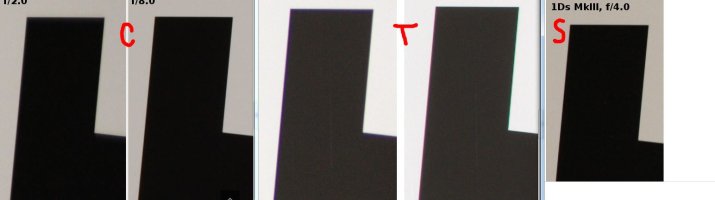
  • cts.JPG
    cts.JPG
    53.5 KB · Views: 196
Upvote 0