The Canon RF 14mm F1.4L VCM is Right Around the Corner

Indeed. The image height of the 20/1.4 lens in the same patent is 18.90mm, the corner performance of that lens is excellent. This is the post-correction extreme upper left corner of an image from the 20/1.4 with Dubhe and Merak in the 100% crop (the two scoop-side stars of the Big Dipper that point to Polaris).

View attachment 227726

As another example, here's a 100% crop from the post-correction extreme lower right corner of an image from the 20/1.4, and most of this image is from the part that was 'stretched' to wider than the original pixel width, as you can see from the full image in DxO showing the output size of 6492 x 4000 from the 6000 x 4000 sensor of the R1.

View attachment 227727

View attachment 227728
What does the distortion correction look like without the crop?
 
Upvote 0
Frankly, I don't care at all.
The VCM lenses were all brilliant, just like the 14mm will be. I could compare my excellent Zeiss 21mm f/2,8 to the 20mm VCM. The Zeiss, though optically corrected, didn't stand a chance...:)
I’m just stating a “fact”, I’m not saying that it is bad.

If the corners are as good as those of the RF 20mm f1.4 VCM, and size and weight are acceptable, I’ll say goodbye to my EF mount Sigma Art 14mm f1.8 and buy the RF 14mm.
 
Upvote 0
I’m just stating a “fact”, I’m not saying that it is bad.

If the corners are as good as those of the RF 20mm f1.4 VCM, and size and weight are acceptable, I’ll say goodbye to my EF mount Sigma Art 14mm f1.8 and buy the RF 14mm.
I knew what you meant, also from your former posts! :)
Chances are high it will be much lighter than Sigma's anvil!
 
  • Like
Reactions: 1 user
Upvote 0
I’m just stating a “fact”, I’m not saying that it is bad.

If the corners are as good as those of the RF 20mm f1.4 VCM, and size and weight are acceptable, I’ll say goodbye to my EF mount Sigma Art 14mm f1.8 and buy the RF 14mm.
I’m right there with you. Been using the Sig 14mm for Milky Way and aurora. Love it, but sure would like to ditch the adapter and the weight of that thing.
 
Upvote 0
Upvote 0
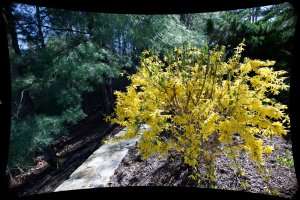
Sorry, not sure what you’re asking. The full (uncropped) image of the forsythia bush is shown in the last screenshot. Keeping the 3:2 aspect ratio would result in a 246 pixel-wide strip cut off both sides on the image.
No, it's my fault. I wasn't clear. See my example with the 16mm 2.8
[Edit for grammar]
Do you mean this?

(timestamp to 5:19 included)

Almost the opposite

Screenshot 2026-02-01 071142.png

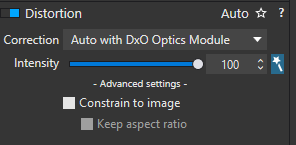
in DXO "uncheck constrain to image"


Screenshot 2026-02-01 071802.png

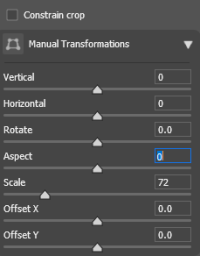
In Adobe, uncheck constrain to crop and adjust the scale

100A6478_DxO.jpg
 
Upvote 0
See my example with the 16mm 2.8
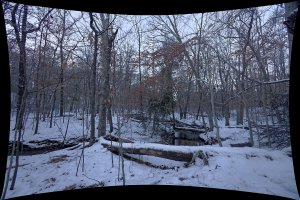
Got it. The image I posted with the 20/1.4 looks like this with Constrain to Image unchecked.
Screenshot 2026-02-01 at 10.52.56 AM.jpg

DxO describes it as, "This is gathering all of the images projected by your lens. This results in black areas, which are not part of the image and could at first sight be misunderstood as distortion."
 
  • Wow
Reactions: 1 users
Upvote 0
DxO describes it as, "This is gathering all of the images projected by your lens. This results in black areas, which are not part of the image and could at first sight be misunderstood as distortion."
For the 'give me optical correction or give me death' crowd, I'll point out (as I've pointed out before) that these phenomena are more pronounced with RF lenses that don't completely fill the frame, but they're not new or unique to such lenses.

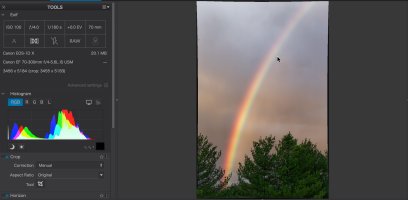
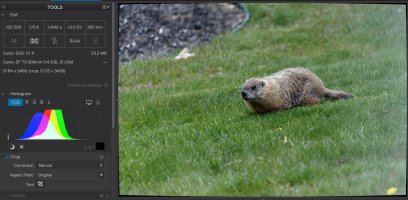
Here are two images from the 1D X and EF 70-300L, a lens with very little distortion (I opened an old RAW image folder at random, these are shots from around the house). You can see that on the wide end, turning off Constrain to Image shows the same pincushioning effect (with lesser magnitude), and at the long end there's a barrel effect. In both cases, this is a representation of remapping the distorted image captured by the lens to correct that distortion.

Screenshot 2026-02-01 at 12.07.15 PM.jpg

Screenshot 2026-02-01 at 12.07.33 PM.jpg
 
  • Like
Reactions: 1 user
Upvote 0
Got it. The image I posted with the 20/1.4 looks like this with Constrain to Image unchecked.
View attachment 227764

DxO describes it as, "This is gathering all of the images projected by your lens. This results in black areas, which are not part of the image and could at first sight be misunderstood as distortion."
I was suprised to see It's about as much correction as the 16mm but looking at 100%, the difference is obvious. Of course the 20mm is 5x the price, 3 x the weight, 2x the circumference, but not very much longer.

I think any distortion correct will add either black corners or a black border. It's possible a mustache pattern might not but I've never seen one.
 
Upvote 0
Now that we’re on the topic of software corrections…

I don’t shoot RAW that often, so I’m happy with in-camera lens aberration correction on my JPEGs.

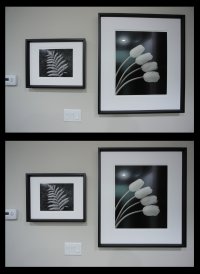
The attachment shows considerable geometric distortion on my EF 17-40mm f/4 L (yes, that lens) at 17mm. Nice correction when applied.
 

Attachments

  • geometric_distortion_OFF-ON.jpg
    geometric_distortion_OFF-ON.jpg
    413.5 KB · Views: 7
  • Like
Reactions: 1 user
Upvote 0