Will Apple Preview support 5D Mark III RAW files?

Status
Not open for further replies.
Apr 17, 2012
7
0
4,641
With my T1I, if I went to a CR2 raw file on my Mac and pressed the space bar, Preview would open and display the image in the file. With my 5D Mark III, this no longer works. In a conversation with Apple Support today, they were unable to say whether support for this new CR2 file would be provided. They sort of implied that it wouldn't be, but said it was up to engineering, and that they could not speak for engineering.
 
Same thing happened to me. Seems that Apple is providing 5D Mark III support for Aperture and iPhoto, but it is not clear whether they will ever provide support for Preview. I am curious if anyone has successfully applied Digital Camera Raw Compatibility Update 3.12 (they would have to have Aperture 3 and/or iPhoto 9?), and if they have, does Preview now work for them with 5D Mark III files?
 
Upvote 0
jk10003 said:
I am curious if anyone has successfully applied Digital Camera Raw Compatibility Update 3.12 (they would have to have Aperture 3 and/or iPhoto 9?), and if they have, does Preview now work for them with 5D Mark III files?

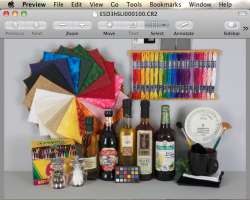
Although I don't have a 5DIII, I do have Aperture 3 and iPhoto 9. I downloaded a 5DIII .CR2 file from Imaging Resource, and it opens in Preview.
 

Attachments

  • 5DIII RAW in Preview.png
    5DIII RAW in Preview.png
    454.1 KB · Views: 3,238
Upvote 0
Well, I just - in effect - paid $15 to upgrade Preview. I never use iPhoto, but I paid the $15 to upgrade from iPhoto '09 (8.xx) to iPhoto '11 (9.xx), and then installed Digital Camera Raw Compatibility Update 3.12. When I start iPhoto, it tells me that the photo library needs to be upgraded, and it will take a long time; since I don't use iPhoto, this is of no concern to me, so I press Quit.

And after all that, Preview finally supports 5D Mark III raw files. I have to wonder if Apple will ever get around to adding a Preview upgrade that would make this iPhoto/Aperture upgrade unnecessary. I just got tired of waiting.

After waiting for a non-Beta version of Lightroom or Adobe Camera Raw and waiting for a defined solution to the light leak problem, I decided to work around the one minor but annoying issue which I could do something about. Humph!!!
 
Upvote 0
jk10003 said:
Well, I just - in effect - paid $15 to upgrade Preview. I never use iPhoto, but I paid the $15 to upgrade from iPhoto '09 (8.xx) to iPhoto '11 (9.xx), and then installed Digital Camera Raw Compatibility Update 3.12. When I start iPhoto, it tells me that the photo library needs to be upgraded, and it will take a long time; since I don't use iPhoto, this is of no concern to me, so I press Quit.

And after all that, Preview finally supports 5D Mark III raw files. I have to wonder if Apple will ever get around to adding a Preview upgrade that would make this iPhoto/Aperture upgrade unnecessary. I just got tired of waiting.

After waiting for a non-Beta version of Lightroom or Adobe Camera Raw and waiting for a defined solution to the light leak problem, I decided to work around the one minor but annoying issue which I could do something about. Humph!!!

That's kind of bunk. That is where I was when the 5DmkII came out, Adobe wouldn't support it in CS3 because CS4 was just announced. So I jumped ship to Aperture. Now Apple does the same crap? At least it was only $15 compared to the several hundred to upgrade my CS design suite. Well at least I didn't have an issue this time around but I guess Aperture 2 user probably would. Even that is only an $80 upgrade.
 
Upvote 0
If you received this error like me, "This update provides support for Aperture 3 and iPhoto 9 only"

here is how to install Digital Camera Raw Compatibility Update 3.12 WITHOUT purchasing Aperture 3 or iPhoto 9:

Step 1: Download the trial of Aperture 3. It's no longer publicly offered, but it still automatically downloads from the Apple site when directly visiting their "Thank you for trying" page. http://www.apple.com/aperture/trial/thankyou.html

Step 2: Use this serial number: E-340-IGT-243-TLB-365-TBB-435-SXE-FFH-5S8X from this random youtube video: How to get Aperture 3 for free! to install Aperture.

Step 3: Run the installer for Digital Camera Raw Compatibility Update 3.12

DONE.

optional Step 4: Uninstall Aperture because you only use Photoshop, Bridge, Lightroom, PhotoMechanic, CaptureOne etc.

Sorry if this offends anyone. I found it irritating and silly that I couldn't view my 5D mkIII files in the Finder window unless I upgraded iPhoto or bought Aperture, two pieces of software that I have never and WILL NEVER use.

(and yes, the 5D mkIII files open in Preview too once this is installed)
 
Upvote 0
Status
Not open for further replies.