
Upvote
0
Canon EOS R1 & R5 Mark II Firmware v1.3.0 Arriving Soon
- Thread starter Canon Rumors
- Start date


Similar threads


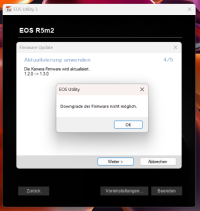
Do you have older firmware files on one of the cards? I had that when going to 1.2.0, there was an old file on the SD card, the new one was on CFe.My R5 Mark II won't upgrade from version 1.2.0 to 1.3.0. Both the camera and EOS Utility say that a downgrade isn't possible. Is anyone else having this problem – or even better, does anyone have a solution? Thanks!
Have you tried doing it by downloading the firmware to a card?My R5 Mark II won't upgrade from version 1.2.0 to 1.3.0. Both the camera and EOS Utility say that a downgrade isn't possible. Is anyone else having this problem – or even better, does anyone have a solution? Thanks!
Do you have older firmware files on one of the cards? I had that when going to 1.2.0, there was an old file on the SD card, the new one was on CFe.
I tried to do it via card - after EOS utility made some problems. It did not work too, so I deleted all files on the card and tried it again... Still does not work. I´ve contacted CPS and described the problem. A second time some minutes ago, again - the employee did not know that there is firmware version 1.3. existing. I sent the link to him and a screenshotHave you tried doing it by downloading the firmware to a card?


Perhaps download the firmware from another country's website? Also, with previous updates users reported issues with >1 card in the camera, even if the firmware is only on one card. So if you had two cards in the camera, take one out and try again.I tried to do it via card - after EOS utility made some problems. It did not work too, so I deleted all files on the card and tried it again... Still does not work. I´ve contacted CPS and described the problem. A second time some minutes ago, again - the employee did not know that there is firmware version 1.3. existing. I sent the link to him and a screenshot

Canon actually now instructs to have only one card in the camera. I didn't do the last upgrade, and this time it asked for a password, which I checked not to use.Perhaps download the firmware from another country's website? Also, with previous updates users reported issues with >1 card in the camera, even if the firmware is only on one card. So if you had two cards in the camera, take one out and try again.
so you have upgraded. somebody on a different message list seems to indicate his DELKIN 2TB CFE card, which i also use, no longer works after the upgrade. have you noticed any troubles?Canon actually now instructs to have only one card in the camera. I didn't do the last upgrade, and this time it asked for a password, which I checked not to use.
My Prograde CFE card works fine.so you have upgraded. somebody on a different message list seems to indicate his DELKIN 2TB CFE card, which i also use, no longer works after the upgrade. have you noticed any troubles?

Can I have M-RAW or M-cRAW?
