EOS R5: Does IBIS work with adapted manual focus lenses (ie vintage)

cayenne

Canon Rumors Premium
Mar 28, 2012
2,907
800
24,496
Hi all,
I'm still doing research about the Canon R series of cameras before I look to jump in.
As I'd mentioned in another thread, I'm interested in adapting interesting vintage lenses to the Canon mirrorless R camera...its a fun benefit for mirrorless that you can get new use out of very interesting old lenses.

I thought I'd heard that the IBIS for some reason may not work when adapted manual lenses are attached?

Is this true or not?

I was kinda puzzled when I thought I heard this as that my GFX has IBIS that works with manual lenses attached, I"d assumed this was normal behavior.

I know the lenses don't have any stabilization but IBIS should work with any lens attached, right?

Thank you in advance,

cayenne
 
Curious - when using a fully manual lens with the focal length added manually, does the system hold that inputted focal length after the lens is removed? Do you have to manually change it back when you put on an RF lens with image stabilization? How about if you put on a different fully manual lens?
 
Upvote 0
when using a fully manual lens with the focal length added manually, does the system hold that inputted focal length after the lens is removed?
Yes
Do you have to manually change it back when you put on an RF lens with image stabilization?
No.

How about if you put on a different fully manual lens?
The IBIS can not work properly and may cause blur in the image.
 
Upvote 0
Thanks. I take from this that if I own just one manual lens I can input the focal length manually and it will remain in place next time I use that same manual lens even though I have used RF stabilized glass in the interim. Is that correct?
 
Upvote 0
Just curious, off the top of your head...how many manual lenses can you "register" with the camera body? How many focal lengths?

I have several of them.

Thank you in advance,
cayenne
 
Upvote 0
I think that is correct. It will hold the focal length you input for manual lenses until you change it. If you use several different manual lenses with different focal lengths you have to change it each time you change the lens to a different focal length. This is a guess. Not 100% sure. It is a bit of a pain in the neck. But, otherwise the camera works quite well with unstabilized manual lenses. You get some stabilization from the IBIS. The viewfinder can be set up to remain quite bright. It all works.
 
Last edited:
Upvote 0
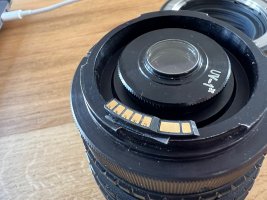
I remember seeing 'dandilion' chips on ebay a few years ago, they were shaped like EF pins and meant to be stuck onto a manual lens. The chip would then report the focal length to the body. It's been on my list for my 8mm fisheye, but I never got around to buying one.
 
Upvote 0
I remember seeing 'dandilion' chips on ebay a few years ago, they were shaped like EF pins and meant to be stuck onto a manual lens. The chip would then report the focal length to the body. It's been on my list for my 8mm fisheye, but I never got around to buying one.
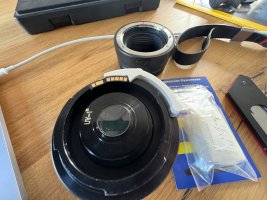
It was a 'dandelion' and I ordered one just now :) The seller will program it for you, but since he's in Ukraine, shipping will take more than 25 days.
 
Upvote 0
Please update us on how this works!!!

C
The postman dropped it off this afternoon and I installed it with a small bit of double sided tape and it worked! It reports 8mm and f/3.5 to the camera. Apple photos.app reports that it's an EF28-80mm lens since hit hijacks that ID.

I'm going to add this to my import/rename/sorting script to rewrite the EXIF.

Bash:
LENS="$(exiftool -Lens -b "${IMAGE}")"

if [ "${LENS}" == "8" ] ; then
    exiftool -q -n  -overwrite_original -api LargeFileSupport=1 -canon:lenstype=0 -LensID=-1 "${IMAGE}"
    exiftool -q -overwrite_original -api LargeFileSupport=1 -LensInfo="8mm f/3.5" -LensModel="Peleng 3.5/8A Fisheye" -LensID=-1 -Lens="Peleng 3.5/8A Fisheye" -LensSerialNumber="6001608" "${IMAGE}"
fi

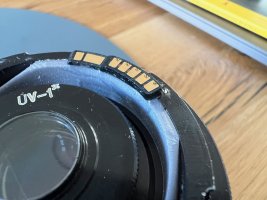
I'll need to 3D print a small flange to make it sit a bit better, when that's done I'll post pictures of how it looks on the lens and how the camera sees it.
 
  • Like
Reactions: 1 user
Upvote 0
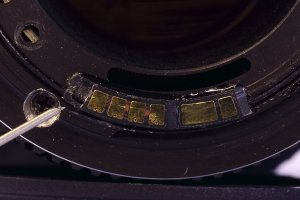
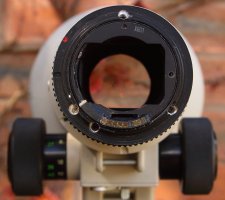
WARNING for everyone out there. Do not use 1.4x or 2x Canon extenders with the Dandelion chip. The extra two pins drop over the edge of the chip and lock the lens and extender together. There is no way of separating them without damage. I know, to my cost! I have now overcome the problem by gluing a piece of plastic on for the extra pins to sit on. The Chinese Pixco type chips do not have this issue. 1st image shows the damaged chip. 2nd image shows the piece of plastic fitted.
 

Attachments

  • Contact.JPG
    Contact.JPG
    1.1 MB · Views: 7
  • EOS M1583.JPG
    EOS M1583.JPG
    5.4 MB · Views: 7
  • Like
Reactions: 1 users
Upvote 0