100mm L not for portraits?

I used to get lost on the math of DOF, so shoot shoot and shoot some more until you get to grips with it.

I have also come past this guys videos and he did one a while back on understanding depth of field which might help give you a better understanding:

"PhotoTips" Episode 110 - Understanding DOF (Depth Of Field)

Simply stopping down (larger F number, from 2.8 to F8/11) as others have said or changing your plane of focus by moving to your left slightly so both of the childrens eyes are in line, or even stepping backwards to increase the DOF.

All part of the learning experience and if anyone here says they have never had the same issue, they are telling fibs!
 
Upvote 0
Marsu42 said:
J.R. said:
One can simply download a DoF app on their phones.

What good is that on its own? If I want to have to required f-stop between a tree 100m away and a hill 130m away, do you carry a long enough stick or an adequate optical tool :-p ... imho your best bet is Magic Lantern, it shows the focal distance in m and you can *then* input into a smartphone. If you have one. Working & with you. Which I haven't. Both not.
With digital, I guess Canon expects people to revert to simply trial & error, that's why they removed a-dep.

Most lenses are 'adequate optical tools' - while they no longer have aperture markings, the majority of enses (cheaper/consumer lenses notwithstanding) still have a distance scale.
 
Upvote 0
neuroanatomist said:

Most lenses are 'adequate optical tools' - while they no longer have aperture markings, the majority of enses (cheaper/consumer lenses notwithstanding) still have a distance scale.
[/quote]

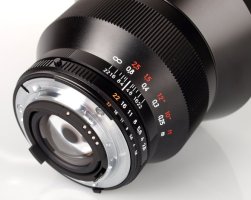
??? Zeiss 15mm 2.8 does have a distamce scale in it, or am I looking at the wrong thing?


in either case, macro lenses being overall so sharp, are not the ideal portrait lens, as they will reveal too many skin flaw. Sure there is always PP, but narrow DOF is part of their signature - that's why the ef 100mm f2 is prefered as a portrait lens
 

Attachments

  • 666-carlzeisszfdistagonTstar15mmf2_1337089215.jpg
    666-carlzeisszfdistagonTstar15mmf2_1337089215.jpg
    56.9 KB · Views: 1,008
Upvote 0
Marsu42 said:
photonius said:
In the old days, manual focus lenses had DOF markings for different apertures, nice and useful.

In the olden days, some Canon bodies even had a helper mode "adepth" for this - af at spot one, af at spot two & it calculates the required f-stop... alas, newer cameras have you-dont-wanna-know how many creative zone programs, but this has been lost along the way.

mm... new magic lantern feature request? :)
 
Upvote 0
Marsu42 said:
J.R. said:
One can simply download a DoF app on their phones.

What good is that on its own? If I want to have to required f-stop between a tree 100m away and a hill 130m away, do you carry a long enough stick or an adequate optical tool :-p ... imho your best bet is Magic Lantern, it shows the focal distance in m and you can *then* input into a smartphone. If you have one. Working & with you. Which I haven't. Both not.

With digital, I guess Canon expects people to revert to simply trial & error, that's why they removed a-dep.

Yes of course one can think of several instances where something might not work but for general shooting thisworks pretty well. As pointed out by Neuro, with the distance scale it can work even better.
 
Upvote 0
Marsu42 said:
In the olden days ...
In the even older days you could tilt the focal plane and have both girls in focus. As long as they were still for the duration of setup and exposure....

(you can actually still do this with a TS lens, not the 100L, but it is a bit of a challenge with moving subjects)
 
Upvote 0
NWPhil said:
??? Zeiss 15mm 2.8 does have a distamce scale in it, or am I looking at the wrong thing?

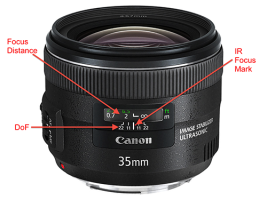
The pictured Zeiss lens has both a distance scale and DoF markings. In fact, many Canon prime lenses (even new ones like the 35/2 IS below) have both a distance scale and DoF markings. Zoom lenses tend not to have DoF markings for the obvious reason that DoF changes with the focal length.
 

Attachments

  • 35mm IS.png
    35mm IS.png
    204.7 KB · Views: 1,533
Upvote 0
2.8 you are not going to be getting both in focus, and depending on how close you are, you may find it hard to get 1 girls entire face in focus... much too shallow. Tilt shift lenses are great for subjects on multiple planes of focus, but impractical on the budget. You can stop down the lens, but you will slow down your shutter speed to compensate so depending on the light in the room, that could be an issue. You could also raise ISO so you dont lose shutter speed, but that's another ball of wax.
 
Upvote 0
neuroanatomist said:
NWPhil said:
??? Zeiss 15mm 2.8 does have a distamce scale in it, or am I looking at the wrong thing?

The pictured Zeiss lens has both a distance scale and DoF markings. In fact, many Canon prime lenses (even new ones like the 35/2 IS below) have both a distance scale and DoF markings. Zoom lenses tend not to have DoF markings for the obvious reason that DoF changes with the focal length.

it makes sense - thanks for the clarification
 
Upvote 0
You need to get further away or increase your depth of field by selecting a smaller aperture (maybe f/5.6 or f/8).

Kind regards,
Jason

Jack56 said:
Of course is this lens for portraits. But what am I doing wrong?
I don't know wether I may post this question here but there I go.
I have to make some photos at my work. Today I took a few, but I didn't manage to get both ladies sharp. What am I doing wrong or do I really need another lens for nice (bokeh) photos?

HvMgpxGl.jpg
 
Upvote 0
You didn't ask for this but I thought I'd see if there was a way to save the image. Not perfect and this was very quick but here is what I did.

Copied the layer
Applied some heavy sharpening in Photoshop to the new layer.
Used a mask to mask out everything but the nearer girl's eyes.
Merged the two layers.
Created a new layer.
Used a high pass filter and hard light blending mode and then once again masked out everything but her eyes and this time a little of hair.

I often used the high pass filter to add a little extra sharpening to eyes in portraits. It's amazing how often you can rescue a portrait when the focus is just a tiny bit off (in this case, though, it's more than just a little off, so it's tough, but it looks a little sharper)

And yes...I know there are some nasty artifacts. But this was a 5-minute job on a low-res web image. If I had the original file or more time I would have upped the clarity in Camera RAW first, instead of applying the sharpening in Photoshop.
 

Attachments

  • Kids-2.jpg
    Kids-2.jpg
    87.1 KB · Views: 1,284
Upvote 0
Once again, thank you all very much for all the comments. I am very happy with it. Not only with the advices, but also with the fact that you people do response on a question so enthusiastic. Very kind of you all.
Practice, yes that will help. I am a beginner (since a year) and did some all-round work, some pictures of children too. But never made such a close-up of two children.
@ Unfocused: Thank you for the time to make a better image. You really did a good job. But you will understand that I have to improve my skills. I will bring my camera with me to school tomorrow and hopefully the two ladies are willing to work together again spontaneously.
 
Upvote 0
I think the photo would have look sharper had you focused on the closer of the two girls. It appears more natural if the subject in the background, rather than the one in front, appears a bit soft. (Due to haze and other aerial disturbance, our eyes are used to accepting things in the distance as being less distinct.)

That and stopping down to maybe f:5.6 or 8 should do the trick. You don't want to go so slow that the girls' movement spoils the shot.
 
Upvote 0
jhpeterson said:
I think the photo would have look sharper had you focused on the closer of the two girls. It appears more natural if the subject in the background, rather than the one in front, appears a bit soft.

Agreed.

Jack56 said:
But you will understand that I have to improve my skills. I will bring my camera with me to school tomorrow and hopefully the two ladies are willing to work together again spontaneously.

Photoshop is never a substitute for getting it right in camera. I was just trying to illustrate that some pretty simple adjustments in Photoshop can sometimes salvage a photo that you think is lost. More importantly though, is that basic Photoshop skills are just as much of photography today as shooting skill.
 
Upvote 0
jhpeterson said:
I think the photo would have look sharper had you focused on the closer of the two girls. It appears more natural if the subject in the background, rather than the one in front, appears a bit soft. (Due to haze and other aerial disturbance, our eyes are used to accepting things in the distance as being less distinct.)

That and stopping down to maybe f:5.6 or 8 should do the trick. You don't want to go so slow that the girls' movement spoils the shot.

good advice, plus, the ol' rule of thumb (although disputed by many), 1/3 of the focal plane in front and 2/3 of the focal plane will be in focus, depending on what aperture you use, so you have the better chance of of the back subject falling in focus than the front one jumping in focus.
 
Upvote 0