1D X EC and ISO button function swapped

  • Thread starter Thread starter wycmfdm
  • Start date Start date
Status
Not open for further replies.
W

wycmfdm

Guest
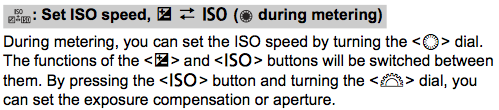
I have just noticed that on my 1D X, the functions of the ISO and EC buttons have swapped place. When "ISO" button is pressed you get to adjust not ISO, but exposure compensation. If you press "EC" button, you get to the screen where you can adjust ISO.
Anybody esle notice this?
 
When I press the ISO button, the ISO screen comes up. I don't think I've ever pressed the EC/Aperture button, since just directly spinning the QCD applies EC.

But I didn't change that setting in the custom controls menu, and I'm guessing you did. :P

Access your custom controls menu (C.Fn5), and I bet you'll see that the QCD (one up from the bottom in the right column) is set to this (taken from p.341 of the manual):
 

Attachments

  • Custom Controls.png
    Custom Controls.png
    27.3 KB · Views: 438
Upvote 0
I haven't done this yet, but on the 1D4 you can set Av mode and minimum shutter speed, to let's say 1/500s. You then turn ISO safety shift to ON, set your aperture, and put in Auto ISO. You can also set EC, so that whatever value is chosen by the camera for ISO, corresponds to your EC value. This is really usefull for indoor sports and I haven't tried it on the 1DX but I imagine it can do this as well.
 
Upvote 0
bdunbar79 said:
I haven't done this yet, but on the 1D4 you can set Av mode and minimum shutter speed, to let's say 1/500s. You then turn ISO safety shift to ON, set your aperture, and put in Auto ISO. You can also set EC, so that whatever value is chosen by the camera for ISO, corresponds to your EC value. This is really usefull for indoor sports and I haven't tried it on the 1DX but I imagine it can do this as well.

My 1DX comes next Wednesday - that will be the first thing i set, apart from RAW and expansion point AF
 
Upvote 0
neuroanatomist said:
When I press the ISO button, the ISO screen comes up. I don't think I've ever pressed the EC/Aperture button, since just directly spinning the QCD applies EC.

But I didn't change that setting in the custom controls menu, and I'm guessing you did. :P

Access your custom controls menu (C.Fn5), and I bet you'll see that the QCD (one up from the bottom in the right column) is set to this (taken from p.341 of the manual):

Presely what happened! I guess this is a good example of "you need to read the whole story (or manual)". I only read the ISO part and made the change ???.

Thanks.
 
Upvote 0
briansquibb said:
bdunbar79 said:
I haven't done this yet, but on the 1D4 you can set Av mode and minimum shutter speed, to let's say 1/500s. You then turn ISO safety shift to ON, set your aperture, and put in Auto ISO. You can also set EC, so that whatever value is chosen by the camera for ISO, corresponds to your EC value. This is really usefull for indoor sports and I haven't tried it on the 1DX but I imagine it can do this as well.

My 1DX comes next Wednesday - that will be the first thing i set, apart from RAW and expansion point AF

Mine too, getting to the store I'm buying it from on Friday.

I just bought a house twice the size of my old one, I bought new Samsung 55" tv and now the 9300 dollar 1d X, and I don't have a job, please give me applause for my dedication to gadgets! LOOOOOL ;D
 
Upvote 0
Status
Not open for further replies.