• The Canon Rumors Forum has officially been shut down as of July 10, 2026.

    All data will be deleted on September 16, 2026.

    the ad free experience will return by July 17, 2026.

5D Mark III High-ISO raw files

Status
Not open for further replies.
Since I saw a couple of people requesting RAW files, I thought I'd share a couple. I would also appreciate any advice on how to do anything useful (e.g convert) with them :) (They can be displayed just fine in ZoomBrowser EX):


I pretty much picked a file hosting service at random, so hopefully downloading them will be not be too much of a hassle.

5D3 RAW @ ISO 51200
5D3 RAW @ ISO 6400
5D3 RAW @ ISO 12800

I have a few more samples, shot at ISO 102400, 25600 and 12800 as well, if anyone's interested. Apparently, the firmware version of my test camera was "4.9.2"

Edit: Added ISO 12800 sample
 
Do you happen to have any black frames and white frames at ISO100?

If you set camera to 1/8000th, put the lens cap on and snap a shot and then set it to an exposure long enough to blow the image out to pure white, all channels blown, over a large chunk of the image, from those two shots, the RAW files can be analyzed and you can find out the SNR, DR and low ISO banding characteristics.

That could answer the question as to whether they have approached Exmor sensor dynamic range or not.
And whether they have fixed up the pattern banding some.

(Assuming software such as IRIS would be able to at least partially open the files.)
 
Upvote 0
IrfanView opens them for me, too. Some free lightweight image viewer for windows. (See www.irfanview.com )

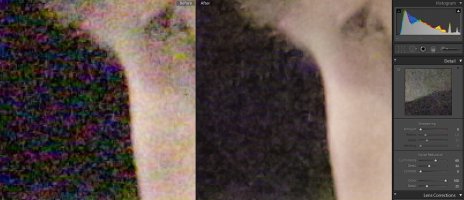
The 51200 sample looks really weird, though. The noise seems to be present in relatively massive same-coloured blobs that are easily 5x15 pixels in size. Noise reduction doesn't help much against it (I converted to TIF with compression set to "none" in IrfanView, and then imported into LR). See included 400% crop...

I hope this is some error caused by my way of dealing with the raw file. Of course this is just the first ISO range "expansion" and not much should be expected, but this seems pretty bad.

(Edit: probably a RAW conversion error.)
 

Attachments

  • 400percent-crop-51200.jpg
    400percent-crop-51200.jpg
    593.4 KB · Views: 11,801
Upvote 0
I'm not sure if this is the raw converter (rawtherappe) or the camera, but I see noise reduction being applied even without any noise reduction set. At the sensor level it looks like the camera has about a 1 stop improvement, which is a truely epic acheivement because only .5 stops were expected if they were really trying to focus on lowering noise but then there is noise reduction on top of that which you can't remove and that leaves fewer options for NR.
 
Upvote 0
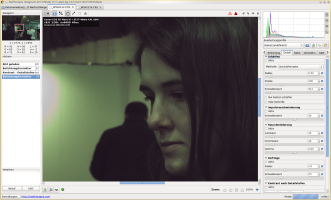
The poor quality images I produced are probably in large part due to errors in the raw conversion. When looking at the raw file in IrfanView zoomed in, it seems to display it in clusters of 8x8 pixels that seem to get some of the colours right, but these clusters have contrasty edges opposite to one another (making them visible).

Phew.
 
Upvote 0
It took me a few minutes to do the raw conversion, and I had problems with a magenta cast to images, so hopefully I can save the rest of you a bit of time.

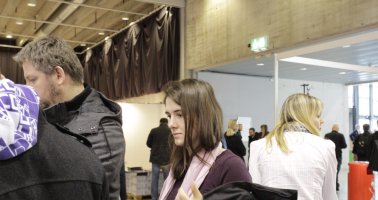
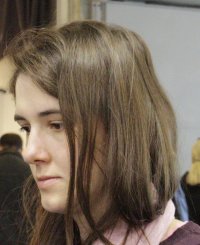
I am attaching 100% crops as PNG files. I used shotwell (under linux) to convert to a tiff, then LR3.6 to crop and export as a jpeg (I tried to post a .png unsuccessfully earlier). As mentioned previously, it is possible that a better raw conversion would result in better quality; however, I have a 5d iii on pre-order and am trying to be realistic and restrain myself from wishful thinking.

Does anyone have a similar 5d ii shot to compare to? I would be very interested in seeing a side-by-side with a 5d ii shot at ISO 6400 and 3200 (but I only have a 5d classic).
 

Attachments

  • _W3A2112.jpg
    _W3A2112.jpg
    181.6 KB · Views: 3,594
Upvote 0
qwerty said:
It took me a few minutes to do the raw conversion, and I had problems with a magenta cast to images, so hopefully I can save the rest of you a bit of time.
I got a similar "view" of the files using IrfanView. I am lead to believe that it is a faulty RAW conversion and that useful claims about noise cannot be made.
Look at a 600% enlargement of the left top corner of the ISO 6400 image to see what I mean. 8x8 pixel "blocks" with articulated edges are visible that introduce incorrect "detail" that will mess with any kind of noise-reduction one might want to perform on it. I can only assume that that is a RAW conversion error.
 

Attachments

  • 600percent-crop-6400.jpg
    600percent-crop-6400.jpg
    74.4 KB · Views: 3,255
Upvote 0
Status
Not open for further replies.