5d Mark iii noise at 1600

Status
Not open for further replies.
Jul 20, 2011
31
0
4,816
I was just doing some test shots and when i opened them in DPP...well, am i missing something here? i still hope that i pressed the wrong button, or chose the wrong settings...something that produced so much noise....Oh maybe i expect too much....But do you guys think this noise is fine? at iso 1600...I am not very happy with that...
0b667a347fa7.jpg

b33f9e7013d2.jpg

thanks
 
I'm not sure... I don't have a 5D III for comparison, but they don't look great, do they?

I tend to import my images into ACR with at least a little NR by default, anyway. What do these same photos look like with minor processing?

EDIT: Just out of curiosity, what is the sixth serial number digit of your camera?
 
Upvote 0
If you are shooting raw, and have no NR or sharpening, you will see some chroma noise at ISO 1600, even at 800. There is a minimal amount of NR required. Nikon does it in camera, but Canon lets you choose how much to use.

I went to my original raw images and turned off all nr and sharpening, and do see some chroma noise at 1600. Not a issue, it goes away with just a touch of chroma nr.
 
Upvote 0
Gheez! Those first 2 examples with strong midtone banding at ISO 1600 are the worst I've seen from any body without a major exposure push. That's just nasty.

Auto Lighting Optimizer is contributing to it but if you wanted to recurve the image a little in post you'd still get the same problem.

My 5D2 used to be nearly that bad with the original 1.x.x firmware at ISO 100 to 400. It's more usable now. (love-hate that camera like I do my sometimes also very bandy 7D)

Hmmm.. the image quality we thought we'd paid for... ??? I don't think so.

I'd contact Canon with a complaint and send them the files they'll request. As for the red hot-pixel in the last example, it's unfortunate, but that happens on occasion. There should be a way to have it mapped out in-camera though. I don't know if the firmware will accomplish this on its own somehow or whether it needs to be done at a Canon service location.
 
Upvote 0
Mt Spokane Photography said:
If you are shooting raw, and have no NR or sharpening, you will see some chroma noise at ISO 1600, even at 800. There is a minimal amount of NR required. Nikon does it in camera, but Canon lets you choose how much to use.

I went to my original raw images and turned off all nr and sharpening, and do see some chroma noise at 1600. Not a issue, it goes away with just a touch of chroma nr.
i just started using DPP and can't figure out why i can't apply noise reduction? It's grey and i can't move the sliders?...

ps

Z, 6th number is "3"
 
Upvote 0
I don't see that noise in my ISO 1600 either. Could your spot metering have metered for the white background, making everything too dark, then your software automatically adjusted it back up where it should be, thus creating the noise?

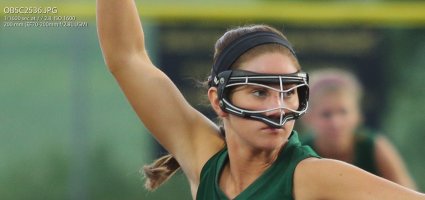
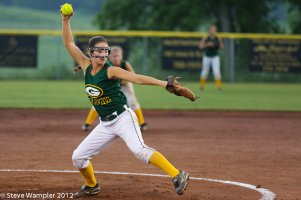
Here's an example at 100% and, while not full frame, slightly cropped for usage frame:
 

Attachments

  • iso1600 100 crop.jpg
    iso1600 100 crop.jpg
    233.8 KB · Views: 4,011
  • OB5C2536.jpg
    OB5C2536.jpg
    147.5 KB · Views: 4,002
Upvote 0
swampler said:
I don't see that noise in my ISO 1600 either. Could your spot metering have metered for the white background, making everything too dark, then your software automatically adjusted it back up where it should be, thus creating the noise?

Here's an example at 100% and, while not full frame, slightly cropped for usage frame:
nice photo!
i was just snapping pictures/testing camera...so i didn't do anything to the settings...first picture metering is on black jacket and second - on pink coat
 
Upvote 0
Yeah, something doesn't look right. That looks like some test images I've gotten out of mine at like 25,600. I shot a night softball game earlier this week and a lot of the images were 3200 and 6400 and they were cleaner than that.
 
Upvote 0
Radiating said:
Looks like you're using the camera without any noise reduction whatsoever and auto light optimizer on. Just change the settings on your camera, the images should be extremely clean at ISO 1600.

can you recommend me the setting i should try?

ps
could it be that my computer's settings are off?
 
Upvote 0
swampler said:
I don't see that noise in my ISO 1600 either. Could your spot metering have metered for the white background, making everything too dark, then your software automatically adjusted it back up where it should be, thus creating the noise?

Here's an example at 100% and, while not full frame, slightly cropped for usage frame:

Correct me if I'm wrong but is it not the image in question is in RAW file and your example is in JPeg? Tnx
 
Upvote 0
yulia said:
Mt Spokane Photography said:
If you are shooting raw, and have no NR or sharpening, you will see some chroma noise at ISO 1600, even at 800. There is a minimal amount of NR required. Nikon does it in camera, but Canon lets you choose how much to use.

I went to my original raw images and turned off all nr and sharpening, and do see some chroma noise at 1600. Not a issue, it goes away with just a touch of chroma nr.
i just started using DPP and can't figure out why i can't apply noise reduction? It's grey and i can't move the sliders?...

ps

Z, 6th number is "3"

I can't help you with the DPP issue, mine works fine. Try a reinstall. Also reset your camera to the default settings, you turned on some paramaters like the ALO which can increase noise in dark areas.

Its best to take your first images with the default camera settings (other than aperture, shutter, and ISO), then you can prove to yourself that the camera is taking good images, and, if it isn't, return it.
 
Upvote 0
Status
Not open for further replies.