
You are using an out of date browser. It may not display this or other websites correctly.
You should upgrade or use an alternative browser.
You should upgrade or use an alternative browser.
5d Mark iii noise at 1600
- Thread starter yulia
- Start date
- Status
- Not open for further replies.

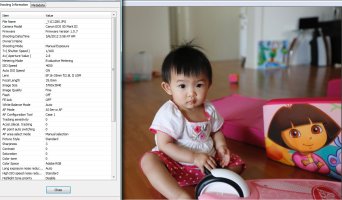
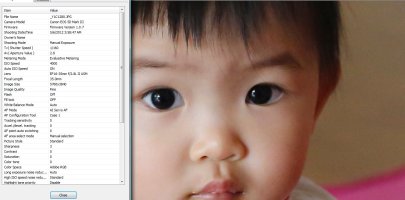

My guess (looking at your metadata) is that you underexposed it, and the software bumped it up... creating the noise (as someone said)
Why do I think that? Well... You were shooting on Shutter priority, at 1/500th... and your lens was at 2.8 (it's maxim aperture). It's easy to underexpose on Shutter priority, especially indoors.
Make a proper digital exposure (over exposing slightly/"expose to the right.. maximizing data), and then see if the noise is still a problem.
My 5d3 is stellar all the way to 6400 with a properly exposed image.
Why do I think that? Well... You were shooting on Shutter priority, at 1/500th... and your lens was at 2.8 (it's maxim aperture). It's easy to underexpose on Shutter priority, especially indoors.
Make a proper digital exposure (over exposing slightly/"expose to the right.. maximizing data), and then see if the noise is still a problem.
My 5d3 is stellar all the way to 6400 with a properly exposed image.
Upvote
0

I don't see that noise in my ISO 1600 either. Could your spot metering have metered for the white background, making everything too dark, then your software automatically adjusted it back up where it should be, thus creating the noise?
I agree with several others. Turn off that Spot Metering. Useful (for my purpose) in a scene were you have all blue sky and only a bird which is your focal point. It ignores the sky and grabs only the exposure on the subject up to 3% of the center of the image if my memory serves me correctly. Partial metering is roughly 9% at the center. Use these modes only when needed, not as an every day default. Note on this site: http://www.cambridgeincolour.com/tutorials/camera-metering.htm where the author states: "...the camera's light meter will incorrectly calculate under or over-exposure, respectively." Hence if the area is under exposed then you found your culprit. I'm also not a big fan of AWB when indoors without flash. I prefer a gray scale card and K WB mode to get those colors spot on.
PS I have the Blue Crane DVD's on the EOS 7D and they claim ALO (auto lighting optimizer) does increase noise. So I've turned that off and use it sparingly only when needed.
Hope this helps you.
Upvote
0
Thank you all, i will try everything recommended...
I don't usually shoot on Shutter priority so maybe i am not aware of all the details that go with this setting...
What is odd is that i didn't turn this ALO on...I don't turn on things that i don't know/remember the purpose of...
I was ready to pack the camera and send it back...now i will give it (or me?) a second chance
I don't usually shoot on Shutter priority so maybe i am not aware of all the details that go with this setting...
What is odd is that i didn't turn this ALO on...I don't turn on things that i don't know/remember the purpose of...
I was ready to pack the camera and send it back...now i will give it (or me?) a second chance
Upvote
0
D
Dragon Ace
Guest
A good quality camera especially at the MkIII's price range should not give you any under par performance be it shooting in Tv, Av or full manual for that matter. The fact your MkIII is performing somewhat inconsistent or less desirable compared to others, I suggest send it back to Canon to be checked if not exchanged.
Secondly, so far all the comparison we have seen are between your RAW file images againts JPeg images. May I suggest our friends to post any example in RAW files at ISO 1600 or higher please so we can see a if the noise level is the same or is it just everytime you shoot in RAW? Tnx
Secondly, so far all the comparison we have seen are between your RAW file images againts JPeg images. May I suggest our friends to post any example in RAW files at ISO 1600 or higher please so we can see a if the noise level is the same or is it just everytime you shoot in RAW? Tnx
Upvote
0


yulia said:what is that bright-pink dot i see?
it was on one of the other photos as well...
I saw similar artifacts when using old version of RAW converters. Try updating your photo editing software.
Upvote
0
well, i am using latest software - any older software does not read mark iii's files....nightbreath said:yulia said:what is that bright-pink dot i see?
it was on one of the other photos as well...
I saw similar artifacts when using old version of RAW converters. Try updating your photo editing software.
Upvote
0
yulia said:
yulia,
If your camera is still under 30days return policy, I say you return it and get another BRAND NEW unit. You might have a bad copy :-\
Upvote
0
Dylan777 said:yulia said:
yulia,
If your camera is still under 30days return policy, I say you return it and get another BRAND NEW unit. You might have a bad copy :-\
Yes, i did tell the store i want to return it... I just wanted to make sure that this photos are result of bad camera, not all mark iii's problem or problem of me doing something wrong...
Upvote
0
P
PhilDrinkwater
Guest
yulia said:Yes, i did tell the store i want to return it... I just wanted to make sure that this photos are result of bad camera, not all mark iii's problem or problem of me doing something wrong...
Are your store a techy store? If so, you might be able to check it through with them as well before finally parting ways with it..
Much respect for investigating before getting rid of it. Many people don't...
Upvote
0
PhilDrinkwater said:yulia said:Yes, i did tell the store i want to return it... I just wanted to make sure that this photos are result of bad camera, not all mark iii's problem or problem of me doing something wrong...
Are your store a techy store? If so, you might be able to check it through with them as well before finally parting ways with it..
Much respect for investigating before getting rid of it. Many people don't...
Thank you! I ordered from onecall, they told me a tech will call me today....
Meanwhile...i am still trying to figure out if there is a mistake on my end...
When i open DPP...when i have jpg file the Noise reduction tab is enabled, i can move the slides etc...When i open RAW file...everything in Noise Reduction Tab is just grey and i can't use it...Is it always like that? (still hoping something is wrong with me, my computer, dpp... but not the camera he he)

Upvote
0
Upvote
0

The apply button in DPP is grey until you make a change to the sliders, then it will turn active.yulia said:When i open DPP...when i have jpg file the Noise reduction tab is enabled, i can move the slides etc...When i open RAW file...everything in Noise Reduction Tab is just grey and i can't use it...Is it always like that? (still hoping something is wrong with me, my computer, dpp... but not the camera he he)
Upvote
0
swampler said:The apply button in DPP is grey until you make a change to the sliders, then it will turn active.yulia said:When i open DPP...when i have jpg file the Noise reduction tab is enabled, i can move the slides etc...When i open RAW file...everything in Noise Reduction Tab is just grey and i can't use it...Is it always like that? (still hoping something is wrong with me, my computer, dpp... but not the camera he he)
the sliders DON'T move at all

they do move with jpegs, but not RAW
Upvote
0
yulia said:swampler said:The apply button in DPP is grey until you make a change to the sliders, then it will turn active.yulia said:When i open DPP...when i have jpg file the Noise reduction tab is enabled, i can move the slides etc...When i open RAW file...everything in Noise Reduction Tab is just grey and i can't use it...Is it always like that? (still hoping something is wrong with me, my computer, dpp... but not the camera he he)
the sliders DON'T move at all
they do move with jpegs, but not RAW
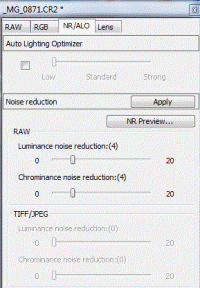
The latest (corrected) DPP version is 3.11.26. If you are editing RAW files, the slider should be active and the TIFF/JPeg sliders should be grayed out and vise versa.
Attachments
Upvote
0
M
MazV-L
Guest
Do you have the general settings in DPP (under Preferences) on High Speed rather than High Quality, because Noise Reduction is switched off when you have it set to High Speed.yulia said:swampler said:The apply button in DPP is grey until you make a change to the sliders, then it will turn active.yulia said:When i open DPP...when i have jpg file the Noise reduction tab is enabled, i can move the slides etc...When i open RAW file...everything in Noise Reduction Tab is just grey and i can't use it...Is it always like that? (still hoping something is wrong with me, my computer, dpp... but not the camera he he)
the sliders DON'T move at all
they do move with jpegs, but not RAW
Upvote
0
- Status
- Not open for further replies.
Similar threads
D
- Replies
- 32
- Views
- 5K

- Replies
- 1
- Views
- 2K
D

- Replies
- 14
- Views
- 2K
L
- Replies
- 12
- Views
- 7K
L