5D Mk3 Grainy footage. Any ideas?

Feb 1, 2014
4
0
4,611
Hello everyone,

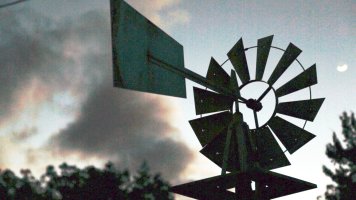
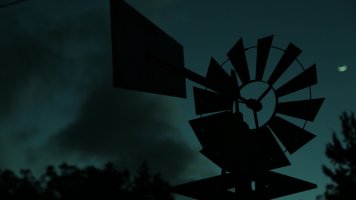
I have been shooting with the Mk3 for a few months now, but have recently started seeing some grain in my images. I'm not really sure if it is something on my end causing this, or if it is within the camera. The attached image is a screen grab from a clip I shot wide open at f4 (24-105mm L) with an ISO of 800. The footage gets incredibly grainy when I sharpen in post and I'm not sure why. Could it be that the sky is out of focus? Should I have shot it at a much smaller fstop to avoid this? Any help would be very much appreciated. I'm still pretty new to videography, but I feel I should be getting much cleaner images than I have been. Thanks!
 

Attachments

  • Sunset Grainy.jpg
    Sunset Grainy.jpg
    890.9 KB · Views: 1,440
jarwood said:
Hello everyone,

I have been shooting with the Mk3 for a few months now, but have recently started seeing some grain in my images. I'm not really sure if it is something on my end causing this, or if it is within the camera. The attached image is a screen grab from a clip I shot wide open at f4 (24-105mm L) with an ISO of 800. The footage gets incredibly grainy when I sharpen in post and I'm not sure why. Could it be that the sky is out of focus? Should I have shot it at a much smaller fstop to avoid this? Any help would be very much appreciated. I'm still pretty new to videography, but I feel I should be getting much cleaner images than I have been. Thanks!

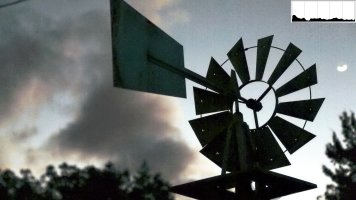
The histogram of the image above:
histunedr.jpg


As you can see, all the information contained in the two darkest segments (5 darkest stops)
This means that you wasted 87.5% of the information.

It looks grainy because of the lack of information and the inaccuracy of the photon count. If you try to bring up the exposure it will look noisy even at a low ISO.

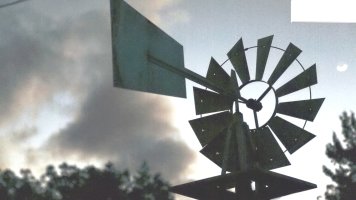
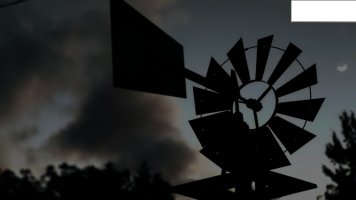
The darkest parts lack the most information, it cannot be effectively recovered. Below you can see how much information can be recovered and how much is lost. First image a quick manipulation to show the really noisy parts with very little information. The second picture a more realistic attempt at pushing the image as far as it will go.
 

Attachments

  • Sunset Grainy.jpg
    Sunset Grainy.jpg
    2.7 MB · Views: 1,383
  • rec.jpg
    rec.jpg
    930.8 KB · Views: 1,341
Upvote 0
You didn't post EXIF. If you don't post more information, we can't help you. What settings did you use? Choosing your ISO correctly is also important, some lower ISOs can actually be noisier than higher ISOs. One way to get cleaner video is to
expose brighter
and then bring the brightness down in post and push the blacks to crush the noisy shadows:
 

Attachments

  • recb.jpg
    recb.jpg
    893.5 KB · Views: 1,322
  • recd.jpg
    recd.jpg
    378.4 KB · Views: 1,285
Upvote 0
Thank you so much for your insight! I have just been at a loss. I haven't accessed the EXIF data before, how would be the easiest way to do so?

Also, I had a breakthrough today. I was working with one of my clips and noticed there was a lot of vertical banding. I realized I had been shooting in IPB, which I thought wouldn't affect anything. So just as a test is switched to ALL-I and filmed similar shots. The ALL-I was much cleaner and did not produce the grain or vertical banding. Is this a common occurrence or is something wrong with my IPB?
 
Upvote 0
jarwood said:
Thank you so much for your insight! I have just been at a loss. I haven't accessed the EXIF data before, how would be the easiest way to do so?

Also, I had a breakthrough today. I was working with one of my clips and noticed there was a lot of vertical banding. I realized I had been shooting in IPB, which I thought wouldn't affect anything. So just as a test is switched to ALL-I and filmed similar shots. The ALL-I was much cleaner and did not produce the grain or vertical banding. Is this a common occurrence or is something wrong with my IPB?
I'm sorry, I was not thinking straight when I wrote the first part of the message. I was dealing with other things at the same time so I momentarily forgot we were talking about video. Video files have no EXIF data!
Do you remember what settings you used for shutter/ISO/aperture?

IPB features better compression but personally I'd always use ALL-I. It makes life easier. It shouldn't have any direct effect on noise, but editing IPB material can result in worse IQ in the final video.
 
Upvote 0
No worries.

ISO was 800. Frame rate 24. Shutter 1/50. Aperture f4. IPB compression.

I really have no idea why, but the ALL-I was a ton cleaner than IPB. Even after sharpening, there was minimal grain. I've noticed the vertical banding before, but it had never been too much of an issue. So I won't be shooting in IPB anymore.
 
Upvote 0
jarwood said:
No worries.

ISO was 800. Frame rate 24. Shutter 1/50. Aperture f4. IPB compression.

I really have no idea why, but the ALL-I was a ton cleaner than IPB. Even after sharpening, there was minimal grain. I've noticed the vertical banding before, but it had never been too much of an issue. So I won't be shooting in IPB anymore.

Those settings should not result in that kind of noise! Don't be afraid to push the 5d3 to 6400 when you need to! It can handle it (even 12800 in a pinch). Underexposure will be noisier than correct exposure or less underexposure. If you underexpose and push black you'll get a darker image than you shot but if you expose brighter and then bright exposure down and black up you'll have a far better control over the final brightness.
:)
 
Upvote 0
Your clip is simply underexposed. Expose it properly and you'll be fine. There's no way to fix a shot like that. And shooting All-I won't make any difference. Underexposed is underexposed. Additionally, shooting All-I is overkill for web video and the like. IPB is fine unless you're shooting for theatrical projection.
 
Upvote 0
mdrewpix said:
Your clip is simply underexposed. Expose it properly and you'll be fine. There's no way to fix a shot like that. And shooting All-I won't make any difference. Underexposed is underexposed. Additionally, shooting All-I is overkill for web video and the like. IPB is fine unless you're shooting for theatrical projection.

I think the banding is making the noise look worse than it actually is. And IPB actually has less banding, so my guess is that All-I would make it look worse.
 
Upvote 0
flowers said:
. Video files have no EXIF data!

There is plenty of shooting information for 5D MK III video. Open up DPP and select a video, then right click and select info.

Here is some from a test video I recently shot.

File Name untitled-6170.MOV
Camera Model Canon EOS 5D Mark III
Firmware Firmware Version 1.2.1
Shooting Date/Time 1/16/2014 9:01:07 PM
Author
Copyright Notice Mount Spokane Photography-2014
Owner's Name
Shooting Mode Movie
Tv(Shutter Speed) 1/160
Metering Mode Center-Weighted Average Metering
Exposure Compensation -2/3
ISO Speed Auto
Auto ISO Speed ON
Lens EF70-200mm f/2.8L IS II USM
Focal Length 70.0mm
Image Size 1920x1080
Movie exposure Shutter-Priority AE
Compression format MPEG-4 AVC/H.264
Movie quality Low compression(intra frame, ALL-I)
Recording Time 143.1 seconds
Frame Rate 29.97
Flash Off
FE lock OFF
White Balance Mode Auto
AF Mode One-Shot AF
Picture Style Faithful
Sharpness 0
Contrast 0
Saturation 0
Color tone 0
Color Space sRGB
Long exposure noise reduction Disable
High ISO speed noise reduction Disable
Highlight tone priority Disable
Auto Lighting Optimizer Disable
Peripheral illumination correction Enable
Chromatic aberration correction Enable
File Size 1523291KB
Drive Mode Movie shooting
Live View Shooting ON
Camera Body No. 062024006599
Comment
 
Upvote 0
Mt Spokane Photography said:
flowers said:
. Video files have no EXIF data!

There is plenty of shooting information for 5D MK III video. Open up DPP and select a video, then right click and select info.

Here is some from a test video I recently shot.

File Name untitled-6170.MOV
Camera Model Canon EOS 5D Mark III
Firmware Firmware Version 1.2.1
Shooting Date/Time 1/16/2014 9:01:07 PM
Author
Copyright Notice Mount Spokane Photography-2014
Owner's Name
Shooting Mode Movie
Tv(Shutter Speed) 1/160
Metering Mode Center-Weighted Average Metering
Exposure Compensation -2/3
ISO Speed Auto
Auto ISO Speed ON
Lens EF70-200mm f/2.8L IS II USM
Focal Length 70.0mm
Image Size 1920x1080
Movie exposure Shutter-Priority AE
Compression format MPEG-4 AVC/H.264
Movie quality Low compression(intra frame, ALL-I)
Recording Time 143.1 seconds
Frame Rate 29.97
Flash Off
FE lock OFF
White Balance Mode Auto
AF Mode One-Shot AF
Picture Style Faithful
Sharpness 0
Contrast 0
Saturation 0
Color tone 0
Color Space sRGB
Long exposure noise reduction Disable
High ISO speed noise reduction Disable
Highlight tone priority Disable
Auto Lighting Optimizer Disable
Peripheral illumination correction Enable
Chromatic aberration correction Enable
File Size 1523291KB
Drive Mode Movie shooting
Live View Shooting ON
Camera Body No. 062024006599
Comment

Oh wow, I didn't know Canon cameras record that much metadata in videos! Thank you for pointing that out. Can you only read it using DPP or can some other programs show it too?
 
Upvote 0
To minimise noise in video using any Canon DSLR shoot with your ISO set in multiples of 160 (so 160, 320, 640, 1250 etc). This makes a surprising amount of difference.

However, in the example frame you've posted, the issue is that the shot is seriously underexposed. Ultimately you can't push a heavily compressed 8-bit video image in the same way you can a 14-bit RAW still (and you'd be pushing it with the level of underexposure in the frame you've posted even it was RAW).
 
Upvote 0
jdramirez said:
People often mention it... expose to the right... so you over expose your image a little and then in post move it back... less grain... more info that's not lost...

This is true for RAW, but not compressed video. H.264 will compress the highlights, using a flat picture style like Cinestyle and exposing normally is the best thing for H.264.
 
Upvote 0
crazyrunner33 said:
jdramirez said:
People often mention it... expose to the right... so you over expose your image a little and then in post move it back... less grain... more info that's not lost...

This is true for RAW, but not compressed video. H.264 will compress the highlights, using a flat picture style like Cinestyle and exposing normally is the best thing for H.264.

True, compressed h.264 doesn't have the highlight recovery latitude.
 
Upvote 0
What about using a clean HDMI out like the Atomos Ninja2 ? With direct compression to ProRes, does the ISO mulitple still benefit from the '160 rule' as much?

And as far as pushing the blacks up / down, can you be a little more specific for the beginners in the audience. If my workflow is MD3 clean video out to atomos ninja2 (with aforementioned ProRes direct compression), and editing in Final Cut or Premiere, what 'other' post-production software / plugin's etc do you recommend? I'm just learning video editing, have access to the Creative Cloud package, but intimidated by the post-production / color grading, etc that is so often needed.
 
Upvote 0
Crapking said:
What about using a clean HDMI out like the Atomos Ninja2 ? With direct compression to ProRes, does the ISO mulitple still benefit from the '160 rule' as much?

And as far as pushing the blacks up / down, can you be a little more specific for the beginners in the audience. If my workflow is MD3 clean video out to atomos ninja2 (with aforementioned ProRes direct compression), and editing in Final Cut or Premiere, what 'other' post-production software / plugin's etc do you recommend? I'm just learning video editing, have access to the Creative Cloud package, but intimidated by the post-production / color grading, etc that is so often needed.

Here's an article you might find of help to answer that question: http://www.photographybay.com/2011/04/17/atomos-ninja-hands-on/

Quote: "That said, you need a camera that sends an uncompressed full-res signal out of the HDMI port. As you may know, most DSLRs don’t do this. In fact, the Canon 5D Mark II, along with other Canon models, actually sends out a less-than-HD signal once you hit the record button."
If I understand it correctly, 5 series models don't output uncompressed video through hdmi, it's compressed before it reaches Ninja (but less than the file written on the SD card... I think!) also it's not full-res. Whatever Ninja outputs is compressed and upscaled. There's a firmware update for 5d iii apparently that give you uncompressed hdmi output (not sure about full res). You might want to consider ML. If you're prepared to handle ProRes then 14-bit RAW is not an incredibly huge step up. Just make sure whatever you're editing on has enough RAM and cores and threads to throw at the software you use to process, grade and edit your raw footage because it will use all you can throw at it. There's no chance of overkill.
ML is your only chance for 7d. There's no way something like 7D would ever output uncompressed clean full res feed, not even two out of three.
 
Upvote 0
With a late 2013 8 Core Mac Pro and 32GB RAM, I'm not really worried about my machine freezing, but rather MY inability to correctly / efficiently post-process my video files. Despite using the same custom WB, my colors just don't seem as vibrant/accurate as my stills, and despite meticulous focusing (on a tripod,m statically shooting men's volleyball), the output is not as sharp as I would expect - so if any of the more experienced can point me in the right direction for fast-action video settings and post-processing tips, I'd appreciate that. :)
 
Upvote 0