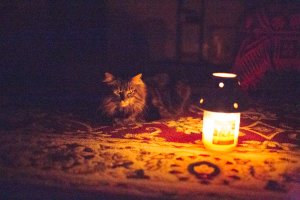
5D3 candle light High ISO (102400)

Status
Not open for further replies.
Aug 19, 2012
718
0
9,076
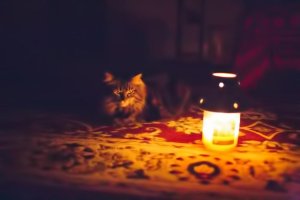
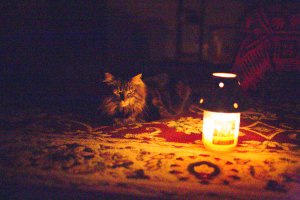
5D3 candle light shot at ISO H2 (102400)

Set up: Shot with 35L. Zero lights in any of the rooms with only the candle seen. Aperture priority f/1.4 generates shutter speed 1/1000 sec. House cat is mostly dark grey and you can see her under normal lighting in another post:
http://www.canonrumors.com/forum/index.php?topic=314.msg226144#msg226144

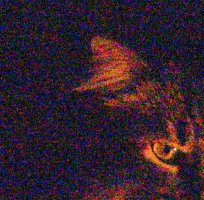
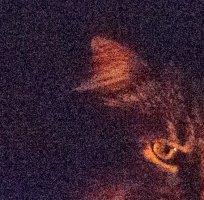
LR4 and export: Everything that had a sliding dial on LR4, I set to zero (first pic and crop). No sharpening, no NR etc… WB was ‘as shot’. LR4, by default, wanted to set NR “color” slider to 25 which clearly cleans up the picture a bit even if everything else is still at zero (second pic and crop). I am not a post-processing officianado, so be gentle.

I realize I can get a much cleaner picture by using a sensible ISO and slower shutter speed, but I just wanted to play with the extended ISO a bit. Coming from film, not so many years ago, getting a relatively discernible image at such low light and high shutter speeds would not even be thinkable for me. I do see the banding up top and the general ugly noise, but either today’s sensors are wonderful or I am one of those saps who is too easily pleased. Cheers! :)


Edit: Just uploaded the original CR2 Raws to skydrive, hope this works:

The primary shot used here at 1/1000 sec:

https://skydrive.live.com/redir?resid=1F78FF9C09DCA480!ADK2oOGh3O_uCXI

An extra shot that is slightly more exposed at 1/800 sec taken moments apart with the same setup as the primary:

https://skydrive.live.com/redir?resid=1F78FF9C09DCA480!107&authkey=!AOL_-sdrd4HXRmY
 

Attachments

  • ISO 102400 Color NR 0.jpg
    ISO 102400 Color NR 0.jpg
    1.4 MB · Views: 6,583
  • ISO 102400 Color NR 25.jpg
    ISO 102400 Color NR 25.jpg
    724.7 KB · Views: 4,049
  • NR Color 0.jpg
    NR Color 0.jpg
    1,014.3 KB · Views: 4,114
  • NR Color 25.jpg
    NR Color 25.jpg
    691.9 KB · Views: 3,996
jrista said:
Any chance you could run that through Topaz Denoise 5, and run the debanding algorithm? I'm just curious to see if you can clean the banding and luma noise up any more.

I don't own the software but I will try their trial version and post the result. Looks like an interesting series of programs.
 
Upvote 0
I generally shoot in RAW and would pull these into Photoshop Camera RAW for processing. Generally speaking as you noticed the chroma noise is easily filtered either in camera converted to a jpg or using software after the fact but after the fact it must be RAW format.

The grain can also be significantly reduced through the luminance filter and maybe some masking. At this high ISO you cant apply the luminance filter too much if you have to crop much at all. Therefore if you know you have to use H1 or H2 mode then you need to fill the frame as much as possible to reduce the grain size with respect to your subject. I would have got MUCH closer to the cat.

The shots are pretty good otherwise, just needs some TLC in a good post processing package.


Ray2021 said:
5D3 candle light shot at ISO H2 (102400)

Set up: Shot with 35L. Zero lights in any of the rooms with only the candle seen. Aperture priority f/1.4 generates shutter speed 1/1000 sec. House cat is mostly dark grey and you can see her under normal lighting in another post:
http://www.canonrumors.com/forum/index.php?topic=314.msg226144#msg226144

LR4 and export: Everything that had a sliding dial on LR4, I set to zero (first pic and crop). No sharpening, no NR etc… WB was ‘as shot’. LR4, by default, wanted to set NR “color” slider to 25 which clearly cleans up the picture a bit even if everything else is still at zero (second pic and crop). I am not a post-processing officianado, so be gentle.

I realize I can get a much cleaner picture by using a sensible ISO and slower shutter speed, but I just wanted to play with the extended ISO a bit. Coming from film, not so many years ago, getting a relatively discernible image at such low light and high shutter speeds would not even be thinkable for me. I do see the banding up top and the general ugly noise, but either today’s sensors are wonderful or I am one of those saps who is too easily pleased. Cheers! :)
 
Upvote 0
East Wind Photography said:
I generally shoot in RAW and would pull these into Photoshop Camera RAW for processing. Generally speaking as you noticed the chroma noise is easily filtered either in camera converted to a jpg or using software after the fact but after the fact it must be RAW format.

The grain can also be significantly reduced through the luminance filter and maybe some masking. At this high ISO you cant apply the luminance filter too much if you have to crop much at all. Therefore if you know you have to use H1 or H2 mode then you need to fill the frame as much as possible to reduce the grain size with respect to your subject. I would have got MUCH closer to the cat.

The shots are pretty good otherwise, just needs some TLC in a good post processing package.

I am not sure you would have much detail to start with, though, at such a high ISO. Not only do you have to deal with read noise, which eats away at shadow detail no matter what you do, there just isn't enough light at such a fast ISO to really give fine detail any real substance. I'd be interested in seeing Ray2021's original images with moderate and heavy lumi NR in lightroom as well as the Topaz adjustments, just to see how the images look. I bet a pretty healthy amount of NR could be applied, maybe with LR's "detail" slider (which is really just a way to tune the deconvolution) set to around 85-90...which should preserve a lot of the detail that does exist. Topaz Denoise 5 should eliminate the banding without seriously affecting the detail present.

I'd bet that image could be cleaned up considerably, although it certainly suffers on the color fidelity and dynamic range front....nothing you can do about those.
 
Upvote 0
Jrista, thanks for the Topaz suggestion. Here is the deNoise program version. I just installed the trial and played with it for the first time. Cleans up the banding significantly.
 

Attachments

  • deNoise.jpg
    deNoise.jpg
    36.2 KB · Views: 3,542
Upvote 0
jrista said:
I am not sure you would have much detail to start with, though, at such a high ISO. Not only do you have to deal with read noise, which eats away at shadow detail no matter what you do, there just isn't enough light at such a fast ISO to really give fine detail any real substance. I'd be interested in seeing Ray2021's original images with moderate and heavy lumi NR in lightroom as well as the Topaz adjustments, just to see how the images look. I bet a pretty healthy amount of NR could be applied, maybe with LR's "detail" slider (which is really just a way to tune the deconvolution) set to around 85-90...which should preserve a lot of the detail that does exist. Topaz Denoise 5 should eliminate the banding without seriously affecting the detail present.

Is there a web spot where I can share the ~22MB raw outside of the CR site? The upload limit at CR obviously is well below that.

jrista said:
I'd bet that image could be cleaned up considerably, although it certainly suffers on the color fidelity and dynamic range front....nothing you can do about those.

Not only the insane ISO, but even the 1/1000sec is crazy short at first blush for me. I think overexposing the shutter speed to 1/500 could produce some additional fidelity in the shadows and increase DR. It will likely blow out the candle highlights completely.
 
Upvote 0
Hi Ray, this is great stuff. What a nice coincidence ;-) Did we post the same topic just yesterday? Great! Here's my thread. And I even opened a Group over at flickr called Insane ISOs. Whoever likes to join, you are more than welcome! http://www.flickr.com/groups/insane_isos/
Your 102.400 cleans up nice! let's go to the limit...you 102kers rock!
Cheers, Pedro

http://www.canonrumors.com/forum/index.php?topic=13147.0

And here's the picture

Z96A3506bTLKLEINBW by Peter Hauri, on Flickr

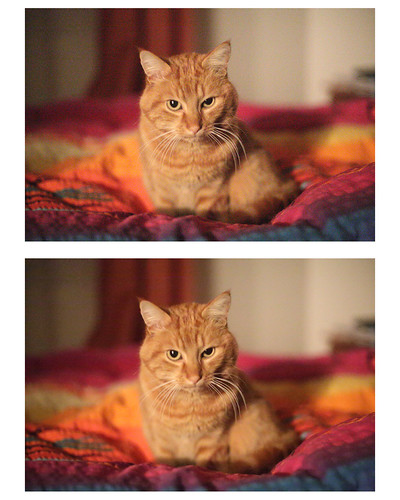
Here's my catshot from about a few weeks ago, in comparison to yours it was taken at ISO 51200 "only" 8)

Shooting my Cat at ISO 51k by Peter Hauri, on Flickr
 
Upvote 0
Here's one I did when experimenting the camera when I first bought it. 24mm, 1/25, f/1.4, ISO 102000. All processing done with Lightroom. The light sources is from a street light about 150 feet outside the house. I could barely see her. The AF assist lamp from my 580EX solved the focus issue.

670C0744.jpg
 
Upvote 0
pedro said:
Here's my catshot from about a few weeks ago, in comparison to yours it was taken at ISO 51200 "only" 8)

Hi Pedro, no coincidence at all... I was actually inspired by your original cat pic and wanted to test with more stringent (loony? lol) conditions... given the detail we see in the comfortor I thought you had "low" but some morning light to provide the DR apparent. I also wanted to push the ISO to the max. I really didn't expect to see much at all in the pitch black room with a point light source, but was pleseantly surprised, so I wanted to share.

For the record, I will never take shots like this in in the dark at 1/1000sec in real life. but I am learning a lot in the process of this experiment :)
 
Upvote 0
Ray2021 said:
Jrista, thanks for the Topaz suggestion. Here is the deNoise program version. I just installed the trial and played with it for the first time. Cleans up the banding significantly.

It cleans it up for sure, but it looks like the settings are too strong. There is definitely more detail in the originals. I'd scale back the NR in Topaz a bit. You want to eliminate noise without blurring detail. It doesn't need to be 100% noise free...maybe more like the amount of noise you might have at ISO 800 or 1600. That should preserve detail, while making the noise "acceptable".
 
Upvote 0
Ray2021 said:
jrista said:
I am not sure you would have much detail to start with, though, at such a high ISO. Not only do you have to deal with read noise, which eats away at shadow detail no matter what you do, there just isn't enough light at such a fast ISO to really give fine detail any real substance. I'd be interested in seeing Ray2021's original images with moderate and heavy lumi NR in lightroom as well as the Topaz adjustments, just to see how the images look. I bet a pretty healthy amount of NR could be applied, maybe with LR's "detail" slider (which is really just a way to tune the deconvolution) set to around 85-90...which should preserve a lot of the detail that does exist. Topaz Denoise 5 should eliminate the banding without seriously affecting the detail present.

Is there a web spot where I can share the ~22MB raw outside of the CR site? The upload limit at CR obviously is well below that.

You could try SkyDrive. You get 7gigs free, and you can make folders public.

Ray2021 said:
jrista said:
I'd bet that image could be cleaned up considerably, although it certainly suffers on the color fidelity and dynamic range front....nothing you can do about those.

Not only the insane ISO, but even the 1/1000sec is crazy short at first blush for me. I think overexposing the shutter speed to 1/500 could produce some additional fidelity in the shadows and increase DR. It will likely blow out the candle highlights completely.

Proper NR can recover a lot of the DR lost in the shadows. You could expose the light source higher, but keep in mind, you only have a few stops of DR at ISO 102400 (I think around 4 stops for the 1D X), and that is limited by physics.
 
Upvote 0
Stephen Melvin said:
Here's one I did when experimenting the camera when I first bought it. 24mm, 1/25, f/1.4, ISO 102000. All processing done with Lightroom. The light sources is from a street light about 150 feet outside the house. I could barely see her. The AF assist lamp from my 580EX solved the focus issue.

Love the film grain look... I had no flash mounted so my 35mm was strugling to lock focus and I am not sure it really did.
 
Upvote 0
Ray2021 said:
pedro said:
Here's my catshot from about a few weeks ago, in comparison to yours it was taken at ISO 51200 "only" 8)

Hi Pedro, no coincidence at all... I was actually inspired by your original cat pic and wanted to test with more stringent (loony? lol) conditions... given the detail we see in the comfortor I thought you had "low" but some morning light to provide the DR apparent. I also wanted to push the ISO to the max. I really didn't expect to see much at all in the pitch black room with a point light source, but was pleseantly surprised, so I wanted to share.

For the record, I will never take shots like this in in the dark at 1/1000sec in real life. but I am learning a lot in the process of this experiment :)

@Ray: Wow. Thanks for this one. You did great! Dare to go the limits, it is less harmful than bungee jumping 8)
 
Upvote 0
So long as we're posting pictures taken in the dark of our cats...here's Baihu the evening I got the 5DIII. 85mm @ 1/4s @ f/1.8 @ ISO 25,600, and then about another stop altogether added in post...call it EV -6, handheld. The main light is from the LED on a battery charger about six feet to his right. The rest of the light is coming from that computer monitor several feet behind him in the top of the frame.

I don't remember how I got this in focus, as I really couldn't see a bloody thing.

That the camera can make pictures like this in settings where a human is blind...well, I'm sure not going to ever do this sort of thing other than on a lark, so I'd say that its low light abilities are much more than I actually need.

Anybody else who needs more than this needs a head examination more than they need a better camera....

Cheers,

b&
 

Attachments

  • 706C0307.jpg
    706C0307.jpg
    55.6 KB · Views: 2,171
Upvote 0
Stephen Melvin said:
Here's one I did when experimenting the camera when I first bought it. 24mm, 1/25, f/1.4, ISO 102000. All processing done with Lightroom. The light sources is from a street light about 150 feet outside the house. I could barely see her. The AF assist lamp from my 580EX solved the focus issue.
Ray2021 said:
Love the film grain look... I had no flash mounted so my 35mm was strugling to lock focus and I am not sure it really did.

I did use a number of tools that LR offers, including adding grain. I add grain to nearly all of my images these days as it is; it helps images look more natural, as far as I'm concerned. It definitely helps with pattern noise.
 
Upvote 0
Status
Not open for further replies.