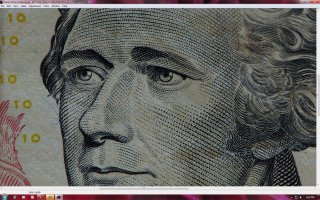
5DIII is SHARP!

  • Thread starter Thread starter neutral_density
  • Start date Start date
Status
Not open for further replies.
N

neutral_density

Guest
I've done a bunch of tests at different ISOs. Here's just one of many examples. This camera definitely produces some sharp enough images, at least for me.

ISO 100, RAW processed in CS5 (ACR 6.7). All I did in CameraRaw was slight increase of clarity contrast, and then some USM in CS5.

edit: most of you probably know this but some may not. To see the full picture, click the link right under the picture and once the image opens, zoom in to 100%.
 

Attachments

  • sharp test ISO100.jpg
    sharp test ISO100.jpg
    702.4 KB · Views: 3,195
neutral_density said:
Here's just one of many examples. This camera definitely produces some sharp enough images, at least for me. All I did in CameraRaw was slight increase of clarity contrast, and then some USM in CS5.
Amazing, I was already wondering what a body for 3500 bucks was good for, I'm sure the updated "1d style" helped - beautiful, vibrant colors, too :-p ... but please remember that clarity in LR is artificial sharpness, so at iso 100 and low dynamic range other cameras might produce ok results, too.
The exif data is missing, what lens did you use? I'm asking because this reminds me of a video and esp. some pictures taken by the host of DigitalRev, "Kai mk. ii": Pro DSLR + Cheapo Lens vs "Cheapo" DSLR + Pro Lens
 
Upvote 0
the file size limit doesn't allow me to post full res jpeg, had to reduce the size :-\ but if you click on the link right under the image, and then zoom in 100% you can get an idea of the detail. believe me, it's awesome :D
 
Upvote 0
AWESOME! I just got my 5d a couple of hours ago and just finished doing a few quick test shots and I have to say I'm really amazed at what I'm seeing from my 24-70 and 50 1.2 as far as sharpness goes. I took the pics as jpegs at iso 100,12800 and 25600 at the widest aperture and f5.6 for the 24-70 at 24mm and f4 with the 50mm. Just looking at the jpgs on the camera zoomed in all the way, excellent sharpness especially from the 50mm when stopped down and what you'd expect when wide open. I'm hoping to get a look at the pics inside the computer tomorrow night and will post the results.
 
Upvote 0
Kane said:
AWESOME! I just got my 5d a couple of hours ago and just finished doing a few quick test shots and I have to say I'm really amazed at what I'm seeing from my 24-70 and 50 1.2 as far as sharpness goes. I took the pics as jpegs at iso 100,12800 and 256000 at the widest aperture and f5.6 for the 24-70 at 24mm and f4 with the 50mm. Just looking at the jpgs on the camera zoomed in all the way, excellent sharpness especially from the 50mm when stopped down and what you'd expect when wide open. I'm hoping to get a look at the pics inside the computer tomorrow night and will post the results.

Nice, looking forward to the results!
 
Upvote 0
so you are able to open the native raw files from the 5dmk3 in cs5?
I've read about people being able to covert them in DPP to DNG files, i tried that and it doesn't give me a DNG option to convert to, only jpegs and tiffs, am i doing something wrong.
i then tried the adobe dng converter and it said files were not supported.
can anyone give me some advice on what to do, i really need to deliver some raw files that they can work with to a client.
thank you.
 
Upvote 0
jlev23 said:
so you are able to open the native raw files from the 5dmk3 in cs5?
I've read about people being able to covert them in DPP to DNG files, i tried that and it doesn't give me a DNG option to convert to, only jpegs and tiffs, am i doing something wrong.
i then tried the adobe dng converter and it said files were not supported.
can anyone give me some advice on what to do, i really need to deliver some raw files that they can work with to a client.
thank you.

Try the 6.7 version of Adobe DNG Converter. It works in batch. Clean conversion 5DmIII CR2 to DNG.

http://labs.adobe.com/downloads/cameraraw6-7.html
 
Upvote 0
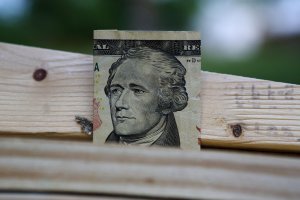
I got my camera Friday but due to weather and work, I wasn't able to do anything until last night. I played around with my 16-35 and 24-70 taking pictures of a $10 bill and I am blown away with how sharp it is. I used DPP and other than just a little contrast and some pop, the pictures are incredible. I am very happy with this camera.
 
Upvote 0
I'm beginning to feel better already ;D

One thing I'm uncertain about is the best way (currently) to process the 5DMkIII RAW files. Some people seem to be using Adobe DNG Converter 6.7 and processing the resulting DNG files in Lightroom and others are using ACR6.7 release candidate directly with Photoshop CS5. Is one way better than the other? If so, why?

I'm hesitant to use either method if there's any chance of messing up my existing software (Lightroom 3 and Photoshop CS5.5 extended) by downloading and installing them, so can anyone please tell me whether there is any chance of this happening or are they both perfectly safe to download and install? How easy is it to uninstall them if they don't work out/ cause problems with Lightroom/Photoshop?
 
Upvote 0
eeek said:
I got my camera Friday but due to weather and work, I wasn't able to do anything until last night. I played around with my 16-35 and 24-70 taking pictures of a $10 bill and I am blown away with how sharp it is. I used DPP and other than just a little contrast and some pop, the pictures are incredible. I am very happy with this camera.

eeek: Post some of those shots! :D
 
Upvote 0
Arkarch said:
jlev23 said:
so you are able to open the native raw files from the 5dmk3 in cs5?
I've read about people being able to covert them in DPP to DNG files, i tried that and it doesn't give me a DNG option to convert to, only jpegs and tiffs, am i doing something wrong.
i then tried the adobe dng converter and it said files were not supported.
can anyone give me some advice on what to do, i really need to deliver some raw files that they can work with to a client.
thank you.

Try the 6.7 version of Adobe DNG Converter. It works in batch. Clean conversion 5DmIII CR2 to DNG.

http://labs.adobe.com/downloads/cameraraw6-7.html
I'm having real problems installing this, i see my problem is i have adobe 6.6 dng converter.
so i downloaded the new one and two things pop up, adobe patch installer and a folder called payloads. when i double click on the patch installer all that happens is adobe manager comes up and says the update is not applicable. what am i doing wrong?
 
Upvote 0
jlev23 said:
Arkarch said:
jlev23 said:
so you are able to open the native raw files from the 5dmk3 in cs5?
I've read about people being able to covert them in DPP to DNG files, i tried that and it doesn't give me a DNG option to convert to, only jpegs and tiffs, am i doing something wrong.
i then tried the adobe dng converter and it said files were not supported.
can anyone give me some advice on what to do, i really need to deliver some raw files that they can work with to a client.
thank you.

Try the 6.7 version of Adobe DNG Converter. It works in batch. Clean conversion 5DmIII CR2 to DNG.

http://labs.adobe.com/downloads/cameraraw6-7.html
I'm having real problems installing this, i see my problem is i have adobe 6.6 dng converter.
so i downloaded the new one and two things pop up, adobe patch installer and a folder called payloads. when i double click on the patch installer all that happens is adobe manager comes up and says the update is not applicable. what am i doing wrong?

There are two download links on that page. Get the one marked DNG converter, it sounds like you downloaded the camera raw converter for photoshop CS5.
 
Upvote 0
Status
Not open for further replies.