70D Diagonal Image Processing (DIP) Defect

Status
Not open for further replies.
Oct 15, 2013
7
0
4,636
I seem to have made a mistake. I bought a 70D.
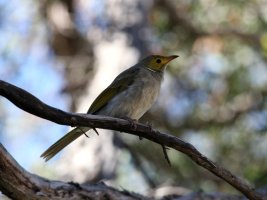
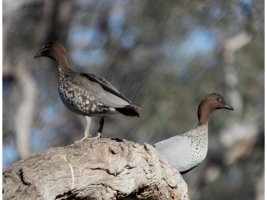
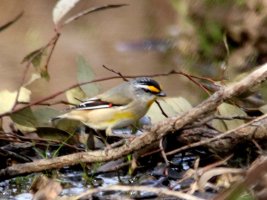
I mostly photograph birds with a 500mm lens and 1/500 sec exposure or faster, formerly with 5D Mk II with no sign of this problem. Normally an out-of-focus point should degenerate to a circle representing the round lens aperture (see honeyeater pic). However, with the 70D, a large proportion of the images develop a diagonal streaking in the bg.(subsequent pics). It appears that part of the image is isolated (face recognition/image stabilization ??) and inserted into a replicated bg. In one instance the bird's beak was replicated, in a 1/750 second shot. This renders the camera unfit for lf lenses. People awaiting the release of a 7D Mk II should note this, for unless rectified it could perhaps be found also in that camera.

It could be that the DIP defect only occurs with long focal length lenses. It has never happened with over 9000 photos using the 5D Mk II with 500mm but has happened with about 1 in 5 of 800 shots with this lens on the 70D. I have not used the 70D yet with shorter fl lenses.

Should you hear of the matter or its resolution please log it here. I will do the same after I've returned the camera to Canon for evaluation.
 

Attachments

  • A White-plumed Honeyeater Fishers WL Philip Is 130115 IMG_5511-m.JPG
    A White-plumed Honeyeater Fishers WL Philip Is 130115 IMG_5511-m.JPG
    84.4 KB · Views: 1,127
  • C Australian Wood-duck Woodlands_13-06-23_m_IMG_8685.JPG
    C Australian Wood-duck Woodlands_13-06-23_m_IMG_8685.JPG
    95.2 KB · Views: 1,119
  • Striated Pardelote Woodlands_13-08-26_m_IMG_0112.JPG
    Striated Pardelote Woodlands_13-08-26_m_IMG_0112.JPG
    142.7 KB · Views: 1,132
  • Welcome Swallow Blind Bight 70D _13-09-15_m_IMG_0355.JPG
    Welcome Swallow Blind Bight 70D _13-09-15_m_IMG_0355.JPG
    148.1 KB · Views: 1,108
That looks like camera movement to me. It might be a problem with the cameras shutter mechanism releasing to late. The 70d has a bit of a clicky shutter button that is not the smoothest. If its releasing to late you will see that, just like a bad rigger on a gun causes that same thing to happen, I don't think its a processing problem
 
Upvote 0
candc said:
That looks like camera movement to me. It might be a problem with the cameras shutter mechanism releasing to late. The 70d has a bit of a clicky shutter button that is not the smoothest. If its releasing to late you will see that, just like a bad rigger on a gun causes that same thing to happen, I don't think its a processing problem

Not simply movement. The bird is unaffected. The images have been oddly processed in some way. The birds seem more or less separate from a bg with repeated detail.
 
Upvote 0
regnwaldo said:
I seem to have made a mistake. I bought a 70D.
I mostly photograph birds with a 500mm lens and 1/500 sec exposure or faster, formerly with 5D Mk II with no sign of this problem. Normally an out-of-focus point should degenerate to a circle representing the round lens aperture (see honeyeater pic). However, with the 70D, a large proportion of the images develop a diagonal streaking in the bg.(subsequent pics). It appears that part of the image is isolated (face recognition/image stabilization ??) and inserted into a replicated bg. In one instance the bird's beak was replicated, in a 1/750 second shot. This renders the camera unfit for lf lenses. People awaiting the release of a 7D Mk II should note this, for unless rectified it could perhaps be found also in that camera.

what makes you think this is a common problem with all 70D?


ps. it´s best to upload images that are not stripped of all the EXIF data.
when you have a problem any information can be helpfull.
 
Upvote 0
the birds and the leaves around them look blurred also. the more distant the object the more movement will show. if you still had the camera you could put it on a tripod and turn off the IS and see if this still shows, if not then it is more likely a physical problem either with the shutter releasing with a slight delay after you push the button or maybe a problem with the IS momentarily stopping or something.

you mentioned face detection, was this shot in live view? it could be a lot of things, strange things happen but i don't think its a widespread problem. i have a 70d and have been using it with a variety of lenses and have not seen anything abnormal.
 
Upvote 0
to my eye, all the pics are blurred due to some form of camera shake/not short enough shutter speds. All of the birds are blurred too. None of these images would have been a keeper, irrespective of the indeed strangely streaked backgrounds.

I guess, shake was simply more than what the IS could handle and that led to some strange results.
There is a limit to the effectiveness of every IS system.

Unless many other users report the same issue with their 70Ds, I see this as "user error" or shooting circumstancs [too much wind?, not solid enough tripod or ground it was standing on?] .... possibly in combination with some problem with this individual camera (or its settings).
 
Upvote 0
AvTvM said:
to my eye, all the pics are blurred due to some form of camera shake/not short enough shutter speds. All of the birds are blurred too.

I agree, the birds look blurred too: look at the spots on IMG_8685.JPG. It does not appear to be a processing error to me, it looks like camera movement. When I first acquired a 100-400 I had a few shots similar to this on my 60D, and it turned out I needed to use a faster shutter.

"Inherent technical error of the entire 70D fleet" should be last on the list of possible causes. I'd troubleshoot like this:

* Rule out user error (full-camera shake) by testing on tripod with remote release or timer
* Rule out faulty mirror/shutter mechanism by using live view with zoom (and tripod with remote)
* If you still see the problem, then call Canon for service

For your test target, I would choose an inanimate (non-moving) object, and don't use flash.
 
Upvote 0
Looks more as a lens problem than a camera one. #2 has very little motion blur but very noticeable diagonal one. Did you use a filter?

It might be also some weird lens/sensor interaction but you should first put another lens on the 70D.

BTW, you images are so fuzzy that the 70D provides no real advantage for reach.
 
Upvote 0
That's exactly the effect you see if there's an object really close to the end of the lens, like grass in front of the lens. It causes an image of that object to appear in all of the bokeh in the background.

For example, in this photo of mine, my release cable inadvertently crossed in front of my lens, you can see a perfect image of it in every point of bokeh.

You might also see this effect by using a crappy UV filter on your lens. It definitely would not be the camera's fault.
 

Attachments

  • 827C6595-Edit-X3.jpg
    827C6595-Edit-X3.jpg
    260.1 KB · Views: 881
Upvote 0
The birds look blurred to me, too.

thenickdude said:
That's exactly the effect you see if there's an object really close to the end of the lens, like grass in front of the lens. It causes an image of that object to appear in all of the bokeh in the background.

For example, in this photo of mine, my release cable inadvertently crossed in front of my lens, you can see a perfect image of it in every point of bokeh.

You might also see this effect by using a crappy UV filter on your lens. It definitely would not be the camera's fault.

Astute observation. Thanks for posting, and it makes sense -- like using a cardboard cutout over the lens to create custom shaped bokeh, only accidentally with grass, branches, release cables or other things in the extreme foreground.

I've been saving up for a 70D, so reports of issues and flaws are on my radar (like when MichaelTheMaven? had a row of dead pixels on his 70D sensor). In my other "shooting" hobby, it's generally good practice to wait until a new model has been out a year or more to establish a reputation for reliability or to reveal any issues inherent to the new design. Since the 70D uses brand new sensor tech, it kinda falls into that category for me (although, I don't think I'll be able to wait a year :)).

Anyway, it's nice to know this "issue" is likely not a camera issue.

Thanks again!
 
Upvote 0
Pi said:
Famateur said:
Anyway, it's nice to know this "issue" is likely not a camera issue.

It may not be but we do not know it yet.

True enough.

TheNickDude's explanation seems most plausible to me, though, so while it might not be 100% confirmed (yet), it still falls into the "likely" category in my opinion. That's enough for me to not worry too much about this issue when considering a 70D purchase. Others may feel differently...
 
Upvote 0
Pi said:
Famateur said:
TheNickDude's explanation seems most plausible to me, though, so while it might not be 100% confirmed (yet), it still falls into the "likely" category in my opinion.

Highly unlikely. The artifacts are in the OOF parts only.

That's a curious statement. Isn't bokeh a phenomenon only found in out-of-focus areas?

Have you seen kits (or DIY cardboard equivalent) for making bokeh into the shapes of musical notes, snowflakes, hearts, et cetera? Those shapes only appear in the bokeh (out-of-focus areas) and not all across the image.

In TheNickDude's example photo, you can see the cable release reproduced in the bokeh circles. This is the equivalent of the custom bokeh kits except the reverse (instead of blocking all but the the cut-out shape in the bokeh, it shows all but the shape/obstruction in the bokeh).

Maybe I'm missing something...
 
Upvote 0
Look Guys, you are all saying the things that passed through my mind. YES it is camera shake. But ALWAYS IN THE SAME DIRECTION??. And yes, the birds ARE blurred. BUT IN A DIFFERENT MANNER TO THE BG. The birds and BG seem to be 'different' images. The Welcome Swallow in mud has a bg HEAVILLY streaked but a foreground mud not significantly affected. The problem has NEVER occurred with nearly 1000 pics using the same lens on the 5D Mk II. The main reason for posting is indeed 'Has anyone else experienced the problem?'
 
Upvote 0
Status
Not open for further replies.