Analysis of RAW samples at Fred Miranda show weak DR

Pookie said:
Jopa said:
privatebydesign said:
Obviously I agree, which is why I started the body of my reply with "Do what you want, I don't care, and I hope you have fun doing it" and included "you take what you want with whatever you want however you want". It seems 90% of the time here people aren't even interested in the words written they just want to pick a fight with whichever poster is getting on their nerves.

Pick a fight? Good trolling pal! Here is how you started your friendly conversation:

privatebydesign said:
They suck 95% of the time they are inflexible and have several severe limitations, put the fact that blending gives a much better result 95% of the time and they look like a very poor investment.

People interested in knockout landscape images are far better spending $20-40 on a blending program/plugin than three to ten times that on ND grads.

privatebydesign said:
I felt the same way about this place, the idea was to share experience and knowledge, but it seems people are so close minded and dismissive of people who actually have experience, and actual experience seems to be in very short supply

My open-minded friend, why would you think anybody would listen to your expert advise, if nobody ever saw your work? Yes, yes, I know, you're probably too busy working with blending plugins in PhotoShop and trolling on CR, so you can't post anything, right?

+1000 Jopa... I'm glad someone else can read through and see this BS. Being a contact of yours I know you actually are a photographer that takes real photos. This is the problem with this site in a nut shell, forum warriors with lots of opinions but when it gets down to brass tacks... not a whole lot of substance.

Hang on, let me reframe what I actually said and tell me what is incorrect.

ND grad filters suck 95% of the time, they are compositionally and scene limited.

Blending gives results with higher IQ and a decent blending program is cheaper, it is also not compositionally or scene limiting.

People interested in the highest quality landscape imagery would be better advised to invest the time and effort in learning blending techniques.

I thought one of the reasons for this site was to share and learn from our collective experience.

At no point did I say anybody using ND grads is wrong, indeed I specifically said "shoot what you want how you want why you want", and "the journey is part of the pleasure", essentially, using ND grads is a step along the way and enjoy using them on your photographic journey, if you want to skip that step then blending is the next one.

Now, what about that is incorrect?
 
Upvote 0
Here's my two cents - I've been reading through this thread, and re-checking the source of the file(s) to be sure... the files are in the numerical range of 9000+.


A quesiton that keeps popping into my mind - if this is "a random guy" on the internet or even a seasoned professional of some sort of repute, would image 9000+ be the one you'd post that would draw questions? or would you have checked the DR on say image 100 or so, or even lower?


Presumably, the firmware was set to start at 0001?


Also - I'm noting that the file - seems to not follow the canon format of starting the file name with "_" for RAW's. (edit - as I posted, I recall that this is only for AdobeRGB and doesn't apply to sRGB photos as set in camera - but for RAW - moot??? anyway... just noting that it might not be relevant - or at least not as much as I had thought, initially).


I'm not suggesting one thing or another, just observations that are causing some head-scratching.
 
Upvote 0
mnclayshooter said:
Here's my two cents - I've been reading through this thread, and re-checking the source of the file(s) to be sure... the files are in the numerical range of 9000+.


A quesiton that keeps popping into my mind - if this is "a random guy" on the internet or even a seasoned professional of some sort of repute, would image 9000+ be the one you'd post that would draw questions? or would you have checked the DR on say image 100 or so, or even lower?


Presumably, the firmware was set to start at 0001?


Also - I'm noting that the file - seems to not follow the canon format of starting the file name with "_" for RAW's.


I'm not suggesting one thing or another, just observations that are causing some head-scratching.

The whole thing is head scratching. :o
 
Upvote 0
Pookie said:
Jopa said:
privatebydesign said:
Obviously I agree, which is why I started the body of my reply with "Do what you want, I don't care, and I hope you have fun doing it" and included "you take what you want with whatever you want however you want". It seems 90% of the time here people aren't even interested in the words written they just want to pick a fight with whichever poster is getting on their nerves.

Pick a fight? Good trolling pal! Here is how you started your friendly conversation:

privatebydesign said:
They suck 95% of the time they are inflexible and have several severe limitations, put the fact that blending gives a much better result 95% of the time and they look like a very poor investment.

People interested in knockout landscape images are far better spending $20-40 on a blending program/plugin than three to ten times that on ND grads.

privatebydesign said:
I felt the same way about this place, the idea was to share experience and knowledge, but it seems people are so close minded and dismissive of people who actually have experience, and actual experience seems to be in very short supply

My open-minded friend, why would you think anybody would listen to your expert advise, if nobody ever saw your work? Yes, yes, I know, you're probably too busy working with blending plugins in PhotoShop and trolling on CR, so you can't post anything, right?

+1000 Jopa... I'm glad someone else can read through and see this BS. Being a contact of yours I know you actually are a photographer that takes real photos. This is the problem with this site in a nut shell, forum warriors with lots of opinions but when it gets down to brass tacks... not a whole lot of substance.

Whilst you guys are bitching about private I've downloaded the blending software that he recommended earlier in the thread, and I'm quite excited about it ;)
 
Upvote 0
Sporgon said:
Whilst you guys are bitching about private I've downloaded the blending software that he recommended earlier in the thread, and I'm quite excited about it ;)

;D

I wish I was on commission, that is three from this one thread that I know of!

Glad to hear you are excited about it, the more you delve the deeper it gets, I actually find the second, newer, panel gets more use. The InstaMask panel contains so much stuff I do repetitively it is a real time saver for me.

I also really appreciate the videos and support you get from Jimmy, and the fact that he shows you how to do all the adjustments without buying anything.
 
Upvote 0
CanonCams said:
Private,

Why did your choose Raya Pro over Lumenzia?

Just preference?

No, honestly I didn't know about Lumenzia!

I did know of several free actions and panels for luminosity masks, it just seemed to me Jimmy's panel had a wealth of useful stuff and he has so many instructional videos posted that go as deep as you want it seemed the right tool. It helped that the Instamask panel came too as I find I use that more often for my pictures.
 
Upvote 0
privatebydesign said:
CanonCams said:
Private,

Why did your choose Raya Pro over Lumenzia?

Just preference?

No, honestly I didn't know about Lumenzia!

I did know of several free actions and panels for luminosity masks, it just seemed to me Jimmy's panel had a wealth of useful stuff and he has so many instructional videos posted that go as deep as you want it seemed the right tool. It helped that the Instamask panel came too as I find I use that more often for my pictures.

I trust your opinion, but I also do a bit of research on it myself.

I found this guy to be helpful;

https://www.exploringexposure.com/blog/2017/3/10/luminosity-mask-panel-review
 
Upvote 0
CanonCams said:
privatebydesign said:
CanonCams said:
Private,

Why did your choose Raya Pro over Lumenzia?

Just preference?

No, honestly I didn't know about Lumenzia!

I did know of several free actions and panels for luminosity masks, it just seemed to me Jimmy's panel had a wealth of useful stuff and he has so many instructional videos posted that go as deep as you want it seemed the right tool. It helped that the Instamask panel came too as I find I use that more often for my pictures.

I trust your opinion, but I also do a bit of research on it myself.

I found this guy to be helpful;

https://www.exploringexposure.com/blog/2017/3/10/luminosity-mask-panel-review

Oh no don't trust my opinion! Trust the process, but the tool is entirely dependent on personal preference. I would point out that RayaPro has changed dramatically since the review but if the reviewer makes other points I'd go with whatever he points to, certainly TK V5 looks very interesting and is a touch cheaper.
 
Upvote 0
privatebydesign said:
Sporgon said:
Whilst you guys are bitching about private I've downloaded the blending software that he recommended earlier in the thread, and I'm quite excited about it ;)

;D

I wish I was on commission, that is three from this one thread that I know of!

Glad to hear you are excited about it, the more you delve the deeper it gets, I actually find the second, newer, panel gets more use. The InstaMask panel contains so much stuff I do repetitively it is a real time saver for me.

I also really appreciate the videos and support you get from Jimmy, and the fact that he shows you how to do all the adjustments without buying anything.

I'm using Easy Panel from Jimmy, if that also counts. But I'm also a big fan of LEE GND filters and LEE Stoppers, so it's a bit schizophrenic :)
 
Upvote 0
The exploring exposure guy Is David Kingham I'd give him another thumbs up.

I've taken some workshops with him and find he does two things well. He finds great locations, often with hiking required, for landscapes day or night, and teaches luminosity masks on down times.


CanonCams said:
privatebydesign said:
CanonCams said:
Private,

Why did your choose Raya Pro over Lumenzia?

Just preference?

No, honestly I didn't know about Lumenzia!

I did know of several free actions and panels for luminosity masks, it just seemed to me Jimmy's panel had a wealth of useful stuff and he has so many instructional videos posted that go as deep as you want it seemed the right tool. It helped that the Instamask panel came too as I find I use that more often for my pictures.

I trust your opinion, but I also do a bit of research on it myself.

I found this guy to be helpful;

https://www.exploringexposure.com/blog/2017/3/10/luminosity-mask-panel-review
 
Upvote 0
Aglet said:
CanonCams said:

as we go from "photography" to "Photoshopery" we still like to argue merits of imaging hardware metrics...

Cool. :)

Thanks for link on masking tools compared..
I'll check that out sometime.

I used to talk about developers, agitation schedules and temperatures, why wouldn't I talk about modern processing tools? As others have said, it is far more relevant than arguing the merits, or not, of RAW files with no provenance.
 
Upvote 0
Aglet said:
CanonCams said:

as we go from "photography" to "Photoshopery" we still like to argue merits of imaging hardware metrics...

Cool. :)

Thanks for link on masking tools compared..
I'll check that out sometime.

P.S. Mind you, I asked a purely camera related question the other day regarding settings people use every single day and not one single person had an answer.
 
Upvote 0
I'll start with saying that I'm no expert in this stuff, so take this with a pinch of salt...

I was intrigued with the analysis and how seemingly random it was. Looking at only the black level in an area of the sensor that's seemingly unused doesn't appear particularly useful. Extrapolating from a small unused corner to the rest of the sensor also seems odd as any flaw in the masked area isn't relevant to your images.

So I downloaded the code and the raw file, built it all and ran the various things described on the FM page to get the exact same result. No surprise there.

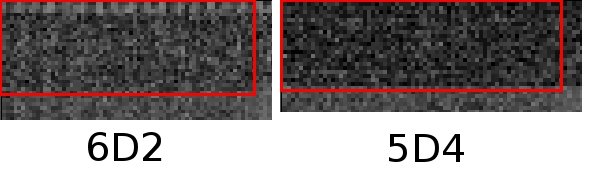
One of his steps says 'Open the PGM file with an image editor and visually determine the area of the masked pixels at the top and left'... which is where things got interesting. I initially had some problems finding something to view the 16 bit binary formatted PGM, however one thing I tried seems to misinterpret the 16 bit file as 8 bit and that shows up something quite clearly that otherwise requires pushing the levels a lot.

Basically the first row (or two) in the supposedly masked black area has some unexpected pattern noise.

The hraw program seems designed to mask off the top left corner, I couldn't find an obvious way to get it to ignore the first couple of rows. Don't know what effect this noise would have on the measurements, but I can't see it being zero.

Doing the same steps to a raw file from the 5D4 doesn't show the same pattern.

I've attached a jpg that shows just the top corner of the PGM files from the posted 6D2 raw and one from my 5D4, the red outline shows approximately the bit being measured by hraw. I wouldn't read too much into the aparrent noise in these two being different as the settings were certainly different as were the images.

Can someone else re-create the PGM file from the raw and see if they can see anything in the first row or two? If you have something better than I do to examine the PGM it may take a substantial push to see anything in that otherwise black corner.

I don't think it's worth reading anything at all into any of this, a one pixel high anomoly in a masked out area isn't going to affect normal images at all. No way to tell if it's a case of an early, imperfect, sensor or whether Canon have noticed this person and are yanking his chain by screwing with his results on pre-release files. Not sure I believe Canon has that much of a sense of humor tho :)
 

Attachments

  • 6d2.jpg
    6d2.jpg
    64.2 KB · Views: 664
Upvote 0
Don Haines said:
I wonder how many people realize that you need to have a picture of a high DR scene to analyze the sensor for DR?

You can't use just any image......

As far as I can tell the test isn't analyzing the image at all, it's simply looking at a 120x44 pixel area in a part of the sensor that's not exposed to light and working out the difference between the theoretical max value and the noise floor. I expect there's a lot of other stuff to consider for real images as it gives little clue as to how the sensor and other algorithms have been tuned.
 
Upvote 0
Looking st the image posted 6dII looked worse than 6d.
Looking at DR calculation, if the results stay true then Canon have deceived us, because they ensured in
interview last year that for every new camera they will use the best available sensor. Thus clearly no longer true.
Even the hidden image above, 6DII looks much noisier and hideous.
Let's wait for production samples but initial reaction does not look good at all.
I ignored dpreview comments on the issue, because I know they hate Canon, but when you can see using your own eyes then it becomes a different matter.
 
Upvote 0
Bill Claff Chimes In

My name is Bill Claff and I'm the guy who does the sensor measurements at PhotonsToPhotos.net
This includes the Photographic Dynamic Range (PDR) that I created in 2007 (a year before DxOMark even existed).
In those past 10 years I have tested over 150 camera models.
I've been lurking here for a while but thought this might be an opportune time to chime in.

Let's recap the current state of Canon EOS 6D Mark II dynamic range measurements.

Ciriaco Garcia performed read noise measurements on raw files and followed the DxOMark algorithm to adjust for pixel size to anticipate their Landscape Score.
As far as I can see the approach has some minor technical flaws but these would not have a significant impact on his results.
Garcia has a good track record of predicting DxOMark Landscape Scores using this approach.
He posted those results on a Fred Miranda forum.

Using raw files available in that Fred Miranda thread I measured Photographic Dynamic Range (PDR).
PDR is not computed from read noise but rather by locating a Signal on the Photon Transfer Curve (PTC) that has an appropriate (pixel size adjusted) Signal to Noise Ratio (SNR).
I also performed separate read noise measurements.
Both the PDR and the read noise are available at PhotonsToPhotos.net
The PDR substantially agrees (in relative terms) with the Garcia read noise results.

Because the measurements were made from images other than my standard test target I have marked the Canon EOS 6D Mark II results as estimated (e).
I don't generally post estimated results but wanted people to have an independent verification of Garcia's work.

In those 10 years and 150 plus camera models of experience I have yet to have my estimates (which I don't normally publish) fall far from the mark.

FWIW, I don't find the results particularly surprising.
Compared to the 6D the Mark II has 25% more pixels, about 44% higher Frames Per Second (FPS); that's about an 80% higher readout rate and reading out faster is noisier.
Furthermore, the Mark II has Dual Pixel technology which is noisier than single pixel of the same area.

The feature set chosen by Canon might not what some people wanted or expected but I'm sure it will be a very capable camera.
 
Upvote 0
Re: Bill Claff Chimes In

bclaff said:
Using raw files available in that Fred Miranda thread I measured Photographic Dynamic Range (PDR).
PDR is not computed from read noise but rather by locating a Signal on the Photon Transfer Curve (PTC) that has an appropriate (pixel size adjusted) Signal to Noise Ratio (SNR).
I also performed separate read noise measurements.
Both the PDR and the read noise are available at PhotonsToPhotos.net
The PDR substantially agrees (in relative terms) with the Garcia read noise results.

Wow, assuming the estimates are correct, the 6D II has the same dynamic range as the original 7D from eight years ago at ISO 100!
 
Upvote 0