Avoiding "blown out" reds, how to?

Status
Not open for further replies.
Apr 24, 2011
1,104
16
12,536
I have noticed that images I take of red or close to red or violet things like flowers never seem to work out properly. The red channel on the histogram is always much further to the right than green, blue or the regular histogram.

What are some ways to handle this problem?

Thanks
 
Neuro has given the practical steps to take, another, obviously, is to shoot RAW, there is often some headway in the RAW file above the histogram that is generated from the preview jpeg that is affected by the picture style choices in camera, even if you are only saving to RAW on your card.

When shooting flowers, a regular source of severe red problems, it really helps to use an X-Rite Color Passport and make some camera profiles, it is very easy to do, especially if you have Lightroom or Photoshop, and will dramatically improve your colour renditions.
 
Upvote 0
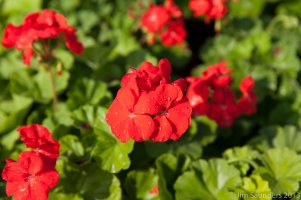
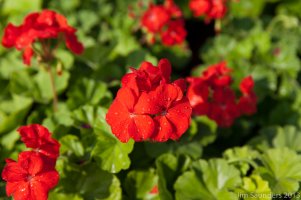
For example, some flowers shot raw with only a lens profile added in LR5 then the same flowers with the red luminance set to -30 and the red saturation down -2. It surprised me that it works, but it appears to work.

Jim
 

Attachments

  • flowers_sooc.jpg
    flowers_sooc.jpg
    352.2 KB · Views: 598
  • flowers_red_adjusted.jpg
    flowers_red_adjusted.jpg
    348.6 KB · Views: 587
Upvote 0
neuroanatomist said:
Set your picture style to neutral, display the RGB histogram and ETTR using the red channel. To take it a step further, you can use UniWB for a more RAW-relevant histogram.

Thanks for the pointers.

I looked a little into the uniWB, and there are conflicting reports as to whether or not it works with the 5D3. Any insights to shorten the learning curve?
 
Upvote 0
privatebydesign said:
Neuro has given the practical steps to take, another, obviously, is to shoot RAW, there is often some headway in the RAW file above the histogram that is generated from the preview jpeg that is affected by the picture style choices in camera, even if you are only saving to RAW on your card.

When shooting flowers, a regular source of severe red problems, it really helps to use an X-Rite Color Passport and make some camera profiles, it is very easy to do, especially if you have Lightroom or Photoshop, and will dramatically improve your colour renditions.

Thanks for the tips.

I have to upgrade Photoshop to be able to use it with my camera, or go on the new cloud based system. I haven't taken the time to delve into Lightroom yet- I suppose it is time to do so.
 
Upvote 0
Status
Not open for further replies.