Best Backup Strategy?

Dec 19, 2012
70
0
5,036
I've been feeling a need for another backup of my photos. Right now I keep them on my laptop, and I periodically back up to an external drive. But there's still some room for failure, if there's a crash during the backup process, or if my house is robbed and they take my laptop and the shiny hard drive next to it.

I thought about trying to put everything on Flickr since they offer 1TB free, but it's been a pain to get photos into it. The uploader in Lightroom times out all the time, and Juploadr has all sorts of errors, including crashing without notice and completely disappearing during an upload. And anything outside of lightroom means I have to export to JPG, which takes a long time on this 2008 computer and is an extra step and extra hassle. And I guess exporting from lightroom makes JPGs, so it takes just as long.

I tried online backup in the past, but I have 200+ GB of photos, and several hundred GB of other stuff that I don't feel like sorting through to figure out what's still important and what's not. I wasn't patient enough to get much progress last time I started an online backup, but maybe I could try it again? I would prefer not to pay the $5 a month, but it's not too bad for the convenience.

The option I'm leaning to right now is to designate a second backup drive just for photos and important stuff, and keep it at work when I'm not using it. I already have a pile of hard drives, I would just need to clear one out for this use. But what would be the best way to do an incremental backup of certain folders to a second hard drive? I already use time machine (mac) for my normal backups, but it doesn't work well with two drives, so I would need some other way. I don't want to copy things manually.

So I'm wondering what other people out there do, and what works best?
 
I use a pair of 2Tb drives and SuperDuper! to clone my primary drive to my backup incrementally after I upload files on my Mac. I also do a straight directory copy monthly to another 2Tb drive which I store offsite.
 
Upvote 0
Hi m.
I use a 2Tb NAS drive as a 1Tb mirrored raid array and the software included in the box to keep the folders in line, bit complicated to organise as I can add to the folder on the NAS from desktop (two 500Gb drives as mirrored raid for photos) or laptop machines, though I no longer keep a copy on my laptop as I ran out of drive space! I therefore have four drives with content identical to within a day, backup scheduled at night. I also regularly do a drag and drop to a portable drive which I then drag and drop on to a pc at my workshop for off site backup!
Personally I don't trust free cloud, don't know where it is and who has rights of access to it, from Fred the mail man up to the government perhaps? And too cheap to pay for cloud when I have enough drives to diy!

Cheers Graham.
 
Upvote 0
Well, I found an old hard drive with nothing important on it, so I'll use that for now. I'm using Crashplan to do the backup. SuperDuper doesn't let me run scripts unless I pay for it, so it can't easily back up just a few folders. I forget why I didn't use CarbonCopyCloner. The main downside to Crashplan is that it insists on encrypting everything, even a local backup. I wrote my passphrase down on a note on the drive itself, but it would be nice to be able to access the files directly.

I got most of the photos from one vacation into Flickr, but it was painful. About 50 files didn't make it in, and I don't know which ones they are even after going through all of them manually. There seems to be some discrepancy within Flickr about the number of files I have in that set, but even the largest number is at least 20 short.

I have another vacation uploading now, and it's been going for a couple days. Luckily the web uploader seems to be robust than API-based uploaders, and although it lost the connection and made me restart the upload, it seems to have picked up where it left off. I guess I could have turned down the JPG quality to make the upload go faster, but I wanted them to be as good as possible if they are giving me 1TB. For each of these vacations I took about 800 photos at about 10MB each for the JPGs. It's a lot of data, but if they claim they will store 1TB for me, I should be able to do this more easily. I still have several thousand more photos in Lightroom, and probably tens of thousands of older ones elsewhere. At this rate I don't think it's practical to upload even all of the most recent ones.

Anyway, I'm satisfied enough with the second external disk that I can finally clean out my memory cards. I stopped deleting photos a while back because I was afraid of losing them. And then I stopped taking photos because all my cards were full! But between my computer and two backups that should be enough.
 
Upvote 0
I have quite a few external HDs and three HDs inside my laptop. I try to do a system image every week, and manually back up individual files and programmes etc at that time. I keep some externals in different countries to avoid the theft issue and do not trust the cloud at all.

When I am on a job I will back up immediately to my HD and another HD in my laptop and also an external. Once I have finished I just delete all but those on the external and duplicate the backups on one external to another for redundancy.
 
Upvote 0
I use a 12 TB NAS with 6 2TB hard drives.

The nice thing about a NAS is that it can run raid 6, and it can be placed in a different location like a out building or garage. You can hide it so that it is unlikely to be taken in a robbery, and Raid 6 is doubly redundant. I also use a battery backup so the NAS keeps going in a power loss, and shuts down automatically if the battery gets low.

Many NAS units also work with networked video monitoring cameras, so you can also record surveillance video and have it in case of a theft. You can also monitor the cameras with a smart phone, tablet, or computer when away from the house
 
Upvote 0
I do a serial back-up, always keeping at least 2 copies...

1) I put the images onto my Mac Book Pro HDD, and leave them on the memory card.
2) I put a copy on my network HDD (2TB time capsule;TC). I have 1 TB dedicated to photos. As soon as I do this, i format my CF/SD card and put it back in my card wallet.
3) I transfer the folder to an external 2TB drive (USB 3). I make sure this drive is up-to-date about once a month. At this point, I can free up some room on my MBP HDD (I usually have 150-200 gb dedicated to images on my laptop), having access to the files on the time capsule (TC).
4) When my TC is getting close to, or over the 1TB i want to use for photos on it, I move the older images over to my long term storage, a 2TB USB2 drive... it is slow, but works great for long term back up.

So, New images I have access to on my MBP for quick easy processing. Images taken in the last ~6 months I have network access to though my TC. All images are backed up on both 2TB external drives, one USB3 for working with and regular back-ups, and one USB2 for long term storage/back-up.

Old photos have 2x redundancy, some of the newer ones have 3x redundancy.

I use one lightroom catalog, and can easily re-locate the masters.... Also, the fact i have previews for most of my images on my MBP, it is easy for me to find and look at old images without having to plus in the external drive.

I will eventually need to get 2 more external drives, as my library gets larger... I think i am in the 1.7 TB range now. But I am gunning less these days and shooting more (less quantity, more quality, well that's the idea anyway). Then I will have two HDD for dates xx/xx/xx to yy/yy/yy (A and B i guess), and two new ones for the later images. It is not too much hassel. Just every now and again, i up-date the back-ups. As long as i have at least 2 copies i'm good! :)

I'm not sure if this is the best way, but it works for me, and I have my routine... :)
 
Upvote 0
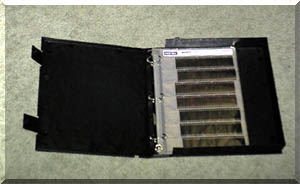
I put my originals in sleeves in a binder, and store that binder on a shelf.

acid_free_binder.jpg


Or at least, I used to do that. ;)

Currently, I always have dupicates of the images, write RAWs simultaneously to both CF cards in the camera, transfer images from one card (leaving the backup in-camera) and swap in an older card to format, transferred images stored on the SSD in my MBP, immediately backed up to an external FW800 drive, once processed the RAWs are stored on two dedicated HDDs, one at home and one at work. Every 2 months I burn images to DVDs and those go in a bank safe deposit box.

dgatwood said:
Then I keep the originals on the flash cards forever.

Doesn't that get pricey?
 
Upvote 0
neuroanatomist said:
dgatwood said:
Then I keep the originals on the flash cards forever.

Doesn't that get pricey?

Yeah, but $80 for 2,200 RAW shots (3.6 cents each) is still more than an order of magnitude cheaper than $15 for 24 shots (62.5 cents cents each) back in the days of plastic negatives and paper, and that's not counting the cost of building shelves for all those photo albums. :)

Besides, a $80 flash card will last for at least a couple of years of normal shooting for me, assuming I'm not going on any big trips (which is where I burn through thousands of photos in two weeks). And when I am going on a big trip, a couple hundred bucks of flash cards is still lost in the noise compared with the cost of the trip....
 
Upvote 0
dgatwood said:
neuroanatomist said:
dgatwood said:
Then I keep the originals on the flash cards forever.

Doesn't that get pricey?

Yeah, but $80 for 2,200 RAW shots (3.6 cents each) is still more than an order of magnitude cheaper than $15 for 24 shots (62.5 cents cents each) back in the days of plastic negatives and paper, and that's not counting the cost of building shelves for all those photo albums. :)

Besides, a $80 flash card will last for at least a couple of years of normal shooting for me, assuming I'm not going on any big trips (which is where I burn through thousands of photos in two weeks). And when I am going on a big trip, a couple hundred bucks of flash cards is still lost in the noise compared with the cost of the trip....

I wouldn't count on flash cards to store indefinitely. You're better off copying to multiple HD's and rotating through a safe deposit box, or burning to multiple DVD's or Blueray discs. Besides, storing all of your flash cards means you can't keep using "trusted" flash cards, and must continually risk manufacturing defects for the stacks of new cards.
 
Upvote 0
I have a kensington lock on my external drives, and not on my imac. That way burglars steal the insured stuff, and not the replaceable stuff.

I Copy from CF to drive on, and when done do a move from CF to drive 2. So my originals are on two drives. I also make backups of lightroom to both drives. I can loose the mac and one drive and still have everything.
 
Upvote 0
Orangutan said:
I wouldn't count on flash cards to store indefinitely. You're better off copying to multiple HD's and rotating through a safe deposit box, or burning to multiple DVD's or Blueray discs. Besides, storing all of your flash cards means you can't keep using "trusted" flash cards, and must continually risk manufacturing defects for the stacks of new cards.

My photos are on two HDs (one fireproof) plus the flash cards, and the most important photos are on a third server hard drive and also on a server at the opposite end of the state. The flash cards are the backup for the backup for the backup for the backup. :)

With that said, yes, flash cards do slowly exhibit bit rot. Nobody is really certain about the real-world decay rate, though.
 
Upvote 0
I'm fairly new to this forum but not new to Canon or backups. I found this thread while looking around here and I thought I'd share my configuration and my story in hopes it helps someone else out there.

First off, Backup! Backup! Backup! You don't have a safe copy unless you go with the 3-2-1 rule, 3 copies, 2 different mediums at least 1 off-site.

I primarily do all my edits on my MacBook Pro and I have my MBP running two different backups. I have time machine running on it and it's pointing to a reserved volume on my Synology 5-bay NAS device and I have a backup agent that runs on it that backups to a cloud backup service. Having time machine allows me to restore quickly when I'm on my network, running a cloud backup service allows me to have the confidence that I am backed up offsite without worrying about it and that my data is duplicated and encrypted.

I use CrashPlan as my backup solution. What I LOVE about it:
[list type=decimal]
[*] It's stupid simple to setup and use. Runs silently in the background. Even sends you an e-mail alert if backup hasn't occurred in a while
[*] Unlimited backup storage!
[*] I can have multiple devices (up to 10) backed up at the same time to their own backup sets with Family plan.
[*] Reasonably priced
[*] Backups up local drive and any attached volumes (e.g. external hard drives, drive arrays, USB storage etc) if included in the backup scan
[*] De-duplication of data, I don't have to worry if I have 2,3,10 copies of a file on my drives, it gets checked and if my backup already has that file it only gets backed up once and pointers to the other locations are made.
[*] Strong encryption possible. If you're paranoid and worried that someone can gain access to your backup cloud provider, or that there's an unscrupulous employee that works there, then rest assured CrashPlan is the only backup provider that I've found where you can give them an encryption key and if you need access to your data because you forgot your password, you and only you can use your encryption key to unlock your data. It's a double edged sword, so don't forget your password or lose your key if you chose to implement it.
[*] Works on Windows, Mac OS X and Linux systems
[*] Did i mention, UNLIMITED BACKUP STORAGE!!!
[/list]

So those are the reasons I love CrashPlan.

Since internal storage isn't super on a MBP, I also attach my Drobo 2nd Gen as a connected storage device to archive my old libraries, I usually split them up by year, and I have the Drobo included as a drive to be scanned. If I'm not attached to my Drobo, CrashPlan skips it and moves on. If it is attached, CrashPlan agent will scan it and only send up difference files. Since my work flow included copying and deleting old libraries, I make sure that my Drobo is connected for a while longer when I do perform a delete of the former year's library so that an upload doesn't have to occur, but CrashPlan just sees it as the same files that were on my other drive and creates a logical pointer copy of it in my backup set. If I have finals that I want to triple check that I have backed up. I'll have those exports copied to my NAS in my Photo volume. Since CrashPlan works on Linux machines (as well as Windows), I have installed the un-officially supported CrashPlan client on my Synology NAS to backup my non-TimeMachine volumes (it's never a good idea to try and backup TimeMachine backups as a whole to cloud-based backup service since it's an encrypted and dynamic file of a very large size.

Anway, to summarize:
  • Laptop Backup with CrashPlan
  • Laptop Backup with TimeMachine
  • Library/Archives backed up to crash-proof storage array - Drobo
  • Drobo backed up to CrashPlan
  • Finals backed up to Synology NAS
  • Synology NAS backed up with CrashPlan

Is this overkill? No because I have had a hard drive crash of no fault of my own (spinning disk - unrecoverable). I have had a hard drive crash of my own doing (camera back with laptop inside dropped to parking lot floor while in my SUV, it was too front side heavy). I've not yet had a SSD Hard Drive crash (YET!), but that's not out of the question since I work in IT and I have had several users SSD's crash and unlike spinning HDD, if it's not a logical error, there's no way of recovering from failed memory modules. Since I'm backed up with a cloud backup provider, I don't have to worry if my computer or drives get lost or stolen; a natural disaster hits my home; fire or water damage occurs; or a freak electrical surge or EMP hits all the equipment in my home.

I don't consider any photo file sharing service a backup because if they change their terms, go belly up or accidentally delete your account and all your data, I don't know that they are guarantying recovery of your data and how far back. And depending on the service, I don't know what quality they are backing up, is it a large format JPEG preview (which is what I assume) or is it actually my 22.3 megapixel RAWs that I shoot on my 5D MK III? And what about any video files that I have? And what about non-media files that I might deem important on my system? Well I know CrashPlan has me covered there. I don't necessarily know I can say Flickr or Google Docs, DropBox or OneDrive has me fully covered.

For my first hard drive crash I lost 25-50% of my first child's first 3 months of photos and videos. Anything that I had already shot and uploaded to my MBP and deleted off the memory cards were gone. It was fortunately just at the time that Apple introduced iCloud storage for photos so I had some streamed backups on iCloud. But much of what I shot with my dSLR that I didn't get copied to my Drobo were lost. I would have paid the ridiculous price of recovering my HDD but the two places I sent my drive into came back with the same answer, there was nothing that could be done because of the extent of damage on the drive. Even at the max. recovery price of $5000 at these recovery shops nothing could be done. I couldn't have planned for the crash as my drive gave no indication it was going bad before it happened. So that is my story and why I'm hyper vigilant about backups. Hope that helps and saves someone else's memories.
 
Upvote 0