Black blob problem

Status
Not open for further replies.
Dec 9, 2012
143
0
6,046
Ok here is the issue, whenever I do a studio shoot and the subject is wearing black (regardless of the back ground color) the photo shows just a black blob unless i turn up the exposure in post which just makes the black more grey.

How do I get the photo to show the detail in dark black clothing?

Is this a dynamic range limitation?
 
How do I get the photo to show the detail in dark black clothing?

You need to light and expose for it. So you need the light at the right angle to show the texture and you need to expose so that the texture is not all in Zone 0, to show detail and texture some of your black must be exposed at Zone I or even II. http://en.wikipedia.org/wiki/Zone_System

Is this a dynamic range limitation?

Absolutely not, you are controlling the light and the dynamic range in a studio environment.
 
Upvote 0
privatebydesign said:
How do I get the photo to show the detail in dark black clothing?

You need to light and expose for it. So you need the light at the right angle to show the texture and you need to expose so that the texture is not all in Zone 0, to show detail and texture some of your black must be exposed at Zone I or even II. http://en.wikipedia.org/wiki/Zone_System

Is this a dynamic range limitation?

Absolutely not, you are controlling the light and the dynamic range in a studio environment.

Thanks for the info. I need to up my technical skill sets.
 
Upvote 0
privatebydesign said:
How do I get the photo to show the detail in dark black clothing?

You need to light and expose for it. So you need the light at the right angle to show the texture and you need to expose so that the texture is not all in Zone 0, to show detail and texture some of your black must be exposed at Zone I or even II. http://en.wikipedia.org/wiki/Zone_System

Is this a dynamic range limitation?

Absolutely not, you are controlling the light and the dynamic range in a studio environment.

The wiki article says that i would need to take multiple pictures at different exposures and combine to get the detail right. Is that the only way?

When I set the aperture and shutter speed it's for a given for the exposure of the light at a specific point in the scene so taking multiple pics makes sense, but is that the only way? Should I just make my camera adjustments based on the darkest area of the photo?
 
Upvote 0
I use Canon Utilities to tether my camera in the studio to a computer and view the image live on my large screen, You can then remotely control the camera settings, see the effects as you adjust lighting, view a live histogram, and generally make adjustments until you see the image as you want it.

Then capture it and save it as well as opening the file in a editor if you choose This really speeds up difficult shots, and you have control over focus and exposure parameters including depth of field preview.

Canon has some very powerful tools that are free!
 
Upvote 0
Agree with what has been suggested by pbd & mt. spokane.

The shot seems to have been taken with white fluorescent light coming from the left casting deep shadows in the already dark clothing. It appears more of an issue with the lighting than the camera.

A few more points -

What camera were you shooting with. I have this weird problem with my 5D3 and the 6D which "seem" to underexpose by 1/2 or 2/3 of a stop. Maybe you are experiencing a similar phenomenon. I usually compensate this by ETTR and bringing down the highlights in post.
 
Upvote 0
J.R. said:
Agree with what has been suggested by pbd & mt. spokane.

The shot seems to have been taken with white fluorescent light coming from the left casting deep shadows in the already dark clothing. It appears more of an issue with the lighting than the camera.

A few more points -

What camera were you shooting with. I have this weird problem with my 5D3 and the 6D which "seem" to underexpose by 1/2 or 2/3 of a stop. Maybe you are experiencing a similar phenomenon. I usually compensate this by ETTR and bringing down the highlights in post.

I shoot with a Canon 6D with Profoto D1 studio kit. No light meter though so my exposure is random. Not that I'm any good anyway, Im just learning.
 
Upvote 0
The wiki article says that i would need to take multiple pictures at different exposures and combine to get the detail right. Is that the only way?

No, it only says you need to do that when the DR within the scene exceeds your sensors abilities, that is not the case here, you are controlling the amount of light so you are controlling the DR.

I didn't really imply you should follow the zone system, I meant if you don't expose some of the black as grey it will all be a blob! :)

Here is the most important bit from the wiki "The key element in the scene is identified, and that element is placed on the desired zone; the other elements in the scene then fall where they may."

Now you are controlling the light, so you need to make sure the scene is contained within your cameras DR, if you decide that detail in the dark shadows is important (your key element) you need to expose so the very darkest areas of the scene are black, but that most of the black suit is grey Zone I and II, without blowing the highlights in the white shirt. Then adjust your blacks and shadows sliders in post to get the suit where you imagined it. If there is not enough contrast in the suit to separate the detail you need to use a levels curve control to spread out the tones in the suit.

 
Upvote 0
privatebydesign said:
The wiki article says that i would need to take multiple pictures at different exposures and combine to get the detail right. Is that the only way?

No, it only says you need to do that when the DR within the scene exceeds your sensors abilities, that is not the case here, you are controlling the amount of light so you are controlling the DR.

I didn't really imply you should follow the zone system, I meant if you don't expose some of the black as grey it will all be a blob! :)

Here is the most important bit from the wiki "The key element in the scene is identified, and that element is placed on the desired zone; the other elements in the scene then fall where they may."

Now you are controlling the light, so you need to make sure the scene is contained within your cameras DR, if you decide that detail in the dark shadows is important (your key element) you need to expose so the very darkest areas of the scene are black, but that most of the black suit is grey Zone I and II, without blowing the highlights in the white shirt. Then adjust your blacks and shadows sliders in post to get the suit where you imagined it. If there is not enough contrast in the suit to separate the detail you need to use a levels curve control to spread out the tones in the suit.

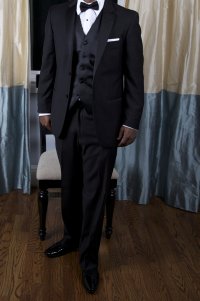
I've used Nik software to increase the exposure in the target area but for some reason the area became noisy and grey. I'll eventually get it right. I'll do as you say and properly expose the target area and see how it goes, I think thats the best solution.
 
Upvote 0
Shooting a black object is not so much about pumping kwatts of light to it or raising shadows. Its all in the reflections /highlights. Play around with some reflectors and/or big softboxes and you'll see you can actually shoot anything black with great definition even in a dark room.
 
Upvote 0
meli said:
Shooting a black object is not so much about pumping kwatts of light to it or raising shadows. Its all in the reflections /highlights. Play around with some reflectors and/or big softboxes and you'll see you can actually shoot anything black with great definition even in a dark room.

thanks for the help.

Will reflectors help me avoid the necessity of using a 4 light set up.

http://www.modelmayhem.com/education/photography/5959-building-your-set-softbox-by-softbox
 
Upvote 0
lighting technique, not just how much and what kind but from what angles

full manual exposure & lighting control for consistent results

shoot raw files, jpgs are too limited unless you've nailed the settings perfectly (in manual)

in a studio, you are in full control and should not be subject to the vagueries of in-camera metering from shot to shot.

play, learn. don't get too bogged down by various exposure setting paradigms, the end results are to light and expose properly to not clip whites or crush dark shades to black.

Once you get a handle on what you need to do, you'll likely find full manual is the way to go for consistency. This is where your custom user settings on your camera come in handy, saving all your studio settings for instant recall with a turn of the dial. If you have enough custom memories, you can save setups for different configurations and have a good starting pont when you want to adapt something.

the range from dark black tux to shimmery white gown can be covered within almost any camera's dynamic range limitations, even Canon's ;)
 
Upvote 0
the range from dark black tux to shimmery white gown can be covered within almost any camera's dynamic range limitations, even Canon's ;)
the end results are to light and expose properly to not clip whites or crush dark shades to black.
Not by everybody, it would appear.............http://www.canonrumors.com/forum/index.php?topic=12844.msg230714#msg230714

So many inconsistencies in such a short post.

For instance, I fail to see how, if you are shooting in manual as you advise, you are ever at "the vagueries [sic] of in-camera metering from shot to shot." whether in a studio or not.

I would value your advice about the same as your wedding photography.
 
Upvote 0
privatebydesign said:
For instance, I fail to see how, if you are shooting in manual as you advise, you are ever at "the vagueries [sic] of in-camera metering from shot to shot." whether in a studio or not.

Vagueries is a legal spelling, according to Wiktionary, albeit a fairly rare one.

I assume what the author means is that in-camera metering gives you an overall measurement of the shot as a whole, but it will vary from shot to shot as people change angles and their tuxes reflect more or less light. Therefore, it isn't as ideal a tool as an intern walking around with a good light meter and taking measurements at various parts of your set.

That said, this is me speaking with my video hat on. I have no idea how you would do the same thing when using flashes without really annoying the heck out of your subject. :)

As for the other comment, the usual goal is to light and expose the shot properly so that you don't clip any important white detail and so that important dark detail doesn't get lost in the mud. What constitutes "important" white/dark detail, however, varies....


JonB8305 said:
Will reflectors help me avoid the necessity of using a 4 light set up.

Depends on the look you're trying to achieve. I've seen a lot of nice portrait shots taken with only a key light and a fill. That said, sometimes you want a backlight on the person and/or a light on the background.

I'd be surprised if a reflector were ever useful as an alternative to a backlight or a background light, but you might be able to get away with using a reflector instead of a fill light in some situations. I'm not sure how well that would work in practice—it would depend in part on on the number of people in the shot, on how reflective the reflector is, and on whether you can come up with a position where it reflects enough of your key light or backlight to do any good without blocking the shot.
 
Upvote 0
Status
Not open for further replies.