
Canon 5dmk2 - weak usb connection - options?

Hi,

So I shoot most of my work tethered to a laptop. Unfortunately the usb connector on the camera has gotten loose, it still works fine if the camera is steady on a tripod and not moving at all. But for situations where I like to move the camera a bit around in between shots i often loose my connections.

My options as I see it is.

1) Get it repaired, does anyone know what this costs? and time. I am based on the Canadian west coast if that makes any difference.
2) Get the wifi grip, i can then tether with wifi, or its built in usb or ethernet ports, correct?. Currently watching a few on ebay to see what they go for.
3) buy used mk2 or new 6d. Will have to hold back on this purchase till end of january. my mk2 does have around 110000 clicks so it is getting old.

If you have any knowledge, advice or thoughts regarding my situation it would be much appreciated.
 
Jens said:
Hi,

So I shoot most of my work tethered to a laptop. Unfortunately the usb connector on the camera has gotten loose, it still works fine if the camera is steady on a tripod and not moving at all. But for situations where I like to move the camera a bit around in between shots i often loose my connections.

My options as I see it is.

1) Get it repaired, does anyone know what this costs? and time. I am based on the Canadian west coast if that makes any difference.
2) Get the wifi grip, i can then tether with wifi, or its built in usb or ethernet ports, correct?. Currently watching a few on ebay to see what they go for.
3) buy used mk2 or new 6d. Will have to hold back on this purchase till end of january. my mk2 does have around 110000 clicks so it is getting old.

If you have any knowledge, advice or thoughts regarding my situation it would be much appreciated.


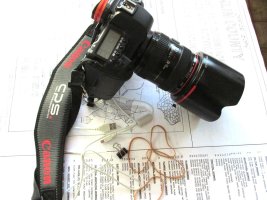
Dear Jens.
Here is my 10 Cents DIY. that might solve your problem.
Enjoy
Surapon
 

Attachments

  • IMG_0429.JPG
    IMG_0429.JPG
    160.2 KB · Views: 766
  • IMG_0431.JPG
    IMG_0431.JPG
    177.4 KB · Views: 776
  • IMG_0432.JPG
    IMG_0432.JPG
    152.3 KB · Views: 862
  • IMG_0433.JPG
    IMG_0433.JPG
    150.9 KB · Views: 736
Upvote 0
Jens said:
Hi,

So I shoot most of my work tethered to a laptop. Unfortunately the usb connector on the camera has gotten loose, it still works fine if the camera is steady on a tripod and not moving at all. But for situations where I like to move the camera a bit around in between shots i often loose my connections.

My options as I see it is.

1) Get it repaired, does anyone know what this costs? and time. I am based on the Canadian west coast if that makes any difference.
2) Get the wifi grip, i can then tether with wifi, or its built in usb or ethernet ports, correct?. Currently watching a few on ebay to see what they go for.
3) buy used mk2 or new 6d. Will have to hold back on this purchase till end of january. my mk2 does have around 110000 clicks so it is getting old.

If you have any knowledge, advice or thoughts regarding my situation it would be much appreciated.
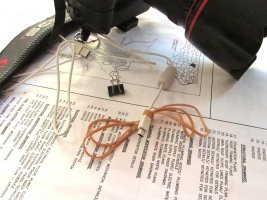
Will an eye-fi card with CF adapter work in your case ?
 
Upvote 0
Get it fixed, and then get a long USB cord, a 15 ft one only costs a few dollars. Secure the cord when its attached to the camera so that it doesn't pull, and it should last a long time. I tether my cameras and have for many years with no issue, I just keep the tension off the camera end of the cable.
You are going to have to fix it sooner or later, the camera is just too valuable to not fix. I can't estimate the cost, it may be $200 or less, if the camera is in warranty, the fix should be free.
 
Upvote 0
I walked away the other day with my 5D2 connected to the computer and fortunately the USB connection survived. The computer did a little bit worse and needed a little soldering. I remember thinking the 5D2 is well constructed (and it is) but it's good to know there are limits to the ruggedness of this body. So far so good though, despite fairly heavy use of the usb connector.
 
Upvote 0
Mt Spokane Photography said:
Get it fixed, and then get a long USB cord, a 15 ft one only costs a few dollars. Secure the cord when its attached to the camera so that it doesn't pull, and it should last a long time. I tether my cameras and have for many years with no issue, I just keep the tension off the camera end of the cable.
You are going to have to fix it sooner or later, the camera is just too valuable to not fix. I can't estimate the cost, it may be $200 or less, if the camera is in warranty, the fix should be free.

Thanks for your input. After my incident I did invest in a LONG cord:) what do you use to keep the tension off?
If fixing is less than 200 I would definitely go with that, I'll try and contact canon next week. Now, I have never had any experience with sending things in to repair, does anyone know how long stuff like that takes?


@Sama: My limited knowledge with a setup like that have not been positive, from what I have been reading the cf adapter is not good for the signal, I also use my memory card in camera as backup, so I might need a few of them. If its not a perfect solution I don't know if its financial worth it.
Thanks
 
Upvote 0
Seen a few people using these.

http://www.shop.tethertools.com/JerkStopper-Camera-Support-JS020.htm?utm_source=google&utm_medium=google-shopping&utm_campaign=google-shopping&gclid=CImChaiti7sCFW5o7Aod-SIAcg

However as a "better" solution I recently got the WFT-E2A (MkI as the MkII offers no improved functionality on the 1Ds MkIII), it works great. Having used mine for a week or so I'd highly recommend the WFT-E4 II, make sure you get the MkII as I believe it has better HTTP functionality on the 5D MkII. I paid $160 for mine, mint in box including everything apart from the external storage media pouch, but I think the WFT-E4II's go for more.

The Ethernet port is for connecting to a laptop, I have a 50 foot cable that works perfectly, on mine (and I suspect yours) the USB port does not have the functionality of the on body port, it is for GPS and external media (self powered HDD's) only, I cannot connect the camera to the computer via the USB port on the WFT.

If you use the functionality they are a very good system addition and well worth the money, I futsed around with the Eye-Fi card for way too long (the 1Ds MkIII has a native SD slot and a CF slot) and now I have used the real thing I will get a WFT for every camera I get.
 
Upvote 0
Jens said:
Mt Spokane Photography said:
Get it fixed, and then get a long USB cord, a 15 ft one only costs a few dollars. Secure the cord when its attached to the camera so that it doesn't pull, and it should last a long time. I tether my cameras and have for many years with no issue, I just keep the tension off the camera end of the cable.
You are going to have to fix it sooner or later, the camera is just too valuable to not fix. I can't estimate the cost, it may be $200 or less, if the camera is in warranty, the fix should be free.

Thanks for your input. After my incident I did invest in a LONG cord:) what do you use to keep the tension off?
If fixing is less than 200 I would definitely go with that, I'll try and contact canon next week. Now, I have never had any experience with sending things in to repair, does anyone know how long stuff like that takes?

As to repair, it can vary by country. The US has several repair centers and repairs usually happen quickly. I believe that there are three tiers of repair, and the lowest is about $200.

Its definitely worth repairing, it will knock several hundred off the resale value of the camera.

You can use the DIY rubber band solution, or there are commercial ones as well I think the rubber band type of fix is just fine.

http://www.shop.tethertools.com/JerkStopper-Thread-Mount-JS080.htm
 
Upvote 0
I tether constantly my 1D3/1Ds3's...get your USB repaired at Canon.

In the meantime, go here: http://www.usbfirewire.com/ucablecam5b.html order the 90deg left OR right angle cable (match the orientation of your USB port). But, order it short, say 12-24".

Then, order a straight through extension cable from here: http://www.usbfirewire.com/usb_cables_a_extensions_straight_75.html for whatever length you want (I use a 50' active USB).

Finally, get one of these: http://www.usbfirewire.com/Parts/rr-portsupport.html and attach it to the 12-24" cable to a strap lug (or tripod base plate/head). Be sure to let the shorty piece have plenty of slack. (You want this springy strap to be 'tight' and the USB to be looped/curved so that the weight of the cable is being held by this piece).

It'll take the tension off the USB and if the cable does get jerked, tensioned, or otherwise, it'll breakaway at the 3' to extension joint instead of destroying the USB connector on the camera. I drag this combo all over the studio to shoot different sets, use it for handheld tethered shooting (dance, models, etc), and even on location for capture (on-site product, architectural).

I tried a TetherTools setup and while they may be great for video shooters, they aren't that good and overpriced for what the item is.

Don't do the EyeFi - they are JUNK and slow/unreliable enough in a studio/tethered situation that you'll be hating life. Had 2 of them, and used them in the SD slot on my 1Ds3. Sometimes, they won't transfer until the card has so many pictures shot, other times, it wouldn't transfer at all, and other times, it would take almost 10 seconds to get 1 RAW file over. Absolutely junk for a professional environment. They are toys at best and only really useful on P&S cameras with JPG output.

The 1-series cameras have a clamp that goes over the USB cable and screws to the body to secure the cable and prevent stress accidents on the jack. But, it only works with the 1-series and only with a straight-through cable. The other suggestion would be to go a WFT transmitter, but you do lose some speed and there is a 1-2 second lag between shot and computer arrival time. Doesn't sound like much, but it can be annoying. If you need the instant speed and fast transfer, use the USB cable.

If you need the distance, then get a WFT-E4 and use ethernet. Get a box of Cat5e cable, and a crimp set. Then, cut what you need, where you need! I have one that's ~225' feet for tethering on architectural/industrial shoots so that a live 'editor' can be in a stationary place if need be (and if the wireless transfer from the WFT is too slow or receiving interference from nearby equipment).

I spent over 25 years in the IT world...and it comes in handy when configuring my studio stuff. I spent a whole month trying out different ideas for the best solution for tethering and this was the most efficient, safe, and productive solution. I keep a spare set of the cables around in case one gets broke and I can change cables out in seconds and be back to shooting if something happens...
 
Upvote 0
In the spring of 2012, I had USB ports on both a 5D Mark II and a 7D fail within a couple of months of each other. I would attach these after a day of shooting to transfer pictures. I never shot tethered. I looked back to see what the repair costs would have been, but both of mine were under warranty and they didn't list a price, just $0.00. I used a 60D in the same way at the same time and never had an issue with it.

One of the Canon techs even went as far as to suggest that it was common for people shooting tethered to trip over the USB cable and break the port. He then went on to ask if I had been shooting tethered. I hadn't and resented the insinuation. In fact the camera was placed carefully on my desk with a short cable connecting to the USB port on my monitor. I personally believe that the USB ports were defective on my 5D and 7D from the start, possibly bad solder joints that cracked after multiple insertions and removals or something along those lines.

I don't believe there was an issue with the USB port on the computer as it is still in use and and I have never had trouble with any of my other devices such as card readers, memory sticks and external hard drives.

I no longer transfer pictures via USB. I now pull the memory cards and use a reader. I don't want to go through another failed USB port on one of my EOS cameras.

I know that doesn't help you as you need to tether, but wanted to share my experience. I was hoping that one of my invoices had a price. Good luck!

Jens said:
Hi,

So I shoot most of my work tethered to a laptop. Unfortunately the usb connector on the camera has gotten loose, it still works fine if the camera is steady on a tripod and not moving at all. But for situations where I like to move the camera a bit around in between shots i often loose my connections.

My options as I see it is.

1) Get it repaired, does anyone know what this costs? and time. I am based on the Canadian west coast if that makes any difference.
2) Get the wifi grip, i can then tether with wifi, or its built in usb or ethernet ports, correct?. Currently watching a few on ebay to see what they go for.
3) buy used mk2 or new 6d. Will have to hold back on this purchase till end of january. my mk2 does have around 110000 clicks so it is getting old.

If you have any knowledge, advice or thoughts regarding my situation it would be much appreciated.
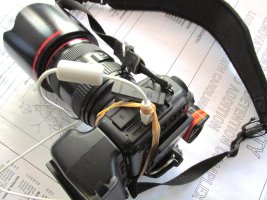
 
Upvote 0
surapon said:
Jens said:
Hi,

So I shoot most of my work tethered to a laptop. Unfortunately the usb connector on the camera has gotten loose, it still works fine if the camera is steady on a tripod and not moving at all. But for situations where I like to move the camera a bit around in between shots i often loose my connections.

My options as I see it is.

1) Get it repaired, does anyone know what this costs? and time. I am based on the Canadian west coast if that makes any difference.
2) Get the wifi grip, i can then tether with wifi, or its built in usb or ethernet ports, correct?. Currently watching a few on ebay to see what they go for.
3) buy used mk2 or new 6d. Will have to hold back on this purchase till end of january. my mk2 does have around 110000 clicks so it is getting old.

If you have any knowledge, advice or thoughts regarding my situation it would be much appreciated.
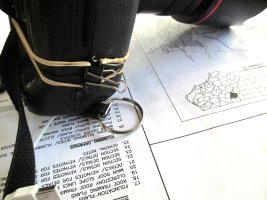

Dear Jens.
Here is my 10 Cents DIY. that might solve your problem.
Enjoy
Surapon
Surapon, I love your ideas! Very practical, very down to earth. You are the true engineer! Much respect.
 
Upvote 0
Or you could just take a pair of needle-nose pliers and squeeze the metal shield of the connector a little bit so that it will be tighter. But before you do that, try a different USB cable. It might be the cable connector that is stretched rather than the one in the camera.
 
Upvote 0
rpt said:
surapon said:
Jens said:
Hi,

So I shoot most of my work tethered to a laptop. Unfortunately the usb connector on the camera has gotten loose, it still works fine if the camera is steady on a tripod and not moving at all. But for situations where I like to move the camera a bit around in between shots i often loose my connections.

My options as I see it is.

1) Get it repaired, does anyone know what this costs? and time. I am based on the Canadian west coast if that makes any difference.
2) Get the wifi grip, i can then tether with wifi, or its built in usb or ethernet ports, correct?. Currently watching a few on ebay to see what they go for.
3) buy used mk2 or new 6d. Will have to hold back on this purchase till end of january. my mk2 does have around 110000 clicks so it is getting old.

If you have any knowledge, advice or thoughts regarding my situation it would be much appreciated.


Dear Jens.
Here is my 10 Cents DIY. that might solve your problem.
Enjoy
Surapon
Surapon, I love your ideas! Very practical, very down to earth. You are the true engineer! Much respect.

Thanks you, Sir, Dear Mr. rpt.
Thanks for your Great Words, You make my weekend.
Sorry, I am not Engineer, But I am Professional American Architect , Live and Work in North Carolina, USA. for 40 years------Yes, Less Smart than the Engineers---Why ?---One of My great friend, Structure Engineer told me That , In USA, We use the Short Letters fro Architect and Engineer = " A/E ", And He ask me Why ?. And He Explain to me that " A = average, and E = Excellent"----Ha, Ha,Ha. I did not agree with Him, Because All of My Architecture jobs in my Company, I will Hire Engineers to do Engineer Part of the Building, And I pay them too, And I am the BOSS---Ha, Ha, Ha, To let some one that I Like to work for me---Now, Who are Smarter---Ha, Ha, Ha.
Yes, Sir, Just talk for fun in this Saturday morning.
Surapon
 
Upvote 0
dgatwood said:
Or you could just take a pair of needle-nose pliers and squeeze the metal shield of the connector a little bit so that it will be tighter. But before you do that, try a different USB cable. It might be the cable connector that is stretched rather than the one in the camera.

I would agree with dgatwood. The USB socket in the camera can have the metal bent from front-back stress on the cable. (That's why I recommend a right angle cable so that the cable hangs down) I am not sure about the 5D2, but on the 60D there is a screw where you can remove the faceplate around the connectors. If you can remove the plate you should be able to pinch the bent metal of the usb connector shell back together so that there is a decent amount of friction when you insert the cable. If the plate does not remove easily, you should be able to use a jewellers screwdriver to bend the metal back.
 
Upvote 0
Don Haines said:
dgatwood said:
Or you could just take a pair of needle-nose pliers and squeeze the metal shield of the connector a little bit so that it will be tighter. But before you do that, try a different USB cable. It might be the cable connector that is stretched rather than the one in the camera.

I would agree with dgatwood. The USB socket in the camera can have the metal bent from front-back stress on the cable. (That's why I recommend a right angle cable so that the cable hangs down) I am not sure about the 5D2, but on the 60D there is a screw where you can remove the faceplate around the connectors. If you can remove the plate you should be able to pinch the bent metal of the usb connector shell back together so that there is a decent amount of friction when you insert the cable. If the plate does not remove easily, you should be able to use a jewellers screwdriver to bend the metal back.

To that, I would add the word "carefully" (which I probably should have said to begin with).
 
Upvote 0