Cards for R5

Oct 29, 2012
234
145
7,256
Hi all, quick question. I was wondering how likely it will be that one could use UHS 1 SD cards in the R5.

In other words, are SD cards backwards compatible? I know it will be able to use UHS2 cards.

I use CF cards in my 5D4.

Thanks for any info!
 
As Tpatama says, if you are only taking shots without using high speed motor drive you'll be fine, but if you intend on taking 4K video or using the 20 fps drive, you'll be very dissapointed.
Bight the bullet and get a V90 UHS II card, and get at least 128gigs. 256 is much better though.
You might get by with a V60 card but 60fps in 4K might get choppy.
A UHS II card is also backward compatible.
 
Upvote 0
As Tpatama says, if you are only taking shots without using high speed motor drive you'll be fine, but if you intend on taking 4K video or using the 20 fps drive, you'll be very dissapointed.
Bight the bullet and get a V90 UHS II card, and get at least 128gigs. 256 is much better though.
You might get by with a V60 card but 60fps in 4K might get choppy.
A UHS II card is also backward compatible.

The UHS II slot is the backup and still quite slow. A CF Express card will serve that camera and currency per Gigabyte and MB/s the CF Express cards are way better value for money. UHS II cards are dreadfully expensive for what they are, wait till they come down in price unless you need a backup card.
 
  • Like
Reactions: 1 user
Upvote 0
As Tpatama says, if you are only taking shots without using high speed motor drive you'll be fine, but if you intend on taking 4K video or using the 20 fps drive, you'll be very dissapointed.
Bight the bullet and get a V90 UHS II card, and get at least 128gigs. 256 is much better though.
You might get by with a V60 card but 60fps in 4K might get choppy.
A UHS II card is also backward compatible.
Yes, except for 8K, the UHS II slot is very fast, faster than needed for 4K, for stills, its much faster than my card reader. I have two 150 MB/s V60's for my EOS R. I can't measure the speed until I get a new reader, I'll do that when I get a CF express reader. Of course, I do not play video from my V60 card, just download it. Who plays native unedited videos from a card? I download my files to my computer for editing.

For my R, note that a class 60 is the fastest needed for 4K. A class 90 is probably needed for R5 8K, but I'd get a CF express for that. I have no plans to use 8K, or 4K for that matter.

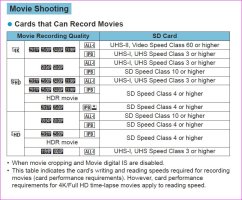
I would not run out and buy cards in advance, we may find that some are incompatible, and your return window would be past.UHS II card.JPG
 
Upvote 0
Yes, except for 8K, the UHS II slot is very fast, faster than needed for 4K, for stills, its much faster than my card reader. I have two 150 MB/s V60's for my EOS R. I can't measure the speed until I get a new reader, I'll do that when I get a CF express reader. Of course, I do not play video from my V60 card, just download it. Who plays native unedited videos from a card? I download my files to my computer for editing.

For my R, note that a class 60 is the fastest needed for 4K. A class 90 is probably needed for R5 8K, but I'd get a CF express for that. I have no plans to use 8K, or 4K for that matter.

I would not run out and buy cards in advance, we may find that some are incompatible, and your return window would be past.View attachment 190959

I tried shooting 4K ALL-I on UHS-I Class 3 on the R
It started to record then stopped and advised the card wasn't up to the job.
Bought UHS-II v90's and issue resolved.
Shooting batches at the R's Hi FPS was a lot smoother as well.
UHS-I are backup or used in older cameras
 
Upvote 0
I tried shooting 4K ALL-I on UHS-I Class 3 on the R
It started to record then stopped and advised the card wasn't up to the job.
Bought UHS-II v90's and issue resolved.
Shooting batches at the R's Hi FPS was a lot smoother as well.
UHS-I are backup or used in older cameras
A UHS-1 card is not up to it, a UHS-II V60 card is ok. V90 is good, but the extra speed is not needed. Hopefully, it will work for the R5. I have a 128GB Lexar UHS-II V60 that is my card for the "R"
 
Upvote 0
A UHS-1 card is not up to it, a UHS-II V60 card is ok. V90 is good, but the extra speed is not needed. Hopefully, it will work for the R5. I have a 128GB Lexar UHS-II V60 that is my card for the "R"
Unfortunately on a small island you can't always get what you want.
I had picked up what I thought was a UHS-II on my travels and it was ok with 4k on M50 but not the R
but it was UHS-I so explains why i got it at a good price!!
When UHS-II were available the only choice was V90
 
Upvote 0