EOS 5D Mark III Firmware 1.2.1 Available for Download

Status
Not open for further replies.
Wauw... they really dropped the ball on this firmware upgrade. What a complete waste of time and hype.

I know it's mainly a still camera, but hey, those so-called video upgrades are worthless.

Magic Lantern is doing better things for the 5D than Canon themselves.
I guess that is just what Canon is about. :(
 
Upvote 0
Well now someone else is insisting that the 1.4x TC III + 70-300L + 1DX doesn't report f/8 or AF well so maybe I got bogus info at first. Maybe there is no way to make that combo report f/8. A huge shame, but what can you do, sounds like you can't blame the firmware after all.

(Although they could add a custom function called force f/8 AF mode hint hint :D). Not that I expect that to happen. Usually companies with more than 4 employees don't do that sort of stuff. But it would be awesome (and boost Canon TC sales vs Kenko hint hint :D))

I guess I'll order the Kenko (apparently it has a chip inside that can spoof things or something and tricks it into reporting f/8 even though the 70-300L doesn't have TC pins) and hope the image quality it provides is enough to make it worthwhile.

To bad the Canon TC III didn't have some fancier logic in it to spoof things when needed or a force f/8 mode custom function is unlikely.

Anyway guess they didn't remove stuff from the f/8 addition so it's all good on their part. Glad we have f/8 ability for what it does handle :D.

Unless I hear otherwise yet again.
 
Upvote 0
dirtcastle said:
Correct me if I'm wrong, but I thought a phenomenon was something amazing and hard to explain, rather than simply being a software bug or a hardware shortcoming.
" a phenomenon (Greek: φαινόμενoν, from the Greek word 'phainomenon', from the verb 'phanein', to show, shine, appear, to be manifest (or manifest itself)),[1] plural phenomena, is any observable occurrence."
http://en.wikipedia.org/wiki/Phenomenon
:)
 
Upvote 0
photosites said:
LetTheRightLensIn said:
preppyak said:
crazyrunner33 said:
Magic Lantern is working on a true RAW and 14 bit video recording along with 4:2:2 to the card, something we'll never see from Canon.
And they've already said it will never be something that will work for video people...best they've gotten so far is 720 at 24fps for 2s...the reality is you'll never get long recording times because the camera has a buffer to deal with. 1080p wont happen.

Really, it's an upgrade for time lapsers and may have some cool other uses.

psolberg said:
If this is the case, the soft output of the 5DmkIII compared to other cameras, as documented on many of his tests, may in fact be impossible to fix with a firmware update, at least one from canon.
That said, what they did find interesting was that the resolution of the DNGs they got from their RAW mode were way higher resolution than just the traditional h.264 video stream from Canon. Not sure if that means that Canon intentionally is crippling it, or if the h.264 encoding loses a lot of resolution, but, that could be useful for some purposes.

Of course, if you want Raw video at 2k, you'd just spend the same amount on a BMCC instead and get a much nicer workflow.

I wonder if they can feed that 'raw' DNG stuff into the h.264 compressor and get better quality out? Or if they can push it out frame by frame over the HDMI and delete each frame from the buffer afterwards so nothing would ever overflow and you could at least get an 8bit or maybe 10bit crisper image out over HDMI? It seems like it should be possible but it's hard to know the internal Canon subsystem, it might not be, or even if it is, it quite likely might require all sorts of knowledge far beyond what they have been able to hack out so far and might only be reasonably doable by Canon people with full docs and access?

I checked out the DNG file posted on eoshd.com. Each file is about 5MB. Therefore, to get 30fps, you need a sustained write bandwidth of 150MByte/s (that is 1.2Gbits/s). That will be quite challenging even for the fastest notebook SSD. A 64GB CF card, even if it were fast enough, would only store about 7 minutes of video.

Therefore your suggestion to use the HDMI out is potentially the solution. HDMI 1.0/1.2 supports a bandwidth of 4.95Gbit/s and HDMI 1.3 supports about 10Gbit/s. BTW, does anyone know which version of HDMI is supported by 5D3?

Ofcourse, I am no camera engineer. These are just rough calculations that I came up with.

Lastly, pardon my ignorance in video, doesn't the 'uncompressed HDMI' output as provided by firmware v1.2.1 mean raw? Is the ML DNG just a higher resolution raw compared to the one provided by firmware v1.2.1?

Actually neither are truly RAW since they are debayered and binned in either case and somewhat processed. The 'raw' DNG ML found does retain 14bits though and 4:4:4 I believe, so it's sort of raw in that sense and seems to have had no NR or anything done and seems crisp.

1.2.1 send ucompressed out over HDMI but it is not RAW, it has been debayered, scaled to 1920x1080 and clipped to 8bits and 4:2:2 color information.

1.2.1 appears to retain more detail in shadows and is crisper (worse AA and artifacts are a question mark) whether recorded internally or externally.
 
Upvote 0
eyeland said:
dirtcastle said:
Correct me if I'm wrong, but I thought a phenomenon was something amazing and hard to explain, rather than simply being a software bug or a hardware shortcoming.
" a phenomenon (Greek: φαινόμενoν, from the Greek word 'phainomenon', from the verb 'phanein', to show, shine, appear, to be manifest (or manifest itself)),[1] plural phenomena, is any observable occurrence."
http://en.wikipedia.org/wiki/Phenomenon
:)

That definition is phenomenal!! ;-)

NEWSFLASH: Canon fixed all observable occurences!!!

I guess my standards for "phenomena" are too high. :-(
 
Upvote 0
Went out shooting today with my 5DmkIII, 100-400 + 1.4 TC.

Works so much better with the new firmware compared with taping up the pins. It's actually even about the same speed as a 1DmkIII - but the focus spot seems so small, which is probably more due to the lack of crop factor rather than it actually being a smaller focus zone.
 
Upvote 0
GMCPhotographics said:
gbchriste said:
Was hoping they were going to fix the black AF points to illuminate them. Had a really, really hard time a couple of nights ago doing some nighttime street photography. Frequently impossible to find the active AF point unless you turn the camera toward a light colored background. :(

AF Oneshot is a lot more accurate in low light...plus one can see which AF point is illuminated.
There's a vast array of different ways of using the AF system on the 5DIII, I'm sure with a little exerimentation a workable solution can be found for your style and genre of photography.

Someone please clarify: does this firmware update change anything with the problem of AF points not being illuminated as they are on other Canon cameras? It's not mentioned in the list of improvements.
 
Upvote 0
notapro said:
LDS said:
Is the CF formatting after the firmware update really necessary, or removing the firmware file is enough?

Wondering about the same thing.

It isn't strictly necessary to format the CF (or SD) card after updating the firmware; you could just as easily remove the card from the camera, insert it into your PC's card reader, and there delete the firmware update file from the card.

I think Canon stipulates this instruction, as it's the simplest, safest and most straightforward method for ensuring that the firmware update file is removed from the card, and that the card is made ready for capturing more images / video, all without needing to remove the card from the camera.

When I put one of my cards into a card reader after capturing images to it, it has two folders, one containing images and a second named CANON_MISC (or something similar). I don't know if these folders are created during the format process, or when the first image is captured; I've never taken the time to check. But if they are created during the format process, it would be another reason for following Canon's recommended procedure, rather than, say, putting the card into your PC's card reader and formatting it there.
 
Upvote 0
LetTheRightLensIn said:
nameless said:
...
15. Removed "support" for 3rd party batteries...

16. Removed the unofficial support that was apparently left in the f/8 firmware improvement for the 1DX that let the 1.4x TC III work with the 70-300L (if you keep it at 300mm). :( (Kinda ironic that they force you to sell your Canon TC and go buy a Kenko it seems or spend an extra $250 for a Kenko and, assuming it is not as sharp, not get the full performance you should be able to and need to get out of the 70-300L. Still hoping that they will put out a 1.2.2 with 'various minor fixes' and they will support this combo unofficially.) I don't have the 1DX but two people are telling me that they see it report as f/8 and work on their 1DX after they put in the f/8 firmware for that body. Canon removed it from the officially reported list (maybe since the TC only fits if you use it on the long end at 300mm) but apparently left the support code in on the 1DX and seemingly removed it :( when they took six months to otherwise perhaps copy and paste the code over the 5D3.

Although now 1DX users are telling me it doesn't work in that combo and, even worse, now a 5D3 user says it does't report or work with the Kenko either (hopefully this user was using a different Kenko). I don't know. Maybe I got bad info from people at first. I will try the Kenko myself and see what the real deal is. (if someone gives me a 1dx a will test that too and give a definitive answer :D )
 
Upvote 0
Hi all,

I've been reading this forum for a while and finally decided to post something today... something weird :
Yesterday, right after the 1.2.1 firmware update, my 5D III set the micro adjustments to -8 (in the option for all the lenses). It was set to 0 before.
By the way, I'm not using the general MA option. I'm using specific MA per lens, which are set between +7 and +10 depending on the lens mounted on the body.

That sounded weird to me so I made a couple of tests with my 50L. And it seems that my +10 MA settings lead constantly to out of focus pictures.
I made tests with MA set to 0 and even to -8 and it appeared to be much better !

So now I'm wondering what Canon meant by "Fixes a phenomenon in which the camera changes the AF microadjustment value to -8." ?

I'm testing my other lenses today...

Thanks for reading.
Bruno
 
Upvote 0
Can I attach Canon 1.4x III and 2.0x III extenders to my Canon 70-200 f/2.8 IS II USM at the same time and still get AF at 560mm f/8, or is this crazy talk?

Also I do a lot of Live View focusing for my landscape work, and always have the focus mode in the contrast detect "Live" mode (not "Quick" or "Face" modes) and it often switches inexplicably to the "Face" mode on it's own. I don't know if they are the correct mode names as I don't have the camera in front of me. It's a real "phenomenon" though - phenomenally annoying as it means I can't move the focus rectangle to where it needs to be! Anyone else get that?

-Gcon
 
Upvote 0
This is a shot of a hawk in my garden. shot with the 5D3, 100-400L+1.4x @400 so effective 560mm. I have not yet AFMAed it yet so this was shot with live view. The settings were f8, 1/800, ISO 1600. You will notice that he has had a drink of water in the garden as well. :)

 
Upvote 0
photosites said:
LetTheRightLensIn said:
preppyak said:
crazyrunner33 said:
Magic Lantern is working on a true RAW and 14 bit video recording along with 4:2:2 to the card, something we'll never see from Canon.
And they've already said it will never be something that will work for video people...best they've gotten so far is 720 at 24fps for 2s...the reality is you'll never get long recording times because the camera has a buffer to deal with. 1080p wont happen.

Really, it's an upgrade for time lapsers and may have some cool other uses.

psolberg said:
If this is the case, the soft output of the 5DmkIII compared to other cameras, as documented on many of his tests, may in fact be impossible to fix with a firmware update, at least one from canon.
That said, what they did find interesting was that the resolution of the DNGs they got from their RAW mode were way higher resolution than just the traditional h.264 video stream from Canon. Not sure if that means that Canon intentionally is crippling it, or if the h.264 encoding loses a lot of resolution, but, that could be useful for some purposes.

Of course, if you want Raw video at 2k, you'd just spend the same amount on a BMCC instead and get a much nicer workflow.

I wonder if they can feed that 'raw' DNG stuff into the h.264 compressor and get better quality out? Or if they can push it out frame by frame over the HDMI and delete each frame from the buffer afterwards so nothing would ever overflow and you could at least get an 8bit or maybe 10bit crisper image out over HDMI? It seems like it should be possible but it's hard to know the internal Canon subsystem, it might not be, or even if it is, it quite likely might require all sorts of knowledge far beyond what they have been able to hack out so far and might only be reasonably doable by Canon people with full docs and access?

I checked out the DNG file posted on eoshd.com. Each file is about 5MB. Therefore, to get 30fps, you need a sustained write bandwidth of 150MByte/s (that is 1.2Gbits/s). That will be quite challenging even for the fastest notebook SSD. A 64GB CF card, even if it were fast enough, would only store about 7 minutes of video.

Therefore your suggestion to use the HDMI out is potentially the solution. HDMI 1.0/1.2 supports a bandwidth of 4.95Gbit/s and HDMI 1.3 supports about 10Gbit/s. BTW, does anyone know which version of HDMI is supported by 5D3?

Ofcourse, I am no camera engineer. These are just rough calculations that I came up with.

Lastly, pardon my ignorance in video, doesn't the 'uncompressed HDMI' output as provided by firmware v1.2.1 mean raw? Is the ML DNG just a higher resolution raw compared to the one provided by firmware v1.2.1?

So Magic Lantern seem to have found the source of the sensor scan for video, the "file" is a 2K resolution 14bit RAW image but the actual "usable image" is about 1920x1080 pixels, the rest of the 2K file are black bars. Even the "720p mode" is still the same sized 2K file only with a "usable image" of 1920x720 pixels.

Alex (from Magic Lantern) then threw in CHDK's Canon DNG converter to save these RAW images to card. (which I think uses the same CR2 RAW converter already in the camera but instead spits it out as a DNG rather then a CR2) each frame (or DNG "file") is about 5.09MBs for all "usable image" resolutions. (1920x1080 or 1920x720 "useable images" are in the same 2K RAW file, just with more black bars on the 720 one so they are actually the same file size)

The "frame buffer" where these images were found only allows 7.5MB/s through it so it can't write the images to the card fast enough and when the buffer is all fill up with as much as it can take it stops the video recording, at most it's getting about 50 frames, which at 24fps is about 2 seconds of video. (setting the camera's photo mode to JPEG only seems to increase the buffer's write speed, having RAW+JPEG or RAW set limits to 4.9MB/s and about 30 frames before recording stops)

HDMI won't work, Canon's HDMI out basically can't display that much detail; it's limited to 8bit, requires "debayering", 4:2:2 "sub-sampling", and needs to resize that 2K image down to 1920x1080. Once you do all that "compressing" guess what we're left with? Yep the 8bit 4:2:2 uncompressed (not RAW) image that Canon just gave us with this update.

The only way to get these images to card is to "compress" them before sending them through this 7.5MB/s buffer. I don't believe the Magic Lantern team has the ability...http://diffractedmedia.blogspot.com/
 
Upvote 0
iP337 said:
The only way to get these images to card is to "compress" them before sending them through this 7.5MB/s buffer.

Thats what the new black magic cameras will do, write compressed .dng. Also clipping out the interesting part of the frame would save bandwidth, no point in writing the black bars. Remains to be seen if it can compress the frames fast enough.
 
Upvote 0
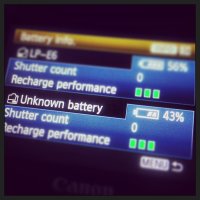
Ok, just completed the firmware 1.2.1 firmware update (which went fine) but I tested six authentic Canon LP-E6 batteries bought from B&H, Best Buy and Adorama. Two of the six can not be recognized. Four are recognized properly. These are not third party batteries. The all carry Canon markings and to me appear identical to the other four. I reviewed them and cannot find any differences other than the serial numbers. Tomorrow I will contact Canon CPS to understand hopefully what is going on. If the two batteries prove to be counterfeit then I'll claim Canon has a real problem that they need to step up and solve. Both worked fine in all previous firmware versions and had recognized serial numbers. I'll have to find a friends 7D or 5D II to see what they say.

Just to get my story straight I tried them yet again. Now one of the two failing batteries is being recognized. But of course I put both failing batteries in my BG-E11 at the same time.
(currently only testing in the BG-E11 and not in the body directly). Now only one failing.

So maybe there is a 1.2.2 firmware update in our near future.
 
Upvote 0
Status
Not open for further replies.