Factory Refurbished 6D Distortion?

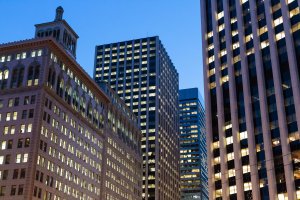
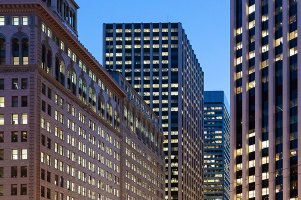
I had been using a T3i and purchased a factory refurbished 6d through Canon the other day. I'm aware that lenses have a certain amount of distortion and I usually correct that in Lightroom. But with the 6D, I'm using the same lenses as I always do (Canon 50mm 1.4 and Canon 4.0 24 - 105), but it seems to me that there's possibly (I could be missing something) a distortion effect coming from the camera itself. Basically, the lines on the buildings in the two attached photos seem to slant inwards from the sides as you go up the building. Any thoughts would be much appreciated.

Thanks,


Matt
 

Attachments

  • IMG_0037.jpg
    IMG_0037.jpg
    3.3 MB · Views: 235
  • IMG_0091.jpg
    IMG_0091.jpg
    1.6 MB · Views: 196
Welcome to CR, Matt!

You're seeing keystoning, aka converging verticals. There are software tools to correct it (Photoshop, DxO, etc.), but you must frame very loosely (the digital corrections crop substantially), and you'll lose some sharpness. It can also be corrected optically with a tilt-shift lens – a more expensive but more effective solution.

Keystoning is one form of perspective distortion, and it's more evident at wider angles. Your T3i was cropping away 60% of the image compared to your 6D, so in effect the FF sensor is giving a wider AoV with the same lenses. That means more noticeable keystoning (and also more noticeable barrel distortion with the 24-105, since the APS-C sensor cropped much of it away).

So...your new 6D is fine.
 
Upvote 0
Thanks for the welcome to the forum and for the good explanation on converging verticals, I appreciate it. I've taken a look at the DxO software before and have Photoshop Elements, but I'll look into some of my options in case I want to address this at some point. Thanks again for your input, it was very useful.

-Matt
 
Upvote 0
Here's your first image with a quick correction (took 10 seconds) in DxO. Verticals are corrected, and you can see how much of the image was lost.
 

Attachments

  • IMG_0037-corr.jpg
    IMG_0037-corr.jpg
    640.4 KB · Views: 230
Upvote 0
PS Elements has the same functionality, just go Image-Transform-Distort and pull the top corner tabs out.

I did a video on perspective correction for a thread a long time ago here, I used PS but PSE works just the same. Here is a link to the video. https://www.dropbox.com/s/otxvj2eq61m74ta/Perspective%20correction.mp4
 
Upvote 0
DonLaFontaine said:
Thanks neuroanatomist and privatebydesign, it also turns out that in the more recent version of Lightroom (5), there's a correction for verticals, which I had been skipping because it hadn't been an issue for me as much in the past.
There are definitely a few things different that a FF reveals from your lenses. The 24-105mmL needs a lot of correction at 24mm, but for the low prices available, its a bargain.

I used the Lightroom corrections after they added the feature with my 24-105.
 
Upvote 0